Checklists
Bookkeeping Document Checklist: Every Source Document (2026)
The master bookkeeping document checklist: every source document a bookkeeper needs from clients, grouped by area, with why each matters and how often to ask.
By Bibin MathewUpdated 27 min read
The short answer
The documents needed for bookkeeping fall into eight groups: bank and credit card statements, sales and receivables records, purchase and payables records, payroll and contractor reports, loan and lease documents, asset records, tax filings and agency letters, and the legal and entity papers that describe the business. Most clients send the first four every month and the rest once at onboarding and again at year-end. Keep one master list, trim it per client with a few yes or no questions, and split it into three standing requests (onboarding, monthly, year-end) so nothing depends on memory.
Every bookkeeper has a version of the same list in their head: the statements, reports, invoices and agreements a set of books cannot be built without. The trouble is that it lives in the head, and in a dozen half-finished emails. A new client asks "what do you need from me?" and the answer comes out slightly different every time. Something gets missed, usually the loan agreement or the lease, and it turns up in March when it is too late to be convenient.
This is the master list. It is for independent bookkeepers and small accounting firms in the United States and Canada who want one page that names every source document a client might need to provide, says why each matters and how often it is needed, and then shows how to turn the list into requests that come back. Our monthly bookkeeping checklist covers the monthly close as a set of tasks and a calendar. This guide is about the documents themselves, across the whole life of a client.
What counts as a bookkeeping source document
A source document is the original evidence that a transaction happened and what it was for: the invoice, the receipt, the statement, the signed agreement. Your bookkeeping software holds the record; the source document proves the record is right. When a lender, an auditor, the IRS or the CRA asks a question, the answer is a source document, not a ledger entry.
That is why a bank feed is not a source document. It is a copy of the bank's data with no opening balance, no closing balance and no page numbers. The statement is the source. The same goes for a Shopify deposit: the bank shows the net; the payout report is the source for gross sales, fees and refunds.
The master bookkeeping document checklist
Each table lists the document, why you need it and how often most clients should send it. "Onboarding" means once, when the client joins, or once per new account, loan or asset. "As it happens" means when the event occurs.
1. Bank and credit cards
| Document | Why you need it | How often |
|---|---|---|
| Bank statements, every business account, every page, as a PDF | The reconciliation anchor: opening and closing balances, every transaction | Monthly |
| Credit card statements, every business card, every page | Card spending, interest and fees; personal cards used for business count | Monthly |
| List of every account and card, with the last four digits | So you know which statements to expect | Onboarding, confirm yearly |
| Statement for the month before your start date | Opening balances tie to something real | Onboarding |
| Merchant or card processor statements (Stripe, Square, a bank terminal) | Processing fees and the gap between sales and deposits | Monthly |
| PayPal, Venmo, Wise or other payment account statements | They are bank accounts in all but name | Monthly |
| Petty cash log | Cash spending that never touches a statement | Monthly |
| Notice of a new, closed or changed account | A card that appears in month eight means seven months of missing statements | As it happens |
Ask for the statement from the bank's website, not a screenshot of the app and not a CSV export. The guides on getting bank statements from clients and read-only bank access for bookkeepers cover the two ways to make this painless.
2. Sales and receivables
| Document | Why you need it | How often |
|---|---|---|
| Sales invoices issued, or an export from the invoicing system | Revenue, receivables and sales tax collected | Monthly |
| Payout reports from every sales platform (Shopify, Stripe, Amazon, Etsy, Square, PayPal) | Gross sales, fees, refunds and chargebacks behind each net deposit | Monthly |
| Point-of-sale sales summary for the month | Total sales, tax and tips for cash and card businesses | Monthly |
| Customer contracts, quotes and signed proposals for larger jobs | Deposits, progress billing and when revenue is earned | As it happens |
| Deposit details: which customer and invoice each deposit belongs to | Apply payments correctly and keep receivables clean | Monthly |
| Customer deposits and gift card balances | Liabilities until earned, not revenue | Monthly or quarterly |
| Credit notes, refunds and write-offs with the reason | Reverse revenue correctly; support bad debt | As it happens |
| Accounts receivable aging, if tracked outside your software | Tie open invoices to the books | Month-end or year-end |
| Sales tax, GST/HST or PST collected by jurisdiction | Sales tax payable and the return | By filing period |
3. Purchases and payables
| Document | Why you need it | How often |
|---|---|---|
| Supplier bills and invoices, paid or unpaid | Expenses, payables and input tax credits | Monthly |
| Receipts for transactions you cannot categorize from the statement line | Prove what was bought; a card line alone is rarely enough for the IRS or CRA | Monthly |
| Receipts for any purchase over a threshold you set (for example $75) | Support for larger deductions | Monthly |
| List of recurring subscriptions and software | Categorize repeat charges once and stop asking | Onboarding, then yearly |
| Vendor statements at month-end for the main suppliers | Reconcile payables and catch missing bills | Monthly for key vendors |
| Expense reports from the owner or staff | Business expenses paid personally | Monthly |
| Mileage log and vehicle expense records | Vehicle deduction and business-use percentage | Monthly or yearly |
| Home office square footage and household bills | Home office deduction for owners who work from home | Yearly |
| Accounts payable aging, if tracked outside your software | Tie unpaid bills to the books | Month-end or year-end |
For how to get receipts without a monthly argument, see getting clients to send receipts and the missing receipt form template.
4. Payroll and contractors
| Document | Why you need it | How often |
|---|---|---|
| Payroll register or journal for every pay date | Gross wages, withholdings, deductions, employer taxes and net pay | Monthly |
| Payroll tax remittance report from the provider | Tie what was withheld to what was paid to the IRS, state or CRA | Monthly |
| Quarterly payroll filings (Form 941 and state returns in the US; CRA remittance history in Canada) | Reconcile payroll liabilities each quarter | Quarterly |
| Year-end payroll slips and summaries (W-2 and W-3; T4 and T4 Summary) | Tie the year's wages to the books | Year-end |
| New hire paperwork: W-4 or TD1, direct deposit form, pay rate | Set the employee up correctly | As it happens |
| Benefits and workers' compensation invoices | Employer costs and accruals | As billed |
| Contractor list with total paid in the year | 1099-NEC (US) and T4A or T5018 (Canada) preparation | Year-end, updated monthly |
| W-9 for every US contractor; legal name, address and SIN or business number for Canadian contractors | Required before you can file the slips | Before first payment |
| Owner draws, distributions or shareholder loan details | Equity, not expense | Monthly |
The payroll reports your bookkeeper needs guide names the exact report in Gusto, ADP, QuickBooks Payroll and the Canadian providers. For contractors, see collecting W-9 forms from vendors and the Canadian version on T4A and T5018 contractor information.
5. Loans and leases
| Document | Why you need it | How often |
|---|---|---|
| Signed loan agreement for every loan and line of credit | Lender, rate, term, security | Onboarding and each new loan |
| Amortization schedule | Split each payment into principal and interest | Onboarding and each new loan |
| Closing or funding statement | Fees, holdbacks and the amount actually deposited | Each new loan |
| Loan and line of credit statements | Balance and interest so the books match the lender | Monthly for lines of credit; at least yearly for term loans |
| Year-end loan statement with balance and total interest paid | Year-end tie-out and interest expense | Year-end |
| Equipment and vehicle finance agreements | An asset plus a liability, not a monthly expense | Each new agreement |
| Premises lease and amendments | Rent, deposits, escalations and lease accounting | Onboarding and renewal |
| Equipment and vehicle leases | Lease expense or liability, depending on the terms | Onboarding and each new lease |
| Intercompany and shareholder loan agreements | Related-party tracking | Onboarding |
| Payoff letters | Close the liability correctly | As it happens |
Our guide to loan documents bookkeepers need covers each loan type and what to do with the documents once they arrive.
6. Assets and inventory
| Document | Why you need it | How often |
|---|---|---|
| Purchase invoice for every piece of equipment, vehicle, computer or furniture over your capitalization threshold | Fixed asset register, depreciation or capital cost allowance | As it happens |
| Vehicle purchase agreement and registration | Asset cost, business use, financing | Each new vehicle |
| Bill of sale or trade-in paperwork for assets sold or scrapped | Remove the asset and record the gain or loss | As it happens |
| Existing fixed asset register or depreciation schedule from the previous accountant | Continue the schedule rather than rebuild it | Onboarding |
| Inventory count | Cost of goods sold and closing inventory | Year-end, quarterly for larger stock |
| Inventory purchase invoices and freight bills | Inventory cost | Monthly |
| Property closing statement, for real estate | Land and building cost | Each purchase |
| Leasehold improvement invoices | Capitalize and depreciate over the lease | As it happens |
If you are picking up a client from another firm, the request records from the previous accountant guide lists what to ask for, including the asset register.
7. Tax
| Document | Why you need it | How often |
|---|---|---|
| Prior-year business tax return (and the Notice of Assessment in Canada) | Opening balances, elections, carryforwards | Onboarding |
| Sales tax, GST/HST, PST or QST returns and payment confirmations | Reconcile tax collected and paid to the filings | By filing period |
| Sales tax registrations and exemption certificates held | Which sales are taxable, and where | Onboarding, then as they change |
| Estimated tax payment confirmations (Form 1040-ES or corporate estimates in the US; instalments in Canada) | Record payments against the right liability | Quarterly |
| Every letter or notice from the IRS, a state, the CRA or a province, every page | Penalties, balances, audits and address changes | As it happens |
| Property tax bills | Expense and, for real estate, cost tracking | Yearly |
| Business license renewals and local tax filings | Expense and the compliance calendar | Yearly |
| Tax ID confirmation (EIN letter in the US; business number and program accounts in Canada) | Correct numbers on every filing | Onboarding |
A letter from a tax agency is the one document that cannot wait for the monthly request. The guide on what to request when a client gets an IRS or CRA letter lists what to ask for the same day.
8. Legal and entity
| Document | Why you need it | How often |
|---|---|---|
| Formation documents: articles of incorporation or organization, partnership agreement, or sole proprietor registration | Entity type drives the chart of accounts and the tax return | Onboarding |
| Operating agreement, bylaws or shareholder agreement | Ownership percentages, distributions, who can sign | Onboarding and amendments |
| Ownership and officer list | Equity accounts and related parties | Onboarding, confirm yearly |
| Board or shareholder minutes and resolutions | Dividends, shareholder loans, major purchases | Yearly, or as they happen |
| Business insurance policies and declarations pages | Prepaid insurance, coverage dates, premium financing | Onboarding and renewal |
| Signed engagement letter with your firm | The scope you agreed to, including who provides what and by when | Onboarding and renewal |
| Authorization forms (IRS Form 8821 or 2848; CRA business authorization) | Permission to deal with the agency on the client's behalf | Onboarding |
| Major contracts: franchise, licensing, distribution | Recurring fees, royalties, deferred revenue | Onboarding and as signed |
| Correspondence about lawsuits, claims or settlements | Contingent liabilities and legal expense | As it happens |
The client onboarding checklist for accounting firms walks through the onboarding items as a sequence, from engagement letter to kickoff. For the scope conversation itself, see the bookkeeping engagement letter template.
Industry add-ons the master list does not cover
Each industry has source documents of its own. Rather than repeat them here, these guides carry the full lists with the exact report names.
| Industry | Extra documents on top of the master list | Full checklist |
|---|---|---|
| Restaurants and bars | POS sales summary with tax and tips split out, delivery platform payouts, food and beverage vendor statements, tip reports, gift card liability, liquor inventory | Restaurant bookkeeping documents checklist |
| Construction and trades | Signed contracts, change orders, pay applications, subcontractor invoices, lien waivers, retainage, job-costed receipts, certificates of insurance | Construction bookkeeping documents checklist |
| Nonprofits, churches and charities | IRS determination letter or CRA registration, grant agreements, donor restrictions, deposit splits by source, in-kind gift details, Form 990 or T3010 items | Nonprofit bookkeeping documents checklist |
| Self-employed and sole proprietors | Full income record (not just 1099s or T4As), home office measurements, mileage log, health insurance and retirement contributions, tax payments made | Self-employed tax documents checklist |
| Online sellers | One payout report per platform, sales and sales tax summary per month, settlement statements, marketplace fee reports | Shopify, Stripe and Amazon reports your bookkeeper needs |
| Rental property owners | Rent roll, mortgage interest statement (Form 1098 in the US), property tax, insurance, repair invoices, management statements, closing statements and improvement invoices | Rental property tax documents checklist |
Two situations cut across every industry. A client who is months or years behind needs the documents in a particular order, covered in the catch-up bookkeeping checklist. A client heading into an audit or review needs the PBC list template, which is the master list reorganized the way an auditor asks for it.
Onboarding, monthly and year-end: three standing requests
Nobody should receive the master list as a single email. Split it into three requests that repeat the same way for every client. The master list says which bucket each document belongs in; these tables are the three buckets.
The onboarding request
Sent once, as soon as the engagement letter is signed, with a needed-by date two to three weeks out.
| Section | Documents |
|---|---|
| Entity | Formation documents, operating agreement or bylaws, ownership list, EIN letter or business number, authorization forms |
| Accounts | List of every bank, card, loan and payment account; statement for the month before the start date; read-only or accountant access invitations |
| History | Prior-year return and Notice of Assessment, last trial balance or financials, fixed asset register, open invoices and unpaid bills at the start date |
| Agreements | Every loan agreement with amortization schedule, premises lease, equipment leases and finance agreements, insurance policies, major contracts |
| People | Payroll provider access, employee list, contractor list with W-9s or Canadian details |
| Systems | Sales platforms and POS in use, invoicing tool, receipt capture tool, and who at the client sends what |
The monthly request
Sent on the same day every month with a needed-by date about a week out. The calendar and email templates are in the monthly bookkeeping checklist.
| Section | Documents |
|---|---|
| Statements | Bank, credit card, line of credit, payment account and processor statements, every page, PDF |
| Sales | Invoices issued or export, payout reports per platform, POS summary, deposit details |
| Purchases | Supplier bills, receipts for uncategorized and over-threshold transactions, vendor statements for key suppliers, expense reports |
| Payroll | Payroll register per pay date, tax remittance report, new hire paperwork, contractor payments |
| Tax | Sales tax or GST/HST filing and payment for the period, any agency letter received |
| Questions | Anything unusual: new accounts, loans, large purchases, asset sales, owner draws, refunds |
The year-end request
Sent in two parts, before and after the fiscal year-end. The timing and templates are in year-end bookkeeping: what to request from clients.
| Section | Documents |
|---|---|
| Balances | Year-end statements for every account including rarely used ones, year-end loan statements with total interest, receivable and payable agings, inventory count |
| Assets | Invoices for every asset bought, bill of sale for every asset sold, vehicle details, improvement invoices |
| People | Final payroll register and year-end slips, contractor list with totals, W-9s or Canadian details for anyone missing |
| Tax | Sales tax reconciliation, estimated payments made, property tax bills, every agency letter from the year |
| Entity | Board minutes, ownership changes, new agreements signed, insurance renewals |
| Questions | Business use of vehicles, home office, personal expenses paid by the business, loans to or from owners, anything unusual |
Format matters as much as the document
Half of all "wrong document" problems are really format problems. Say which format you want on every item.
| Document type | Ask for | Do not accept | Why |
|---|---|---|---|
| Bank, card and loan statements | PDF downloaded from the bank's website | Screenshots, CSV exports, bank feed | Only the statement has opening and closing balances and page numbers |
| Payout, payroll and aging reports | PDF, Excel or CSV export from the software | Screenshots, a typed summary | You need the detail rows, and the export names the report and period |
| Receipts and bills | Photo or PDF with date, vendor, total and items readable | Card terminal slip alone | The slip shows the amount, not what was bought |
| Agreements and leases | Full signed PDF, every page and schedule | First page only, unsigned draft | Terms live in the schedules; unsigned means nothing |
| Tax notices and filings | Every page of the letter or filed return | Photo of the envelope or the first page | The amount due and the reason are usually on page two |
| Lists and answers | A form answer or a spreadsheet | A sentence in an email | You can act on structured data |
The IRS and CRA both accept electronic records, with conditions, and their general retention rules are 3 years (IRS, longer in several situations) and 6 years from the end of the last tax year the records relate to (CRA). The monthly bookkeeping checklist links the official pages; point clients there rather than promising that a photo always replaces the paper.
The master checklist in Tangentflow, step by step
A PDF of this list is a fine reference to attach to the engagement letter, but it is a poor collection tool, because nothing tells you or the client what has arrived. Tangentflow collects documents through one private link per request, checks every upload as it arrives and has an AI collection agent do the chasing by email. The plan: one master checklist with yes or no questions that hide what does not apply, split into onboarding, monthly and year-end checklists.
1. Start from the built-in templates
Go to "Checklists", choose "Browse templates" and look at the three templates that already carry parts of the master list:
- "Monthly bookkeeping": bank statements for the month, credit card statements, receipts and bills, sales or invoices issued, a payroll report and an "Anything unusual this month?" question.
- "Year-end documents": income documents, bank statements with every page required, expense receipts and an "Any changes this year?" question.
- "Audit / review PBC list": trial balance, general ledger detail, bank statements and reconciliations, AR and AP aging, fixed asset register, loan and lease agreements, board minutes, a lawsuits question and an "anything unusual" question, with the report items set to "PDF or spreadsheet."
For the onboarding request, start from scratch or from "Year-end documents" and build the onboarding sections from the tables above. You can also describe what you need in a sentence and let AI draft the items, then edit.

2. Give every item a format and a rule
Open each item in the checklist editor. Fill in "What should it be?" in the client's words ("the PDF statement from your bank's website for every business account"), set the count, and pick the accepted file type: "PDF only" for bank, card and loan statements, "PDF or spreadsheet" for payout, payroll and aging reports so Excel and CSV exports upload as readily as PDFs. Tick "every page" for statements and agreements, and add a date rule such as "dated in the last 45 days" for monthly statements.
Add an "Example" to anything clients get wrong: "A good upload is the 4-page PDF from your bank's Documents tab, not a screenshot of the app."

3. Trim the list per client with questions
Add "Form field" items for the questions that decide which sections apply: "Do you have any loans, lines of credit or equipment financing?", "Do you have employees on payroll?", "Do you sell through an online platform or POS?", "Does the business lease its premises?", "Did you buy or sell any equipment or vehicles this year?" Set "Only ask if" on the loan, payroll, payout, lease and asset items so they appear only when the answer is yes. One master checklist then fits a solo consultant and a twelve-employee contractor without either seeing the other's items.
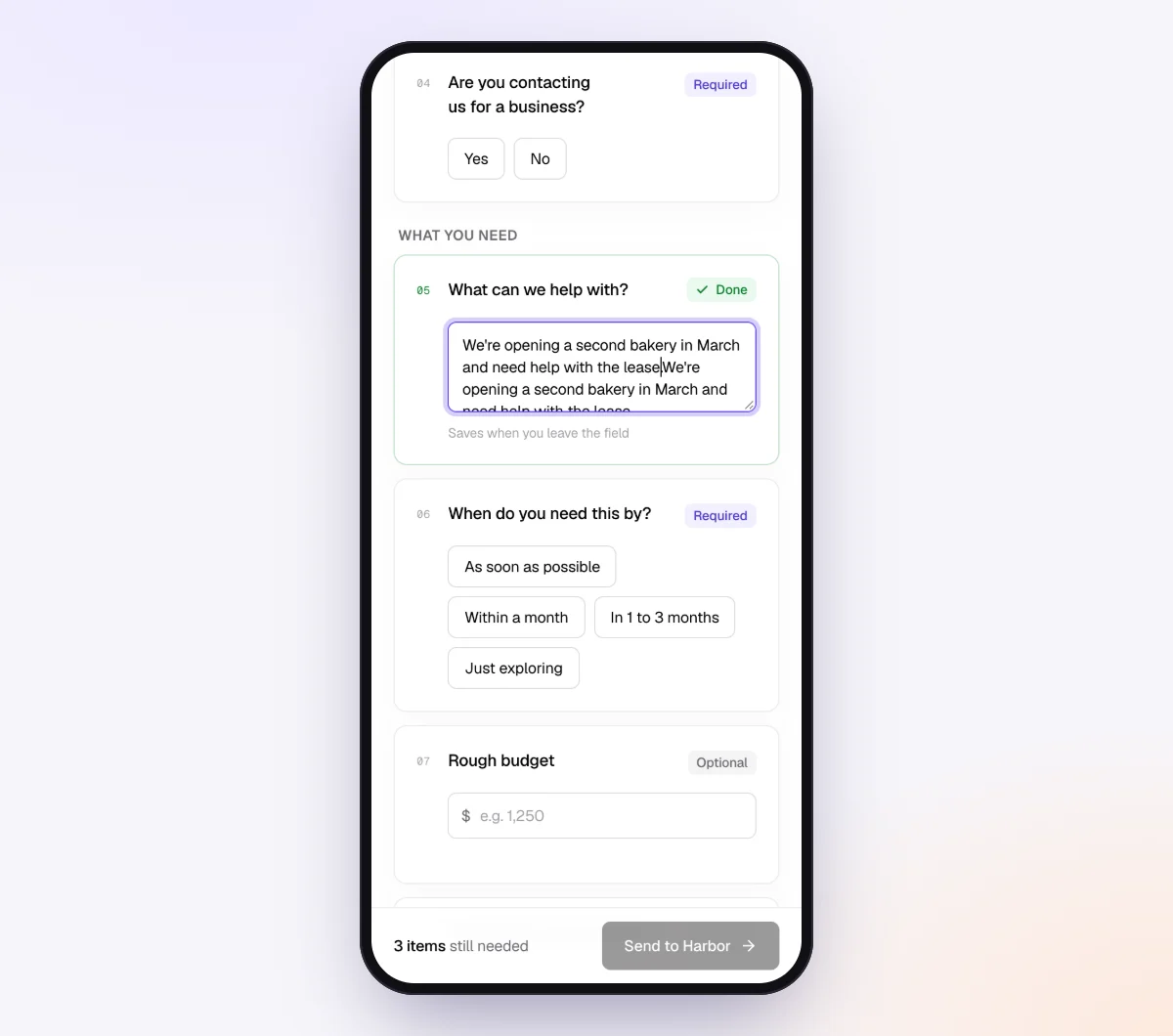
Keep the legal, entity, loan and lease items in the onboarding checklist, the recurring items in the monthly checklist, and the balance and asset items in the year-end checklist. Private context goes in "Notes for the agent (private)" on each request, such as "Owner holds the loan agreements; the office manager sends statements."
4. Send the request
Go to "Requests", click "New request", choose the checklist, add a reference such as "Pinecrest Landscaping, onboarding" or "Pinecrest Landscaping, October 2026", the client's name and email, and a needed-by date. Leave "Email the link" on and the agent sends the invitation from your firm's name. For the monthly request across every client, use "Batches": paste your client list, pick the monthly checklist, give each client a needed-by date and turn on "Repeat every month" so it goes out again on the same day each month (bulk requests, part of Pro).
For checklists that carry payroll registers, tax notices or agreements, turn on "Require an email code": before the link opens, the client enters a 6-digit code emailed to them, so a forwarded link is not enough on its own. If a link goes to the wrong address, "Reset link" on the request stops the old one working. After the client sends everything, the link no longer shows the files.

5. Review what came in and download the Evidence index
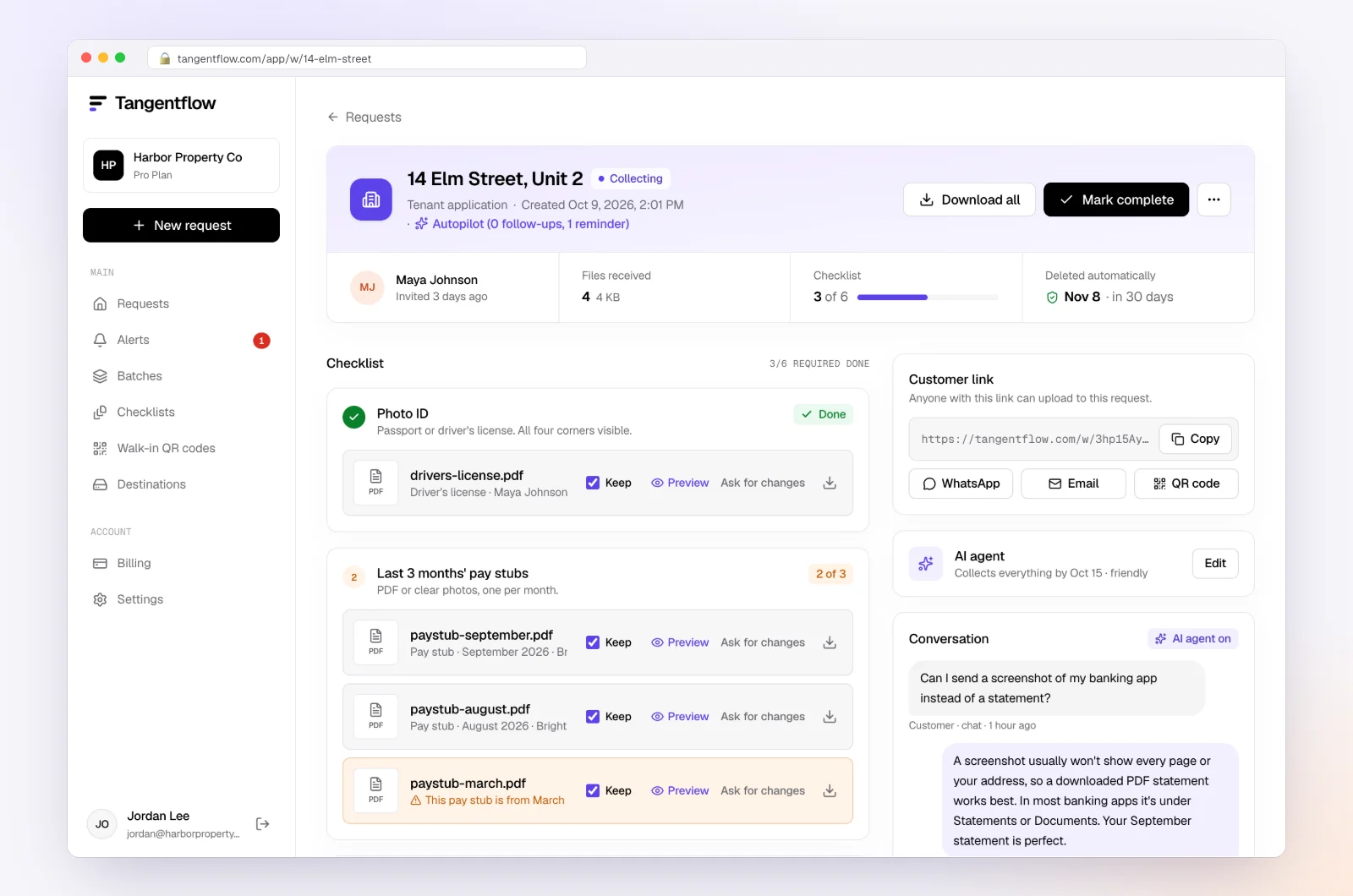
Each upload is checked in seconds by document checks: the right document type, readable, every page, covering the right period, and for spreadsheets the first rows are read to confirm what the report is and whether it covers the month. If something is off, the client sees a friendly note while they still have the file open. Reminders are paced to the needed-by date and list only what is still missing, and the agent answers questions like "Is the loan statement the same as the amortization schedule?" from your item hints and private notes, or hands off to you.
The request page shows every file, its check result, the client's answers, what is outstanding and an activity timeline, with "Ask for changes" on any single file. When everything is in, download the organized ZIP, or on Pro deliver to Google Drive or a webhook. From the request's menu, download the "Evidence index (CSV)": one row per item and file with the status, check result, extracted facts such as the report name and period, and the client's answers. It is a ready-made record of which source documents you hold for the period. Mark the request complete and the files are deleted 24 hours later; your bookkeeping file, not the collection tool, is the system of record.
Setups by type of client
Start from the master list and the three templates, then adjust per group. Keep one checklist per group and send each group its own batch.
| Client type | Sections to emphasize | Settings worth turning on | Learn more |
|---|---|---|---|
| Service business, no employees | Bank and cards, sales invoices, purchases, home office and mileage | Yes/no for loans and vehicles with "Only ask if" | Self-employed checklist |
| Retail or online store | Payout reports per platform, sales tax by jurisdiction, inventory | "PDF or spreadsheet" on payout items, higher max count | E-commerce reports |
| Trades and construction | Contracts and change orders, subcontractor invoices, equipment finance, W-9s or T5018 details | Per-job references, yes/no for new subs | Construction checklist |
| Clients with payroll | Payroll register, remittance reports, quarterly filings, new hire forms | "Require an email code" on the checklist | Payroll reports |
| Corporations with several owners | Minutes, shareholder loans, dividends, ownership changes | "Every page" on agreements in the onboarding checklist | Accounting and tax |
| Audit or review clients | Trial balance, ledger detail, agings, register, agreements, minutes | "Audit / review PBC list" template, Evidence index | PBC list template |
When something goes wrong
| Problem | Likely cause | Fix |
|---|---|---|
| Client sends a bank CSV or app screenshot instead of the statement | They do not know where the PDF lives | Set the item to "PDF only" and add an Example naming the bank's Documents or Statements tab |
| Loan agreement arrives as the first page only | Client photographed the summary | Tick "every page"; the check flags the missing schedules |
| A loan, lease or account appears months later | The onboarding questions missed it, or it is new | Add "Any new accounts, loans or leases this month?" to the monthly request |
| Payroll register is for the wrong period | Provider defaults to the current pay date | Add a date rule and an Example naming the report and date range to pick |
| Client says a document "doesn't exist" | Different situation than you assumed | Put the item behind a yes/no with "Only ask if"; call if the answer surprises you |
| Client is overwhelmed by the onboarding list | Too many items at once | Split onboarding into two requests a week apart: accounts and history first, agreements and entity second |
| Client is frustrated by reminders | Busy month, too many emails | The agent stops and hands off to you; reply personally and move the date |
Check "Alerts" daily during onboarding and close week. That is where handoffs and missed dates show up. If a client is late every month, the late document policy guide covers what to put in writing.
Free and Pro, honestly
You can run a real request without paying anything.
| Free | Pro ($29/month) | |
|---|---|---|
| Open requests | 1 at a time | Unlimited |
| AI check on each file | Yes | Yes |
| AI autopilot (answers, reminders, follow-ups) | Your first request | Every request |
| Send to many clients at once (Batches) | No | Yes |
| Clients reply by email with attachments | No | Yes |
| Branding | Tangentflow badge | Your logo |
| Delivery to Google Drive or a webhook | No | Yes |
| Works with AI assistants (MCP) | No | Yes |
| File retention | 7 days | 60 days |
Both plans include unlimited checklists, QR codes and posters, ZIP export, AI summaries, the Evidence index and email delivery. Pro is billed monthly with no contract, and you can cancel any time. Full details on the pricing page, and more on how files are protected on the security page.
What Tangentflow does not do: SMS or text messages, a native mobile app, full legal e-signature certificates, identity verification, collecting payments, or permanent storage. If you need any of those, pair it with a tool that does. It also does not connect to bank feeds, categorize transactions or replace your bookkeeping software.
The master document checklist as a checklist
- Keep one master list of source documents in eight groups: bank and cards, sales, purchases, payroll and contractors, loans and leases, assets, tax, legal and entity.
- For each document, know why you need it and how often: onboarding, monthly, quarterly, year-end or as it happens.
- Add the industry add-ons for restaurants, construction, nonprofits, self-employed, online sellers and rental properties from their own checklists.
- Split the master list into three standing requests: onboarding, monthly and year-end. Never send it as one email.
- Trim per client with four or five yes or no questions rather than editing the list by hand.
- Name the format on every item: PDF only for statements, PDF or spreadsheet for reports, readable photos for receipts, every page for agreements.
- Treat tax agency letters and new accounts, loans or leases as same-day items, not monthly ones.
- Check every file on arrival, keep an index of which source documents you hold for each period, and move the files into your system of record.
Sources
Official pages for the forms and rules named in this guide. Links checked on October 24, 2026; rules and rates change, so confirm on the official page before relying on them.
- CRA, GST/HST for businesses: registering, charging, filing and input tax credits
- IRS Form 941: employer's quarterly federal tax return
- CRA Form T5018: statement of contract payments
- IRS Form 1040-ES: estimated tax for individuals
- IRS Form 8821: tax information authorization
- IRS Form 990: return of organization exempt from income tax
- CRA Form T3010: registered charity information return
- IRS Form 1098: mortgage interest statement
Frequently asked questions
What documents are needed for bookkeeping?
Bank and credit card statements for every business account, sales records such as invoices and platform payout reports, supplier bills and receipts, payroll reports and contractor details, loan and lease agreements with their statements, invoices for assets bought and sold, tax filings and any letters from a tax agency, and the entity documents that describe the business. Most clients send the first four groups monthly and the rest at onboarding and year-end.
What is a source document in bookkeeping?
A source document is the original evidence that a transaction happened and what it was for: an invoice, a receipt, a bank statement, a signed agreement or a payroll register. Your bookkeeping software holds the entries; source documents prove the entries are right when a lender, an auditor, the IRS or the CRA asks.
Is a bank feed enough, or do I still need statements?
You still need statements. A bank feed can drop or duplicate transactions and has no opening or closing balance, so there is nothing to reconcile to. Ask for the PDF statement from the bank's website every month, or get read-only accountant access and download it yourself.
What should a new bookkeeping client send first?
The entity documents, a list of every account with a statement for the month before your start date, the prior-year return, every loan agreement with its amortization schedule, the premises lease, insurance policies, the employee and contractor lists, and access to the payroll and sales platforms. Our onboarding checklist for accounting firms puts these in order with a 30-day plan.
How often should clients send bookkeeping documents?
Statements, sales reports, bills, receipts and payroll registers monthly. Sales and payroll tax filings each filing period. Loan statements monthly for lines of credit and at least yearly for term loans. Agreements, entity documents and asset invoices when they are signed or bought, with a year-end review to catch anything missed.
How long do clients need to keep bookkeeping source documents?
The IRS general rule is 3 years, with longer periods in several situations such as employment tax records and unreported income. The CRA general rule is 6 years from the end of the last tax year the records relate to. Both accept electronic records with conditions. Check the official IRS and CRA pages and the client's advisor for their situation.
Can I collect all of these documents through one link?
Yes. In Tangentflow, one master checklist with yes or no questions and "Only ask if" shows each client only the sections that apply, split into onboarding, monthly and year-end checklists sent through one private link per request. Each file is checked on arrival, the agent chases what is missing by email, and the Evidence index gives you a CSV record of every source document received. Read how bookkeepers use Tangentflow, or try it free with one client.