Guides
How to Get Bank Statements From Clients Every Month (2026)
How to get bank statements from clients every month: uploads vs view-only bank access vs forwarding, client download steps, email templates and a setup.
By Bibin MathewUpdated 19 min read
The short answer
Pick one method per client and make it routine; for most clients that means a request on the same day each month, asking for a PDF of every page of every statement, through one link that opens on a phone. Where the bank offers it, have business clients add you as a view-only user so you can download statements yourself. Keep a list of every account each client has, ask monthly whether anything was opened or closed, and still reconcile to the PDF, not the bank feed.
The short answer to how to get bank statements from clients without chasing: choose one of three methods per client and run it the same way every month. Either the client uploads a PDF of every page of each statement through one link on a fixed date, or the client adds you as a view-only user in their business online banking so you download statements yourself, or the client sets up statements to be forwarded to you. Keep a written list of every account each client has, and ask each month whether anything new was opened.
Statements hold up the close more than anything else. The bank makes one every month, yet clients send app screenshots, page one of four, or nothing at all, and an account you never knew about turns up months later. Without the statement, the reconciliation does not start.
This guide is for independent bookkeepers and small firms in the US and Canada. You get a comparison of the three methods, what Chase and Bank of America offer for accountant access, download steps to paste into a client email, the "all accounts" problem that reopens closed months, email templates and a step-by-step setup. It covers statements only; for receipts, see how to get clients to send receipts, and for the full monthly list, the monthly bookkeeping checklist.
Three ways to get bank statements from clients, compared
There are three options, plus the bank feed you probably already have. Most bookkeepers mix them: view-only access where the bank supports it, monthly uploads for everyone else.
| Method | Client effort each month | Setup | Covers every account | Works for personal and closed accounts | Best for |
|---|---|---|---|---|---|
| Client uploads a PDF to one link | Low, a few minutes | None | Only if you ask about each one | Yes | Most clients, all banks |
| View-only or accountant access to online banking | None after setup | Client adds you as a user once | Only the accounts they give you | Rarely | Business accounts at banks that support it |
| Statement forwarding | Low, but easy to forget | Client sets up a rule or habit | No | Yes | Clients who live in their inbox |
| Bank feed into QuickBooks Online or Xero | None | Connect once | Only connected accounts | No | Daily transactions, never a substitute for the statement |
Option 1: The client uploads a PDF every month
This works with every bank and account type. Its weakness is that the client must act every month, so make the ask small, specific and identical each time, and remind on a schedule.
Option 2: Read-only bank access for the bookkeeper
Many banks let the owner of a business account add users with limited permissions. For a bookkeeper, the right setup is view-only access to the accounts you need, including statements, with no ability to move money. After a one-time setup you download statements yourself on day 1.
The catch: it is usually business accounts only, the client has to set it up, and permission to see statements can be separate from permission to see activity. Confirm you can open a statement PDF before you stop asking the client for it.
Chase: view-only access for a bookkeeper
Chase's business account management page says the owner can add an accountant or bookkeeper as an authorized user through Access & Security Manager and "restrict a user to view-only access to some or all of your accounts."
Bank of America: accountant access
Bank of America calls this Account Management in Business Advantage 360. Its Account Management page says the business can "establish individual account access levels," including "allowing your accountant to view details of all accounts," with no fee. It requires a Business Advantage deposit account and Business Advantage 360 enrollment. Ask the client to add you with view access, and to include statements if the screen offers that choice.
Canadian banks
Multi-user access at Canadian banks varies by bank and by business banking package, and we could not confirm one standard setup. Have the client ask their business banking advisor for "a view-only user for my bookkeeper who can download statements." If their package does not offer it, use monthly uploads.
Option 3: Statement forwarding
If the bank emails the PDF, a client who lives in their inbox can forward it. Many banks only email a notice that a statement is ready, though, so the client still has to sign in and download it. Forwarding also leaves account details in email threads; our post on secure ways to receive sensitive documents covers the trade-offs.
Bank feed vs bank statement: why you still need the PDF
If you have feeds in QuickBooks Online or Xero, why ask for statements at all? The feed gives you transactions. The statement is the bank's record of the period, and you reconcile against it.
| Bank feed | Bank statement PDF | |
|---|---|---|
| What it is | A stream of transactions sent to your software | The bank's record of the period, with opening and closing balances |
| Ending balance to reconcile to | No, or only a current balance | Yes |
| Can drop or duplicate transactions | Yes, especially after a broken connection | No |
| Covers accounts that are not connected | No | Yes, if you ask for them |
| Useful for lenders, auditors and tax notices | Rarely | Yes |
The IRS page on what kind of records to keep lists account statements among documents that show proof of payment, and notes that a combination of documents may be needed to support an expense. Either way, a reconciliation is only as good as the balance you reconcile to, and that balance comes from the statement.
What a usable bank statement looks like
Half of the chasing is getting the wrong thing and asking again. Put these rules in every request.
| Requirement | Why it matters | What clients send instead |
|---|---|---|
| PDF from the bank's website or app | Shows the bank's layout, the period and both balances | A screenshot of the app, a photo of the screen |
| Every page | The summary and fees are often on the last page | Page 1 only |
| The full statement period | You need the closing balance for that period | A custom date range or "last 30 days" activity |
| The statement, not the export | An export has no opening or closing balance | A CSV or spreadsheet download |
| Business accounts at minimum | Personal accounts used for business need to be on your list too | Only the main checking account |
How to ask a client for credit card statements
Card statements cause more trouble than bank statements, for four reasons. Handle each in the request.
- The closing date is not month-end. A card that closes on the 14th means a September close needs the statements ending September 14 and October 14. Name the statement dates, not the month.
- There are often several cards. Ask for the full account statement, which usually lists every cardholder, not one employee's view.
- Personal cards are used for business. If so, you need that statement too, or at least its business lines. Agree which in writing.
- Charge cards and store cards are forgotten. Ask about them by name: "Any Amex, Costco, Home Depot or fuel cards?"
How to download a bank statement PDF: instructions for clients
Give clients the path. The pattern is similar at almost every bank:
- Sign in to online banking, ideally on a computer.
- Look for Statements, Statements & documents or eStatements in the main menu or on the account page.
- Choose the account and the statement period.
- Open the statement and use Download or Save to keep the PDF.
- Upload that PDF, not a screenshot of it.
Here is where some major banks put statements, per their own help pages. Menu names change, so if a client cannot find it, have them search the bank's help center for "statements."
| Bank | Where to find statements | How far back online | Source |
|---|---|---|---|
| Chase | Main menu, then Statements & documents; in the app, Profile & Settings, then Statements & documents under Document manager | Up to 7 years, depending on the account type | Chase paperless FAQ |
| Bank of America | Accounts tab, then Statements & Documents | 18 months to view and download; older copies up to 7 years by request | Bank of America digital banking FAQ |
| TD (Canada) | EasyWeb, Statements & Documents, then pick the account and year | Up to 7 years | TD help |
| RBC | Statements/Documents from the Accounts Summary page; in the app, More, then Statements under Services | Check with RBC | RBC tutorial |
At Bank of America, older statements are requested from the same menu with Request statements; the bank says electronic copies arrive 24 to 36 hours later. These are mostly consumer help pages, and business banking screens can differ.
The accounts list: what to do when a client has an account you didn't know about
In March the client opens a savings account for taxes. Nobody tells you. In August you see transfers to an account ending 7781, and March through July have to be reopened. The fix is a short accounts list per client, plus one question every month.
Keep an accounts list for every client
At onboarding, write down every account the business uses, and confirm it with the client in writing:
| Account | Bank | Last 4 | Type | Statement closes | How you get it |
|---|---|---|---|---|---|
| Operating | Chase | 4410 | Checking | Month-end | View-only access |
| Tax savings | Chase | 7781 | Savings | Month-end | View-only access |
| Ink card | Chase | 1002 | Credit card | 14th | Monthly upload |
| Line of credit | Local credit union | 5533 | LOC | Month-end | Monthly upload |
| Owner's Visa (used for business) | TD | 9087 | Credit card | 22nd | Monthly upload |
Store the last four digits only.
Ask one question every month
Add a yes or no question to your monthly request: "Did you open or close any bank accounts, credit cards or loans this month?" If yes, ask for the account name and its first statement. It takes the client three seconds.
Watch for the signals
Transfers to an account number not on your list, payments to a card issuer you have no statement for, loan deposits with no loan account, or a Form 1099-INT or T5 at year-end from a bank you have never seen.
When you find one, ask for statements back to the opening date, add it to the list and adjust the months it touched. Reopening months is catch-up work; our bookkeeping late document policy has wording for charging for it.
Email to a client asking for bank statements
Keep the subject line the same every month so clients recognize it. More variations are in our document request email templates.
Monthly request
Subject: [Month] bookkeeping: statements by [day, date]

Hi [First name],

It's time to close [Month] for [Business name]. Please upload a PDF of
each of these statements, every page:

- [Bank] checking ending [last 4]: statement ending [date]
- [Bank] credit card ending [last 4]: statement ending [date]
- [Lender] line of credit ending [last 4]: statement ending [date]

How to find them at [Bank]: [two-line path, e.g. "Accounts tab >
Statements & Documents"]. Please send the PDF, not a screenshot.

Upload here, no account needed:
[link]

One more question: did you open or close any bank accounts, cards or
loans in [Month]?

With these by [day, date], your reports will be ready by [date].

Thanks,
[Your name]
Account you didn't know about
Subject: Quick question about an account ending [last 4]

Hi [First name],

In [Month] we see transfers to an account ending [last 4] that isn't on
our list. Is this a business account? If so, please upload statements
from when it was opened, every page, here:

[link]

We'll add it to your accounts list so it's included every month.

Thanks,
[Your name]
Getting bank statements in Tangentflow, step by step
You set up a checklist once, each client gets a private link, and an AI collection agent sends the invitation, answers questions and reminds clients about only what is missing. More on our bookkeepers page.
1. Start from the "Monthly bookkeeping" template
Open "Checklists," choose "Browse templates" and pick "Monthly bookkeeping." It already includes:
- "Bank statements for the month", with the hint "One PDF per business account." It accepts PDF only, is checked for every page and must be dated in the last 2 months.
- "Credit card statements", optional, with the hint "If you have a business card," also checked for every page.
It also has "Receipts and bills you paid," "Sales or invoices you issued," "Payroll report" and "Anything unusual this month?" Remove what you do not need.

2. Tune the statement items
In the checklist editor, keep "What should it be?" specific, such as "business bank statement PDF from the bank's website, covering last month, every page." Add an "Example" and a tip with the download path for your clients' most common bank.
Then add a yes/no "Form field": "Did you open or close any bank accounts, cards or loans this month?" Add a file item, "Statement for the new account," with "Only ask if…" so it appears only on a yes. That is your accounts-list check, built in.

3. Send to every client at once with Batches
Open "Batches," choose "Send to many customers," pick your checklist and upload an Excel file or CSV, or paste rows from Google Sheets, with name, email, reference, needed-by date and notes. Extra columns, such as each client's accounts, become context the agent can use. Schedule the send up to 30 days ahead, and turn on "Repeat every month" so the same clients get a new request on the same day each month, with the same gap to the needed-by date, until you stop it from the batch page. Batches are Pro, up to 100 clients per sheet. See bulk requests. For one client, use "New request" instead.
4. Statements are checked the moment they arrive
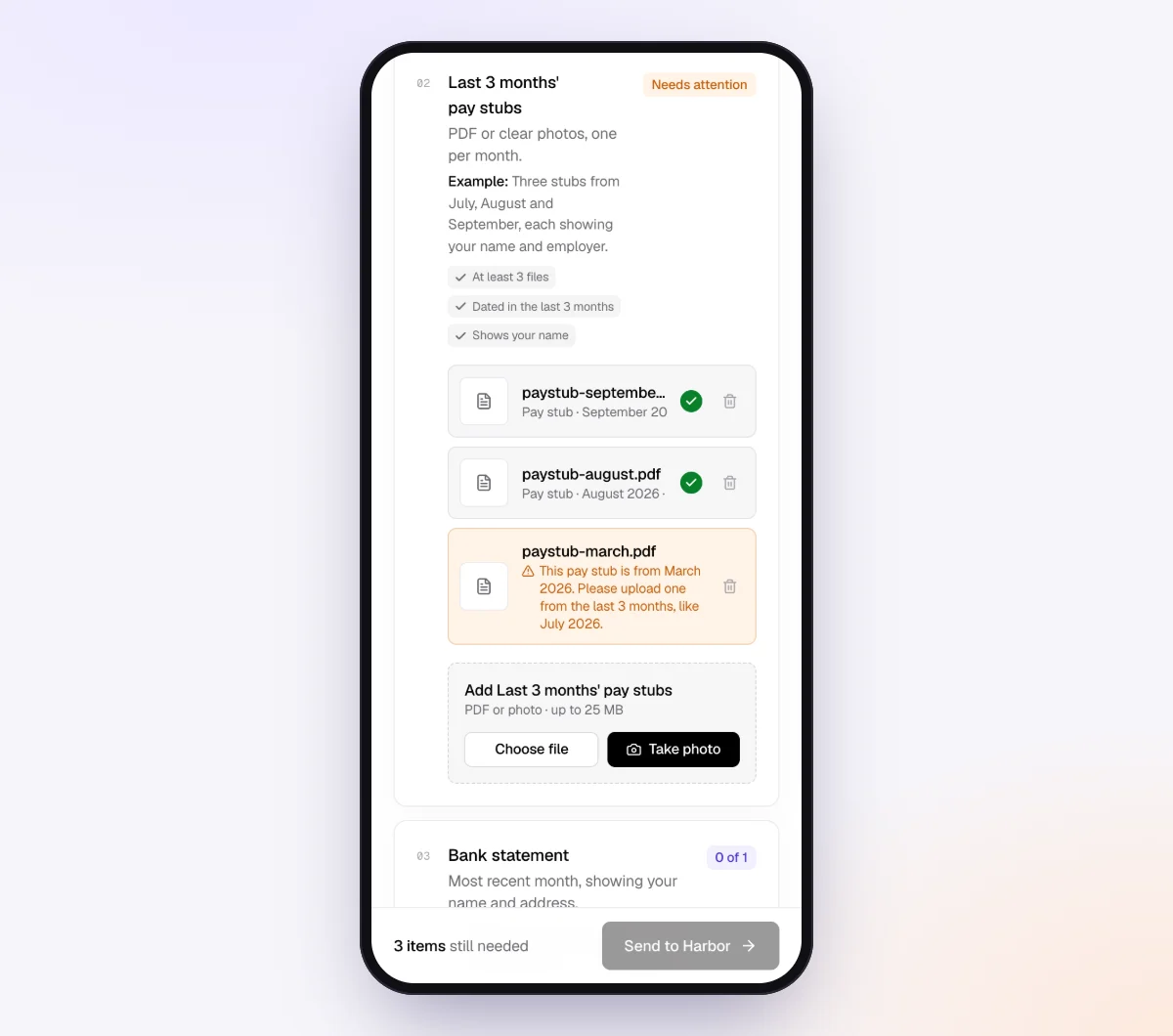
Clients open a branded invitation on a phone or computer, with no account and no app. Each upload is checked in seconds by document checks: right kind of document, readable, recent enough and every page. A client who uploads page one of four or an old statement sees a friendly note on what to fix while still signed in to their bank. Because the item accepts PDF only, an app screenshot cannot be uploaded there at all.
5. The agent chases what's missing
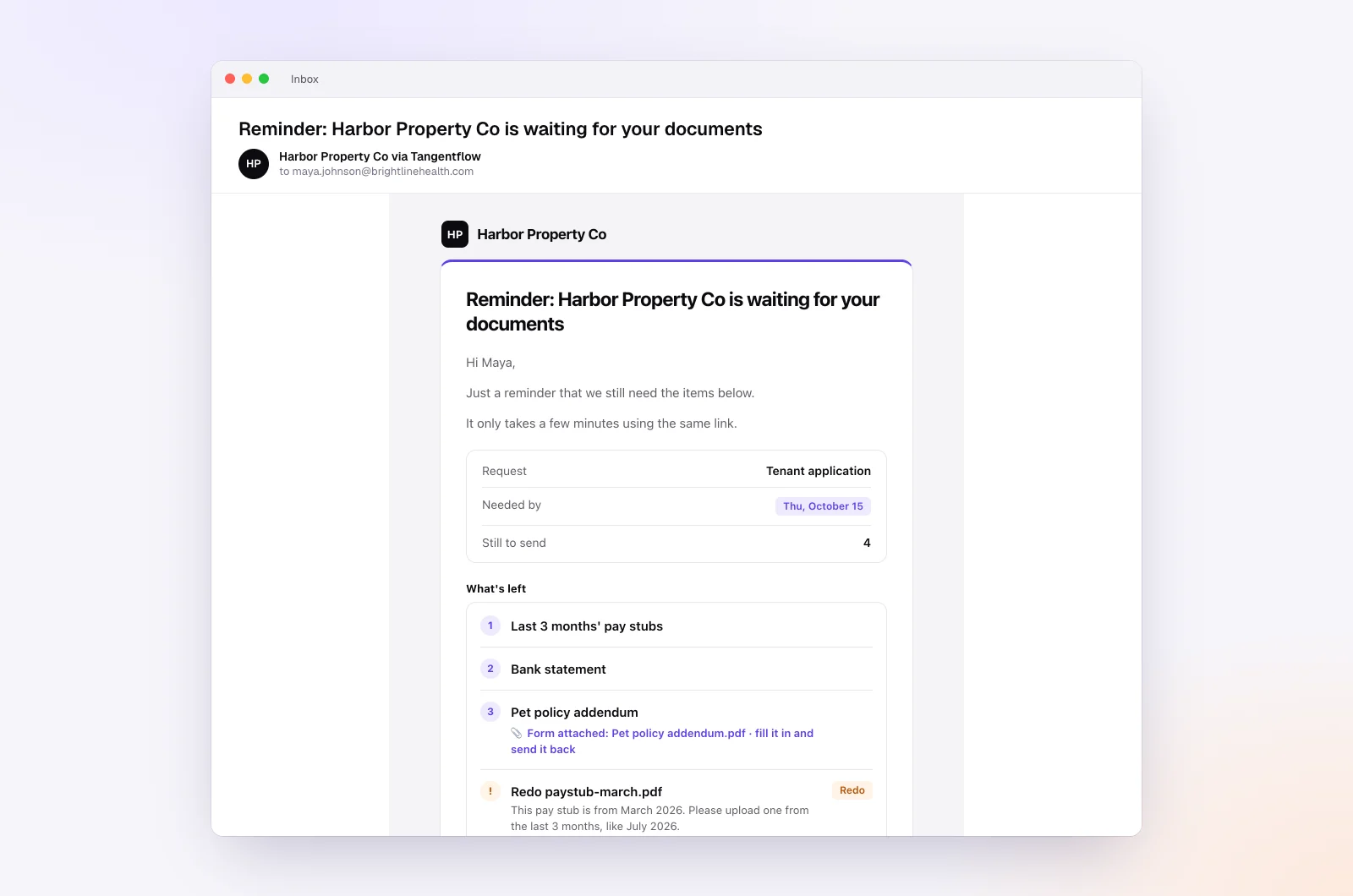
In the "AI autopilot" settings, turn on "Chase until it's all in" and choose "Paced to each request's deadline." Reminders get closer as the date nears, at most one automatic email a day, never right after the client was active, each listing only what is missing. "Follow up on anything missing" asks a client who submits without the card statement for exactly that.
Clients can ask "Do you need the savings account too?" by email or in the upload page chat; the agent answers from your checklist and notes, or hands off to you when a question is outside the checklist, a client is upset or the date passes. On Pro, clients can reply with statements attached, and each is checked and filed under the right item.
6. Review, deliver and close
The request page shows every file with its check result and what is missing. Use "Ask for changes" on a single file, download a ZIP or on Pro deliver to Google Drive or a webhook, then mark the request complete. Files are deleted 24 hours later.
For extra protection, turn on "Require an email code" on the checklist: the client enters a 6-digit code emailed to them before the link opens. If a link goes to the wrong person, reset the customer's link and the old one stops working. After the client sends everything, the link no longer shows the files.
Setups by type of client
| Client type | Statements that matter | Best method | Settings worth turning on |
|---|---|---|---|
| Single-member business, one bank | One checking, one card | View-only access, upload as backup | Card statement optional |
| Trades and contractors | Checking, employee cards, equipment loans | Monthly upload | Accounts list in private notes, a loan statements item |
| Online sellers | Checking, card, extra accounts for payouts | Monthly upload plus bank feed | The new-account yes/no question |
| Catch-up clients | Every account for every missing month | One request, longer needed-by date | A longer date rule on the item; see our late document policy |
When something goes wrong
| Problem | Likely cause | Fix |
|---|---|---|
| Client tries to send an app screenshot | Does not know where the PDF is | Paste the bank's download path into the item tip; the statement item accepts PDF only |
| Page 1 of 4 only | Printed or saved one page | "Every page" on the item; the check flags pages that look missing |
| Card statement for the wrong period | Card closes mid-month | Name the statement closing dates you need in the request |
| View-only access shows activity but no statements | Statement permission not granted, or admin-only at that bank | Ask the client to add statement access, or keep the monthly upload |
| Transfers to an unknown account | Account opened without telling you | Ask for statements from its opening date, add it to the accounts list |
Check "Alerts" daily during close week; handoffs and missed dates show up there. For timing, see our client reminder schedule.
Free and Pro, honestly
You can run a real request without paying anything.
| Free | Pro ($29/month) | |
|---|---|---|
| Open requests | 1 at a time | Unlimited |
| AI check on each file | Yes | Yes |
| AI autopilot (answers, reminders, follow-ups) | Your first request | Every request |
| Send to many clients at once (Batches), with monthly repeat | No | Yes |
| Clients reply by email with attachments | No | Yes |
| Branding | Tangentflow badge | Your logo |
| Delivery to Google Drive or a webhook | No | Yes |
| Works with AI assistants (MCP) | No | Yes |
| File retention | 7 days | 60 days |
Both plans include unlimited checklists, QR codes and posters, ZIP export, AI summaries and email delivery. Pro is billed monthly with no contract, and you can cancel any time. Full details on the pricing page.
What Tangentflow does not do: SMS or text messages, a native mobile app, full legal e-signature certificates, identity verification, collecting payments, or permanent storage. If you need any of those, pair it with a tool that does. It also does not connect to banks or bank feeds, download statements for you, reconcile accounts or replace QuickBooks Online, Xero or your other bookkeeping software.
The statement routine as a checklist
- Keep an accounts list for every client: bank, last four digits, type and closing date.
- Choose a method per account: view-only access, monthly upload or forwarding.
- Confirm view-only access includes statement PDFs, and never accept a client's banking password.
- Send the request on the same day every month, with the same subject line.
- Ask for a PDF from the bank, every page, one file per account, named by closing date.
- Give each client the download path for their bank.
- Ask every month whether any account, card or loan was opened or closed.
- Check each statement on arrival and remind only about what is missing.
- Reconcile each account to its statement, not the feed, as soon as it arrives.
Frequently asked questions
How do I get bank statements from clients every month?
Ask on the same day every month for a named list of statements, as PDFs of every page, through one link that works on a phone without an account, and remind about only what is missing. Where the bank supports it, have business clients add you as a view-only user so you download statements yourself.
Can a bookkeeper get read-only access to a client's bank account?
Often, for business accounts. Chase lets the account owner add authorized users with view-only access through Access & Security Manager, and Bank of America's Account Management lets a business give its accountant view access. Check that your permissions include statements, and never use the client's own login instead.
Why do I need bank statements if I have a bank feed?
The feed gives you transactions, not the bank's opening and closing balances for the period, and feeds can drop or duplicate transactions. You reconcile to the statement, and it is the document lenders and auditors ask for.
How do I ask a client for credit card statements?
Name the statement closing dates you need, since cards often close mid-month, and ask for the full account statement with every page so all cardholders are included. Ask by name about charge cards, store cards and any personal card used for business.
What should I do when a client has an account I didn't know about?
Ask for statements from its opening date, add it to the client's accounts list and adjust the months it touched. To prevent it, ask every month whether any account, card or loan was opened or closed.
Is a screenshot of the banking app good enough?
Usually not. A screenshot rarely shows the full period, both balances or every transaction. Ask for the PDF from the bank's website or app, with the download path for the client's bank in your request.
Can Tangentflow download statements from the client's bank for me?
No. Tangentflow does not connect to banks. It sends each client a private link and a checklist, checks every statement as it is uploaded and reminds clients about what is still missing. Try it free with one client's monthly request.