Checklists
Client Onboarding Checklist for Accounting Firms (2026)
A client onboarding checklist for accounting firms in the US and Canada: engagement letter, IRS and CRA authorizations, prior-year documents and a 30-day plan.
By Bibin MathewUpdated 19 min read
The short answer
Onboard every new accounting client in the same six stages: a fit call, a signed engagement letter, identity and business details, prior-year returns and notices, system access and a kickoff. Ask for read-only or accountant access invitations instead of passwords, get IRS Form 8821 or 2848 (or CRA authorization) signed early, and verify identity where your rules require it. Send one checklist through a private link with a real deadline, and plan the first 30 days so nothing waits on a missing document.
A new client signs on, everyone is excited, and then nothing happens for three weeks. You are waiting on last year's return. The engagement letter is sitting unsigned in someone's inbox. The bank login they emailed you is something you should never have received. By the time the paperwork is in, the first deadline is close and the relationship already feels rushed.
Clients judge a firm by how organized the first month feels, long before they see your technical work. A repeatable onboarding process also protects you: scope in writing, authorizations on file and identity checks done where your rules require them.
This guide is for CPAs, enrolled agents, tax preparers and bookkeepers in the United States and Canada who take on individual and small business clients. You'll get the six stages, a full checklist for individual and business clients, the IRS and CRA authorization forms, Canadian identity verification rules, a welcome email, a 30-day plan and a step-by-step setup in Tangentflow if you want the chasing done for you.
The six stages of accounting client onboarding
Most good onboarding processes follow the same order. Don't collect statements before the engagement letter is signed, or call the IRS before an authorization is on file.
| Stage | Goal | What you need from the client | Typical time |
|---|---|---|---|
| 1. Fit call | Confirm scope, fees and that you are the right firm | A short questionnaire and a 20 to 30 minute call | Day 0 |
| 2. Engagement letter | Agree on scope, responsibilities and fees in writing | A signed engagement letter | Days 1 to 3 |
| 3. Identity and business info | Know exactly who and what you are working for | ID where required, taxpayer numbers, entity documents | Days 2 to 7 |
| 4. Prior-year documents | Understand history and open issues | Prior returns, tax agency notices, financial statements | Days 3 to 14 |
| 5. System access | Work in the client's books and accounts safely | Accountant or read-only access invitations, signed authorizations | Days 3 to 14 |
| 6. Kickoff | Agree on the plan and the next deadline | A kickoff meeting and a calendar of what happens next | Days 14 to 21 |
Stages 3, 4 and 5 run in parallel. That is where most of the waiting happens, and where one clear document request pays off.
Stage 1: The fit call and onboarding questionnaire
Before the call, send a short questionnaire covering: individual, business or both (and the entity type); which services and which years; any unfiled returns; current software for books, payroll and invoicing; any open letters from the IRS, CRA, a state or a province; and fiscal year-end and upcoming deadlines.
Stage 2: The engagement letter
The engagement letter defines what you will and will not do, who is responsible for what, the fee and how either side can end the relationship. Insurers and professional bodies generally expect one for every engagement. Common sections:
- Scope, by year and form ("2025 Form 1040 and one state return" or "2025 T1 and monthly bookkeeping"), and what is out of scope
- Client responsibilities, such as complete and accurate information by a cut-off date
- Fees and payment terms, including late documents and scope changes
- Data handling: how documents should be sent and how long you keep them
- Term and termination
Get it signed before any work starts. Your professional body or insurer often has template wording.
Stages 3 to 6: Details, history, access and kickoff
Once the letter is signed, collect identity details, prior-year documents and system access in parallel (the full list is below). Prior returns tell you what carries forward, such as losses, depreciation and installment payments, so ask for every page. System access is where onboarding goes wrong most often, because clients reach for the fastest option: emailing you a password. Finish with a short kickoff that confirms what you found, the next deadline and the client's recurring routine.
The full new client checklist: individual vs business
Use this as your master list, then trim it per client. An individual tax client does not need entity documents, and a corporation with no employees does not need payroll reports.
| Item | Individual client | Business client |
|---|---|---|
| Signed engagement letter | Yes | Yes |
| Government-issued photo ID | Where your firm or rules require it | For each owner or signer, where required |
| Taxpayer numbers | SSN or ITIN (US), SIN (Canada) for client, spouse and dependents | EIN (US) or Business Number (Canada), plus owners' numbers where needed |
| Prior-year tax returns | Last 2 to 3 years, every page, plus the latest Notice of Assessment (Canada) | Last 2 to 3 years of business returns, every page |
| IRS, CRA, state or provincial notices | Every open letter, every page | Every open letter, every page, including payroll and sales tax |
| Entity formation documents | Not needed | Articles of incorporation or organization, certificate of incorporation, operating or partnership agreement, bylaws |
| Proof of tax number | Not needed | IRS CP 575 (EIN assignment notice) or Letter 147C; CRA Business Number confirmation |
| Ownership details | Not needed | Owners and percentages, officers and directors, who can give instructions |
| Financial statements | Not needed | Last year-end financial statements and trial balance or general ledger |
| Bank and credit card statements | If self-employed or for bookkeeping | All business accounts, last 2 to 3 months or since year-end |
| Payroll information | Not needed | Payroll provider, recent payroll registers, quarterly and annual payroll filings (941, W-2 or T4 summaries) |
| Sales tax / GST/HST registration | Not usually | Registration numbers, recent returns, filing frequency |
| Accounting software access | Rarely | Accountant user invitation |
| Bank and payroll access | Not needed | Read-only or accountant access invitations, never passwords |
| IRS or CRA authorization | Form 8821 or 2848, or CRA authorization | Form 8821 or 2848, or CRA authorization for each program account |
For annual slips and receipts (W-2s, 1099s, T4s, T5s), see our tax document checklist. This list covers the one-time onboarding items.
Never ask for passwords
Bank, payroll and accounting logins should never travel by email, text or upload form. Sharing them often breaks the platform's terms and leaves you holding credentials you then have to protect. Use the built-in options instead:
| System | Ask for this instead of a password |
|---|---|
| Accounting software (QuickBooks Online, Xero and similar) | An accountant or advisor user invitation sent to your email |
| Payroll provider | An accountant or read-only user added by the client |
| Business online banking | A view-only or limited user, if the bank offers one, or monthly statement downloads |
| Personal banking | Monthly or annual statements as PDFs |
| Tax agency accounts | IRS or CRA authorization, not the client's own login |
Say in your engagement letter and welcome email that you will never ask for passwords. It also helps clients spot phishing that pretends to be you.
IRS and CRA authorization forms
You cannot discuss a client's account with a tax agency without an authorization on file. Get these signed in the first week; they are often the slowest part of onboarding.
United States: Form 8821 and Form 2848
- Form 8821, Tax Information Authorization, lets the person or firm named receive and inspect the client's confidential tax information for the tax matters and periods listed. It does not let you represent the client or speak for them. Anyone can be named, and only the taxpayer signs.
- Form 2848, Power of Attorney and Declaration of Representative, lets an eligible representative (attorney, CPA, enrolled agent and certain others) represent the client before the IRS. Both the taxpayer and the representative sign.
You can submit either form online at IRS.gov (the "Submit Forms 2848 and 8821 Online" tool), by fax or by mail. For individual clients, the IRS Tax Pro Account lets you send an authorization request that the client approves in their own IRS Online Account, which can be faster. Business authorizations still go through the form. Check the current IRS pages for processing times and which method suits the matter.
Canada: CRA representative authorization
Representatives use the CRA's Represent a Client service. There are three ways to get authorized:
- Online, by the client. An individual signs in to My Account (or a business to My Business Account) and authorizes your RepID, GroupID or Business Number.
- Online, by you. You submit an authorization request through Represent a Client. For individuals, the client may need to confirm it in their CRA account, usually within 10 business days; in some cases you can confirm with information from their Notice of Assessment instead.
- On paper. Form AUT-01, Authorize a Representative for Offline Access, gives offline access only (phone, mail, fax, in person). The CRA asks that it reach the tax centre within 6 months of signing.
Choose the access level and expiry date deliberately, and for businesses, the specific program accounts (corporate income tax, payroll, GST/HST). Canada.ca has the current steps under "Authorize a representative."
Identity verification: what applies in the US and Canada
United States
Tax preparers generally don't face bank-style identity verification rules, but checking ID is a sensible fraud control. The FTC Safeguards Rule and IRS Publication 4557, Safeguarding Taxpayer Data, expect you to protect client data carefully. Many firms ask new clients for a government-issued photo ID and compare names and taxpayer numbers against prior returns.
Canada: FINTRAC obligations for accountants
Under Canada's Proceeds of Crime (Money Laundering) and Terrorist Financing Act, FINTRAC obligations apply to chartered professional accountants (and legacy CA, CGA and CMA designations) and accounting firms when they carry out "triggering activities" on a client's behalf: receiving or paying funds or virtual currency, buying or selling securities, real property or business assets, transferring funds or securities, or giving instructions about any of these. CPABC has noted that paying a balance to the CRA on a client's behalf can count.
When a triggering activity applies, obligations can include verifying the client's identity using prescribed methods, collecting beneficial ownership information for entities, politically exposed person determinations, record keeping, ongoing monitoring and a compliance program. FINTRAC states that audit, review and compilation engagements performed under CPA Canada Handbook standards are not triggering activities on their own.
Welcome email and document request template
Send this right after the engagement letter is signed. Keep it short and put the detail behind the link.
Subject: Welcome to [Firm name], your onboarding checklist

Hi [First name],

Welcome aboard. We're glad to be working with you on [scope, e.g.
your 2025 return and monthly bookkeeping].

To get started, please upload the items on your onboarding checklist
using your private link:

[link]

It works on your phone, you don't need an account, and it shows exactly
what's still missing. You can send what you have now and come back for
the rest.

We need everything by [day, date] so we can [reason, e.g. review your
prior returns before our kickoff call on (date)].

A few things to know:
- For your bank, payroll and accounting software, we'll send
  instructions to invite us as an accountant user.
- We'll also send an authorization form so we can speak with the
  [IRS / CRA] on your behalf.
- We will never ask for your passwords, PINs or card details by email.

Questions? Just reply to this email.

Thanks,
[Your name]
[Firm name]
For reminder and follow-up wording, see our document request email templates, and for timing, the client reminder schedule.
Your first 30 days with a new client
Adjust the days to your season; a client who signs in March needs a faster version.
| When | You | The client |
|---|---|---|
| Day 0 | Fit call, send proposal and engagement letter | Completes questionnaire, joins call |
| Days 1 to 3 | Send welcome email and onboarding checklist link, send authorization forms | Signs engagement letter |
| Days 3 to 7 | Review first uploads, request fixes, verify identity if required | Uploads ID, prior returns and notices, signs authorizations, sends access invitations |
| Days 7 to 14 | Accept access invitations, pull transcripts once authorized, review prior returns | Uploads remaining items, answers questions |
| Day 14 | Final reminder on missing items, call anyone stuck | Finishes the checklist |
| Days 14 to 21 | Kickoff meeting, set recurring schedule | Attends kickoff |
| Days 21 to 30 | Start the work, set up recurring requests (monthly bookkeeping or annual tax) | Knows the routine and next deadline |
How to onboard accounting clients in Tangentflow, step by step
Tangentflow handles the document side of onboarding: one private link with your checklist, a check on every upload, and an AI collection agent that sends the reminders. This setup uses two built-in templates.
1. Start from "Year-end documents" and "Client ID check (AML / KYC)"
Go to Checklists and choose "Browse templates." Two templates fit onboarding:
- "Year-end documents" includes "Income documents," "Bank statements" (with every page required), "Expense receipts" and a question, "Any changes this year?"
- "Client ID check (AML / KYC)" includes "Photo ID" (not expired, name matches, both sides), "Proof of address (last 3 months)," "Selfie holding your ID," a question, "Acting for a company?" (company name and number, and anyone who owns 25% or more), and an optional "Source of funds."

Open one and add the onboarding items from the table above, or describe what you need in a sentence and let AI draft the list.
2. Add your onboarding items and rules
For each file item, fill in "What should it be?" so the check knows what to expect, for example "2024 Form 1040 tax return, all pages" or "CRA Notice of Assessment for 2024." Turn on every page for prior returns and statements, and the customer's own name where it matters. Add an "Example" and a short tip, such as "Your CP 575 is the letter the IRS mailed when you got your EIN. If you lost it, upload Letter 147C instead."
Add form fields for questions like "Do you have employees?" (yes/no) or entity type (single choice), and use "Only ask if…" so payroll and entity items only appear for clients who need them. Section headings like "Your business" and "Prior years" keep the page scannable.

For access, add yes/no items such as "I've invited [firm email] as an accountant user in QuickBooks Online" instead of asking for any login. Attach your engagement letter and Form 8821 as fillable PDFs on their own items; clients fill them in online and sign with a drawn signature. See forms and e-signatures and our guide to collecting signed forms online.
3. Lock down the sensitive items
- Turn on "Require an email code." Before the link opens, the client enters a 6-digit code emailed to them, so a forwarded link isn't enough.
- Switch the AI check off on the "Photo ID" and "Selfie holding your ID" items if you prefer that IDs are never sent to the AI provider. Those files are stored for a person to review.
- If a link went to the wrong person, you can reset the client's link. Once the client sends everything, the link no longer shows the files.
The check confirms an upload looks like the right document, is readable, isn't expired and shows the right name. It is not identity verification.
4. Send the request
Go to Requests, click "New request," choose your onboarding checklist, add a reference like "Onboarding, Rivera Landscaping LLC," the client's name and email, and a needed-by date a few days before your kickoff. Leave "Email the link" on and the agent sends a branded invitation from your firm's name.

Use "Notes for the agent (private)" for context, for example "S corp, two owners, payroll through Gusto. Previous preparer filed late in 2024."
5. Review, fix and deliver
Each upload is checked in seconds. If a client uploads page one of a 30-page return, they see a friendly note and can fix it on the spot. The agent paces reminders to your date, lists only what's missing, answers "what is a CP 575?" style questions from your checklist and notes, and hands tax questions to you.
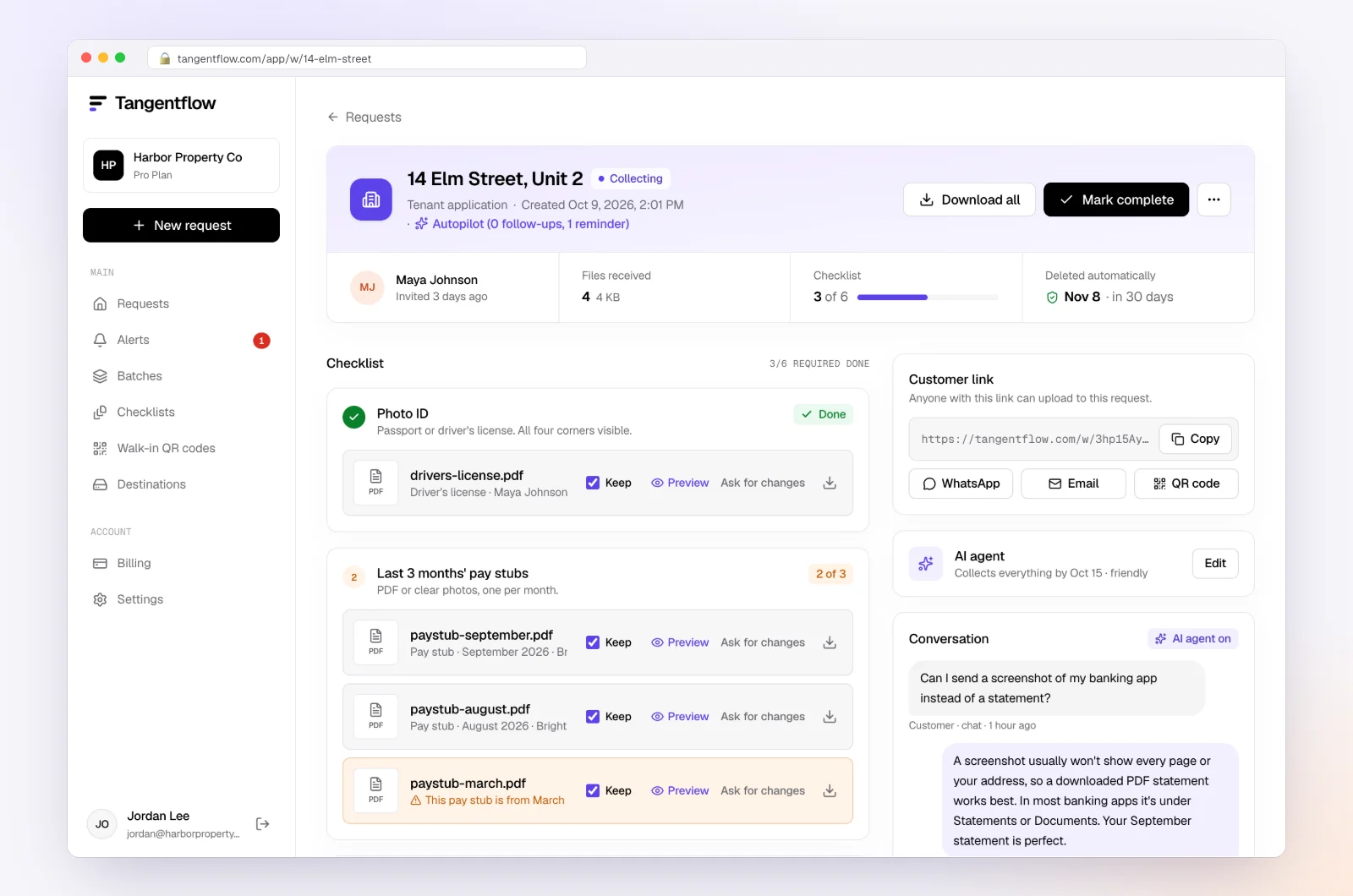
Use "Ask for changes" on any file that needs redoing. When everything is in, download the ZIP, or on Pro deliver it to Google Drive or a webhook, then mark the request complete. Files are deleted 24 hours later, so your own document system stays the system of record.
Onboarding setups by client type
| Client type | Key checklist items | Settings worth turning on | Learn more |
|---|---|---|---|
| Individual tax client (US) | Engagement letter, ID, last 2 returns, IRS notices, Form 8821 | "Every page" on returns, email code | Accounting and tax |
| Individual tax client (Canada) | Engagement letter, ID, Notice of Assessment, CRA letters, authorization confirmation | Name check, email code | Tax document checklist |
| Small business, bookkeeping | Entity documents, EIN or BN proof, statements, accountant invitations | "Only ask if" for payroll, then switch to "Monthly bookkeeping" | Accounting and tax |
| Canadian client with triggering activities | "Client ID check (AML / KYC)" items, beneficial owners | AI check off on ID items, deliver to your storage | Secure document collection |
| Business with contractors | Vendor list, W-9s for 1099 prep | A separate W-9 request per vendor | Collect W-9 forms |
Common onboarding mistakes
- Starting work before the engagement letter is signed. Scope disputes almost always trace back to this.
- Sending a 12-page onboarding packet. Long packets get postponed. Break it into named items with a clear date.
- Accepting passwords. Ask for accountant or read-only access invitations, and say so in writing.
- Filing authorizations late. If you wait until you need a transcript, you'll wait again for processing.
- Skipping the notice question. An unopened IRS or CRA letter changes the scope and the fee.
- Assuming FINTRAC doesn't apply. Canadian CPAs who move money for clients should check.
When something goes wrong
| Problem | Likely cause | Fix |
|---|---|---|
| Client emails their bank password anyway | They thought it was the fastest way | Don't use it, delete the email, ask them to change the password and send accountant access instructions |
| Client can't find the CP 575 | It was mailed years ago | Ask them to request Letter 147C from the IRS, or upload any IRS letter showing the EIN for now |
| Only part of the prior return arrived | Photos of some pages | Turn on "every page"; the check flags missing pages |
| Authorization not confirmed | Client didn't complete the CRA or IRS online step | Walk them through it on a call, or switch to the paper form |
| Link went to the wrong email address | Typo in the request | Reset the client's link so the old one stops working, then share it with the right person; ask your advisor whether it needs reporting |
Free and Pro, honestly
You can run a real onboarding request without paying anything.
| Free | Pro ($29/month) | |
|---|---|---|
| Open requests | 1 at a time | Unlimited |
| AI check on each file | Yes | Yes |
| AI autopilot (answers, reminders, follow-ups) | Your first request | Every request |
| Clients reply by email with attachments | No | Yes |
| Branding | Tangentflow badge | Your logo |
| Delivery to Google Drive or a webhook | No | Yes |
| Works with AI assistants (MCP) | No | Yes |
| File retention | 7 days | 60 days |
Both plans include unlimited checklists, QR codes and posters, ZIP export, AI summaries and email delivery. Pro is billed monthly with no contract, and you can cancel any time. Full details on the pricing page.
What Tangentflow does not do: SMS or text messages, a native mobile app, full legal e-signature certificates, identity verification, collecting payments, or permanent storage. If you need any of those, pair it with a tool that does.
The whole onboarding process as a checklist
- Send a short questionnaire before the fit call.
- Confirm scope and fees, then get the engagement letter signed before any work starts.
- Send one onboarding checklist link with a needed-by date before your kickoff.
- Collect taxpayer numbers, ID where required and entity documents.
- Collect every page of prior returns and every open tax agency notice.
- Get Form 8821 or 2848, or CRA authorization, signed in week one.
- Ask for accountant or read-only access invitations, never passwords.
- In Canada, check whether FINTRAC identification rules apply to your work for this client.
- Review uploads as they arrive and ask for fixes right away.
- Hold a kickoff meeting and set the recurring routine.
- Move what you must keep into your document system and delete other copies.
Frequently asked questions
What should be on a client onboarding checklist for an accounting firm?
A signed engagement letter, identity details and taxpayer numbers, prior-year returns and any tax agency notices, entity documents and ownership details for businesses, IRS or CRA authorization forms, and accountant or read-only access to books, payroll and banking.
Do accountants need an engagement letter for every client?
It is strongly recommended for every engagement, including small tax-only clients. It puts scope, responsibilities and fees in writing, which protects both sides.
What is the difference between IRS Form 8821 and Form 2848?
Form 8821 lets you receive and inspect a client's tax information but not represent them. Form 2848 is a power of attorney that lets an eligible representative, such as a CPA, attorney or enrolled agent, act for the client before the IRS.
How do I get authorized with the CRA for a new client?
The client can authorize you online through My Account or My Business Account using your RepID, GroupID or Business Number, or you can submit a request through Represent a Client that the client may need to confirm. Form AUT-01 gives offline access only. Check canada.ca for the current steps.
Do Canadian accountants have to verify client identity?
Chartered professional accountants and accounting firms have FINTRAC obligations, including identity verification, when they carry out certain triggering activities such as receiving, paying or transferring funds for a client. Audit, review and compilation engagements are not triggering activities on their own. Check FINTRAC's guidance and your provincial CPA body for your situation.
Should clients give their accountant bank or software passwords?
No. Ask clients to invite you as an accountant or read-only user in their accounting software, payroll and banking where available, or to send statements. Tangentflow's agent never asks clients for passwords.
Can I use Tangentflow for bookkeeping client onboarding?
Yes. Build an onboarding checklist from the templates, send one private link per client, and switch them to the "Monthly bookkeeping" template once onboarding is done. Try it with a real client on the Free plan, which includes the full AI agent on your first request.