Guides
How to Get Bookkeeping Clients to Send Receipts on Time (2026)
How to get clients to send receipts on time: a fixed monthly date, one phone-friendly link, a list of only what's missing, paced reminders and templates.
By Bibin MathewUpdated 21 min read
The short answer
Clients send receipts on time when the ask is small, specific and the same every month. Pick a fixed monthly date, send one private link that opens on a phone with no account, and ask only for the receipts you actually need, listed by date, vendor and amount. Remind on a schedule that names only what is still missing, escalate in clear steps, and write the routine into your engagement letter so it is part of the deal from day one.
Every bookkeeper knows the month where the statements arrive on day two and the receipts never arrive at all. You park a dozen transactions in "Ask My Accountant," send a polite email, then another, and by the 20th you are closing with gaps and a client asking why their profit and loss looks strange.
Receipts are the hardest thing to collect because they are scattered across wallets, gloveboxes, inboxes and camera rolls. Asking for "your receipts" sends the client on a monthly scavenger hunt, and most people put scavenger hunts off.
This guide is for independent bookkeepers and small firms in the United States and Canada. It covers one problem: how to get clients to send receipts reliably, without nagging. You will get a system, receipt basics, a lost-receipt policy, client segments, copy-ready messages, engagement letter wording and a Tangentflow setup.
For the full list of what to collect each month, see our monthly bookkeeping checklist. This post is only about receipts.
Why clients don't send receipts
When a client is late with receipts every month, it is tempting to call it laziness. It is usually one of four things, and each has its own fix.
- There is no habit. The request arrives on a different day each month, in a different format, so every month starts from zero.
- The ask is unclear. "Send your September receipts" raises questions: all of them? The coffee? The ones already on the card statement? Unsure clients do nothing, or dump forty photos on you.
- There is too much friction. If sending a receipt means a scanner, a portal login or ten attachments from a laptop, it waits for a quiet evening that never comes.
- There is no consequence. If late receipts change nothing, the books still close and the bookkeeper quietly absorbs the extra work.
| Reason | What it looks like | The fix |
|---|---|---|
| No habit | Every month feels like a new request | Same date, same subject line, same link every month |
| Unclear ask | Nothing arrives, or everything arrives | A specific list: date, vendor, amount |
| Friction | "I'll do it this weekend" | Phone photo uploads, no account, no app |
| No consequence | Receipts drift past close every month | A stated default, then a clear escalation ladder |
A system that gets receipts on time
Pick a fixed monthly date
Choose one day and never move it. The first business day of the month is common, since card statements are usually available within a few days. Set the needed-by date about a week later, earlier than you truly need it.
After two or three months the request stops being an interruption and becomes the thing that happens on the 1st.
Use one link for everything
Every extra channel is another place a receipt can get lost. The best single place is a private link per client that:
- Opens on a phone with no account and no password.
- Lets the client snap a photo or pick one from the camera roll.
- Shows what is done and what is still missing.
- Keeps working if they leave and come back later.
Email forwards can work too, as long as they land in the same place. What fails is a mix of email, shared folders and texts to your personal phone.
Make phone photos the default
Tell clients plainly that a clear phone photo is fine for your bookkeeping. Many assume they need a scanner and wait. Give them three rules:
- Flat surface, good light, the whole receipt in frame.
- The date, vendor and total readable.
- One receipt per photo, or a long receipt in two overlapping photos.
Ask for only what's missing
This is the change that makes the biggest difference. Do not ask for "all receipts." Ask for the specific receipts you need, as a short list:
| Date | Vendor as shown on statement | Amount | What we need |
|---|---|---|---|
| Sep 3 | HOME DEPOT #4410 | $386.22 | Receipt, plus: which job or property? |
| Sep 9 | AMZN MKTP US | $129.47 | Order receipt from your Amazon account |
| Sep 14 | SQ *RIVERSIDE CAFE | $142.80 | Receipt, plus: who attended and the business purpose |
| Sep 22 | COSTCO WHOLESALE | $611.05 | Receipt, so we can split business and personal items |
Build the list after you have categorized everything you can. Six receipts get done on a lunch break. "September receipts" gets done never.
Many bookkeepers also set a standing rule, such as "a receipt for every business expense over $75," so clients know what to save before you ask.
Remind on a pace, not a whim
Space reminders out early, tighten them near the deadline, and skip one if the client just uploaded something. Each reminder should list only what is still missing.
For a one-week window: the request on day 1, a reminder on day 4, a final one the day before the deadline. Our guide to client reminder schedules has longer schedules.
Use an escalation ladder
Decide in advance what happens when receipts do not arrive, so you never improvise an awkward email:
| Step | When | What happens |
|---|---|---|
| 1. Request | Fixed monthly date | Specific list, one link, needed-by date |
| 2. Reminder | Midway | Only what's missing, same link |
| 3. Final notice | Day before the deadline | States the default that applies after the date |
| 4. Close with gaps | Deadline passes | Unreceipted items go to Ask My Accountant and appear on the report |
| 5. Call | Same client, second month in a row | A short call to fix the cause, not just this month |
| 6. Engagement terms | Third month or a pattern | Apply what the engagement letter says: catch-up fee, delayed reports or a scope change |
Step 4 means you close on time. A report with five flagged items beats no report, and the flags are their own reminder.
Receipt rules that matter
Clients often ask "do you really need the receipt if it's on the card statement?" Here are the stable basics.
What makes a receipt usable
For bookkeeping, a usable receipt shows:
- The date of the purchase.
- The vendor name, and ideally address.
- What was bought, itemized if possible.
- The total, and the sales tax, GST/HST or PST paid.
- How it was paid, when that is not obvious from the statement.
A card statement shows the date, vendor and amount, but not what was bought. A Costco or Amazon line can be office supplies, inventory or groceries.
United States (IRS), at a high level
The IRS says business records should include supporting documents such as sales slips, paid bills, invoices, receipts and canceled checks, and that for expenses the documents should show the payee, the amount, proof of payment, the date and a description of the item or service. See What kind of records should I keep.
Travel, gift and car expenses have stricter substantiation rules. Publication 463 says you generally need documentary evidence such as receipts, canceled checks or bills, with an exception for expenses other than lodging that are under $75. Meals with a business purpose fall in this area too, which is why "who attended and why" belongs on your receipt list.
Canada (CRA), at a high level
The CRA's page on business records says to always get receipts or other vouchers for business purchases, showing details such as the date, the seller's name and address and a description of what was bought. GST/HST registrants claiming input tax credits need extra details above certain amounts, such as the supplier's business number.
Retention periods are covered in our monthly bookkeeping checklist.
When the client says "I lost it"
It will happen. Have a policy ready so the answer is the same every time. A reasonable order:
- Look for a replacement. Many vendors can reprint or re-send a receipt: online stores have order history, larger retailers can often look up a card purchase, and suppliers can re-send an invoice. Ask the client to try this first.
- Gather what does exist. A card or bank statement line, an order confirmation email, a contract, a delivery slip or a photo of the item.
- Add a short note. Ask the client to write, close to the time, what was bought, from whom, the amount, the date and the business purpose. Attach it to the transaction.
- Code it consistently. Decide with the client's tax advisor how undocumented items should be treated, and apply that every time.
Publication 463 allows reconstructing records when a receipt is missing for reasons beyond the taxpayer's control, such as a fire or flood, and the CRA describes what to record when a receipt is not available. Neither is a blanket pass for routine missing receipts.
The best fix for lost receipts is earlier collection. A receipt photographed the week of purchase is rarely lost.
Sort clients by how late they are
Not every client needs the same treatment. Sort your book into three groups and adjust.
| On-time | Slow | Chronic | |
|---|---|---|---|
| Typical pattern | Sends within the window most months | Sends after one or two reminders | Late most months, often after close |
| Request | Standard monthly link | Standard link, shorter list | Shortest possible list, highest-value receipts first |
| Reminders | Paced, light | Paced, standard | Paced, plus a final notice that states the default |
| Biggest lever | Leave it alone | Remove friction (phone photos, one link) | Consequence and scope: written terms, catch-up fee |
The slow client is usually a friction problem, and a phone link plus a short list moves them into the on-time group. The chronic client is usually a priority problem that reminders alone will not fix: make the consequence visible and talk once about what would help. If a client stays late after that, it is fair to change the price or the scope.
Message templates
Copy and adapt these. Keep the tone friendly and specific. For more variations, including wrong-file and unreadable-file messages, see our document request email templates.
First ask
Subject: [Month] bookkeeping: [number] receipts by [day, date]

Hi [First name],

We're closing [Month] for [Business name]. We've categorized everything we can, and need receipts for just these:

- [Date], [Vendor], [Amount]: [what we need]
- [Date], [Vendor], [Amount]: [what we need]
- [Date], [Vendor], [Amount]: [what we need]

A clear phone photo is fine. Upload them here, no account needed:
[link]

With these by [day, date], your reports will be ready by [date].

Thanks,
[Your name]
Reminder
Subject: Reminder: [Month] receipts, [number] left

Hi [First name],

Thanks for what you've sent. We're still missing:

- [Date], [Vendor], [Amount]
- [Date], [Vendor], [Amount]

Same link as before:
[link]

If one of these was personal, or you can't find it, just reply and tell me. That's an answer too.

Thanks,
[Your name]
Final notice
Subject: [Month] closes [day]: [number] receipts still open

Hi [First name],

We're closing [Month] on [day, date]. These are still open:

- [Date], [Vendor], [Amount]
- [Date], [Vendor], [Amount]

Anything without a receipt or an answer by then will be recorded in Ask My Accountant and listed on your report, so you can see what's unresolved. You can still send them after that and we'll update the books next month.

Upload here:
[link]

Thanks,
[Your name]
After the fact
Use this after close, when a transaction is still unresolved or the client has said a receipt is lost.
Subject: Open items from [Month]: quick note needed

Hi [First name],

These [Month] transactions are still in Ask My Accountant:

- [Date], [Vendor], [Amount]

Please try to get a copy from the vendor (online order history or a re-sent invoice usually works). If you can't, reply with a short note: what it was, who it was from, and the business purpose.

Whether a note is enough to support the expense for tax purposes is a question for your tax advisor, so we'd suggest mentioning it to them too.

Thanks,
[Your name]
Build the habit into your engagement letter
Set expectations before the first month. A few lines in the engagement letter turn your receipt process from a favor into part of the deal:
- The monthly date you will send the request and the date receipts are due.
- How receipts are sent: one link, phone photos accepted.
- Your threshold, such as receipts for every expense over a set amount, plus anything on the monthly list.
- What happens if they are late: the month closes on schedule with unreceipted items flagged, and catch-up work after close is billed or delays reports.
- No passwords: you will never ask for banking passwords, and the client should not send them.
Have your own professional body or lawyer review the wording, since engagement terms are a legal document. Our accounting client onboarding checklist covers the rest of the first-month setup.
Then walk the client through the first request on a five-minute call.
Ways to collect receipts, compared
| Method | Client effort | Shows what's missing | Reminders | Checks on arrival | Fits when |
|---|---|---|---|---|---|
| Email forwards | Low per receipt | No | Manual | No | A few receipts a month |
| Shared folder per client | Medium | No | Manual | No | Clients already in Drive or Dropbox |
| Receipt capture app or bookkeeping software attachments | Medium, needs an app or login | Partly | Some | Some | Clients who adopt the app and keep using it |
| Private link with checklist and AI agent (Tangentflow) | Low, no account | Yes | Paced to the date | Yes, every file | Many clients, same request every month |
Receipt apps work when clients keep using them; many drift back to email after a few months. A short list once a month asks less of the client, so it tends to stick.
Getting receipts in Tangentflow, step by step
Tangentflow is built for exactly this kind of recurring chase. You set up a checklist once, each client gets a private link, and an AI collection agent does the inviting, answering and reminding. More on how it fits a practice on our bookkeepers page.
1. Start from the "Monthly bookkeeping" template
Open "Checklists," choose "Browse templates" and pick "Monthly bookkeeping." The item that matters here is "Receipts and bills you paid," with the hint "Photos are fine. Make sure the date and total are readable." The template also includes "Bank statements for the month" and optional items such as "Credit card statements" and "Payroll report." Remove what a client group does not need.

2. Tell the receipts item what "good" looks like
Open "Receipts and bills you paid" in the checklist editor. Set "What should it be?" to something like "receipt or invoice showing the vendor, date, items and total," a date rule so old receipts are flagged, and an "Example" describing a good photo. Add a short tip such as "One receipt per photo, flat surface, good light."
Add a "Form field" for anything you need as an answer, like a yes/no "Did you make any purchases over $75 in cash this month?" and use "Only ask if…" to show an upload item only when the answer is yes.

3. Send to every client at once with Batches
Open "Batches," choose "Send to many customers," pick your checklist and name the batch, for example "October receipts." Upload an Excel file or CSV, or paste rows from Excel or Google Sheets with name, email, reference, needed-by date and notes. Schedule the send for your fixed monthly date, up to 30 days ahead. Batches are part of Pro, up to 100 clients per sheet. Turn on "Repeat every month" and the same clients get a new request on the same day each month, with the same gap to the needed-by date, until you stop it. See bulk requests.
For a single client, click "New request," choose the checklist, add a reference such as "Acme Bakery, October 2026" and set the needed-by date.
4. Clients snap photos, and problems are caught on the spot
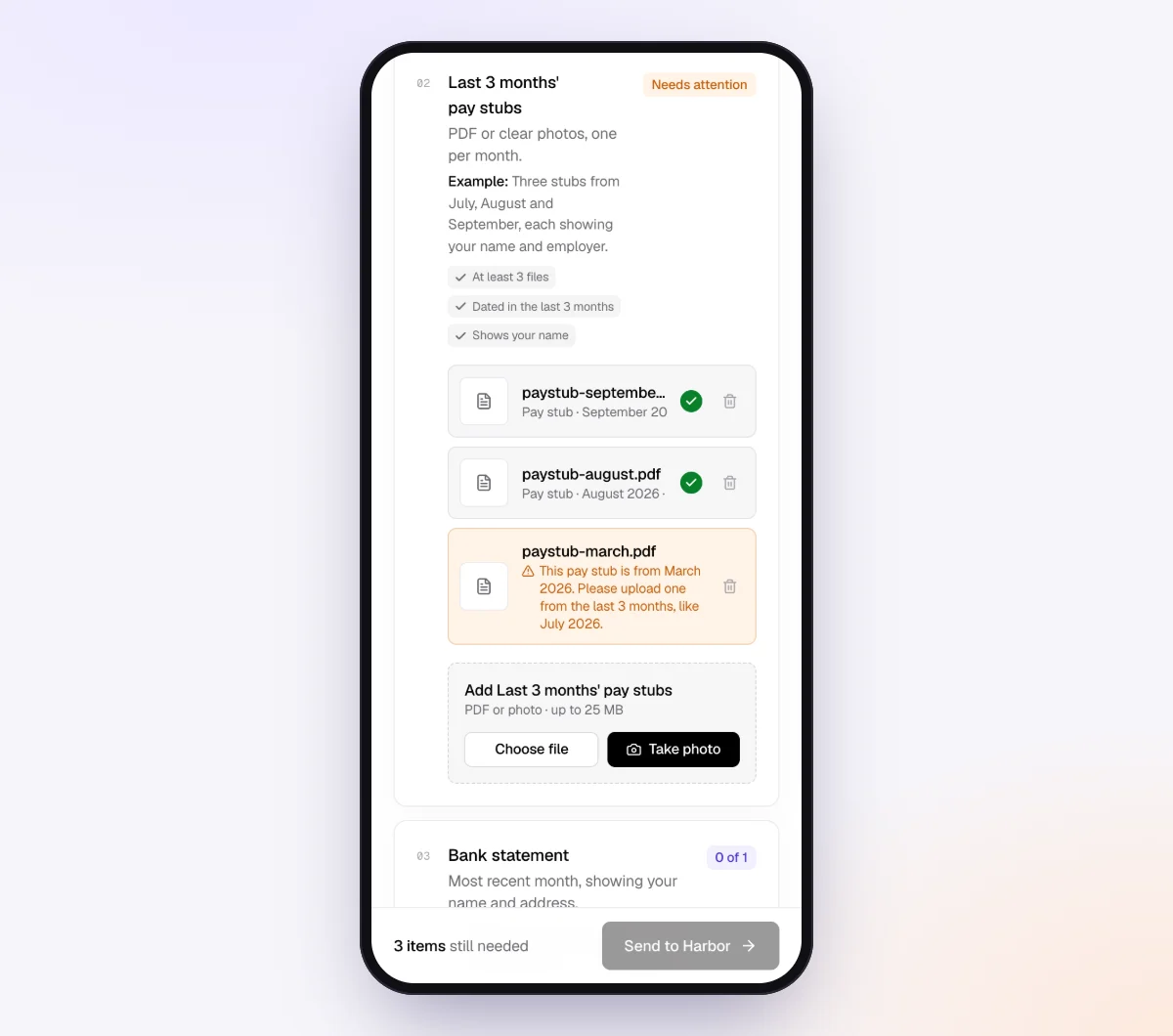
Each client gets a branded invitation from your business name and opens their checklist on a phone, with no account and no app. Every upload is checked in seconds by document checks: the right kind of document, readable and recent enough. If a photo is too dark or cuts off the total, the client sees a friendly note explaining what to fix while the receipt is still in their hand.
5. The agent chases what's missing
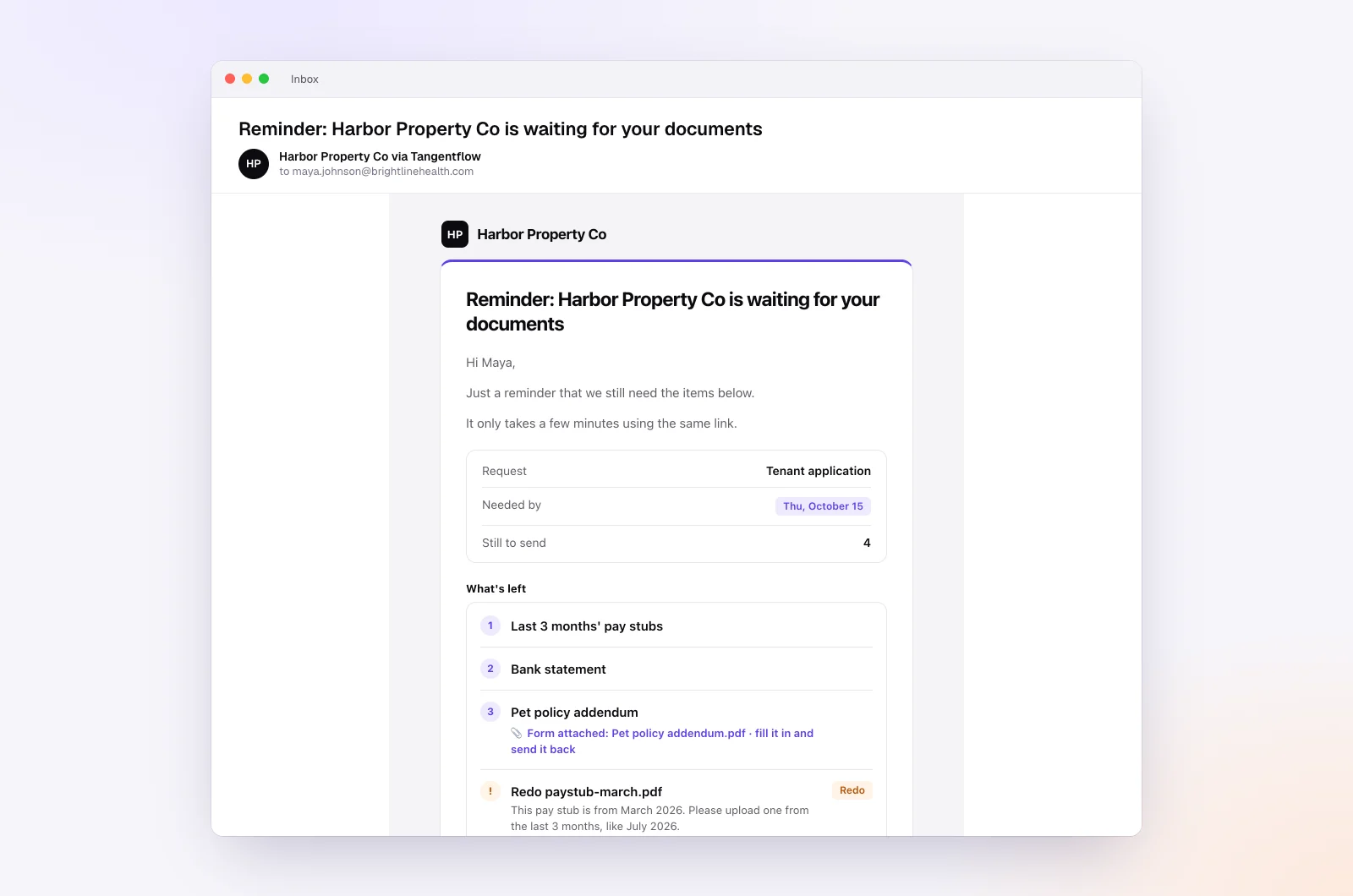
In the "AI autopilot" settings, turn on "Chase until it's all in" and choose "Paced to each request's deadline." Reminders are spaced out early, closer as the date nears, with a last one the day before. Clients get at most one automatic email a day, never right after they were active, and each reminder lists only what is still missing. Turn on "Follow up on anything missing" so a client who submits without the receipts gets asked for exactly what's left.
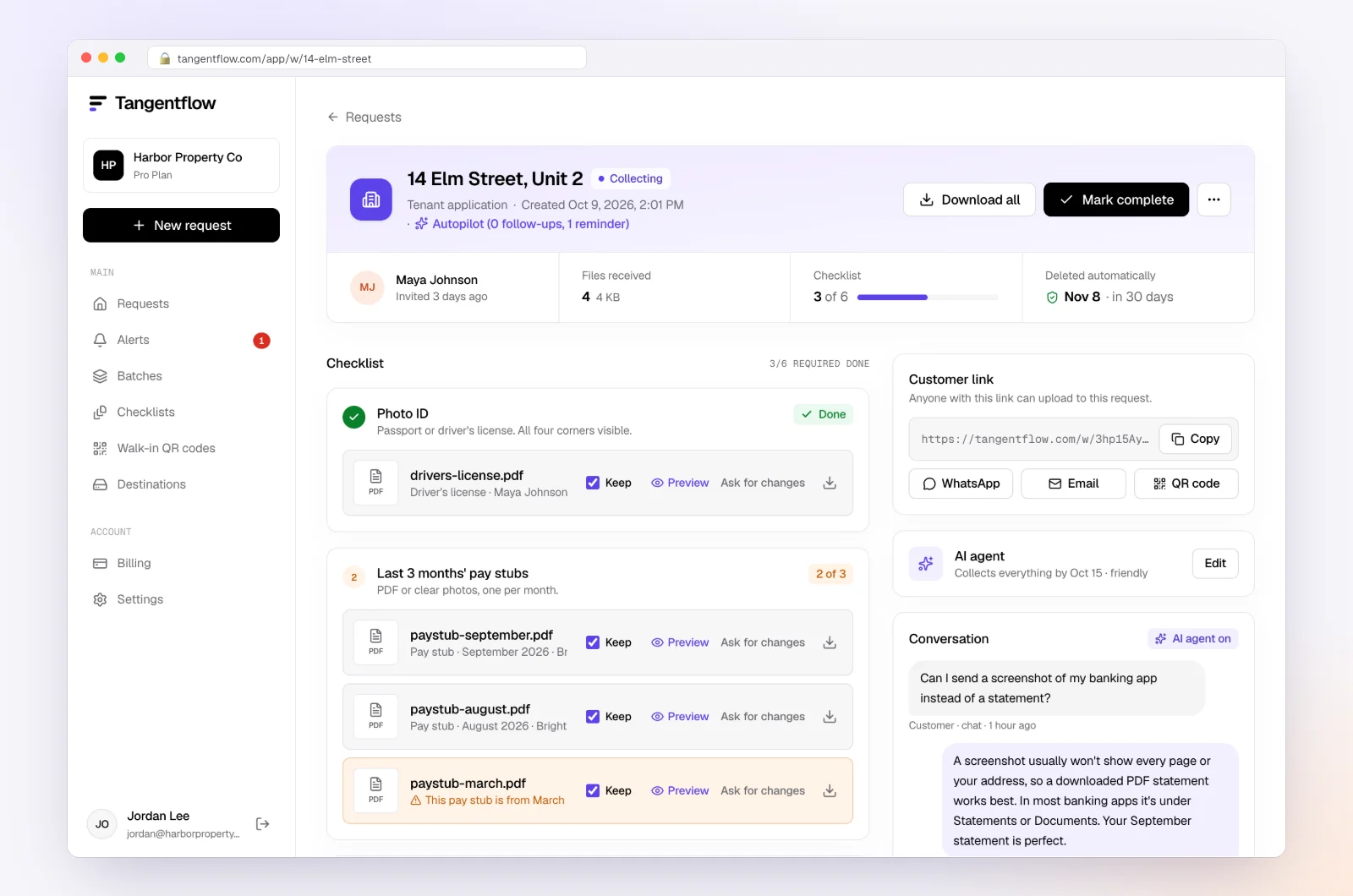
Clients can ask questions like "Is a photo of the Amazon order page OK?" and the agent answers from your checklist and notes, or hands off to you when a question is outside the checklist, a client is upset or the date passes. On Pro, clients can reply with receipts attached, and each file is filed under the right item.
6. Review and close
The request page shows every file with its check result and what's still missing. Use "Ask for changes" on any single file. When everything is in, download a ZIP, or on Pro deliver to Google Drive or a webhook, then mark the request complete. Files are deleted 24 hours later.
Setups by type of client
Start from the "Monthly bookkeeping" template and adjust the receipts item per group. Send each group its own batch.
| Client type | Receipts that matter most | Settings worth turning on | Learn more |
|---|---|---|---|
| Trades and contractors | Supplier and hardware store receipts, tagged to a job | Tip asking for the job name; higher max count | Home services |
| Online sellers | Inventory and shipping supply receipts, platform order receipts | Example showing an order page with totals | Document checks |
| Consultants and sole proprietors | Meals, travel and software receipts | Yes/no question for travel with "Only ask if…" | Accounting and tax |
| Clients sending payroll or sensitive files alongside receipts | Receipts plus payroll reports | "Require an email code" on the checklist | Security |
"Require an email code" is an optional checklist setting: the client enters a 6-digit code sent to their email before the link opens. If a link ever goes to the wrong person, reset the customer's link from the request and the old one stops working. After the client sends everything, the link no longer shows the files.
When something goes wrong
| Problem | Likely cause | Fix |
|---|---|---|
| Photos are blurry or cut off | Phone in poor light, long receipt | The check flags it; add a tip about two overlapping photos |
| Client sends the card statement instead of the receipt | Thinks the statement is enough | Explain in the hint that the statement does not show what was bought |
| Client is upset about reminders | Busy month, too many emails | The agent stops and hands off to you; reply personally |
| Same transactions unclear every month | No rule for a recurring charge | Ask once, then add a bank rule so it never makes the list again |
Check "Alerts" daily during close week. That is where handoffs and missed dates show up, so you only spend time on clients who need a person.
Free and Pro, honestly
You can run a real request without paying anything.
| Free | Pro ($29/month) | |
|---|---|---|
| Open requests | 1 at a time | Unlimited |
| AI check on each file | Yes | Yes |
| AI autopilot (answers, reminders, follow-ups) | Your first request | Every request |
| Send to many clients at once (Batches) | No | Yes |
| Clients reply by email with attachments | No | Yes |
| Branding | Tangentflow badge | Your logo |
| Delivery to Google Drive or a webhook | No | Yes |
| Works with AI assistants (MCP) | No | Yes |
| File retention | 7 days | 60 days |
Both plans include unlimited checklists, QR codes and posters, ZIP export, AI summaries and email delivery. Pro is billed monthly with no contract, and you can cancel any time. Full details on the pricing page.
What Tangentflow does not do: SMS or text messages, a native mobile app, full legal e-signature certificates, identity verification, collecting payments, or permanent storage. If you need any of those, pair it with a tool that does. It also does not connect to bank feeds, categorize transactions or replace your bookkeeping software.
The receipt routine as a checklist
- Pick one fixed monthly date and keep the same subject line.
- Send one private link per client that opens on a phone with no account.
- Tell clients a clear phone photo is fine, with three rules for a good one.
- Categorize what you can, then ask only for the specific receipts you need, by date, vendor and amount.
- Remind on a pace tied to the needed-by date, listing only what's missing.
- Send a final notice that states the default, then close on time with gaps.
- Have a written policy for lost receipts, and send tax questions to the client's advisor.
- Sort clients into on-time, slow and chronic, and treat each group differently.
- Put the routine and the consequence in the engagement letter.
- Turn repeat answers into bank rules so next month's list is shorter.
Frequently asked questions
How do I get clients to send receipts on time?
Ask on the same day every month, for a short, specific list of receipts by date, vendor and amount, through one link that works on a phone. Remind on a schedule that lists only what is still missing, and tell clients in advance what happens if receipts are late.
What should I do when a client won't send receipts?
Close the month on time with unreceipted items in Ask My Accountant and listed on the report, so the gap is visible. If it happens two months running, call to find the cause, and apply what your engagement letter says about late documents.
Is a photo of a receipt good enough?
For your bookkeeping, a clear photo showing the date, vendor, items and total is usually fine. Whether the client can discard the paper original depends on IRS or CRA rules and their tax advisor's view, so do not promise that a photo always replaces the paper.
How do I handle missing receipts in bookkeeping?
First ask the client to get a copy from the vendor, since online order history and re-sent invoices often work. If that fails, collect what exists, such as the statement line and an order email, plus a short note on what was bought and why, and ask the client's tax advisor how the item should be treated.
Should I ask clients for every receipt?
Usually not. Ask for receipts for transactions you cannot categorize from the statement, plus anything over a threshold you set, and let bank rules handle routine charges. A short list gets done; "all your receipts" gets put off.
Can Tangentflow send receipt reminders by text message?
Not today. Reminders, answers and follow-ups go by email and through the chat on the client's upload page. If a client never checks email, you will still need to call or text them yourself.
Can I send the receipt request to all my clients at once?
Yes, on Pro. In "Batches" you upload or paste your client list, pick your checklist and send now or schedule up to 30 days ahead, up to 100 clients per sheet. Turn on "Repeat every month" and the same clients get a new request on the same day every month until you stop it.
Is there a lost receipt form clients can fill out?
Yes, a short signed note works as a fallback: date, vendor, amount, what was bought and the business purpose, ideally with the matching statement line attached. It doesn't guarantee the deduction, so the client's tax advisor decides how to treat it. In Tangentflow you can add a form field for this note and use "Only ask if…" so it only appears when the client says a receipt is lost.
Can clients upload receipts to QuickBooks Online without having access to the books?
QuickBooks Online doesn't offer a "receipts only" user, so the usual workarounds are forwarding receipts to the company's receipt email address or using a third-party capture app. A separate upload link is another option: the client opens a private link on their phone with no account, and you download the files and attach them in QuickBooks yourself. Tangentflow doesn't connect to QuickBooks or post transactions.