Checklists
Monthly Bookkeeping Checklist: What to Get From Clients (2026)
A monthly bookkeeping checklist of what to get from clients: statements, receipts, payouts and payroll, plus a request calendar, email templates and IRS/CRA basics.
By Bibin MathewUpdated 20 min read
The short answer
Each month, ask every client for bank and credit card statements (every page), receipts for transactions you cannot categorize, sales and payout reports from platforms like Stripe, Shopify or Square, payroll and loan statements, and a short note on anything unusual. Send one request on the same day every month with a firm needed-by date, follow up with a short list of specific transaction questions, and remind on a schedule that lists only what is still missing. Add quarter-end and year-end items on top of the monthly list instead of sending a separate request.
Monthly bookkeeping has a strange rhythm. The work itself takes a few hours per client. The waiting takes weeks. You need a card statement, six receipts and an answer about a $1,840 transfer, and until they arrive the books cannot close, the reconciliation sits half done and the client asks why their reports are late.
This guide is for bookkeepers and small accounting firms in the United States and Canada who close books for small business clients every month. You will get the monthly document list, a workflow for uncategorized transactions, a request calendar, IRS and CRA receipt basics, copy-ready emails, a plan for late clients and quarter-end and year-end extras. The last part shows how to run it in Tangentflow, if you would rather an agent did the chasing.
Why month-end close stalls
- The request changes every month. Clients never learn the routine.
- "Send me your receipts" is too broad. The client does not know which receipts, so they send none, or forty.
- Statements arrive incomplete. Page one of four, or a screenshot of the banking app.
- Questions trickle in one at a time. Each one restarts the wait.
- There is no date. "When you get a chance" is a request the client can always put off.
The fix is a fixed monthly checklist, a fixed calendar and one batched list of questions, so the same short request arrives on the same day every month.
The monthly bookkeeping checklist
What most small business clients should send every month. Mark items that do not apply to a client as optional, or leave them off.
Statements
- Bank statements for every business account, one PDF per account, covering the full month, every page. Include savings and any account the client opened recently.
- Credit card statements for every business card, every page. Personal cards used for business count too, if the client uses them.
- Loan and line of credit statements, showing the principal and interest split, so you can book the payment correctly.
Bank feeds in QuickBooks Online, Xero and similar tools are not a substitute for the statement. Feeds break and drop transactions, and the statement is what you reconcile to.
Receipts and bills
- Receipts for transactions you cannot categorize from the bank or card line alone. This is the most important item, and the one clients most often skip.
- Bills and supplier invoices the client received or paid during the month.
- Receipts over a threshold you set, for example every expense over $75.
Sales and income
- Invoices issued, or an export from the invoicing system.
- Sales platform payout reports: Stripe, Shopify, Square, PayPal, Amazon, Etsy or whatever the client sells through. The bank deposit is the net amount; the payout report shows gross sales, fees and refunds.
- Point-of-sale reports for cash businesses, including cash sales that never touch the bank.
Payroll and people
- Payroll summary report for each pay run in the month, from Gusto, ADP, Wagepoint or whatever the client uses.
- Contractor payments, and a W-9 (US) for any new contractor. Our guide to collecting W-9 forms from vendors covers that in detail.
Sales tax, GST and HST
- Sales tax reports from the client's sales platforms, by state where relevant (US).
- GST/HST, PST or QST collected and paid details, and any filing confirmations (Canada).
- Any letter from a tax agency received that month, every page.
Questions, not files
- Anything unusual this month? Large purchases, new loans, refunds, owner draws or contributions, new accounts, a new location or a new employee.
- Answers to your list of uncategorized transactions (more on this below).
The uncategorized transactions workflow
Every month, some transactions cannot be categorized from the bank line alone: "AMZN MKTP US," an e-transfer to a person, a cash withdrawal. Do not send one email per transaction. Send one batched list with a single date.
1. Categorize everything you can first. Only what is genuinely unclear goes on the list.
2. Build the list in one place, a spreadsheet or your bookkeeping software's question feature, with the date, amount, statement description and account.
3. Ask a specific question for each. Not "what is this?" but a question with answer options where possible:
| Date | Amount | As shown on statement | Your question |
|---|---|---|---|
| Sep 4 | $412.18 | AMZN MKTP US | Office supplies, inventory or personal? Please upload the order receipt. |
| Sep 11 | $2,000.00 | E-TRANSFER J SMITH | Contractor payment, loan repayment or owner draw? |
| Sep 19 | $1,840.00 | DEPOSIT | Customer payment (which invoice?), loan or owner contribution? |
| Sep 27 | $89.99 | APPLE.COM/BILL | Which subscription is this, and is it for the business? |
4. Send it a few days after the main request, with its own needed-by date and a link where receipts can be uploaded. A one-line answer per transaction is enough.
5. Set a default for silence. Tell clients what happens if an item is not answered by the date, for example "unanswered items stay in Ask My Accountant and will appear on your monthly report."
6. Turn repeat answers into rules. If a client says "the Apple charge is always our design software," add a bank rule and never ask again.
A monthly bookkeeping calendar
A common pattern for a calendar-month close, with day 1 as the first business day of the new month. Adjust to when statements close and when you promise reports.
| Day | What happens | Who |
|---|---|---|
| 1 | Send the monthly request to every client, with a needed-by date of day 7 | You |
| 1–5 | Statements become available; clients upload statements, receipts and reports | Client |
| 4 | First reminder, listing only what is still missing | You or your tool |
| 5–6 | Categorize everything you can, build the uncategorized transactions list | You |
| 6 | Send the transaction questions with a needed-by date of day 10 | You |
| 7 | Needed-by date for documents; final reminder the day before | You or your tool |
| 8–10 | Reconcile bank and card accounts, book payroll and payouts | You |
| 10 | Needed-by date for answers; anything unanswered stays parked | Client |
| 12–15 | Review, close the period, send reports to the client | You |
| 15+ | Call anyone who is still outstanding | You |
Send on the same day every month, and set the needed-by date earlier than you really need it, so one round of fixes still fits.
For more on how often to remind and when to switch to a phone call, see our guide to client reminder schedules.
Receipt rules: IRS and CRA basics
Clients often ask whether they really need receipts, and for how long. Here is the official guidance in plain terms.
United States (IRS)
The IRS says business records should include supporting documents such as sales slips, paid bills, invoices, receipts, deposit slips and canceled checks. For expenses, the documents together should show the payee, the amount, proof of payment, the date and a description of what was bought. A card statement alone rarely shows what was bought, which is why receipts still matter. See the IRS page What kind of records should I keep.
Electronic records are allowed, and the IRS notes that all requirements for paper records also apply to electronic ones.
On retention, the IRS page How long should I keep records? gives the general rule as 3 years, with important exceptions:
- 6 years if income was underreported by more than 25% of the gross income shown on the return.
- 7 years for a claim for a loss from worthless securities or a bad debt deduction.
- At least 4 years for employment tax records, after the tax is due or paid, whichever is later.
- Indefinitely if no return was filed or a fraudulent return was filed.
- Property records until the period of limitations expires for the year the property is disposed of.
Canada (CRA)
The CRA says that generally, businesses must keep required records and supporting documents for six years from the end of the last tax year they relate to. Some records, such as those tied to an objection or appeal, must be kept longer. See the CRA page on where to keep your records and how long to keep them.
The CRA accepts electronic records. If paper documents are scanned to the CRA's imaging standards, the images can serve as the records; if not, the originals should be kept. The CRA page on acceptable format and imaging paper documents explains the conditions.
What this means for your monthly request
- A photo of a receipt is usually fine for your bookkeeping, as long as the date, vendor, total and items are readable. Whether the client can then discard the paper depends on the rules above and their own advisor.
- Retained documents belong in your system of record, not your inbox or an upload tool.
Monthly request and reminder email templates
Keep the same subject line every month so clients recognize it.
The monthly request
Subject: [Month] bookkeeping: please send by [day, date]

Hi [First name],

It's time to close [Month] for [Business name]. Please send these by [day, date] so we can have your reports to you by [date]:

- Bank statements for [Month], every account, every page (PDF from your bank website, not a screenshot)
- Credit card statements for [Month], every card
- Receipts and bills you paid in [Month]
- Your [Stripe / Shopify / Square] payout report for [Month]
- Payroll report, if you ran payroll
- A quick note on anything unusual: big purchases, loans, refunds, new accounts

You can upload everything here from your phone, no account needed:
[link]

If something doesn't apply this month, just mark it or reply and tell me.

Thanks,
[Your name]
[Firm name]
Friendly reminder
Subject: Reminder: [Month] bookkeeping, [number] items left

Hi [First name],

Thanks for what you've sent so far. To close [Month], we're still missing:

- [Item 1]
- [Item 2]

Same link as before:
[link]

We need these by [day, date] to keep your reports on schedule.

Thanks,
[Your name]
For more wording, including tone variations and messages for wrong or unreadable files, see our document request email templates.
How to handle chronically late clients
Every practice has a few clients who are late every month. Reminders alone will not fix it. Try these, roughly in order.
| Approach | When to use it | How it sounds |
|---|---|---|
| Make it smaller | The request feels like too much | Drop optional items; ask for statements first, receipts second |
| Move the date | Their month-end is genuinely busy | "Would the 10th work better than the 7th every month?" |
| Close with gaps | The client is late but reports are due | Close on time and mark missing items, then update later |
| Bank feeds and statement access | Statements are always the holdup | Ask for read-only or accountant access where the bank offers it |
| Put it in the engagement letter | Nothing else has worked | Due dates and a late fee or delayed reporting written into the agreement |
A report with three items in "Ask My Accountant" is more useful than no report, and the gaps are their own reminder. And never ask for banking passwords; use the bank's accountant access or your software's bank feed instead.
Quarter-end and year-end extras
Add these to the regular monthly request in the right month rather than sending a separate one.
Quarter-end
| Extra item | Country | Why |
|---|---|---|
| Payroll quarterly report (Form 941 if the payroll provider files it) | US | Tie payroll expense to what was reported |
| Estimated tax payment confirmations | US | Record owner estimated payments correctly |
| Tax instalment payment confirmations | Canada | Record instalments correctly |
| GST/HST, PST or QST return and confirmation, for quarterly filers | Canada | Reconcile tax collected to what was filed |
| State sales tax returns, for quarterly filers | US | Reconcile sales tax payable |
Year-end
| Extra item | Country | Why |
|---|---|---|
| December (or fiscal year-end) statements for every account, including ones rarely used | Both | Year-end balances must tie out |
| Year-end loan statements with total interest paid | Both | Interest expense and loan balances |
| Inventory count, if the client holds stock | Both | Cost of goods sold |
| Receipts for large purchases (equipment, vehicles, computers) | Both | Fixed assets and depreciation or capital cost allowance |
| W-9s for every contractor paid during the year | US | Preparing 1099-NEC forms |
| Contractor list with total paid | Canada | T4A slips where required |
Filing deadlines for 1099s, W-2s, T4s and T4As, sales tax and GST/HST returns change from time to time and depend on the client's filing frequency. Confirm the current dates on the IRS and CRA websites each year. Our tax document checklist covers the owner's personal tax documents if you also prepare their return.
Four ways to collect monthly bookkeeping documents, compared
| Method | Setup effort | Client effort | Shows what's missing | Reminders | Checks on arrival |
|---|---|---|---|---|---|
| Email attachments | None | Low | No | Manual | No |
| Shared folder per client | Low | Medium | No | Manual | No |
| Receipt capture app or practice portal | Medium | Medium to high (app or login) | Partly | Some | Some |
| Private link with checklist and AI agent (Tangentflow) | Low | Low (no account) | Yes | Paced to the date | Yes, every file |
Email and shared folders are fine for a client who sends one statement a month. Receipt apps and portals work when clients actually use them, and many drift back to email after a month. A private link with a checklist fits when you send the same request to many clients every month and the chasing is what eats your time.
Monthly bookkeeping in Tangentflow, step by step
Tangentflow ships with a "Monthly bookkeeping" template, so the checklist is mostly ready. Here is how to set it up and send it each month.
1. Start from the "Monthly bookkeeping" template
Open "Checklists", choose "Browse templates" and pick "Monthly bookkeeping". It comes with these items:
- "Bank statements for the month": one PDF per business account, set to every page and a recent date.
- "Credit card statements" (optional): if the client has a business card, every page.
- "Receipts and bills you paid": photos are fine, with the date and total readable.
- "Sales or invoices you issued" (optional): an export from the invoicing or till system.
- "Payroll report" (optional): if the client ran payroll this month.
- "Anything unusual this month?" (optional): a long-answer question for large purchases, loans, refunds and owner drawings.

2. Add the items your clients need
Open any item in the checklist editor to change it. Useful additions:
- A "Payout reports" item with "What should it be?" set to something like "Stripe, Shopify or Square payout report for last month."
- Optional "Loan statements" and "Sales tax or GST/HST" items for clients who need them.
- Form fields such as a yes/no "Did you open any new bank accounts or cards this month?" Use "Only ask if…" to show an upload item only when the answer is yes.
Add an "Example" and a short tip to items people get wrong, such as "A PDF from your bank website, not a screenshot of the app."

3. Send it to every client at once with Batches
Open "Batches", choose "Send to many customers", pick your bookkeeping checklist and give the batch a name such as "October close." Upload an Excel file or CSV, or paste rows from Excel or Google Sheets: name, email, reference, needed-by date and any notes. Extra columns, like "sells on Shopify," become context for the agent.
You can send now or schedule the send (for example, 8 a.m. on the first business day of the month), give each client their own needed-by date and skip clients who already have an open request. Turn on "Repeat every month" and the same clients get a new request on the same day each month, with the same gap to the needed-by date, until you stop it. More on bulk requests, which are part of Pro, up to 100 clients per batch.
For a single client, click "New request", choose the checklist, add a reference such as "Acme Bakery, October 2026" and set the needed-by date.

4. Clients upload, and problems are caught on the spot
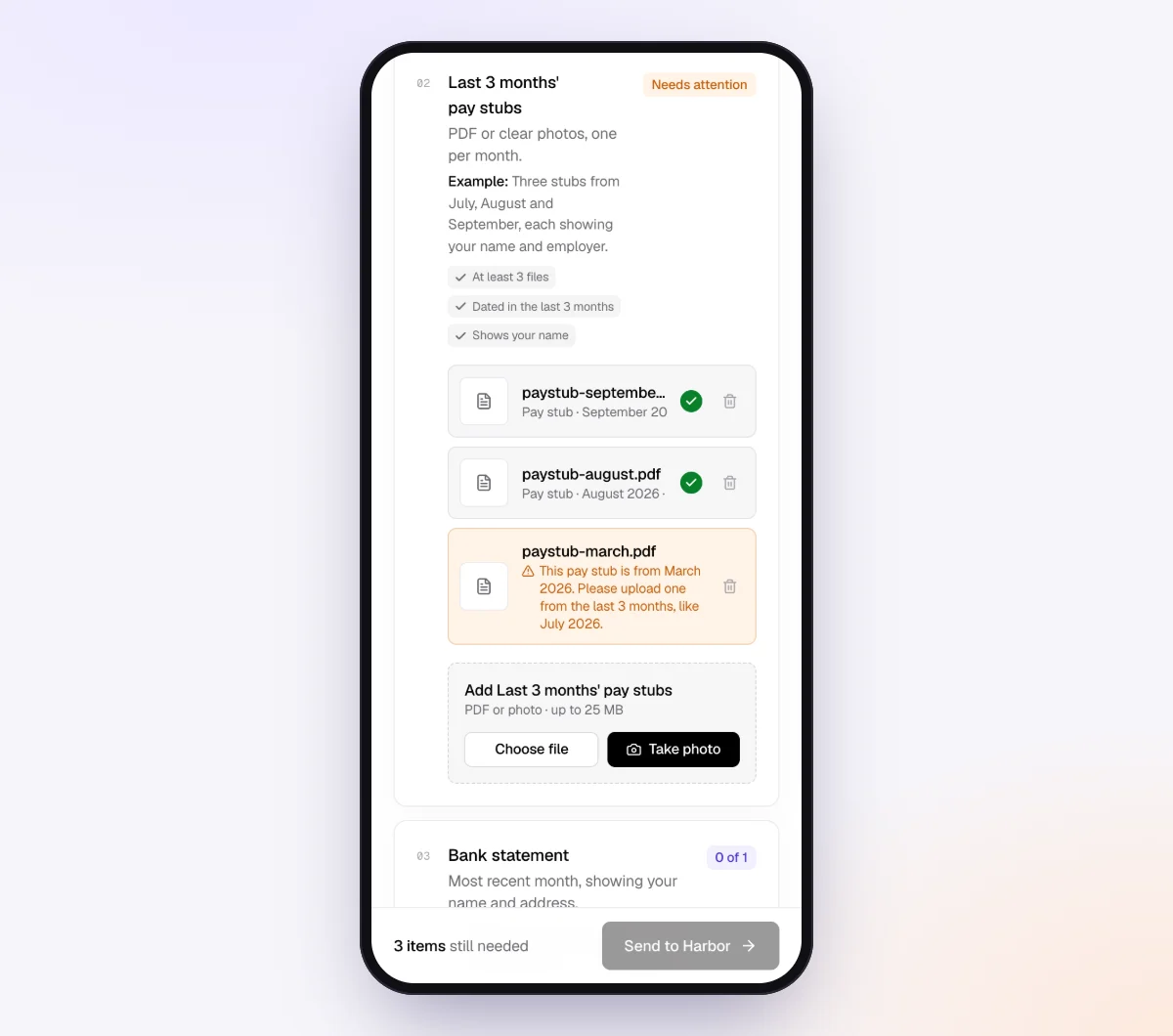
Each client gets a branded invitation from your business name and opens the checklist on their phone, with no account and no app. Every upload is checked in seconds by document checks: the right document type, readable, recent enough and every page. If a client uploads page one of a four-page statement or last month's statement by mistake, they see a friendly note explaining what to fix while they still have it open.
5. The agent chases, you review
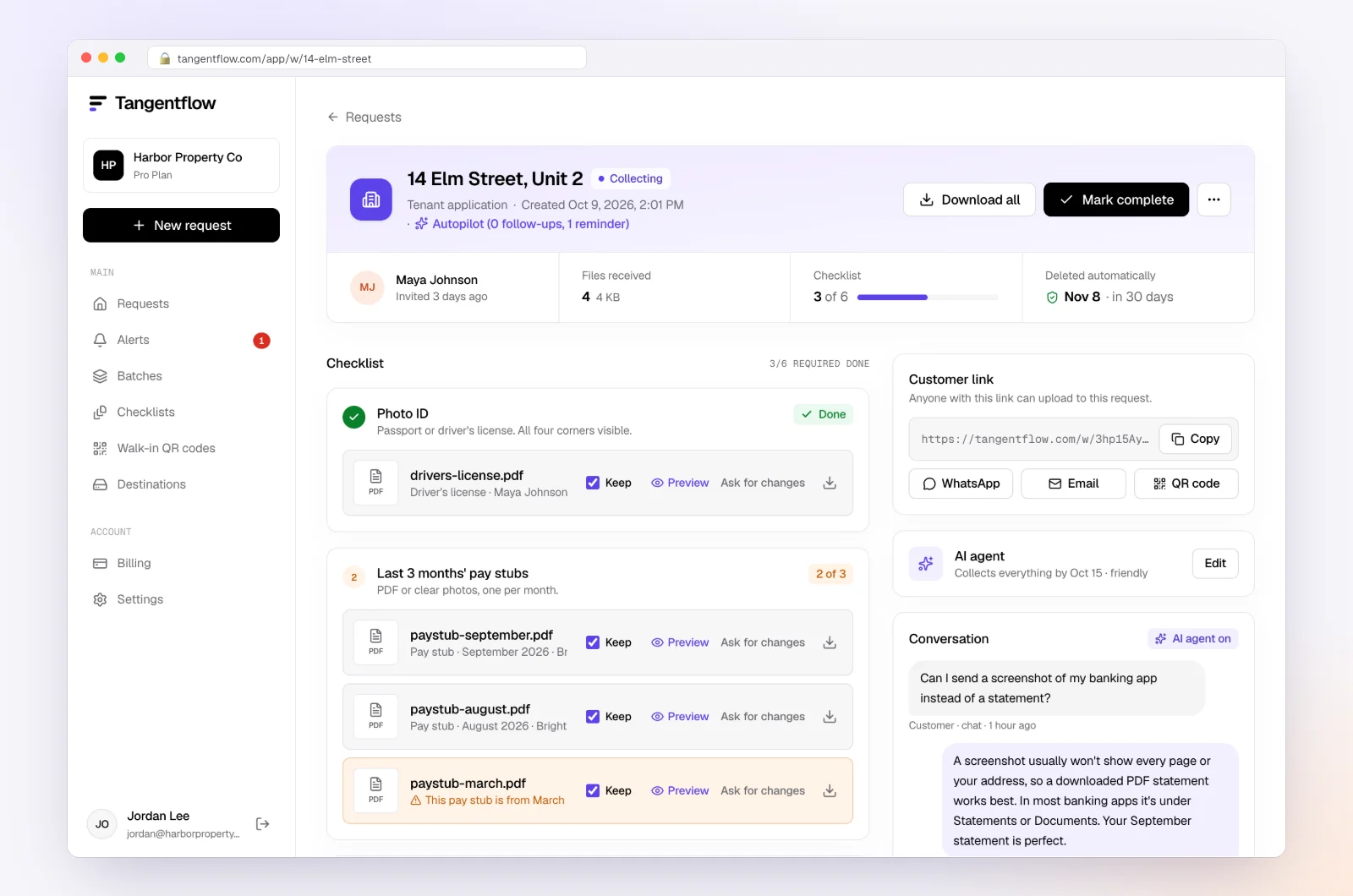
With the AI collection agent on, reminders are paced to the needed-by date and list only what is still missing. Clients can reply with questions like "Do you need the PayPal report too?" and the agent answers from your checklist and notes, or hands off to you when a question is outside the checklist. On Pro, clients can reply with statements attached, and each file is filed under the right item.
The request page shows each file with its check result and what is missing. Use "Ask for changes" on any single file. When everything is in, download an organized ZIP, or on Pro deliver to Google Drive or a webhook, then mark the request complete. Files are deleted 24 hours later.
Setups by type of client
Start from the "Monthly bookkeeping" template and adjust per group. You can keep one checklist per group and send each group its own batch.
| Client type | Items to add or emphasize | Settings worth turning on | Learn more |
|---|---|---|---|
| Online store | Shopify, Stripe or Amazon payout reports, sales tax reports | Required payout item, higher max count | Document checks |
| Contractor or trades | Supplier invoices, subcontractor payments, W-9s for new subs | Yes/no for new subs with "Only ask if…" | Collect W-9 forms |
| Canadian clients filing GST/HST | GST/HST details, QST or PST where relevant | Optional tax item with a tip | Accounting and tax |
| Clients with sensitive payroll files | Payroll reports | "Require an email code" on the checklist | Security |
"Require an email code" is an optional checklist setting: the client enters a 6-digit code sent to their email before the link opens. It is worth turning on for checklists that collect payroll reports with employee details. If a link ever goes to the wrong person, reset the customer's link from the request and the old one stops working. After the client sends everything, the link no longer shows the files.
When something goes wrong
| Problem | Likely cause | Fix |
|---|---|---|
| Client sends a screenshot of the banking app | They do not know where the PDF statement lives | Add an "Example" and a tip: "Download the PDF from your bank's website under Statements" |
| Statement is missing pages | They printed or saved one page | "Every page" on the item flags it at upload |
| Payout report missing, only bank deposits | Client thinks the deposit is enough | Explain in the hint that the deposit is after fees and refunds |
| New account shows up mid-year | Client opened a card without telling you | Add a monthly yes/no question about new accounts |
| Client is upset about reminders | Busy month, too many emails | The agent stops and hands off to you; reply personally |
Check "Alerts" daily during close week. That is where handoffs and missed dates show up, so you only spend time on clients who need a person.
Free and Pro, honestly
You can run a real request without paying anything.
| Free | Pro ($29/month) | |
|---|---|---|
| Open requests | 1 at a time | Unlimited |
| AI check on each file | Yes | Yes |
| AI autopilot (answers, reminders, follow-ups) | Your first request | Every request |
| Send to many clients at once (Batches) | No | Yes |
| Clients reply by email with attachments | No | Yes |
| Branding | Tangentflow badge | Your logo |
| Delivery to Google Drive or a webhook | No | Yes |
| Works with AI assistants (MCP) | No | Yes |
| File retention | 7 days | 60 days |
Both plans include unlimited checklists, QR codes and posters, ZIP export, AI summaries and email delivery. Pro is billed monthly with no contract, and you can cancel any time. Full details on the pricing page.
What Tangentflow does not do: SMS or text messages, a native mobile app, full legal e-signature certificates, identity verification, collecting payments, or permanent storage. If you need any of those, pair it with a tool that does. It also does not connect to bank feeds, categorize transactions or replace your bookkeeping software.
The monthly close as a checklist
- Keep one monthly checklist per client type: statements, receipts, payouts, payroll, loans, sales tax and an "anything unusual" question.
- Send the request on the same day every month, with a needed-by date about a week out.
- Ask for every page of every statement, as a PDF from the bank, not a screenshot.
- Remind on a schedule that lists only what is still missing.
- Categorize what you can, then send one batched list of transaction questions with its own date.
- Set a default for unanswered questions and tell the client what it is.
- Close on time with gaps rather than waiting indefinitely.
- Add quarter-end and year-end items to the regular request in the right month.
- Move what you must retain into your system of record and delete other copies.
- Turn repeat answers into bank rules so next month's list is shorter.
Frequently asked questions
What documents do I need from clients for monthly bookkeeping?
At minimum, bank and credit card statements for every business account, receipts for transactions you cannot categorize, invoices issued, and payout reports from sales platforms like Stripe, Shopify or Square. Add payroll reports, loan statements and sales tax or GST/HST details where they apply, plus a short note on anything unusual that month.
When should I send the monthly bookkeeping request?
On the first business day of the month is a common choice, since most statements for the prior month are available within a few days. Send on the same day every month so clients learn the routine, and set a needed-by date about a week out so there is time for one round of fixes.
How do I get clients to send receipts?
Ask for specific receipts rather than "all your receipts": a list of the transactions you could not categorize, plus any expense over a threshold you set. Let clients upload photos from their phone without an account, and send reminders that list only what is still missing.
How should I handle missing receipts at month-end?
Close the month on time and park the transactions in an "Ask My Accountant" or suspense account, then send the client one batched list with a date. If a receipt never turns up, other evidence such as a card statement and an invoice may help support the expense, but check IRS or CRA guidance and the client's tax advisor on what is acceptable.
How long do small businesses need to keep receipts?
The IRS generally says 3 years, with longer periods in some situations, such as 4 years for employment tax records and 6 or 7 years in specific cases. The CRA generally requires 6 years from the end of the last tax year the records relate to. Check the official IRS and CRA pages and the client's advisor for their situation.
Can I send the same monthly request to all my clients automatically?
In Tangentflow you send it as a batch: upload or paste your client list, pick the "Monthly bookkeeping" checklist and schedule the send up to 30 days ahead. Each client gets their own request and reminders. Turn on "Repeat every month" and it goes out again on the same day each month until you stop it.