Checklists
Month-End Close Checklist for Bookkeepers (2026)
A month-end close checklist for bookkeepers: reconciliations, AR/AP, payroll, sales tax, accruals, reports and locking the period, plus a 10-day close timeline.
By Bibin MathewUpdated 21 min read
The short answer
A month-end close runs in six stages: gather what the client owes you, reconcile every bank, card and loan account, review AR, AP, payroll, sales tax and clearing accounts, post adjustments, produce and review reports, then lock the period in your software. Most small business closes fit in 5 to 10 business days, and the first few days are almost always spent waiting on the client. Send the document request on day 1 with a firm date, reconcile as statements arrive, and track each client's close-readiness on one sheet so you can see who is blocking what.
Ask a bookkeeper how long a month-end close takes and you get two answers. The work takes a few hours per client. The close takes two weeks. The gap is rarely the reconciliation itself. It is the card statement that has not arrived, the payroll report nobody sent, and the $3,200 deposit nobody can explain.
This guide is for independent bookkeepers and small firms in the United States and Canada who close books for small business clients every month. It covers the close process itself: gather, reconcile, review, adjust, report and lock. If you are looking for the list of documents to request from clients, that lives in our monthly bookkeeping checklist. Here we pick up where that list ends and walk through what you do with it.
You will get a step-by-step close checklist, a day-by-day timeline, a close-readiness tracker, and how to take the waiting out of days 1 to 5 with Tangentflow.
What a month-end close actually is
A month-end close is the routine that turns a month of raw transactions into numbers you are willing to put your name on. For a small business client on a calendar month, it usually means six stages:
- Gather. Get the statements, reports, receipts and answers you need from the client.
- Reconcile. Tie every bank, credit card, loan and clearing account to an outside source.
- Review. Check AR, AP, payroll, sales tax, owner activity and anything still uncategorized.
- Adjust. Post accruals, prepaids, depreciation and corrections.
- Report. Produce the P&L, balance sheet and any other reports, and review them for things that look wrong.
- Lock. Set a closing date in your software so nobody changes a finished month by accident.
The order matters. You cannot reconcile without statements, so the first stage, the one you control least, sets the pace for everything else.
The month-end close checklist
Here is the full close, step by step. Not every step applies to every client. A cash-basis sole proprietor with one bank account will skip half of it. An accrual-basis client with payroll, inventory and a loan will need all of it.
| # | Step | What to do | Tie it to | Applies to |
|---|---|---|---|---|
| 1 | Confirm documents received | Check off statements, payroll reports, payout reports and receipts against your list | Your monthly request | All clients |
| 2 | Bank reconciliations | Reconcile every business bank account to the statement ending balance | Bank statement | All clients |
| 3 | Credit card reconciliations | Reconcile every business card, including cards the owner uses personally for business | Card statement | All clients with cards |
| 4 | Clearing accounts | Clear undeposited funds, payment processor clearing (Stripe, Square, PayPal) and transfers in transit | Payout reports, deposits | Clients with merchant processors |
| 5 | Uncategorized and suspense | Work "Ask My Accountant," uncategorized income and expense down to zero or to a known list | Client answers, receipts | All clients |
| 6 | Accounts receivable | Review the aging, apply payments, flag old invoices, check for credits and duplicates | AR aging report | Clients who invoice |
| 7 | Accounts payable | Review the aging, enter missing bills, match payments to bills | Supplier statements, bills | Clients who track bills |
| 8 | Payroll tie-out | Match wages, employer taxes, withholdings and net pay to the payroll provider's reports | Payroll summary report | Clients with employees |
| 9 | Sales tax or GST/HST check | Compare the liability account to the tax collected per sales reports and to filed returns | Sales tax or GST/HST reports | Clients who collect tax |
| 10 | Loan balances | Split payments into principal and interest; tie the balance to the lender's statement | Loan statement | Clients with loans or lines of credit |
| 11 | Owner draws and contributions | Confirm personal spending and transfers are booked to equity, not expense | Client answers | Sole props, partnerships, many small corps |
| 12 | Accruals and prepaids | Accrue unbilled revenue and unpaid expenses; amortize prepaid insurance and software | Contracts, invoices | Accrual-basis clients |
| 13 | Fixed assets and depreciation | Capitalize large purchases per the client's policy; post depreciation or CCA entries if done monthly | Receipts, asset register | Clients with equipment or vehicles |
| 14 | Variance review | Compare this month to last month and to the same month last year; explain big swings | Prior-period reports | All clients |
| 15 | Reports | Produce P&L, balance sheet and any agreed extras; review before sending | Your review notes | All clients |
| 16 | Lock the period | Set the closing or lock date so the month cannot change without notice | Software setting | All clients |
The steps below expand on the ones that cause the most rework.
Bank and credit card reconciliations
A bank reconciliation checklist is short, but every line matters:
- Reconcile to the statement, not the feed. Feeds drop or duplicate transactions.
- Start from a clean opening balance. If last month's reconciliation was changed after the fact, fix that first.
- Investigate every uncleared item older than a month. Old outstanding checks and deposits are usually duplicates, voids or miscoded transfers.
- Match transfers between accounts on both sides. A transfer from checking to savings should clear in both reconciliations for the same amount.
- Reconcile credit cards to the statement closing date, which is often not month-end.
- Save the reconciliation report with your close file.
Clearing accounts
Undeposited funds, payment processor clearing and transfers in transit should be at or near zero after the close, or contain only items you can name. For clients who sell through Stripe, Shopify, Square or PayPal, the bank deposit is net of fees and refunds. Book gross sales, fees and refunds from the payout report and let the deposit clear the balance. If it will not net to zero, look for a refund, a chargeback or a payout that landed in another account.
Payroll tie-out
For clients with employees, compare the payroll provider's summary for the month to the ledger. Gross wages should match, employer taxes (in the US, the employer share of Social Security and Medicare plus unemployment taxes; in Canada, employer CPP and EI) should be booked as expense, withholdings should sit in a liability that matches what is due to the IRS, state agencies or the CRA, and net pay should match the bank withdrawals for each pay run.
If the liability keeps growing month over month, a remittance is being booked to expense or not being made. Either way, tell the client.
Sales tax and GST/HST liability check
For clients who collect sales tax (US) or GST/HST, PST or QST (Canada), compare three numbers: the liability balance in the ledger, tax collected per the sales or invoicing reports, and amounts filed and paid. In a filing month, the liability should drop by the amount paid. Filing frequency depends on each client's registration, so confirm it on the CRA or state revenue site, and check with the client's tax advisor where registration is unclear.
Owner draws and contributions
A personal purchase on the business card, a transfer to the owner's personal account, a contribution to cover payroll: each belongs in equity, not expense or income. Put these on your batched question list rather than guessing.
Accruals, prepaids and fixed assets
Cash-basis clients can skip most of this. For accrual-basis clients, accrue material revenue earned but not invoiced and expenses incurred but not billed, amortize prepaids such as annual insurance over the months they cover, and capitalize purchases above the client's threshold before posting depreciation (or capital cost allowance in Canada, usually handled at year-end with the tax preparer).
Variance review
Before you send reports, compare the month to the prior month and the same month last year. Look for expense lines that doubled or vanished, unexplained revenue swings, and negative balances in asset or expense accounts. Five minutes here catches most miscategorizations before the client does.
Lock the period
Once reports are out, lock the month. In QuickBooks Online, the setting is under Settings > Account and settings > Advanced > Accounting, where you turn on "Close the books" and set a closing date, optionally with a password. The Exceptions to Closing Date report shows any changes made later. In Xero, an advisor sets lock dates under Accounting settings > Financial settings. Other tools have similar settings. Menu names change, so check the QuickBooks help article on closing your books and Xero's lock dates article for the current steps.
A month-end close timeline, day by day
Most small business closes fit into 5 to 10 business days. Here is a common 10-day pattern, with day 1 as the first business day of the new month.
| Business day | Stage | What happens | Blocked by |
|---|---|---|---|
| 1 | Gather | Send the monthly document request to every client, needed by day 5 | Nothing, if it is scheduled |
| 1–3 | Gather | Statements become available; clients upload. Download what you can from bank feeds and processor dashboards yourself | Statement cycle dates |
| 3 | Gather | First reminder, listing only what is still missing | Client |
| 3–5 | Reconcile | Reconcile each account as its statement arrives; book payouts and payroll | Client documents |
| 5 | Gather | Documents due. Build one batched list of uncategorized transactions and owner questions | Client |
| 5 | Gather | Send the question list, answers needed by day 7 | You |
| 6–7 | Review | AR and AP review, clearing accounts, payroll tie-out, sales tax check, loans | Missing statements |
| 7 | Gather | Answers due; anything unanswered stays in suspense with a note | Client |
| 8 | Adjust | Accruals, prepaids, depreciation, reclasses from client answers | Answers |
| 9 | Report | Variance review, produce reports, second look at anything odd | Your review |
| 10 | Report and lock | Send reports with a short note; set the closing date | Nothing |
Two rules make this calendar work:
- The request goes out on the same day every month. Clients learn when to expect it.
- The client deadline is earlier than your real deadline. Room for one round of fixes is built in.
A 5-day close compresses gathering into days 1 to 3, which only works when clients send everything early. For reminder pacing, see our guide to client reminder schedules.
Where month-end closes get stuck
| Bottleneck | How it shows up | Fix |
|---|---|---|
| Waiting on the client | Reconciliations sit at 80% for a week | Send on day 1, set a date, remind on a schedule that lists only what is missing |
| Incomplete statements | Page 1 of 4, or an app screenshot | Ask for "every page, PDF from the bank website" and check on arrival |
| Drip-fed questions | One email per transaction, one answer per day | One batched question list with its own date |
| Payroll surprises | Liability balance keeps growing | Request the payroll summary for every pay run, not just the last |
| Prior periods changed | Opening balances no longer match | Lock every month after reports go out |
| Too many clients, no overview | You cannot say who is ready to close | Keep a close-readiness tracker (below) |
Waiting on the client is the big one. Every other stage is work you control.
If a client is late every month, close on time anyway: park unknowns in suspense, note what is missing on the report, and update it later. Our monthly bookkeeping checklist covers chronically late clients and the uncategorized transactions workflow.
A close-readiness tracker for every client
With more than a handful of clients, you need one view that answers "who can I close today, and who is blocking me?" A spreadsheet works fine. One row per client, one column per readiness item:
| Client | Basis | Docs received | Bank rec | Card rec | Clearing | Payroll | Sales tax | Questions answered | Reports sent | Locked |
|---|---|---|---|---|---|---|---|---|---|---|
| Example: Maple Street Bakery | Cash | 5 of 6 | Done | Waiting | Done | Done | n/a | 3 of 5 | ||
| Example: Northside Plumbing | Accrual | All | Done | Done | n/a | Done | Done | All | Done | Done |
| Example: Lakeview Online Shop | Cash | 2 of 5 | Waiting | Waiting | Waiting | n/a | Waiting |
The clients above are illustrative examples.
Use only three states (done, waiting on client, waiting on you), sort "waiting on client" to the top, and copy the sheet each month. Record the date the request went out and the date documents were complete. After a few months you will see which clients are always late, which is a conversation for the next engagement letter.
Ways to run the gathering stage, compared
The gathering stage is the one you can speed up most. Here is how the common approaches compare.
| Method | Setup effort | Client effort | Shows what's missing | Reminders | Checks documents on arrival |
|---|---|---|---|---|---|
| Email request and attachments | None | Low | No, you track it | Manual | No |
| Shared folder per client | Low | Medium | No | Manual | No |
| Bank feeds and accountant access only | Medium | Low | Partly (no receipts or answers) | Not needed for feeds | No |
| Practice portal or receipt app | Medium to high | Medium to high (login or app) | Partly | Some | Some |
| Private link with checklist and AI agent (Tangentflow) | Low | Low (no account) | Yes, per client | Paced to the date | Yes, every file |
Bank feeds and accountant access are worth setting up regardless, but they do not bring you receipts, payroll reports, payout reports or answers, so most clients still need a monthly request. Our accounting client onboarding checklist covers setting up that access at the start of an engagement.
Collecting what clients owe in days 1–5 with Tangentflow, step by step
Tangentflow handles the gathering stage: the request, the reminders, the questions and a first check on every document. It does not reconcile or categorize anything. It gets you a complete, checked set of documents sooner.
1. Start from the "Monthly bookkeeping" template
Open "Checklists", choose "Browse templates" and pick "Monthly bookkeeping." It ships with these items:
- "Bank statements for the month", a PDF per business account, checked for every page.
- "Credit card statements" (optional), every page.
- "Receipts and bills you paid", where photos are fine as long as the date and total are readable.
- "Sales or invoices you issued" (optional).
- "Payroll report" (optional).
- "Anything unusual this month?" (optional), a long-answer question for large purchases, loans, refunds and owner drawings.

2. Shape the checklist around your close
Look at the close checklist above and add an item for every outside source you reconcile to. Common additions:
- "Payout reports" for clients who sell through Stripe, Shopify or Square, so the clearing account nets to zero.
- "Loan statements", optional, for the principal and interest split.
- "Sales tax or GST/HST reports", optional, for clients who collect tax.
- A yes/no "Form field": "Did you open any new bank accounts or cards this month?" Use "Only ask if…" to show an upload item only when the answer is yes.
Fill in "What should it be?" for each item and add an "Example" for the ones clients get wrong, such as "A PDF from your bank's website, not a screenshot of the app."

3. Send the whole client list on day 1 with Batches
Open "Batches", choose "Send to many customers", pick your checklist and name the batch, for example "October close." Upload an Excel file or CSV, or paste rows from Excel or Google Sheets: name, email, reference, needed-by date and any notes. Extra columns such as "sells on Shopify" become context the agent can use.
Schedule the send for the morning of day 1 (up to 30 days ahead), give each client their own needed-by date and skip clients who already have an open request. Each client gets their own request, link and reminder schedule. Bulk requests are part of Pro, up to 100 clients per batch. Keep the spreadsheet and reuse it next month.
For one client, click "New request", choose the checklist, add a reference such as "Maple Street Bakery, October 2026" and set the needed-by date.

4. Statements are checked the moment they arrive
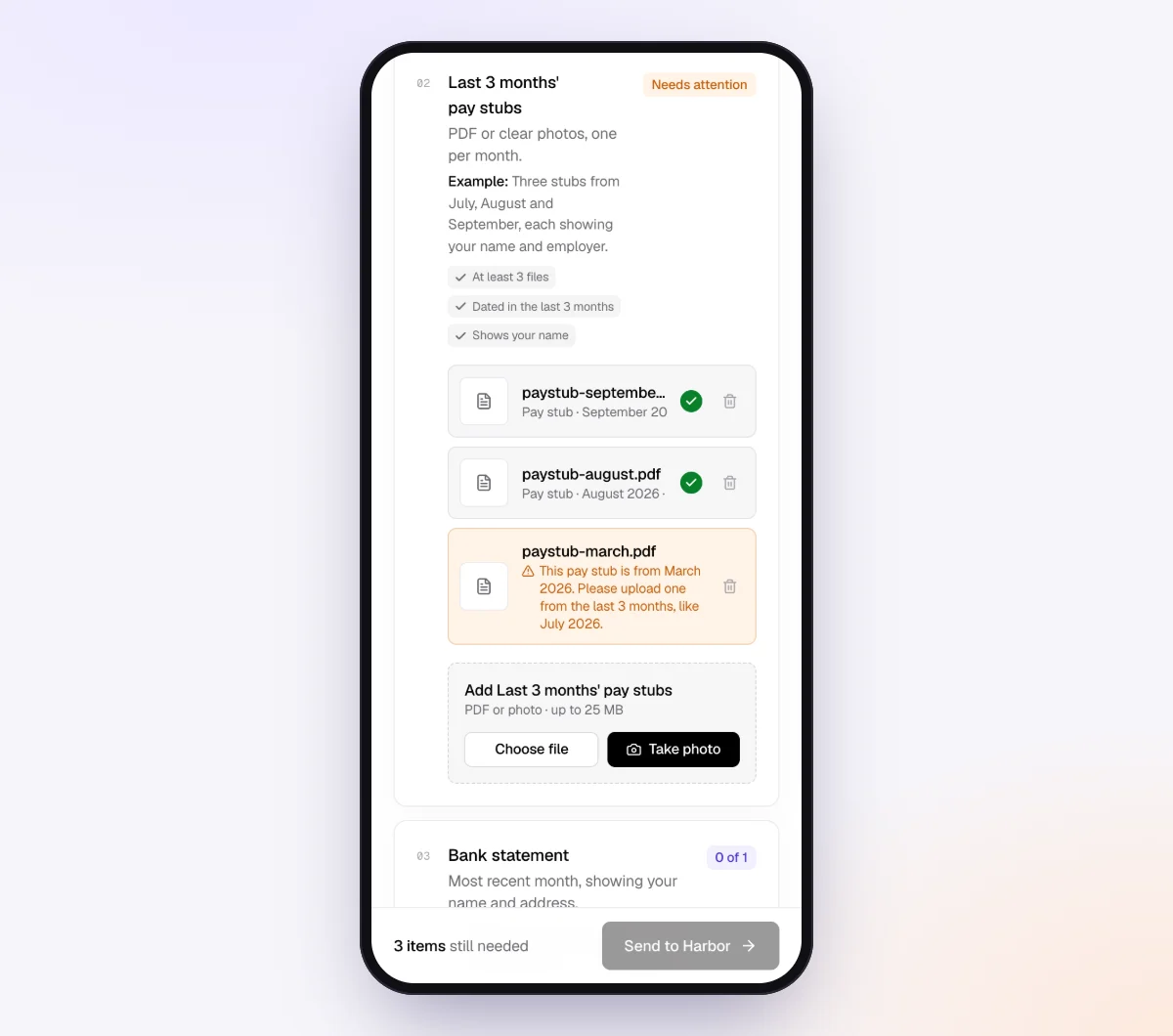
Clients get a branded invitation from your business name and open the checklist on their phone, no account or app. Each upload is checked in seconds by document checks: right document type, readable, recent enough and every page. A client who uploads page one of a four-page statement, or September instead of October, sees a friendly note telling them what to fix while they still have the file open.
5. The agent chases, you reconcile
With the AI collection agent on, reminders are paced to each client's needed-by date and list only what is still missing, at most one automatic email a day. Clients can ask "Do you need the PayPal report too?" by email or in the upload page chat, and the agent answers from your checklist and private notes, or hands off to you. On Pro, clients can reply with statements attached, and each file is filed under the right item.
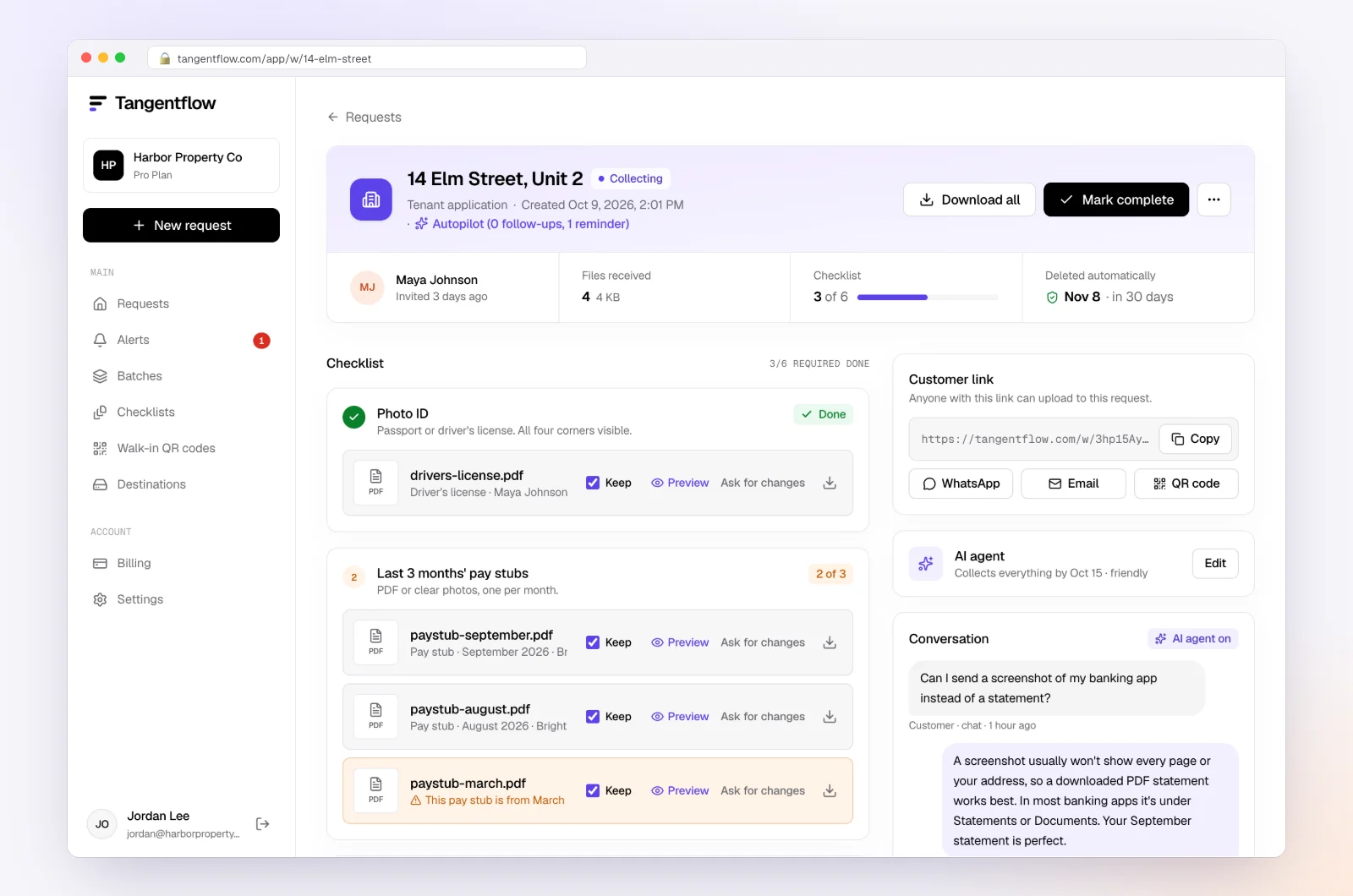
The request page shows every file with its check result, what is still missing and an activity timeline, which is your "Docs received" column. Use "Ask for changes" on any single file. When everything is in, download an organized ZIP, or on Pro deliver to Google Drive or a webhook, then mark the request complete. Files are deleted 24 hours later.
More on how Tangentflow fits a bookkeeping practice is on our page for bookkeepers and the accounting and tax use case.
Close setups by type of client
| Client type | Close steps that matter most | Items to add to the checklist | Settings worth turning on |
|---|---|---|---|
| Service business, cash basis | Bank and card recs, uncategorized, owner draws | "Anything unusual this month?" stays on | Short needed-by window, 4–5 days |
| Online store | Clearing accounts, sales tax, inventory | Payout reports, sales tax reports | Payout item required, higher max count |
| Contractor or trades | AP, job costs, loans, fixed assets | Supplier invoices, loan statements | Yes/no for new equipment with "Only ask if…" |
| Clients with payroll | Payroll tie-out, liabilities | "Payroll report" required, one per pay run | "Require an email code" on the checklist |
| Canadian GST/HST registrants | Sales tax check in filing months | GST/HST, PST or QST details | Optional tax item with a tip |
"Require an email code" is an optional checklist setting: the client must enter a 6-digit code emailed to them before the link opens. It is worth turning on for checklists that collect payroll reports with employee details. If a link ever goes to the wrong person, reset the customer's link from the request and the old one stops working. After the client sends everything, the link no longer shows the files.
When something goes wrong
| Problem | Likely cause | Fix |
|---|---|---|
| Bank rec off by a small amount | Duplicate from the bank feed or a manual entry | Search for the exact amount; check for matched and manual copies of the same transaction |
| Opening balance does not match last month | A reconciled transaction was edited | Check the reconciliation history; lock prior months going forward |
| Clearing account will not clear | Missing refund, chargeback or payout to another account | Get the full payout report for the month, not just the deposit list |
| Payroll liability keeps growing | Remittances booked to expense, or not made | Compare to the provider's tax payment report; tell the client |
| Sales tax liability does not match the return | Tax collected booked to income, or a filing not recorded | Reconcile collected tax to platform reports; record the payment |
| Client sends app screenshots instead of statements | They do not know where the PDF lives | Add an "Example" and tip; the check flags it on upload |
| Client is frustrated with reminders | Busy month | The agent stops and hands off to you; reply personally and agree on a date |
Check "Alerts" daily during close week. Handoffs and missed dates show up there, so you only spend time on the clients who need a person.
Free and Pro, honestly
You can run a real request without paying anything.
| Free | Pro ($29/month) | |
|---|---|---|
| Open requests | 1 at a time | Unlimited |
| AI check on each file | Yes | Yes |
| AI autopilot (answers, reminders, follow-ups) | Your first request | Every request |
| Send to many clients at once (Batches) | No | Yes |
| Clients reply by email with attachments | No | Yes |
| Branding | Tangentflow badge | Your logo |
| Delivery to Google Drive or a webhook | No | Yes |
| Works with AI assistants (MCP) | No | Yes |
| File retention | 7 days | 60 days |
Both plans include unlimited checklists, QR codes and posters, ZIP export, AI summaries and email delivery. Pro is billed monthly with no contract, and you can cancel any time. Full details on the pricing page.
What Tangentflow does not do: SMS or text messages, a native mobile app, full legal e-signature certificates, identity verification, collecting payments, or permanent storage. If you need any of those, pair it with a tool that does. It also does not connect to bank feeds, reconcile accounts, categorize transactions or replace QuickBooks Online, Xero or your other bookkeeping software.
The month-end close as a checklist
- Send the document request on day 1, same day every month, due about five business days out.
- Reconcile each bank, card and loan account to its statement as soon as it arrives.
- Clear undeposited funds, processor clearing and transfers in transit.
- Send one batched list of uncategorized transactions and owner questions, with its own date.
- Review AR and AP agings for duplicates, credits and missing bills.
- Tie payroll and sales tax or GST/HST liabilities to provider reports and filed returns.
- Book owner draws and contributions to equity.
- Post accruals, prepaids and depreciation for accrual-basis clients.
- Run a variance review, then produce, review and send reports.
- Lock the period and update the close-readiness tracker.
Frequently asked questions
What is a month-end close checklist?
It is the list of steps you run every month to finalize a client's books: gather documents, reconcile bank, card and loan accounts, review AR, AP, payroll and sales tax, post adjustments, produce reports and lock the period. Writing it down means every client gets the same close.
How long should a month-end close take for a small business?
Many bookkeepers aim for 5 to 10 business days after month-end. The hands-on work is often a few hours per client; most of the elapsed time is waiting for statements and answers, so speeding up gathering shortens the close the most.
What is the difference between a monthly bookkeeping checklist and a month-end close checklist?
A monthly bookkeeping checklist is what you ask the client for: statements, receipts, payout and payroll reports, and answers. A month-end close checklist is what you do with them: reconcile, review, adjust, report and lock. You need both, and the first one feeds the second. See our monthly bookkeeping checklist for the client-facing list.
What should a bank reconciliation checklist include?
Reconcile to the statement ending balance rather than the bank feed, start from a clean opening balance, investigate uncleared items older than a month, match transfers on both sides, and save the reconciliation report. Do the same for every card and loan account.
How do I close the books faster?
Send the document request on the same day every month with a firm date, reconcile accounts as statements arrive instead of waiting for all of them, batch your client questions into one list, and close with gaps rather than waiting on late items. Locking every month also stops old periods from changing under you.
What do I do when a client never sends their documents on time?
Close on time with the gaps marked, and park unknown transactions in a suspense account until answers arrive. Then make the request smaller, consider moving their due date, and put due dates in the engagement letter.
Can Tangentflow do the reconciliation for me?
No. Tangentflow collects and checks what clients owe you in the first days of the close: statements, receipts, payroll and payout reports, and answers. You still reconcile, review and report in your bookkeeping software. Try it free on one client's month-end request.
What reports do I need from Shopify, Stripe or PayPal clients?
Ask for the monthly payout or settlement report for each platform. It should show gross sales, fees, refunds, chargebacks and the net amount deposited, so each bank deposit can be matched to its sales. Add one checklist item per platform the client uses, with a hint describing the report, so the AI check can flag a screenshot or the wrong report.
What if a client has an account I didn't know about?
It happens often, and it reopens a month you thought was closed. Ask for a complete list of accounts and cards at onboarding and again at year-end, and add a monthly yes/no question such as "Did you open any new accounts or cards this month?" In Tangentflow that's a form field, and "Only ask if…" can show an upload item for the new statement only when the answer is yes.