Checklists
Catch-Up Bookkeeping Checklist: What to Get From Clients (2026)
The documents needed for catch-up bookkeeping, in the order to ask: accounts list, every statement, sales, payroll and tax letters, plus a month tracker.
By Bibin MathewUpdated 19 min read
The short answer
For catch-up bookkeeping, start with a list of every account the client had during the period, then get every bank, credit card and loan statement from the last reconciled month to today (plus the statement before the first month, so opening balances tie out), followed by sales and payout reports, payroll and contractor records, and every letter from the IRS, CRA or state. Request it in waves, not all at once, and track it in a grid of accounts by month so you always know exactly which statements are still missing. Ask for receipts only for transactions you cannot explain from the statements.
The documents needed for catch-up bookkeeping are, in order: a list of every account and card the client used, every statement for each of them from the last reconciled month to today, sales and payout reports, payroll and contractor records, loan statements, and every tax agency letter. Receipts come last, and only for transactions you cannot explain from the statements. Ask in waves, and track the statements in an accounts-by-month grid so the gaps are obvious.
This guide is for independent bookkeepers and small firms in the US and Canada who just took on a client 6 to 18 months behind. Most catch-up checklists are written for the owner ("gather your documents"). This one is for you, the person who has to ask, track and chase, ideally without forty emails.
What this checklist covers (and what it doesn't)
Catch-up bookkeeping brings a client's books from the last properly reconciled month up to today. This post covers that historical backlog only. Once the client is current, switch them to the regular request in our monthly bookkeeping checklist. How to charge for catch-up work is covered in our late document policy guide.
Catch-up and cleanup often arrive together, but they are different jobs:
| Catch-up | Cleanup | |
|---|---|---|
| The problem | Months were never booked | Months were booked, but wrongly |
| What you need most | Statements and sales records for every missing month | Statements plus the existing file, to find and fix errors |
| Biggest unknown | Accounts you don't know exist | Which past entries you can trust |
The documents are mostly the same. A cleanup also needs access to the existing file and a clear answer on which periods were already filed with tax agencies.
How far back do you need bank statements for catch-up bookkeeping?
Go back to the last month that was fully reconciled, and ask for the statement for that month too. Its closing balance is your opening balance, and without it the first reconciliation has nothing to tie to.
| Situation | Where to start | Why |
|---|---|---|
| Books were reconciled through a known month | The month after it, plus that month's statement | Opening balance ties to a known number |
| Last tax return was filed from good books | The first day of the next fiscal year | The filed return gives you year-end balances to tie to |
| Nothing was ever reconciled | The month the business or account opened, or an agreed cutoff | Discuss scope; you may agree to start at a year-end and book an opening balance entry |
| Previous bookkeeper left mid-year | Their last reconciled month, confirmed by reports | Ask for their last trial balance and reconciliation reports |
Then count the months to today. A client who stopped in March of last year and calls in October has about 19 months per account. Three bank accounts and two cards means close to 100 statements before a single receipt. That number is the core of your scope.
The catch-up bookkeeping documents checklist
The full list, grouped the way you will request it. Leave off what doesn't apply.
1. The account inventory (always first)
- A list of every bank account, card, loan, line of credit and payment platform used during the period, including closed ones.
- Personal accounts or cards used for business, where missing expenses usually hide.
- Access to the existing bookkeeping file through an accountant or user invite, never the client's own login.
- The last tax return filed, so you know what has already been reported.
2. Statements for every month
- Bank and credit card statements for every account, every month, every page.
- Loan and line of credit statements showing the principal and interest split.
- Payment platform statements: Stripe, Square, PayPal, Shopify Payments, Amazon or Etsy.
- The statement for the month before the catch-up period for each account, for opening balances.
3. Sales and income
- Invoices issued, or an export from the invoicing system.
- Payout reports from each sales platform, showing gross sales, fees, refunds and the net deposit.
- Point-of-sale reports, including cash sales that never reached the bank.
- Any 1099-K, 1099-NEC or 1099-MISC forms the business received (US), and T4A or T5018 slips where relevant (Canada).
4. Payroll and contractors
- Payroll register or summary for every pay run, from the payroll provider.
- Payroll filings, such as Form 941 and W-2s (US) or the T4 summary and slips (Canada).
- A list of contractors paid, with amounts, and W-9s for US contractors (see collecting W-9 forms).
5. Assets, loans and the owner
- Purchase documents for large items: vehicles, equipment, computers, property.
- Loan agreements for any new loan, including loans from the owner or family.
- Owner contributions and draws, if not obvious from the statements.
6. Tax agency letters and filings
- Every letter from the IRS, CRA, or a state or provincial agency, every page. Unopened envelopes count.
- Sales tax, GST/HST, PST or QST returns filed, plus estimated tax or installment payment confirmations.
7. Receipts (last, and only what you need)
- Receipts or invoices for transactions you cannot categorize from the statement line.
- Receipts for large purchases, which matter for depreciation or capital cost allowance.
Never ask for "all receipts for the last 18 months." You'll get a shoebox, or nothing. Book from the statements first, then ask about what's left; our guide to uncategorized transaction questions has templates.
The catch-up bookkeeping checklist for clients: ask in waves
Sending the whole list at once is the most common mistake. The client sees 40 items and does nothing. Ask in four waves, each with its own needed-by date.
| Wave | What you ask for | Why it comes here | Typical window |
|---|---|---|---|
| 1. Inventory | Account list, cleanup questionnaire, software access, last filed return | Everything else depends on it | 3 to 5 days |
| 2. Statements | Every statement, every account, every month, plus the opening month | Lets you book most transactions | 1 to 2 weeks |
| 3. Sales, payroll, loans, letters | Payout reports, payroll records, loan statements, agency letters | Explains deposits, payroll and balances | 1 to 2 weeks |
| 4. Questions and receipts | A batched list of the transactions you could not categorize | Only what's genuinely unclear | 1 week |
Wave 4 waits until you have booked everything else.
Track statements in an accounts-by-month grid
The second most common mistake is losing track of which months arrived. Use one row per account and one column per month.
| Account | Jun | Jul | Aug | Sep |
|---|---|---|---|---|
| Checking ...4412 | In | Missing | In | In |
| Visa ...1187 | Page 2 missing | In | Missing | Missing |
| Line of credit | Missing | Missing | Missing | Missing |
| PayPal | In | In | In | In |
When you remind the client, copy the "Missing" cells: "Visa ending 1187: August and September, and page 2 of June." A client can act on that in five minutes.
Bookkeeping cleanup questionnaire
Send these with wave 1. Each "yes" tells you which documents to add.
Accounts and software
- List every bank account, savings account, card, loan and line of credit the business has had since [start month], including closed ones.
- Do you use PayPal, Stripe, Square, Shopify, Amazon or another platform to take payments?
- Did you use any personal accounts or cards for business expenses?
- Is there an existing QuickBooks, Xero or other file? Who last worked in it, and when?
- What was the last month you are confident was reconciled?
Income and people
- Do you have cash sales that never go to the bank?
- Did you run payroll or pay contractors?
Owner money, loans and assets
- Did you put money in or take money out, other than salary?
- Did you take out any loans, including from family?
- Did you buy vehicles, equipment or property for the business?
Tax
- When was the last business tax return filed, and by whom?
- Are you registered for sales tax, GST/HST, PST or QST? How often do you file?
- Have you received any letters from the IRS, CRA or a state or provincial agency?
- Is anything due soon: a loan application, a filing deadline, an investor report?
Question 14 sets the order of work. If a lender wants financials in six weeks, catch up the most recent fiscal year first.
How to get old bank statements from a closed account
Online access usually ends when an account closes, and the client assumes the statements are gone. Often they are not.
In the US, federal recordkeeping rules require banks to keep many account records for five years (31 CFR 1010.430), and many keep them longer. Canadian banks have their own record-keeping obligations. In practice:
- Check the client's email and downloads first. Saved or emailed PDFs often exist.
- Log in anyway. Some banks keep past statements available online for a while after closing.
- Ask the bank directly. The account holder requests copies of specific months. Expect identity checks, a possible fee and a turnaround of days to weeks.
- If the bank cannot help, fall back on what you have: the other side of transfers in surviving accounts, card processor reports and invoices.
Open accounts can have the same delay, since many banks show only a limited window of statements online.
What to do when a client has no receipts for last year
It happens on almost every catch-up. Don't stall the project waiting for receipts that don't exist.
- Book from the statements. For most transactions, the vendor and amount are enough to categorize.
- Ask for electronic copies. Email order confirmations, Amazon order history, supplier portals and utility accounts. A client who "has no receipts" usually has hundreds in their inbox.
- Ask suppliers to re-send invoices or a statement of account.
- Ask for an explanation for the rest. A short note with the date, amount, vendor and business purpose, matched to the statement line.
- Flag the unsupported ones in a list for the client's tax preparer, who decides how to treat them.
The IRS says business records should show the payee, the amount, proof of payment, the date and a description of what was bought (What kind of records should I keep). A statement alone shows some of that, not all, and the CRA expects supporting documents too. Whether substitute evidence is enough is a tax question. More in our guide to getting clients to send receipts.
For US sole proprietors, the IRS wage and income transcript lists information returns such as Forms 1099 and W-2 filed under the owner's number, for the current and nine prior tax years, and can reveal a forgotten 1099-K or 1099-NEC. The owner gets it through their IRS online account or Form 4506-T (IRS transcript types).
Catch-up bookkeeping for Canadian clients
GST/HST reporting periods. Find out how often the client is supposed to file. The CRA assigns a reporting period based on annual taxable supplies: annual for $1.5 million or less, quarterly for more than $1.5 million up to $6 million, and monthly above $6 million, with options to file more often. See the CRA guide RC4022, General Information for GST/HST Registrants. If returns were missed, line your catch-up up with those periods.
CRA My Business Account. The client (or you, once authorized through Represent a Client) can see filed and expected GST/HST returns, account balances and transactions, and payroll account details. See services in My Business Account. Ask for authorization in wave 1; our accounting client onboarding checklist explains how.
Extra items to request: GST/HST, PST or QST returns filed and any notices of assessment, payroll remittance confirmations and the T4 summary, and details of Interac e-transfers to individuals, which often show only a name on the statement.
How to scope and price catch-up from the document list
The document list is also your scoping tool. Wave 1 tells you nearly everything you need to quote:
| Factor | Lower effort | Higher effort |
|---|---|---|
| Months behind | Under 6 | 12 or more |
| Accounts and cards | 1 or 2 | 5 or more, or closed accounts |
| Transactions per month | Under 100 | Several hundred |
| Payroll | None, or provider records available | Payroll run by hand |
| Starting point | Known reconciled month | Never reconciled, or software migration |
| Agency notices | None | Unfiled returns or letters outstanding |
Quote after wave 1, not before: per month behind, per account-month or hourly with an estimate, based on your own numbers. Say in writing what happens if new accounts turn up. The late document policy guide covers fee structures and engagement letter wording.
Ways to collect catch-up documents, compared
| Method | Shows what's missing | Handles 100+ files | Reminders | Checks on arrival | Client effort |
|---|---|---|---|---|---|
| Email attachments | No | Poorly, files scatter across threads | Manual | No | Low at first, high later |
| Shared folder per client | No | Yes | Manual | No | Medium |
| Practice management portal | Partly | Yes | Some | Some | Login needed |
| Private link with checklist and AI agent (Tangentflow) | Yes, per item | Yes | Paced to the date | Yes, every file | Low, no account |
Read-only accountant access, where a bank offers it, covers that bank's statements and nothing else. Never accept the client's own banking login.
Catch-up bookkeeping in Tangentflow, step by step
Tangentflow handles the collection side: one private link per client, a check on every file and an AI collection agent that chases what's missing by email.
1. Start from the "Monthly bookkeeping" template
Open "Checklists," choose "Browse templates" and pick "Monthly bookkeeping." It already has "Bank statements for the month," "Credit card statements," "Receipts and bills you paid," "Sales or invoices you issued," "Payroll report" and "Anything unusual this month?" Rename it "Catch-up bookkeeping."

2. Change the date rules and counts for old statements
The template's statement items expect recent documents, which suits a monthly close, not a backlog. Open each statement item and set "How recent?" to "Any date," or the AI check will flag last year's statements as too old. Rename the items ("Bank statements, every month since [start]"), raise "At most" so a client can upload a full year per account, and keep "every page" on.
Use "Section heading" to group items ("Your accounts," "Statements," "Letters from tax agencies") and add a tip such as "The PDF from your bank's website, not a screenshot."

3. Add the questionnaire as form fields
Add the cleanup questions as "Form field" items: a long answer for "List every account and card since [start month]," and yes/no for payroll, loans and agency letters. Use "Only ask if…" so "Payroll reports for the period" only appears when the client answers yes to "Did you run payroll?"
4. Create the request with the client's details
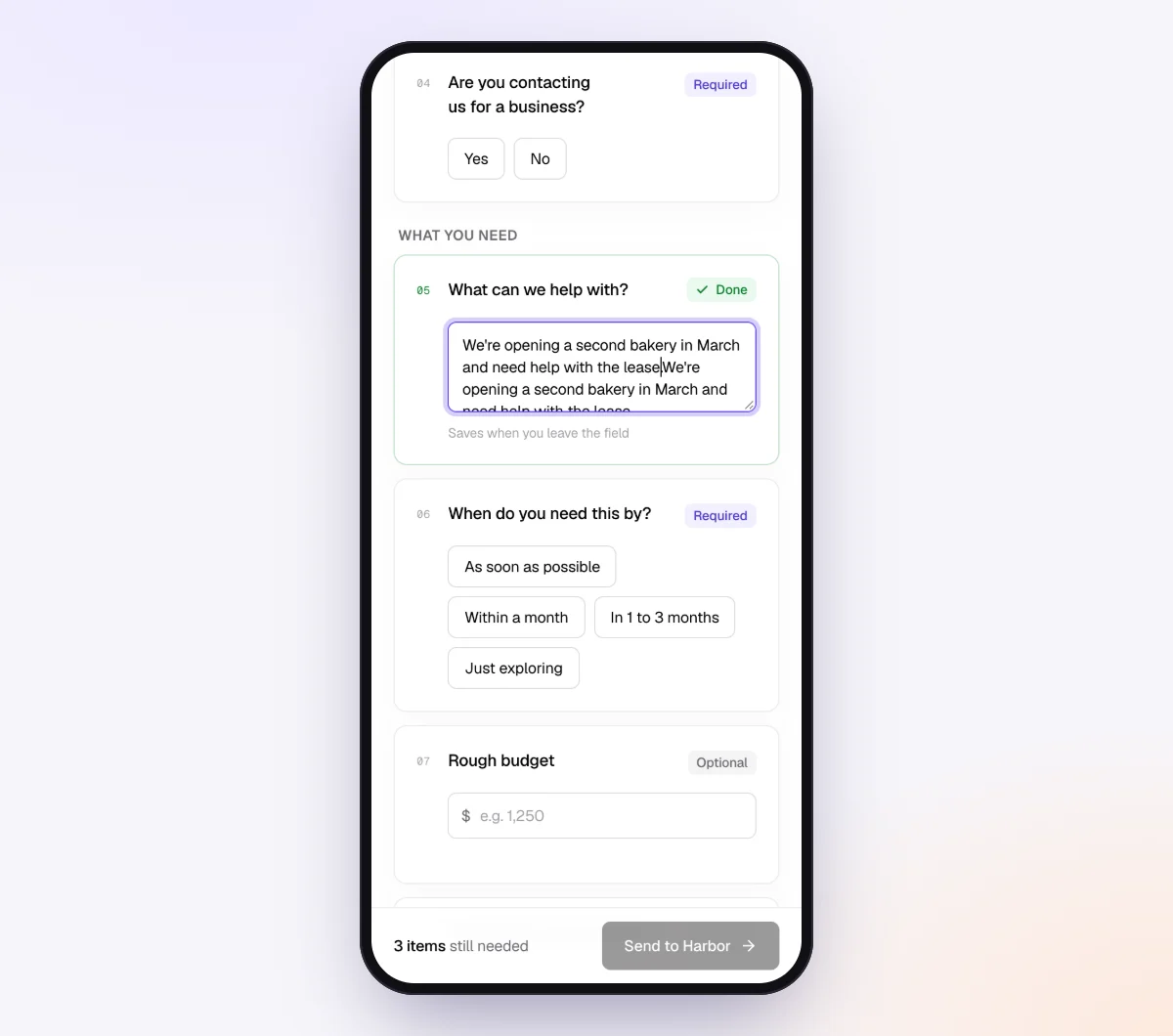
Click "New request," choose the checklist, add a reference such as "Rivera Landscaping, catch-up Mar 2025 to Sep 2026" and a needed-by date for this wave. A checklist is shared by every request that uses it, so put client-specific details in "Notes for the agent (private)" on the request: the accounts, the months needed, and notes like "Visa closed in June, statements ordered from the bank."

If the checklist collects payroll registers or tax letters with Social Security or Social Insurance numbers, turn on "Require an email code." The client then enters a 6-digit code sent to their email before the link opens.
5. Review files as they arrive
The client opens the link on their phone, with no account. Each upload is checked by document checks: the right kind of document, readable, every page. A banking app screenshot or page one of a four-page statement gets a friendly note while the client still has it open. The request page shows each file, its check result and what's still missing.
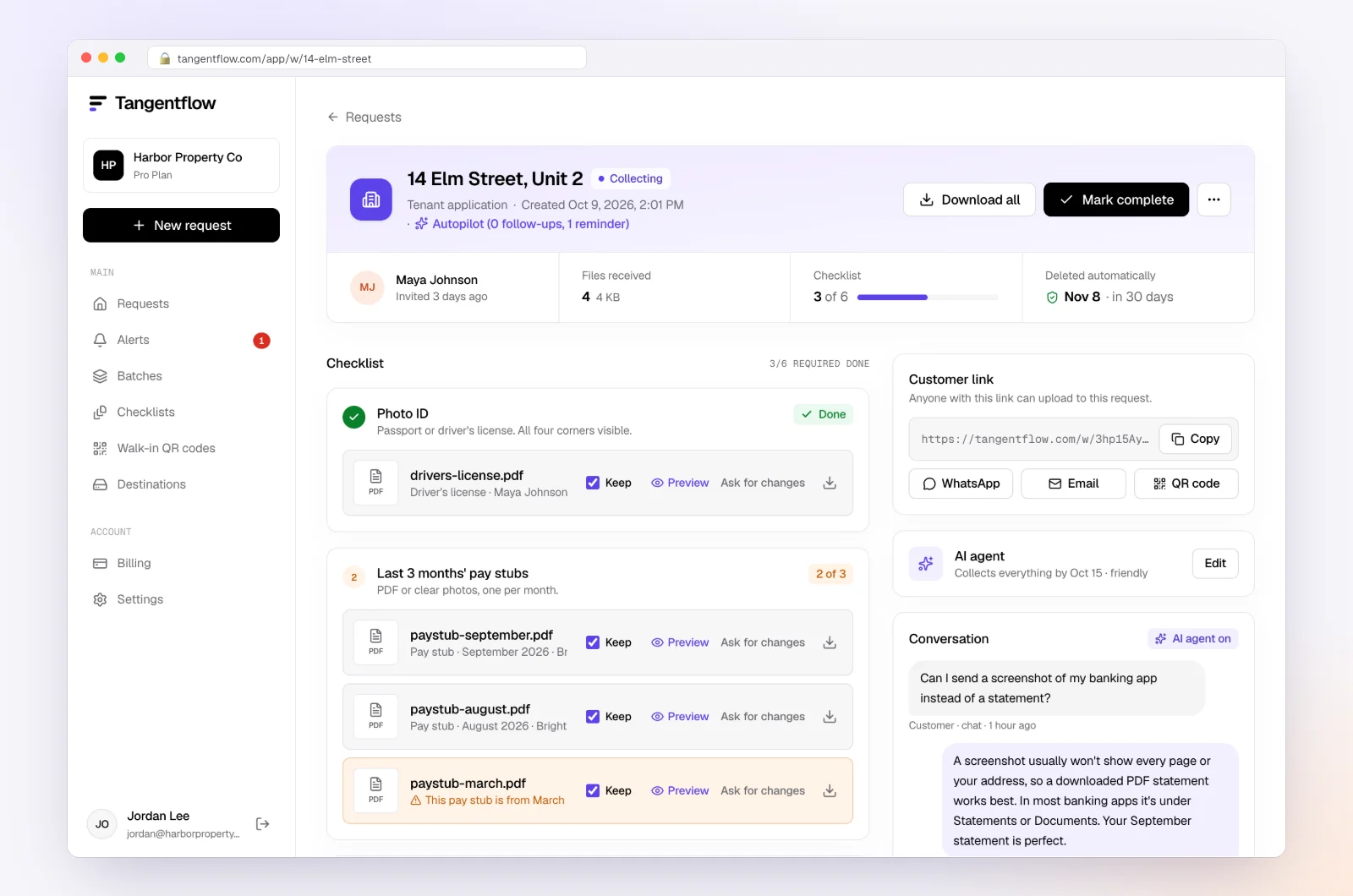
Reminders are paced to the needed-by date and list only what's still missing. When wave 2 is done, download the ZIP package, mark the request complete and send the next wave as a new request.
Setups by client situation
| Client situation | Items to add or emphasize | Settings worth turning on | Learn more |
|---|---|---|---|
| Online seller, 12+ months behind | Payout reports per platform, 1099-K forms, sales tax filings | "Any date" on statements, a higher "At most" | Document checks |
| Contractor or trades with subs | Contractor list, W-9s, supplier statements | Yes/no for contractors with "Only ask if…" | Collect W-9 forms |
| Canadian client with missed GST/HST returns | Filed returns, notices, My Business Account authorization | A heading per GST/HST period | Tangentflow for bookkeepers |
| Client with payroll | Payroll registers, quarterly filings, year-end slips | "Require an email code" on the checklist | Monthly bookkeeping checklist |
Once the client is current, move them to your monthly routine. On Pro, add them to a monthly batch with "Repeat every month" turned on, and they get the same request on the same day each month. See Tangentflow for bookkeepers.
When something goes wrong
| Problem | Likely cause | Fix |
|---|---|---|
| Client goes quiet after seeing the list | It looks too big | Send wave 1 only; the rest comes later |
| Old statements flagged as too old | Date rule left over from the monthly template | Set "How recent?" to "Any date" on statement items |
| A new account appears in month 8 | Not on the account list | Ask again about all accounts and cards, including closed ones; add it to the grid |
| Client has no receipts at all | Never kept them | Book from statements, ask for email copies, list unsupported items for the tax preparer |
| Wrong person received the link | Typo in the email address | Reset the customer's link from the request so the old one stops working |
Check "Alerts" every day while a catch-up is open. Handoffs and missed dates show up there.
Free and Pro, honestly
You can run a real request without paying anything. A single catch-up, one wave at a time, fits the Free plan's one open request, and your first request gets the full AI agent.
| Free | Pro ($29/month) | |
|---|---|---|
| Open requests | 1 at a time | Unlimited |
| AI check on each file | Yes | Yes |
| AI autopilot (answers, reminders, follow-ups) | Your first request | Every request |
| Send to many clients at once (Batches) | No | Yes |
| Clients reply by email with attachments | No | Yes |
| Branding | Tangentflow badge | Your logo |
| Delivery to Google Drive or a webhook | No | Yes |
| Works with AI assistants (MCP) | No | Yes |
| File retention | 7 days | 60 days |
Both plans include unlimited checklists, QR codes and posters, ZIP export, AI summaries and email delivery. Pro is billed monthly with no contract, and you can cancel any time. Full details on the pricing page.
What Tangentflow does not do: SMS or text messages, a native mobile app, full legal e-signature certificates, identity verification, collecting payments, or permanent storage. If you need any of those, pair it with a tool that does. It also does not connect to bank feeds, categorize transactions or replace your bookkeeping software.
The catch-up process as a checklist
- Find the last reconciled month and agree on the period.
- Wave 1: account list, questionnaire, software access, last filed return.
- Order archived and closed-account statements right away.
- Build an accounts-by-month grid and quote from it.
- Wave 2: every statement, every account, every month, plus the opening month.
- Wave 3: payouts, payroll, contractors, loans and agency letters.
- Book everything you can from the statements.
- Wave 4: one batched list of questions and receipts.
- List unsupported transactions for the tax preparer.
- Move the client to your monthly request.
Frequently asked questions
What documents are needed for catch-up bookkeeping?
A list of every account and card, then every statement for the catch-up period plus the month before it for opening balances. Add sales and payout reports, payroll and contractor records, loan and asset documents and every tax agency letter. Receipts come last, only for transactions you cannot categorize.
How far back do you need bank statements for catch-up bookkeeping?
Back to the last month that was fully reconciled, including that month's statement so the opening balance ties out. If the books were never reconciled, agree on a starting point with the client, often the start of a fiscal year, and book an opening balance entry. Then get every month up to today.
How do I get old bank statements from a closed account?
Check the client's email and saved files first, then try the bank's online archive. If neither works, the account holder asks the bank for copies of specific months. In the US, banks must keep many account records for five years, but fees and turnaround vary, so order them as early as possible.
What should I do if a client has no receipts for last year?
Book from the statements, then ask the client to search email, online accounts and supplier portals for electronic copies. For anything still missing, get a short written explanation and give the client's tax preparer a list of unsupported items.
How do I price catch-up bookkeeping?
Quote after you have the account list and questionnaire, not before. Common structures are per month behind, per account-month or hourly with an estimate. Base the numbers on your own hours, and say in writing what happens if new accounts turn up later.
Is catch-up bookkeeping different in Canada?
The documents are mostly the same. Check the client's GST/HST reporting period and which returns are missing, get authorized to see their CRA business accounts, and request filed GST/HST, PST or QST returns, payroll remittances and any notices of assessment.
Can Tangentflow tell me which months are missing?
Not by itself. The AI check reviews each file for the right kind of document, readability and every page, but it doesn't track coverage month by month. Keep an accounts-by-month grid alongside the request.