Checklists
Payroll Reports Your Bookkeeper Needs Each Month (2026)
The payroll reports a bookkeeper needs each month from Gusto, ADP, QuickBooks, Paychex, Wave and Canadian providers, plus how to book and reconcile them.
By Bibin MathewUpdated 21 min read
The short answer
Each month, a bookkeeper needs one payroll register or journal for every pay date in the month, showing gross wages, each withholding and deduction, employer taxes and net pay, plus a report or statement of the tax amounts the provider debited and remitted. Quarterly, add the filed Form 941 and state unemployment returns in the US, or the CRA remittance history in Canada; at year-end, the W-2/W-3 or T4/T4 Summary. Ask for the PDF version of each report, and where the payroll provider offers accountant or bookkeeper access, use that instead of monthly exports.
Payroll is usually the biggest expense on a small business's books, and the bank statement shows almost none of it. You see "GUSTO NET 14,470.00" on the 15th, "GUSTO TAX 6,220.00" the same day, and a separate debit for the 401(k) a few days later. Behind those three lines sit gross wages, five or six withholdings, employer taxes, benefit deductions and sometimes a reimbursement. Book only the debits and wages are understated, employer taxes are missing, and the liabilities never clear.
That is why clients so often ask what payroll reports does my bookkeeper need, and why "a payroll report" gets them nowhere. Every provider names its reports differently, and the first one the client finds is usually a pay stub.
This guide is for independent bookkeepers in the US and Canada who close books monthly for clients with employees, and for owners who want to send the right thing the first time: report names by provider, quarterly and year-end filings, and how to book and reconcile payroll.
Why a payroll debit is not a payroll expense
Payroll providers pay out net, and they usually pull money from the client's account in several pieces: net pay for direct deposits, a tax impound for withholdings plus employer taxes, and sometimes separate debits for garnishments, retirement contributions or the provider's fee. Benefits such as health insurance are often paid to the insurer on a different date altogether.
An illustrative semimonthly payroll for a small US business with six employees:
| Line | Amount |
|---|---|
| Gross wages | $20,000.00 |
| Federal income tax withheld | −$2,100.00 |
| Employee Social Security and Medicare | −$1,530.00 |
| State income tax withheld | −$700.00 |
| Employee 401(k) deferrals | −$800.00 |
| Employee share of health premiums | −$400.00 |
| Net pay (direct deposits) | $14,470.00 |
| Employer Social Security and Medicare | $1,530.00 |
| Employer federal and state unemployment | $360.00 |
| Tax debit (employee withholdings plus employer taxes) | $6,220.00 |
The bank shows $14,470 and $6,220. The real cost is $20,000 of wages plus $1,890 of employer taxes, and $1,200 of deductions still has to reach the 401(k) provider and the insurer. Book $20,690 of "payroll" and the expense, the wage and tax split, and two liabilities are all wrong. Quarterly and annual filings (Form 941, W-2s, T4s) also start from gross wages, so books built on debits will never tie to them.
The universal monthly payroll request
Whatever provider the client uses, ask for these each month:
- A payroll register or journal for every pay date in the month, showing gross wages, each tax and deduction, employer taxes and net pay. Ask for employee detail if you allocate wages by department or job.
- A tax or liability report showing what the provider debited for taxes and remitted to each agency.
- A bank debit or cash requirements report, if the provider has one, listing every debit and its date.
- Contractor payments made through the payroll provider, if any.
- Benefit and retirement bills paid outside payroll, such as health insurance and the 401(k) or group RRSP remittance.
- A short note on new hires, terminations, bonuses, manual checks, off-cycle runs and any payroll tax notices.
Pay stubs are not a substitute. A stub shows one employee's pay; you need company totals by pay date, including employer taxes.
This slots into the "Payroll and people" part of a monthly bookkeeping checklist, and the payroll tie-out step of a month-end close.
Gusto: payroll journal report and accountant access
For Gusto clients, the core report is the Payroll Journal.
Where the client finds it: In the Gusto admin account, click Reports, then find Payroll Journal among the recommended reports or by searching for the name. Set the date range to the month, leave all employees selected and generate the report. It shows earnings, taxes, deductions and net pay by employee and pay date, and can be filtered by employee, state, earnings, taxes and more. Download it as PDF for your records.
Each payroll also has its own summary in the client's pay history, and quarterly and annual filings sit in Gusto's tax documents area.
Accountant or bookkeeper access instead: The primary admin goes to People, clicks the arrow next to "Add person," chooses "Add collaborator" and selects Accountant or Bookkeeper. Outside collaborators get Limited admin or Global admin; ask for Limited admin with reports access unless you also run payroll.
ADP RUN: payroll summary, details and tax filings for your accountant
RUN Powered by ADP is ADP's small business platform. Its reports sit under the Reports menu, grouped into Payroll, Taxes, Benefits and Misc.
What to ask for each month:
- Reports > Payroll > Payroll Summary: hours, wages, taxes and deductions for each pay period, with company totals, net pay and employer liability.
- Reports > Payroll > Payroll Details: the tax and deduction amounts broken down by type.
- Reports > Payroll > Payroll Liability: total liability, combining amounts paid to employees and the company's share of taxes and deductions. This is the one that ties to the debits.
The client filters by a range of pay periods with all employees selected, then uses Print Report (print to PDF). Each quarter, add the filed Form 941 and state forms from Reports > Taxes > Tax Records/Filings, plus Statement of Deposits.
Other ADP products: On ADP Workforce Now and older ADP packages, the core report is usually the Payroll Register, and some packages include a period totals report called the Statistical Summary. If unsure, ask for "the register showing gross, taxes, deductions and net for each pay date."
Access instead: ADP's free Accountant Connect portal lets accountants view data for clients who authorize them.
QuickBooks Payroll: payroll summary and payroll details reports
If you already have accountant access to the client's QuickBooks Online company, you may not need to ask for anything: payroll reports live in the same file and paychecks post automatically. Check the account mapping.
Where the client finds the reports (US and Canada): Go to Reports, select Standard reports, scroll to the Payroll section (or search by name), choose a report, set the date range and select Apply. Reports appear only after at least one payroll has run.
The ones to request:
- Payroll Summary: totals by employee for the period, including wages, taxes withheld and deductions.
- Payroll Details: each paycheck in the period.
- Payroll Tax Liability: tax owed and payments made.
- Total Payroll Cost: wages plus employer taxes and contributions, useful for a quick sanity check.
Reports export to Excel, and the client can save or print them as PDF from the report screen.
Paychex payroll journal and cash requirements
Paychex Flex has over 100 standard reports. The two that matter monthly:
- Payroll Journal: gross-to-net detail for every employee on each payroll, including taxes withheld and voluntary deductions. Paychex produces it as a PDF.
- Cash Requirements: the total amount needed to cover the payroll, including checks, direct deposits, withholdings and liabilities. This is your map of what Paychex will debit and when.
Access instead: Paychex Flex has an Accountant Access feature. You request access with the client's Paychex company ID, and the client approves it and chooses your role, which controls what you can see.
Wave Payroll reports
Wave keeps payroll reporting simple. On the web (not the mobile app), the client clicks Reports in the left menu, then Payroll Reports, picks the period under the report and clicks "Generate and download PDF."
Ask for both reports Wave offers:
- Wage and tax report: wages and payroll tax liabilities by employee.
- Payroll benefits and deductions report: benefits and deductions withheld.
If you already work in the client's Wave account, these reports are a few clicks away for you too.
Canadian payroll providers: Wagepoint, ADP Canada, Payworks, QuickBooks Payroll Canada
Canadian providers withhold income tax, CPP or QPP and EI, add the employer's share, and remit to the CRA (and Revenu Québec). Ask for a register for each pay date plus proof of what was remitted.
| Provider | Monthly report to request | Remittance proof | Access option |
|---|---|---|---|
| Wagepoint | Payroll register for each pay date; journal or posting report if offered | Remittance or tax summary from the Reports area | Wagepoint's partner dashboard for firms; ask the client to add you as an admin |
| ADP Canada | Payroll register for each pay date | ADP Statement of Remittance report (ADP says it can be provided annually or more often) | User access through the client's ADP product |
| Payworks | Payroll Register (PDF or Excel) | Remittance history and CRA remittance report | Payworks offers accountant and bookkeeper tools; ask the client to add you |
| QuickBooks Online Payroll Canada | Payroll Summary, Payroll Details | Payroll Tax Liability | Accountant access to the QuickBooks Online company |
Report names vary by plan and version. If the client is unsure, describe the content: "gross pay, CPP, EI, income tax and net pay for each pay date, with totals."
About the PD7A: The CRA's PD7A Statement of account for current source deductions shows previous remittances and a voucher for the next one. The CRA says you will not receive one if you remit electronically, as most clients using a payroll provider do. Use the provider's remittance report, or check the account yourself if the client has authorized you as a CRA representative.
Quarterly payroll tax filings to collect
Add these to the request in the month after each quarter ends. Most full-service providers file them and keep copies in a tax documents area.
| Filing | Country | What it is | Why you want it |
|---|---|---|---|
| Form 941 | US | Employer's quarterly federal tax return: federal income tax withheld, plus employee and employer Social Security and Medicare | Tie the quarter's gross wages and payroll taxes to the books |
| State unemployment (SUI) wage report | US | Quarterly wages and unemployment tax by state; names vary by state | Confirm the SUI rate and taxable wages used |
| State withholding returns | US | Quarterly or periodic state income tax withholding returns, in states that have them | Confirm the state withholding liability cleared |
| Statement of tax deposits | US | The provider's record of every deposit made to the IRS and states | Match deposits to debits on the bank statement |
| CRA remittance history or PD7A | Canada | Source deductions remitted for the period | Confirm the CRA payroll liability is zero after each remittance |
Form 941 is generally due by the last day of the month after each quarter (April 30, July 31, October 31 and January 31); see the IRS page About Form 941. State rules differ, so check the state agency's page or the provider's filing calendar.
Year-end payroll documents
At year-end, add the annual filings to the December or January request. Our year-end bookkeeping client checklist has the rest of that list.
- US: the W-3 transmittal (company totals) and copies of the W-2s, the Form 940 annual federal unemployment return, state annual reconciliations, and a year-to-date payroll summary. W-2s and the W-3 are due to employees and the Social Security Administration by January 31.
- Canada: the T4 Summary and T4 slips (and RL-1 for Québec employees), due by the last day of February, plus a year-to-date register. Tie T4 box totals to the year's payroll expense and remittances.
- Contractors: not payroll, but often paid through the payroll provider. In the US that feeds the 1099-NEC; see our 1099 season checklist for bookkeepers. In Canada, see collecting contractor info for T4A and T5018.
Every provider on one page
| Provider | Monthly report to request | Where the client finds it (as of October 2026) | PDF available | Accountant access |
|---|---|---|---|---|
| Gusto | Payroll Journal | Reports > Payroll Journal | Yes | Add collaborator: Accountant or Bookkeeper |
| ADP RUN | Payroll Summary, Payroll Liability | Reports > Payroll | Print to PDF | Accountant Connect, or a user role |
| QuickBooks Online Payroll | Payroll Summary, Payroll Details, Payroll Tax Liability | Reports > Standard reports > Payroll | Save or print as PDF | Accountant access to the company |
| Paychex Flex | Payroll Journal, Cash Requirements | Reports for each payroll | Yes | Accountant Access, client approves |
| Wave Payroll | Wage and tax report, benefits and deductions report | Reports > Payroll Reports | Yes | Invite as a user (Payroll Manager on any plan; Viewer or Editor on the Pro plan) |
| Wagepoint | Payroll register | Reports area | Check with the client | Firm partner dashboard |
| Payworks | Payroll Register | Reports area | Yes | Ask the client to add you |
| ADP Canada | Payroll register, Statement of Remittance | Reports area; remittance statement on request | Check with ADP | User access |
How to book payroll from the journal
Once you have the journal, book each pay date (or the month's pay dates combined, if the client is happy with that level of detail) as one entry. Using the illustrative US payroll above:
| Account | Debit | Credit |
|---|---|---|
| Wages and salaries expense | $20,000.00 | |
| Payroll tax expense | $1,890.00 | |
| Bank: net pay debit | $14,470.00 | |
| Bank: tax debit | $6,220.00 | |
| 401(k) deferrals payable | $800.00 | |
| Health insurance payable (employee share) | $400.00 | |
| Totals | $21,890.00 | $21,890.00 |
How to read it:
- Gross wages go to wage expense, split by department or job if the client wants that. Employee withholdings are part of gross, not a separate expense.
- Employer taxes (employer Social Security and Medicare, FUTA and SUI in the US; employer CPP and EI in Canada) go to payroll tax expense.
- Withholdings and employer taxes are a liability until paid. If the provider debits them on a different day than net pay, credit a payroll tax liability account and clear it when the debit lands.
- Benefit and retirement deductions sit in payables until the insurer or 401(k) provider is paid. Reimbursements paid through payroll go to the expense they reimburse, not wages.
In Canada the structure is the same, with income tax, CPP or QPP and EI withheld, and the total owed to the CRA held as source deductions payable until remitted.
Reconciling payroll to the bank
After booking, three checks catch almost every payroll error:
- Debits match the journal. For each pay date, net pay on the journal equals the direct deposit debit, and the tax report equals the tax debit. Any extra debit (garnishment, retirement, fee) should appear on the provider's cash requirements or bank debit report.
- Liabilities go to zero. Payroll tax payable, source deductions payable, 401(k) or RRSP payable and benefit payables should clear after each remittance or bill. A balance that grows month after month means a remittance was missed or booked to expense.
- Gross ties to filings. Each quarter, gross wages and payroll taxes in the books should match Form 941 and the SUI report, or the CRA remittances. At year-end, they should match the W-3 or T4 Summary.
Watch month-end cutoff. For accrual-basis clients, accrue wages and employer taxes earned in the month but paid after it, then reverse next month.
Accountant access is the cleaner long-term answer where the provider offers it, but it is not password sharing. Never accept the client's own login. Ask them to invite you with your own account and the narrowest role that can view and download reports.
Collecting payroll reports in Tangentflow, step by step
Tangentflow covers the "client sends reports" route: one private link per client per month, a checklist naming each report, and an AI collection agent that sends the request, reminds and answers questions. It suits bookkeepers who already collect statements and receipts with the "Monthly bookkeeping" template and want payroll in the same request. More on how it fits a practice on the bookkeepers page.
1. Start from the "Monthly bookkeeping" template
Open "Checklists," choose "Browse templates" and pick "Monthly bookkeeping." It already includes "Bank statements for the month," "Credit card statements," "Receipts and bills you paid," "Sales or invoices you issued," "Payroll report" (optional, "If you ran payroll this month") and "Anything unusual this month?" Keep a copy for clients with employees.

2. Make the payroll item specific
Rename "Payroll report" to what the client will see in their provider, for example "Gusto Payroll Journal for last month (PDF)." In the checklist editor:
- Set "What should it be?" to "Payroll Journal covering every pay date in the previous month, with company totals."
- Set "Accepted as" to "PDF only" and put the menu path in the hint.
- Add items for the health insurance bill and, after quarter-end, "Form 941 and state unemployment report" or "CRA remittance report."
- Add a yes/no form field, "Any off-cycle or bonus payrolls this month?", with "Only ask if…" showing an extra item when the answer is yes.

Payroll reports list employee names and pay, so consider "Require an email code": the client enters a 6-digit code emailed to them before the link opens. If a link goes to the wrong person, reset it from the request. After the client sends everything, the link no longer shows the files.
3. Send it every month without thinking about it
For one client, use "New request," choose the checklist, and add a reference such as "Harbor Dental, September 2026."

For all your payroll clients, open "Batches," choose "Send to many customers," pick the checklist and upload or paste your client list. A column such as "Payroll: Gusto, semimonthly" becomes context the agent uses when clients ask which report applies. Schedule the send up to 30 days ahead and turn on "Repeat every month": the same clients get a new request on the same day each month, with the same gap to the needed-by date, until you stop it from the batch page. Batches are part of Pro, up to 100 clients per sheet; see bulk requests.
4. Pay stubs and wrong months are caught at upload
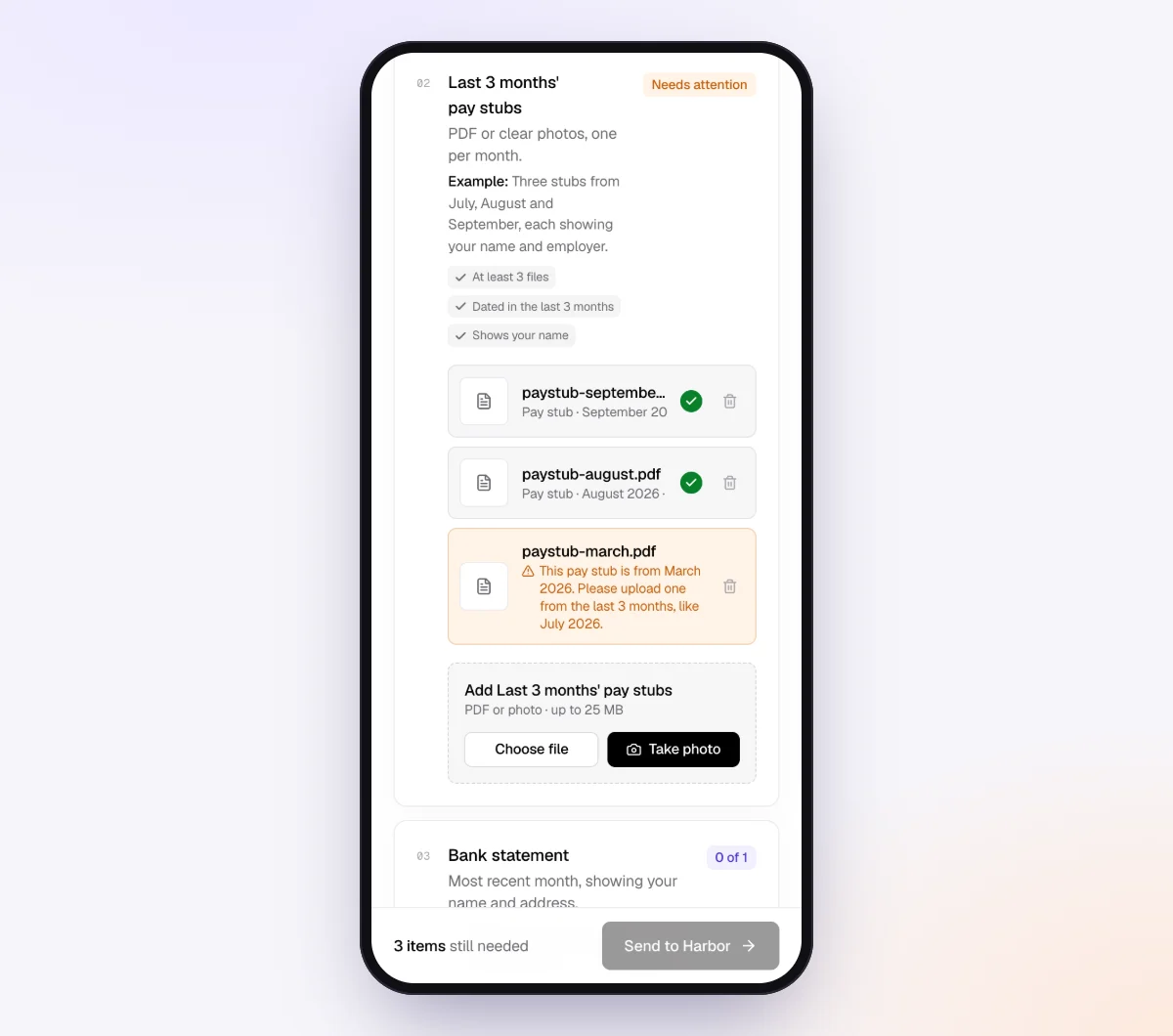
Each upload is checked in seconds by document checks against what the item should be and how recent it is. If a client uploads a single employee's pay stub where the payroll journal belongs, or last month's report again, they see a note explaining what to fix before they leave. The check reads the document; it does not reconcile the numbers. That part is still yours.
5. The agent answers "which report?" questions
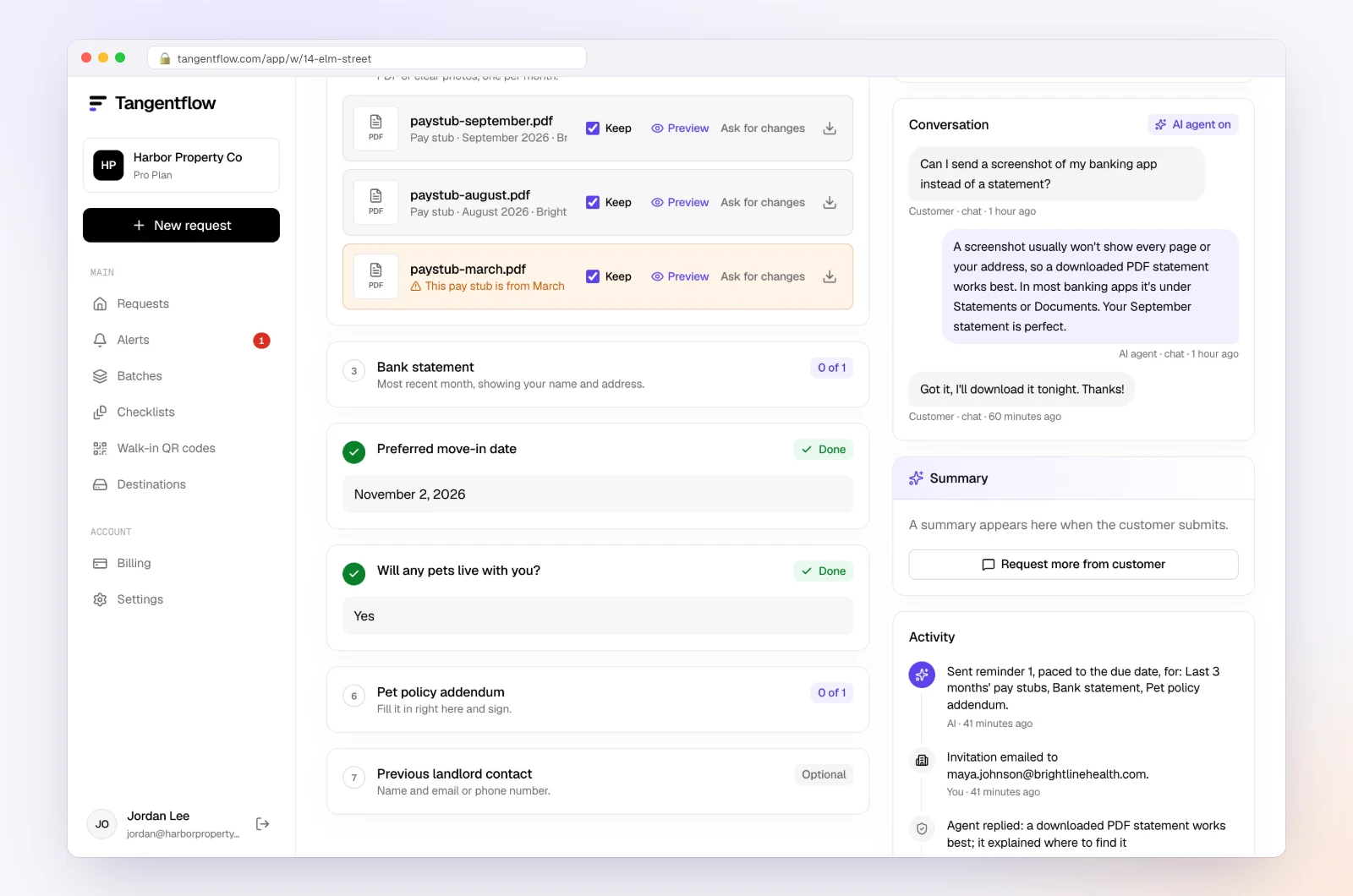
Clients ask things like "Do you need the payroll from the 1st if it was for last month's work?" The agent answers from your checklist and private notes, or hands off to you. Reminders are paced to the needed-by date and list only what is still missing. When everything is in, download a ZIP or, on Pro, deliver to Google Drive or a webhook.
Setups by type of client
| Client type | Request monthly | Add quarterly or yearly | Better via access or integration |
|---|---|---|---|
| Owner plus 1–3 employees on Gusto | Payroll Journal (PDF) | Form 941, state reports; W-2/W-3 | Gusto bookkeeper collaborator |
| Restaurant or shop on ADP RUN | Payroll Summary, Payroll Liability, tip reporting if any | Tax Records/Filings, Statement of Deposits | Accountant Connect |
| Contractor business on QuickBooks Payroll | Usually nothing, if you have QuickBooks access | Payroll Tax Liability, W-2s and 1099s | Accountant access to the company |
| Multi-location business on Paychex | Payroll Journal, Cash Requirements | Quarterly tax filings | Paychex Accountant Access |
| Canadian company on Wagepoint, Payworks or ADP Canada | Payroll register (PDF) | Remittance report; T4 (and RL-1) Summary | Provider access |
When something goes wrong
| Problem | Likely cause | Fix |
|---|---|---|
| Client sends pay stubs | The stub is what they see most | Name the exact report and path in the request; set the item to PDF only |
| Journal total doesn't match the debits | Benefits, garnishments or fees debited separately; or a debit landed in another month | Ask for the cash requirements or bank debit report and match debit by debit |
| A payroll is missing | Off-cycle bonus or correction run outside the regular schedule | Ask monthly about off-cycle runs; set the journal's dates to the whole month, not one pay period |
| Payroll tax liability keeps growing | Tax debits booked to expense instead of clearing the liability | Reclassify, then use one liability account per agency |
| Quarter doesn't tie to Form 941 | Manual check, voided check or wages in the wrong account | Compare by pay date; 941 follows pay date, not work period |
| Client tries to upload a CSV export | It was the first download button they saw | Ask for the PDF version, or pull the CSV through accountant access |
Check "Alerts" in Tangentflow for handoffs and missed dates. For clients who are late every month, our late document policy guide has engagement letter wording.
Free and Pro, honestly
You can run a real request without paying anything.
| Free | Pro ($29/month) | |
|---|---|---|
| Open requests | 1 at a time | Unlimited |
| AI check on each file | Yes | Yes |
| AI autopilot (answers, reminders, follow-ups) | Your first request | Every request |
| Send to many clients at once (Batches) | No | Yes |
| Clients reply by email with attachments | No | Yes |
| Branding | Tangentflow badge | Your logo |
| Delivery to Google Drive or a webhook | No | Yes |
| Works with AI assistants (MCP) | No | Yes |
| File retention | 7 days | 60 days |
Both plans include unlimited checklists, QR codes and posters, ZIP export, AI summaries and email delivery. Pro is billed monthly with no contract, and you can cancel any time. Full details on the pricing page.
What Tangentflow does not do: SMS or text messages, a native mobile app, full legal e-signature certificates, identity verification, collecting payments, or permanent storage. If you need any of those, pair it with a tool that does. It also does not connect to Gusto, ADP, Paychex or other payroll providers, accept CSV or spreadsheet uploads from clients, or post payroll entries to your bookkeeping software.
The payroll reports checklist
- Note each client's payroll provider and ask monthly about off-cycle runs.
- Request a payroll register or journal for every pay date in the month, as a PDF.
- Add the tax or liability report, the cash requirements report where offered, and benefit bills.
- Add quarterly filings (Form 941, state unemployment, or CRA remittances) and year-end W-2/W-3 or T4 Summary.
- Book gross wages, employer taxes, net pay and each liability from the journal.
- Match debits to the bank, clear every payroll liability, and tie gross wages to the filings.
- Use accountant or bookkeeper access in the provider where it exists, with the narrowest role.
Frequently asked questions
What payroll reports does my bookkeeper need?
A payroll register or journal covering every pay date in the month, showing gross wages, each tax and deduction, employer taxes and net pay. Add the provider's tax or liability report, any benefit bills paid outside payroll, and quarterly and year-end filings such as Form 941 and W-2s, or CRA remittances and T4s in Canada.
Where is the payroll journal report in Gusto?
As of October 2026, in the Gusto admin account click Reports and open Payroll Journal, or search for it by name. Set the date range to the month, keep all employees selected, generate the report and download it as a PDF.
Which ADP report should I give my accountant?
In RUN Powered by ADP, send the Payroll Summary and Payroll Liability reports from Reports > Payroll for the month's pay periods. Each quarter, add the filings from Reports > Taxes > Tax Records/Filings. On other ADP products, the equivalent is usually called the Payroll Register.
What QuickBooks Payroll reports does my bookkeeper need?
The Payroll Summary, Payroll Details and Payroll Tax Liability reports for the month, from Reports > Standard reports > Payroll. If your bookkeeper already has accountant access to your QuickBooks Online company, they can run these themselves.
Should I give my bookkeeper my payroll login?
No. Gusto, ADP, Paychex, QuickBooks and Wave all let you invite your bookkeeper or accountant with their own login and limited permissions. That way you can remove access later and nobody uses your credentials.
What do Canadian employers send their bookkeeper for payroll?
A payroll register for each pay date showing gross pay, income tax, CPP or QPP, EI and net pay, plus the provider's remittance report or the CRA PD7A if you receive one. At year-end, add the T4 Summary and slips, and the RL-1 for Québec employees.
Can I collect payroll reports in Tangentflow?
Yes, as PDFs, in the same monthly request as bank statements and receipts. Client uploads accept PDFs and photos, not CSV or spreadsheet files, so ask for the PDF version of each report, and use accountant access in the payroll provider when you need CSV detail.