Checklists
1099 Season Checklist for Bookkeepers (2026)
A 1099 season checklist for bookkeepers: an October to January plan for every client, the client request, the $2,000 threshold, IRIS and the 2027 deadline.
By Bibin MathewUpdated 19 min read
The short answer
Start 1099 season in October, not January. Pull a vendor list for every client, send each client one 1099 prep request in November asking them to confirm the list, add anyone paid outside the books and chase missing W-9s, then run TIN Matching and fix problems in December. For payments made in 2026, Form 1099-NEC and most 1099-MISC boxes apply at $2,000 or more, and 1099-NEC is due to recipients and the IRS by February 1, 2027, filed electronically through IRIS if you have 10 or more returns.
Start 1099 season in October. Pull a vendor report for every client, mark who probably needs a 1099 and who is missing a W-9, and send each client one 1099 prep request in November: confirm the vendor list, add anyone paid outside the books, and get missing W-9s back. Use December for TIN Matching and fixes, and January for preparing and filing. For the 2026 tax year, Form 1099-NEC is due to recipients and the IRS by February 1, 2027, because January 31 falls on a Sunday.
Most 1099 checklists online are written for one business filing its own forms. A bookkeeper has twenty or forty clients, each with a few contractors, each waiting on a client who answers email whenever they get to it. The forms take an afternoon. The chasing takes three months if you let it.
This guide is for US bookkeepers who prepare 1099s for clients: what changed this year, who needs a 1099, a month-by-month plan from October to January, the client-facing request, and a step-by-step setup in Tangentflow.
What's different for the 2026 tax year (filed in early 2027)
| What | Tax year 2025 (filed early 2026) | Tax year 2026 (filed early 2027) |
|---|---|---|
| 1099-NEC threshold | $600 or more | $2,000 or more |
| Most 1099-MISC boxes (rents, other income, medical) | $600 or more | $2,000 or more |
| Royalties (1099-MISC) | $10 or more | $10 or more |
| 1099-NEC due date | February 2, 2026 | February 1, 2027 |
| IRS e-filing systems | FIRE or IRIS | IRIS only (FIRE retired) |
| 1099-K from payment processors | Over $20,000 and over 200 transactions | Over $20,000 and over 200 transactions |
The $2,000 threshold. The One Big Beautiful Bill Act (Public Law 119-21) raised the reporting threshold for Form 1099-NEC and most Form 1099-MISC payments from $600 to $2,000 for payments made after December 31, 2025. The IRS instructions say the amount may be adjusted for inflation beginning in 2027.
FIRE is gone. FIRE stops accepting information returns on November 19, 2026, and from January 1, 2027, IRIS (the Information Returns Intake System) is the only IRS system for e-filing them, per the IRS FIRE retirement page. If you filed through FIRE, get an IRIS Transmitter Control Code (TCC) or confirm your software files through IRIS.
1099-K stays at $20,000 and 200 transactions. The same law restored the old Form 1099-K threshold. Clients will ask about it, but it doesn't change who gets a 1099-NEC (see "card payments" below).
Who needs a 1099 (and who doesn't)
The test: did your client pay this payee, in the course of their business, for services or a listed 1099-MISC category, at or above the threshold, by check, ACH, cash or wire? If yes, check the entity type.
| Payee | 1099-NEC for services? | Notes |
|---|---|---|
| Individual or sole proprietor | Yes, at $2,000 or more | Includes freelancers and part-time contractors |
| Single-member LLC (disregarded) | Yes | Report under the owner's name and TIN from the W-9 |
| Multi-member LLC taxed as a partnership | Yes | |
| Partnership | Yes | |
| LLC that elected C or S corporation status | Generally no | The W-9 classification tells you which |
| C or S corporation | Generally no | Exceptions below |
| Attorney or law firm, for legal services | Yes, even if incorporated | Fees go on 1099-NEC; gross proceeds such as settlements on 1099-MISC box 10 |
| Medical or health care provider | Yes on 1099-MISC box 6, even if incorporated | Applies to payments in your client's business |
| Employee | No | Wages go on Form W-2 |
| Tax-exempt organization or government entity | Generally no | |
| Anyone paid by credit card or a payment network | No 1099-NEC or 1099-MISC | The processor reports on Form 1099-K |
The IRS instructions also exclude payments for merchandise, freight, storage, telephone and similar items.
LLCs are the trap. "LLC" tells you nothing on its own. The W-9's line 3 classification decides it, which is one more reason to have the W-9 first.
Card and payment app payments. The IRS instructions say payments by credit card, debit card or a third party payment network are reported by the processor on Form 1099-K, not on 1099-NEC or 1099-MISC. If a contractor was paid partly by check and partly by card, only the check payments count toward the $2,000. For payment apps, check how the payment was processed, and ask the client's preparer if unclear.
1099-NEC vs 1099-MISC: which form for which payment
Most of what a small business pays contractors goes on 1099-NEC; 1099-MISC covers a narrower list.
| Payment | Form and box | Threshold for 2026 payments |
|---|---|---|
| Fees for services by a contractor or freelancer | 1099-NEC, box 1 | $2,000 |
| Legal fees to an attorney for services | 1099-NEC, box 1 | $2,000 |
| Office, storage or equipment rent paid to a non-corporate landlord | 1099-MISC, box 1 | $2,000 |
| Royalties | 1099-MISC, box 2 | $10 |
| Prizes and awards to non-employees, other income | 1099-MISC, box 3 | $2,000 |
| Medical and health care payments | 1099-MISC, box 6 | $2,000 |
| Gross proceeds paid to an attorney (for example, a settlement) | 1099-MISC, box 10 | Check current instructions |
| Backup withholding you withheld | Box 4 on either form | Any amount withheld |
1099-NEC is due to recipients and the IRS by January 31. For 1099-MISC, recipient copies are generally due January 31, and the IRS copy February 28 on paper or March 31 electronically. A date on a weekend or legal holiday moves to the next business day.
| Form | To recipients | To the IRS |
|---|---|---|
| 1099-NEC | February 1, 2027 | February 1, 2027 |
| 1099-MISC | February 1, 2027 (some boxes later) | March 1, 2027 on paper, March 31, 2027 electronically |
The 10-return e-file rule. Since 2024, a filer with 10 or more information returns in a year, counting W-2s and all 1099s together, generally must file electronically. The free IRIS Taxpayer Portal lets a filer with a TCC e-file up to 100 returns at a time, by hand or CSV upload, and download recipient copies.
The 1099 season timeline, October to January
Run this across your whole client list, not client by client.
| When | Your work | What you send clients |
|---|---|---|
| Early October | Pull year-to-date vendor reports; flag likely 1099 vendors and missing W-9s; confirm your IRIS or software setup | A one-line heads-up in the monthly request |
| Early November | Prepare each client's draft vendor list | The 1099 prep request |
| Late November | Review answers; request W-9s directly from vendors where the client agrees | Reminders for what's missing |
| Early December | Run TIN Matching on new W-9s; chase mismatches | Last reminder before the holidays |
| Mid December | Lock the list of who gets a 1099 for each client | Ask about any large December payments |
| First week of January | Post December activity; confirm final totals | Confirmation of final amounts, if needed |
| By February 1, 2027 | Furnish 1099-NEC and file with the IRS | Copies to clients for their records |
October: inventory every client
- Run a vendor payments report for each client for January 1 to date, excluding card payments.
- Flag vendors at or near $2,000. Anyone at $1,200 in October may well cross the line by December, so keep them on the list.
- Check W-9 status for each flagged vendor: on file, missing, unsigned, an old revision, or a name that changed midyear.
- Check the classification. Corporations generally drop off. Attorneys and medical providers stay on.
- Check your filing setup. If you used FIRE, confirm IRIS access now; a TCC application can take weeks.
- Include fiscal year-end clients. 1099s follow the calendar year.
November: send every client a 1099 prep request
Contractors still answer email in November, and you have two reminder cycles before December 31. Send every client the same request with their own vendor list attached (details below).
Give it a needed-by date around December 1. If you'll contact vendors directly, get the client's go-ahead first.
December: TIN Matching, backup withholding and fixes
- Run TIN Matching on new W-9s. If the payer (or you, as an authorized agent) is enrolled in IRS e-Services, Interactive TIN Matching checks up to 25 name and TIN combinations at a time. A mismatch now is a corrected W-9; after filing it can become a CP2100 notice.
- Deal with refusals. If a vendor won't provide a TIN, backup withholding at 24% generally applies to reportable payments. Tell the client before their next payment.
- Ask about late payments. A $3,000 payment on December 28 adds a 1099.
January: prepare, review and file
- Post December activity, re-run each vendor report and compare to the list the client confirmed.
- Prepare the forms in your 1099 software or the IRIS Taxpayer Portal.
- Send each client a summary of who's getting a 1099 and for how much, and get approval.
- Furnish and file 1099-NEC by February 1, 2027.
- Keep the W-9s and workpapers in your system of record, and delete inbox copies.
For the rest of year-end (statements, loans, inventory), see our year-end bookkeeping client checklist.
When to start collecting W-9s for 1099s
Before the first payment, while the vendor is eager to get paid. For vendors already paid without one, October is the latest comfortable start and November the latest workable one. Our guide to collecting W-9 forms from vendors covers the form itself: what to check line by line, the request email and reminders.
The client-facing 1099 prep request
Your clients are the payers, so the request goes to them. Keep it to five things.
What to ask each client for
- Confirm the vendor list. Send your draft (vendor, total paid by check or ACH, W-9 status) and ask them to mark anything wrong.
- Anyone paid outside the books. Cash, a personal account, a nephew who did the website. These never show up in your report.
- Missing W-9s. Either the client gets them, or they give you the vendor's email and let you ask directly.
- Rent, legal and medical payments, which can need a 1099 even when the payee is incorporated.
- Any big payments still to come before December 31.
Yes or no questions that save time
- Did you pay anyone by cash or from a personal account?
- Did you pay rent to a person or partnership?
- Did you pay an attorney?
- Will you pay any contractor over $2,000 before December 31?
- May we contact your vendors for missing W-9s?
Copy-ready request email
Subject: 1099 prep for 2026: please confirm by December 1

Hi [First name],

It's 1099 season. To get [Business name]'s 1099s out by the
February 1 deadline, we need a few things from you this month:

- Mark anything wrong or missing on the attached vendor list
- Tell us about anyone you paid outside the books
- Help us get W-9s from the vendors marked "missing"
- Answer five quick yes/no questions

New this year: 1099s are generally required for payments of $2,000
or more, not $600, so your list may be shorter than last year.

Everything goes through this private link, no account needed:
[link]

Please don't email W-9s or tax numbers. Use the link instead.

Thanks,
[Your name]
[Firm name]
For reminder wording, our client reminder schedule has examples paced to a two-week and a 30-day date.
Ways to run 1099 season across clients, compared
| Method | Setup effort | Client effort | Shows what's missing | Reminders | Good for W-9s |
|---|---|---|---|---|---|
| One email per client, by hand | None | Medium | No | Manual | No, they come back as attachments |
| Shared tracking spreadsheet | Low | Medium | Yes, if kept up | Manual | No, files still go elsewhere |
| Vendor W-9 portal in 1099 or payables software | Medium | Vendor creates an account in some tools | Inside that tool | Some | Usually good |
| Practice portal | Medium to high | Client logs in | Partly | Some | Usually good |
| Private link with checklist and AI agent (Tangentflow) | Low | Low, no account | Yes | Paced to the date | Yes, with an email code |
1099 prep in Tangentflow, step by step
Tangentflow sends each client a private link with a checklist, checks each upload as it arrives, and has an AI collection agent send the invitation, answer questions and chase what's missing. Set up the November request once and send it to everyone.
1. Build a "1099 prep" checklist
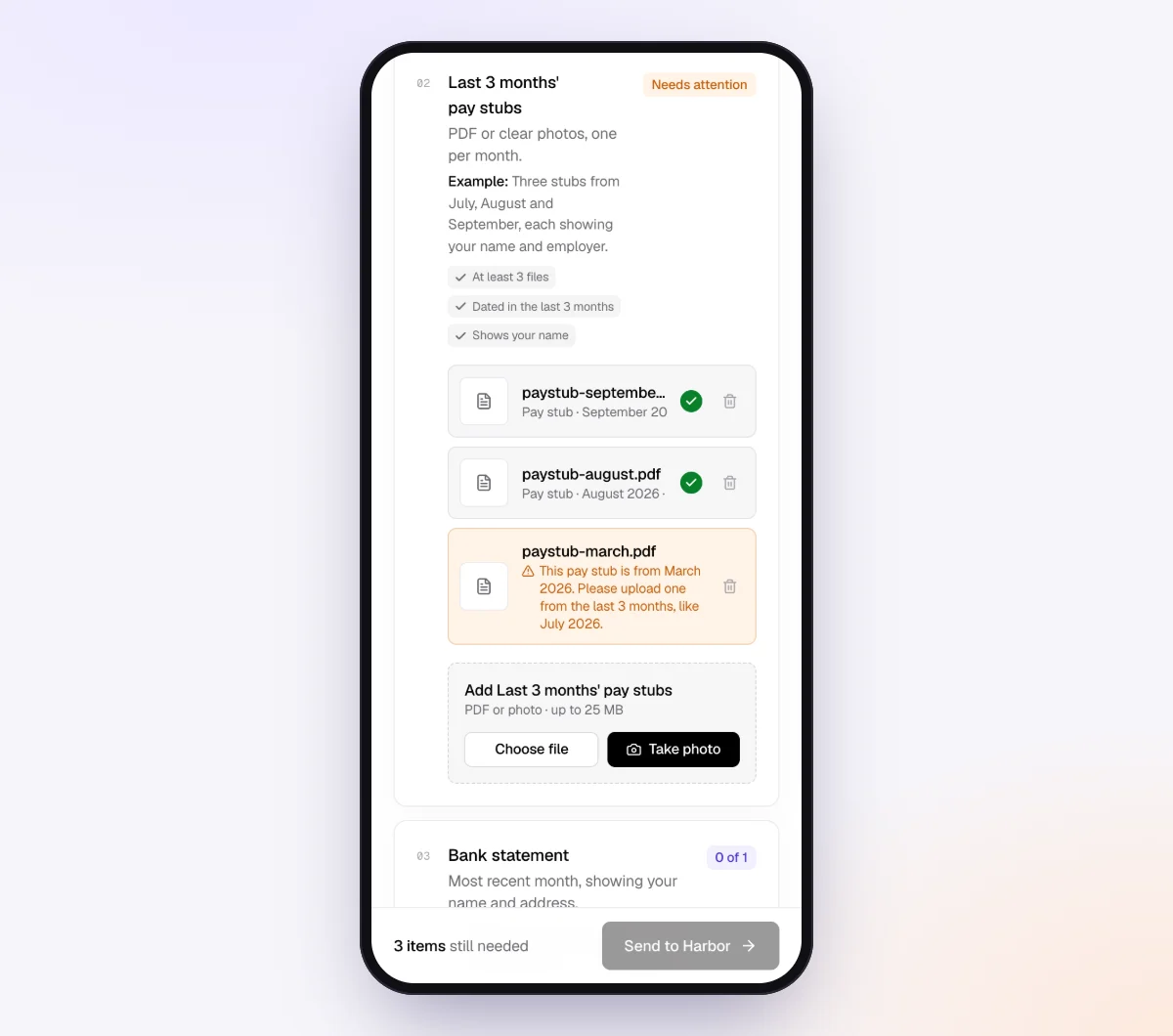
Go to Checklists and create a new one. Describe what you need in a sentence ("1099 prep for bookkeeping clients: confirm vendor list, payments outside the books, missing W-9s") and let AI draft the items, or add them one by one. A good set of items:
- "Vendor list for 2026": attach your draft list as an Excel form so the client downloads it, marks it up and returns it. Spreadsheets can only come back as an attached form; otherwise ask for a PDF or photo.
- "W-9 forms": a file item with a minimum of 1, marked optional for clients with nothing missing. In "What should it be?" write "Form W-9, Rev. March 2024, completed, signed and dated." Customers can upload PDFs and photos up to 25 MB each.
- "Anyone paid outside the books?": a long text question.
- "Vendors we may contact for W-9s": a long text question for names and emails.

To request W-9s straight from vendors, use "Browse templates" and the Subcontractor paperwork template, trimmed to its "Tax form" item ("W-9 in the US; your tax or VAT registration elsewhere"). You can attach the official fillable W-9 PDF so vendors fill it in and sign on their phone; see forms and e-signatures.
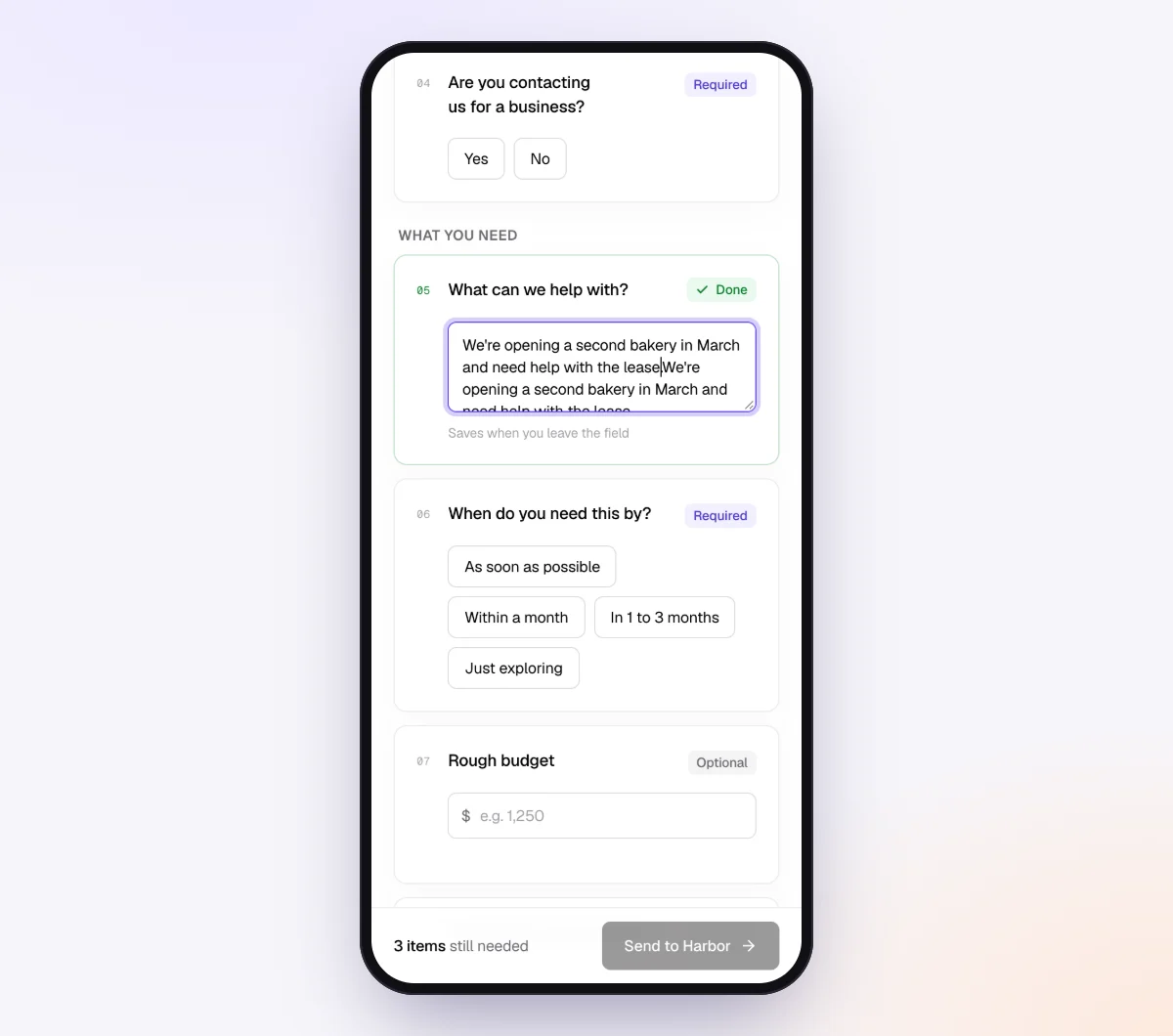
2. Add yes or no questions and gate the follow-ups
Add the questions above as form fields (yes/no, short text, dollar amount and more), then use "Only ask if…" on follow-up items. A client who answers "No" to "Did you pay an attorney this year?" never sees the attorney item.
3. Protect the W-9s
Turn on "Require an email code" for this checklist: the client enters a 6-digit code emailed to them before the link opens. If a link went to the wrong person, reset it and the old one stops working.
With the AI check on, each W-9 is checked in seconds for the right document, readability and a signature, and full tax numbers aren't kept in summaries. If you'd rather W-9s never go to the AI provider, switch the AI check off for that item; files are then stored and marked "Received" for you to review. More on handling tax forms safely in secure ways to receive sensitive documents.
4. Send it to every client in November with Batches
Open "Batches," choose "Send to many customers," pick your 1099 prep checklist and upload an Excel file or CSV, or paste rows: name, email, reference ("1099 prep 2026"), needed-by date and notes. Extra columns such as "vendors missing W-9: 3" or "pays rent to owner" become context for the agent. Schedule the send up to 30 days ahead, so in October you can set it to go out on the first business day of November. Bulk requests are part of Pro, up to 100 clients per batch.
Batches skip clients with an open request from the same checklist, so an open "Monthly bookkeeping" request won't block this one. Leave "Repeat every month" off here; it belongs on your monthly close batch (see our monthly bookkeeping checklist).
5. Let the agent chase, and review on one page
The agent paces reminders to the needed-by date, at most one automatic email a day, each listing only what's missing. It answers questions from your checklist and private notes and hands anything else to you. On Pro, clients can reply by email with attachments.
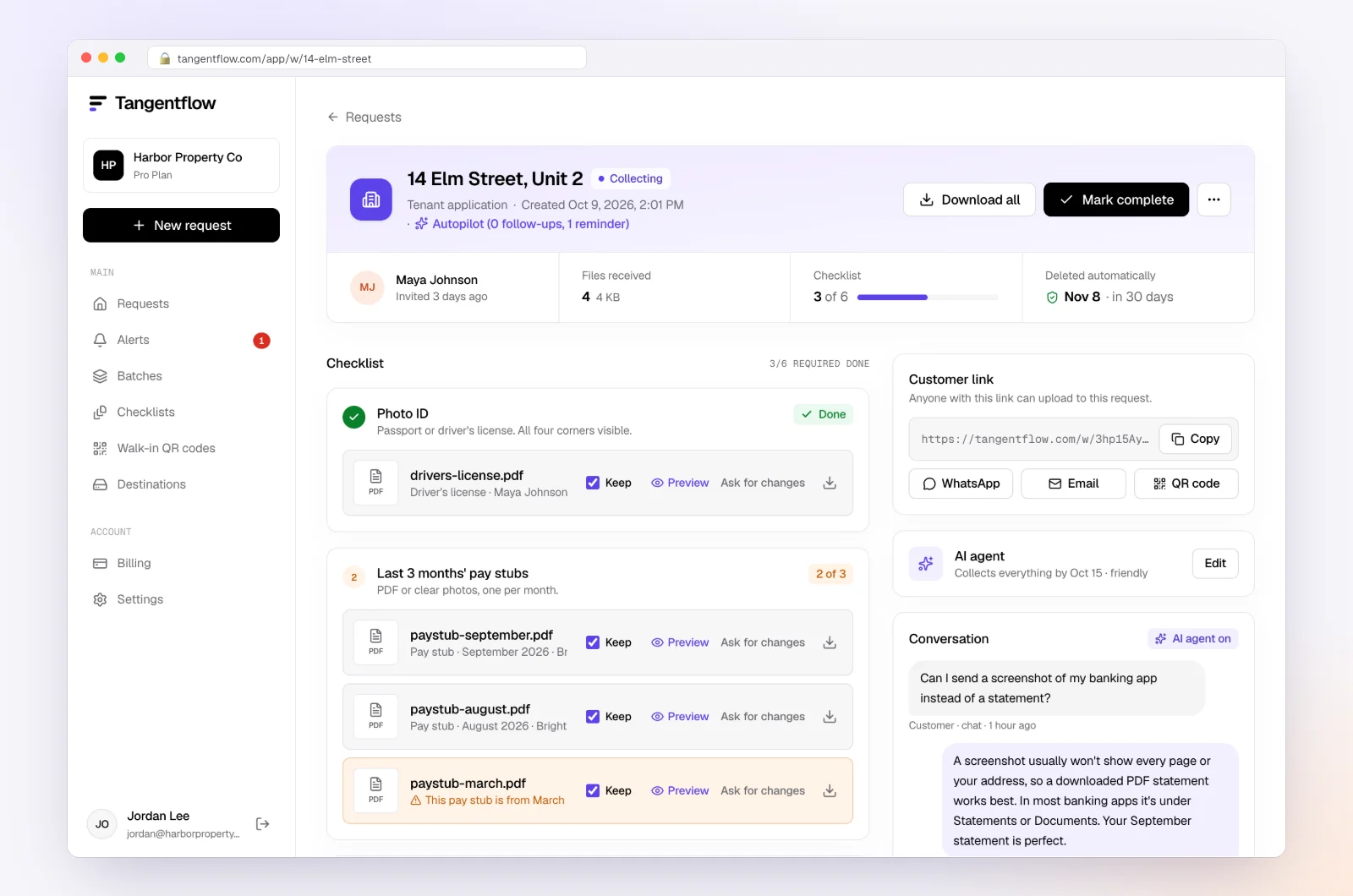
Use "Ask for changes" on any file that needs redoing. When everything is in, download the ZIP, or on Pro deliver to Google Drive or a webhook. Mark the request complete and the files are deleted 24 hours later.
1099 setups by type of client
Use one checklist and adjust it with "Only ask if…". More on running a practice this way for bookkeepers.
| Client type | What to emphasize | Settings worth turning on |
|---|---|---|
| Service business with several contractors | Vendor list, W-9s, payments outside the books | "Require an email code," AI check off on W-9s if you prefer |
| Contractor or remodeler with subs | W-9s plus COIs, collected from subs directly | Subcontractor paperwork template sent to each sub |
| Business renting office or storage from an individual | Rent paid and the landlord's W-9 (1099-MISC box 1) | Yes/no question gating the rent item |
| Client who pays most vendors by card | Short list; confirm which payments were by check or ACH | Payment method column in the batch notes |
| Canadian client | T4A and T5018 details instead of W-9s | See contractor info for T4A and T5018 |
When something goes wrong
| Problem | Likely cause | Fix |
|---|---|---|
| Client ignores the November request | Busy, or the request looked long | Lead with "check this list and mark anything wrong"; the agent reminds on schedule, and Alerts shows who's stuck |
| Vendor refuses to send a W-9 | Distrust, or hard to reach | Tell the client backup withholding at 24% generally applies until a TIN is provided; keep a record of each request |
| W-9 name doesn't match the TIN | Business name on line 1 with the owner's SSN | Ask for a corrected W-9 before filing; TIN Matching catches it |
| Contractor paid partly by card | Mixed payment methods | Count only check, ACH, cash and wire toward the $2,000 |
| Client says "they're an LLC, so no 1099" | Common misunderstanding | Check the W-9 classification; disregarded and partnership LLCs generally get one |
| Link went to the wrong email | Typo in the batch sheet | Reset the client's link so the old one stops working, then resend |
Check "Alerts" daily in late November and December; handoffs and missed dates show up there.
Free and Pro, honestly
You can run a real request without paying anything.
| Free | Pro ($29/month) | |
|---|---|---|
| Open requests | 1 at a time | Unlimited |
| AI check on each file | Yes | Yes |
| AI autopilot (answers, reminders, follow-ups) | Your first request | Every request |
| Send to many clients at once (Batches) | No | Yes |
| Clients reply by email with attachments | No | Yes |
| Branding | Tangentflow badge | Your logo |
| Delivery to Google Drive or a webhook | No | Yes |
| Works with AI assistants (MCP) | No | Yes |
| File retention | 7 days | 60 days |
Both plans include unlimited checklists, QR codes and posters, ZIP export, AI summaries and email delivery. Pro is billed monthly with no contract, and you can cancel any time. Sending a 1099 request to every client at once is really a Pro workflow. Full details on the pricing page.
What Tangentflow does not do: SMS or text messages, a native mobile app, full legal e-signature certificates, identity verification, collecting payments, or permanent storage. If you need any of those, pair it with a tool that does. It also doesn't prepare or file 1099s, run TIN Matching, or replace your bookkeeping software.
1099 season as a checklist
- In early October, pull year-to-date vendor reports for every client, excluding card payments.
- Flag vendors at or near $2,000, plus attorneys, medical providers and individual landlords.
- Check W-9 status and classification for each flagged vendor.
- Confirm your IRIS access or your software's IRIS filing before November.
- In early November, send every client one 1099 prep request with their draft vendor list.
- Ask about payments outside the books, rent, legal and medical payments, and large payments still to come.
- Collect W-9s through a private link, never by email.
- In December, run TIN Matching, fix mismatches and flag backup withholding cases.
- In January, re-run reports, get approval, and file 1099-NEC by February 1, 2027.
- Keep W-9s in your system of record and delete other copies.
Frequently asked questions
When should bookkeepers start 1099 season?
In October. Pull vendor reports and check W-9 status for every client, send each client a 1099 prep request in early November, and use December for TIN Matching and fixes.
What is the 1099 filing deadline in 2027?
For the 2026 tax year, Form 1099-NEC is due to recipients and the IRS by February 1, 2027, because January 31 falls on a Sunday and the IRS moves the date to the next business day. Form 1099-MISC recipient copies are generally due February 1, 2027, with the IRS copy due March 1, 2027 on paper or March 31, 2027 electronically. Check the current IRS instructions before you file.
What is the 1099 threshold for 2026?
For payments made in 2026, Form 1099-NEC and most Form 1099-MISC boxes apply at $2,000 or more, up from $600, under the One Big Beautiful Bill Act. Royalties stay at $10. The IRS says the amount may be adjusted for inflation beginning in 2027.
What's the difference between 1099-NEC and 1099-MISC?
Form 1099-NEC reports nonemployee compensation, which covers most payments to contractors and freelancers for services, including legal fees. Form 1099-MISC covers rents, royalties, prizes, medical and health care payments, gross proceeds to attorneys and other listed income. The two forms also have different IRS due dates.
Do LLCs and corporations get a 1099?
Payments to C and S corporations, including LLCs that elected corporate status, are generally not reportable. Single-member LLCs that are disregarded entities and LLCs taxed as partnerships generally are. Payments to attorneys for legal services and medical or health care payments are reportable even to corporations, so check the W-9 classification for every vendor.
Do I need to file 1099s for contractors paid by credit card or PayPal?
Generally no. The IRS instructions say payments made by credit card, debit card or through a third party payment network are reported by the processor on Form 1099-K, not on 1099-NEC or 1099-MISC. Only count check, ACH, cash and wire payments toward the threshold, and ask the client's preparer about anything unclear.
What if a vendor refuses to give a W-9?
If a vendor doesn't provide a TIN, the payer generally must apply backup withholding at 24% on reportable payments and report it on the 1099. Keep a record of each request and involve the client's CPA.