Checklists
Nonprofit Bookkeeping Documents Checklist (2026)
What to request from nonprofit, church and charity clients: onboarding papers, monthly deposits and receipts, grants, in-kind gifts, Form 990 or T3010 items.
By Bibin MathewUpdated 20 min read
The short answer
At onboarding, ask a nonprofit client for its IRS determination letter or CRA registration, bylaws, a board list, every bank and card account, and last year's return. Each month, ask for statements plus deposit details that split donations, events and grants, check stubs, and volunteer reimbursement receipts. Track grant agreements and donor restrictions separately, and collect in-kind gift details as they happen. Because the records sit with several volunteers, send each person their own short request with a real date instead of one long list to the treasurer.
A nonprofit bookkeeping client needs four sets of documents from you: onboarding papers (its IRS determination letter or CRA registration, bylaws, a board list, every bank and card account), monthly records (statements, deposit details split by donor, event or grant, check stubs, volunteer reimbursement receipts), restriction records (grant agreements and donor letters), and year-end items for Form 990, 990-EZ or 990-N in the US, or the T3010 in Canada. The hard part is not knowing the list. It is that the list is spread across four or five volunteers.
A small business has one owner who holds most of the records. A church or youth soccer club has a volunteer treasurer, an event lead who counted the fundraiser cash, a grant writer with the funder's agreement in their personal email, and a payroll provider. Ask the treasurer for "everything for October" and the treasurer has to chase everyone else, and usually doesn't.
This guide is for independent bookkeepers and small firms in the US and Canada who take on small nonprofits, churches, clubs and registered charities. You'll get the checklists, a table of who usually holds what, and a step-by-step setup in Tangentflow that sends each volunteer their own request. The checklists work with any tool, including plain email.
Why nonprofit clients are harder to collect from
Most of the friction comes from how small organizations are run, not from the accounting:
- Records live with volunteers, each holding one piece, none working full time.
- Turnover is constant. Treasurers serve short terms, and the new one often doesn't know where the old one kept anything.
- Money arrives in mixed bundles. One deposit can hold offering envelopes, bake sale cash and a foundation check.
- Restrictions matter. A grant for a new roof can't pay the utilities. You need the paperwork that says so.
- Nobody wants an account. A volunteer will photograph a receipt. They won't sign up for your client portal to do it.
The fix is the same as for any client, with one change: split the request by person. Each volunteer gets a short checklist of only what they hold, with a date.
Who sends what: a map of nonprofit records
Before you send anything, ask the board chair or treasurer to fill in this table with names and emails. It takes ten minutes and saves weeks of "I thought Linda had that."
| Person | What they usually hold | How often you need it |
|---|---|---|
| Treasurer | Bank and card statements, check register, deposit slips, bills paid, giving platform payout reports | Monthly |
| Executive director, pastor or office administrator | Board minutes, budget, contracts, insurance, payroll approvals, donor restriction letters | Monthly to quarterly |
| Event leads and committee chairs | Cash count sheets, ticket and auction sales, event expense receipts | After each event |
| Volunteers who spend their own money | Receipts and a signed reimbursement form | Whenever they're reimbursed |
| Grant manager or grant writer | Grant agreements, budgets, award letters, reports sent to funders | When awarded, then each reporting period |
| Payroll provider or whoever runs payroll | Payroll register, tax filings, year-end W-2 or T4 summaries | Each payroll and year-end |
| Board secretary | Signed bylaws, minutes, conflict of interest statements, officer list | Onboarding and annually |
In a small church, three of these roles may be one person. Keep the table anyway; it survives the next treasurer handover.
Onboarding documents for a nonprofit client
Collect these once, mostly from the treasurer and board secretary. For general setup items, use the accounting client onboarding checklist.
Legal and tax status
United States:
- IRS determination letter and the exact subsection: most charities are 501(c)(3), but clubs and associations may be (c)(4), (c)(6) or (c)(7).
- EIN confirmation notice.
- Articles of incorporation, amendments and the latest state annual report.
- State charitable solicitation registration, where the state requires one.
- Churches: many never applied for a determination letter, since qualifying churches are generally treated as exempt without applying. Ask, and note the answer.
Canada:
- CRA registration letter showing the charity's registration number.
- Letters patent or articles of incorporation, and amendments.
- Nonprofits that are not registered charities (many clubs and associations): incorporation documents and whether they have filed a T1044 or T2 before.
Governing documents
- Bylaws, the current signed version. They often set the fiscal year-end, check signers and spending limits.
- A current board and officer list, with roles and terms.
- The board-approved budget for this year.
- Recent board minutes, especially ones approving bank signers, loans, staff pay or a US church's clergy housing allowance.
- Policies that affect the books: expense reimbursement, gift acceptance, conflict of interest.
Accounts and money flows
- Every bank account, including the savings account nobody touches and any account a committee runs on its own.
- Every card, including prepaid cards and store charge accounts.
- Online giving and payment platforms (PayPal, Stripe, a church giving app, ticketing), and who can download reports.
- Loans, mortgages and investment accounts, with the latest statement.
History
- Last year's return: Form 990, 990-EZ or a 990-N confirmation in the US; the T3010 and financial statements in Canada.
- The last year-end financial statements, and any audit or review report.
- Last year's general ledger as a PDF report. If the old treasurer kept books in a spreadsheet, ask for a PDF printout or the spreadsheet itself, on a PDF or spreadsheet item.
- Any open letters from the IRS, CRA, a state or a province.
- The donor list and fund list as the treasurer tracks them today.
Monthly nonprofit bookkeeping documents
This is the recurring request. It looks like the monthly bookkeeping checklist for a small business, with more detail on where money came from.
From the treasurer
- Bank statements for the month, every account, every page, as a PDF from the bank website.
- Card statements, every page.
- Deposit details for each deposit: the deposit slip plus a breakdown (see the table below).
- Check stubs or the check register, with who was paid and what for.
- Bills and invoices paid.
From everyone else
- Payout reports as PDFs from each giving, ticketing or payment platform, showing gross gifts, fees and net payout. Without them, a $1,843.27 Stripe deposit is a mystery.
- Reimbursement receipts from volunteers, with a signed reimbursement form naming the program or fund. For lost receipts, use a missing receipt form.
- The payroll register and tax filings, as PDFs. See payroll reports for bookkeepers.
What a deposit breakdown should show
A deposit slip tells you the total. You need the source:
| Kind of money | What to ask for | Who usually has it |
|---|---|---|
| Offering or general donations | Count sheet signed by two counters, totals by cash and check, envelope or donor numbers | Treasurer or counting team |
| Designated gifts | Donor name, amount and what it was given for | Treasurer |
| Event income | Cash count sheet, ticket sales report, auction results | Event lead |
| Grants | Award letter or payment advice naming the grant | Grant manager |
| Online giving | Platform payout report | Platform admin |
Questions, not files
Ask monthly as yes or no questions: Any gift with a restriction attached? Any goods donated instead of cash? A new grant or grant report? A new account, card or giving platform? A board-approved purchase, loan or pay change?
Restricted grants and donor restrictions
Restricted money is where nonprofit books most often go wrong, and the fix is paperwork. US GAAP reports net assets "with donor restrictions" and "without donor restrictions"; Canadian not-for-profits under ASNPO commonly use the deferral or restricted fund method. Either way, you need the document that creates the restriction.
Grant documentation to collect
- The grant agreement or award letter, signed, every page, plus any amendment.
- The approved grant budget, so you can code expenses to the right lines.
- Reporting requirements, dates and payment schedule.
- Reports already sent to the funder, so your books match what the organization told them.
- Government grants: any audit requirement in the agreement. Flag it early for the auditor.
Donor restriction records
- The donor's letter, email or pledge card stating the purpose, or the appeal it answered ("Give to the roof fund").
- The board minute creating any board-designated fund, which is tracked but is not a donor restriction.
| Situation | What it usually means | Document to request |
|---|---|---|
| Donor writes "for the youth trip" on a check memo | Possibly restricted to that purpose | Copy of the check or envelope, any note |
| Foundation grant for a specific program | Restricted to that program and budget | Grant agreement and budget |
| Board sets aside $10,000 for repairs | Board-designated, not donor-restricted | Board minute |
| Unconditional gift with no stated purpose | Unrestricted | Gift record only |
In-kind donations
Donated goods and property never show up in a bank statement, so ask for these as they happen, not at year-end.
For each in-kind gift, collect:
- What was given, by whom and when, with quantity and condition.
- A value estimate and how it was set: the donor's receipt, a price list or an appraisal.
- A photo, for property like equipment or a vehicle.
- What the organization did with it: used, auctioned or given away.
United States:
- The organization's written acknowledgment for gifts of $250 or more describes non-cash property but doesn't place a value on it, per the IRS page on written acknowledgments.
- For an item over $5,000, the donor may ask the organization to sign Form 8283, Section B. If the organization disposes of it within three years, it generally files Form 8282 within 125 days. Keep the signed 8283.
Canada:
- A receipt for a non-cash gift shows its fair market value plus extra details, such as a description of the property and, if appraised, the appraiser's name and address. See the CRA on determining fair market value of non-cash gifts.
- Donated services, such as a volunteer's time, generally can't be receipted. Check edge cases with the charity's advisor.
Year-end documents for Form 990 or the T3010
The monthly items still apply. Our year-end bookkeeping client checklist covers the general side (loans, fixed assets, open bills); these are the nonprofit extras.
United States: which return applies
The IRS sets these thresholds on its page on which Form 990 to file:
| Return | Who generally files it |
|---|---|
| Form 990-N (e-Postcard) | Gross receipts normally $50,000 or less |
| Form 990-EZ | Gross receipts under $200,000 and total assets under $500,000 |
| Form 990 | Gross receipts $200,000 or more, or total assets $500,000 or more |
| Form 990-PF | Private foundations, regardless of size |
The return is due on the 15th day of the 5th month after the fiscal year ends: May 15 for a calendar year, or the next business day. Churches and certain church-related organizations generally don't have to file. Missing three years in a row means automatic revocation of exemption, so even a tiny club's 990-N is worth chasing.
US year-end documents to request:
- Fiscal year-end statements for every account, including investments.
- A donor list with totals. Schedule B of Form 990 or 990-EZ generally reports contributors of $5,000 or more in the year, with special rules for some 501(c)(3)s.
- Copies of donor acknowledgments for gifts of $250 or more, and quid pro quo disclosures for payments over $75 where the donor got something back, like a gala dinner (see the IRS quid pro quo page).
- Event details: gross receipts, the value of what attendees received, and direct expenses.
- Grant agreements and reports, plus any grants the organization made.
- Officer, director and key staff compensation, and hours.
- Contractor list and W-9s for 1099s. See collecting W-9 forms from vendors.
- Board items: conflict of interest disclosures, the board list and the year's minutes.
Canada: T3010 or T1044
A registered charity files the T3010 Registered Charity Information Return no later than six months after its fiscal period ends, which is June 30 for a December 31 year-end. The CRA can revoke registration for not filing.
A nonprofit that is not a registered charity may have to file a T1044 NPO information return, generally if it had more than $10,000 in interest, dividends, rentals or royalties, owned more than $200,000 in assets at the end of the previous fiscal period, or filed one before. See the CRA's T4117 guide, and check it each season, since NPO reporting changes have been proposed.
Canadian year-end documents to request:
- Fiscal year-end statements for every account and investment.
- Copies of official donation receipts and the receipt register.
- Gifts to other qualified donees, with recipients' names and registration numbers.
- Directors' list with positions and terms.
- Compensation details and the T4 summary; contractor details for any T4A.
- Fundraising records, foreign activity and gifts in kind, with their agreements, receipts and valuations.
How long the organization keeps records
The CRA's books and records page sets minimums for registered charities: receipt copies for two years after the calendar year of the donation, most financial records for six years, and minutes and governing documents for as long as the charity is registered. In the US, ask the organization's advisor for a written retention policy.
Ways to collect from several volunteers, compared
| Method | Volunteer effort | Who chases | Sees what's missing | Good for |
|---|---|---|---|---|
| Email the treasurer one long list | Low for you, high for the treasurer | The treasurer, if anyone | No | Very small groups with one treasurer |
| Shared drive folder for the organization | Needs the right account and permissions | You, by hand | No | Groups already on Google Drive or Dropbox |
| Client portal | Every volunteer needs an account | Portal reminders, sometimes | Partly | Paid staff who log in often |
| One private link per person with a checklist and an AI agent (Tangentflow) | Low, no account | The agent, paced to a date | Yes, per person | Several volunteers with different items |
A shared folder works until the treasurer leaves and it turns out to be in their personal account. A portal suits a paid administrator, not an event lead you hear from twice a year.
Nonprofit bookkeeping documents in Tangentflow, step by step
Tangentflow sends each person a private link to a checklist, checks each upload and has an AI collection agent answer questions and remind. For a nonprofit, every volunteer gets their own request with only their items, and nobody creates an account.
1. Build one checklist per role
Open "Checklists" and choose "Browse templates." Start the treasurer checklist from the "Monthly bookkeeping" template, which already includes "Bank statements for the month." Then create two or three small checklists from scratch with "Add your own items one by one": "Event records," "Volunteer reimbursement" and "Grant documents."

2. Tell each item what "good" looks like
Open an item in the checklist editor. For "Deposit details," set "What should it be?" to "Deposit slip and count sheet for each deposit this month" and add an "Example" like "A photo of the signed count sheet showing cash, checks and designated gifts."
Add form fields for the monthly questions, such as a yes/no "Did anyone give goods instead of money?", and use "Only ask if…" on an "In-kind gift details" item so it appears only when the answer is yes.
For the reimbursement checklist, attach your organization's reimbursement form to a file item as a "Form to fill in" with signed ticked. The volunteer fills in the PDF and signs it on their phone. See forms and e-signatures.

3. Send each volunteer their own request
Click "New request," choose the checklist, and use the same reference for everyone at the organization, such as "Grace Community Church, October 2026." Add the volunteer's name and email and a needed-by date. In "Notes for the agent (private)" add context like "Volunteer event lead for the fall fair. Be friendly and brief. Questions about which fund to use go to me."

On Pro, "Batches" sends the treasurer checklist to all your nonprofit clients' treasurers from one sheet, and "Repeat every month" sends a new request on the same day each month until you stop it. See bulk requests.
For sensitive items like payroll registers or donor lists, turn on "Require an email code" for that checklist. The person enters a 6-digit code emailed to them before the link opens. If a link went to the wrong volunteer, use "Reset link" and the old one stops working. After someone sends everything, the link no longer shows the files.
4. Volunteers upload from their phone
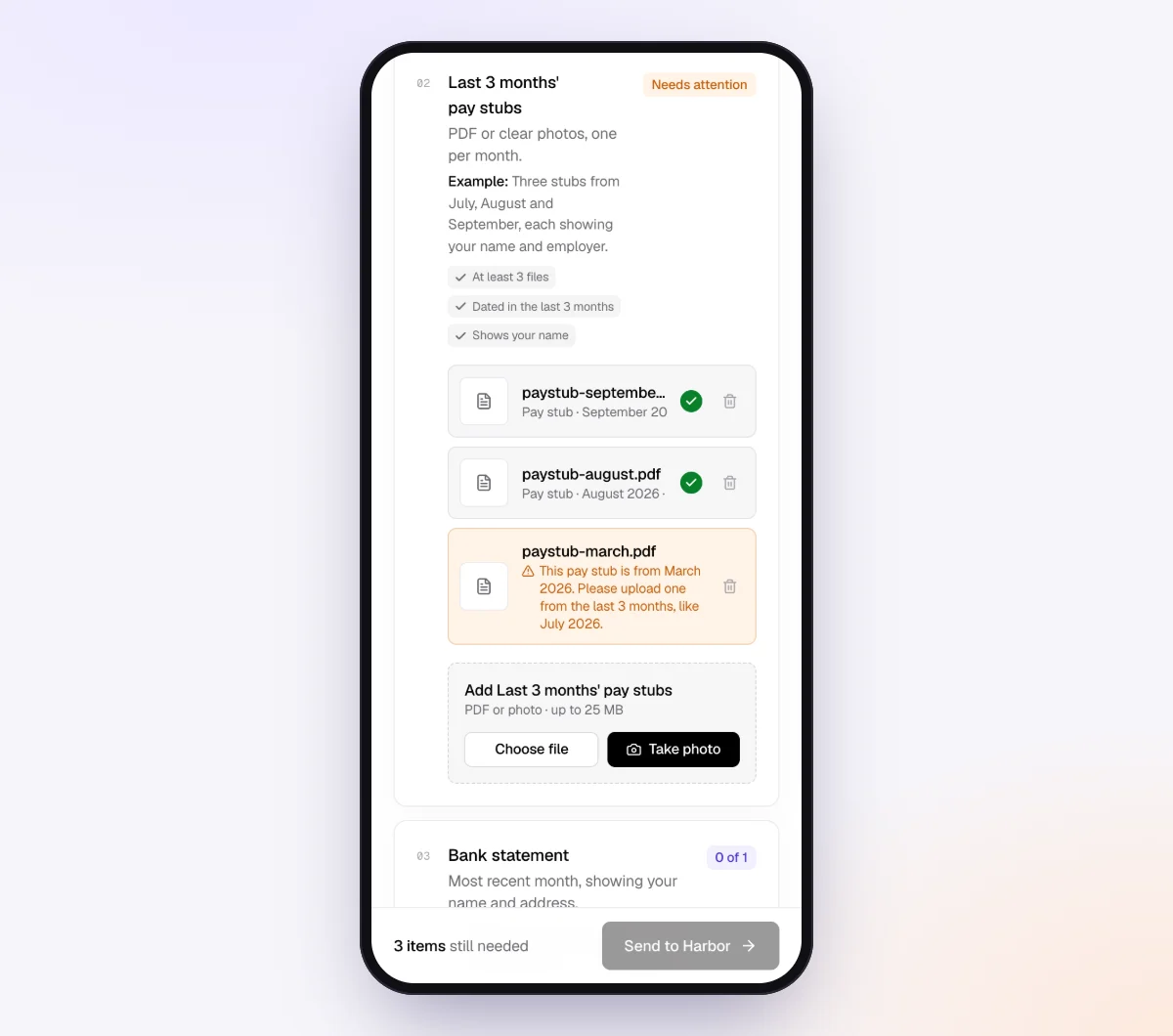
Each volunteer gets an invitation from your business name, opens their checklist and uploads from their camera or files. Each upload is checked in seconds by document checks: the right document, readable, recent enough, every page, signed where needed. A blurry count sheet or page one of a three-page statement gets a friendly note while they still have it in hand.
5. The agent chases, you review
With "Chase until it's all in" and "Paced to each request's deadline" on, reminders are spaced to each volunteer's date and list only what's still missing. If the event lead asks "Do you need the receipts for the raffle prizes too?", the agent answers from your checklist and notes, or hands off to you. On Pro, volunteers can also reply by email with the file attached.
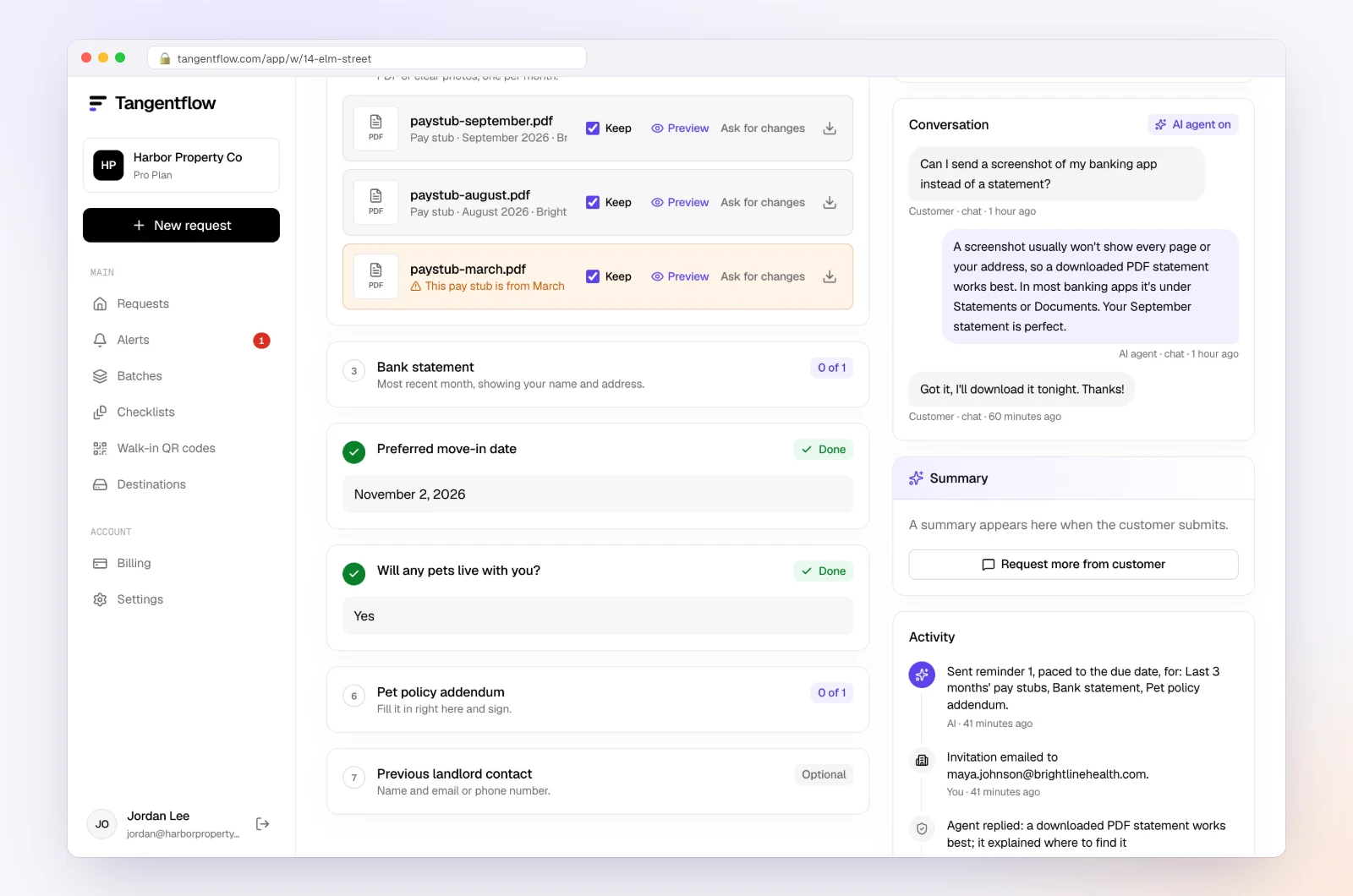
When everything is in, download an organized ZIP, or on Pro deliver to Google Drive or a webhook. Mark the request complete and the files are deleted 24 hours later. More on running a practice this way for bookkeepers.
Setups by type of organization
| Organization | Who gets a request | Key items | Settings worth turning on |
|---|---|---|---|
| Small church or parish | Treasurer, counting team lead, office administrator | Statements, signed count sheets, designated gift notes, payroll register | "Repeat every month" for the treasurer, "Require an email code" for payroll |
| Youth sports club | Treasurer, registrar, tournament lead | Statements, registration platform payouts, tournament cash counts | "Only ask if" for tournament months |
| Food bank or community services | Treasurer, grant manager, warehouse lead | Statements, grant agreements and reports, in-kind donation logs and photos | Separate "Grant documents" checklist |
| Registered charity (Canada) | Treasurer, development lead, executive director | Statements, receipt register, gifts in kind valuations, directors' list | Year-end checklist for T3010 items |
When something goes wrong
| Problem | Likely cause | Fix |
|---|---|---|
| Treasurer forwards your request to five people | One request covered everyone's items | Send each volunteer their own short request under the same reference |
| A deposit has no breakdown | Count sheet stayed in the church office | Add a "Deposit details" item with an example photo of a count sheet |
| Volunteer reimbursement with no receipt | Receipt lost or never kept | Use a missing receipt form signed by the volunteer and approved by the treasurer |
| A grant appears with no agreement | Grant writer kept it in personal email | Send the grant manager a "Grant documents" request |
| New treasurer can't find anything | Handover never happened | Re-run the onboarding checklist and update the "who sends what" table |
| Volunteer hasn't opened the link | Email in spam, or rarely checked | Ask them to check spam, or copy the link and text it yourself |
| Platform payout sent as a CSV | Default export format | Fine on a "PDF or spreadsheet" item; the check reads the first rows to confirm the platform and the period |
| Deadline passed with items missing | Volunteer busy or stuck | The agent hands off to you; call the board chair and agree a new date |
Free and Pro, honestly
You can run a real request without paying anything.
| Free | Pro ($29/month) | |
|---|---|---|
| Open requests | 1 at a time | Unlimited |
| AI check on each file | Yes | Yes |
| AI autopilot (answers, reminders, follow-ups) | Your first request | Every request |
| Send to many clients at once (Batches) | No | Yes |
| Clients reply by email with attachments | No | Yes |
| Branding | Tangentflow badge | Your logo |
| Delivery to Google Drive or a webhook | No | Yes |
| Works with AI assistants (MCP) | No | Yes |
| File retention | 7 days | 60 days |
Both plans include unlimited checklists, QR codes and posters, ZIP export, AI summaries and email delivery. Pro is billed monthly with no contract, and you can cancel any time. Full details on the pricing page.
Free allows one open request at a time, so requests to several volunteers at once are a Pro workflow.
What Tangentflow does not do: SMS or text messages, a native mobile app, full legal e-signature certificates, identity verification, collecting payments, or permanent storage. If you need any of those, pair it with a tool that does. It also does not connect to bank feeds, categorize transactions or replace your bookkeeping software.
The whole process as a checklist
- Fill in the "who sends what" table with a name and email for each role.
- Collect onboarding papers once: tax status, bylaws, board list, every account, last year's return.
- Build a short checklist per role.
- Ask for a breakdown with every deposit, not just the slip.
- Ask monthly about restricted gifts, in-kind gifts and new grants.
- Keep grant agreements and restriction letters with the books.
- Send each volunteer their own request with a real needed-by date, and remind only about what's missing.
- Before year-end, confirm which return applies: 990-N, 990-EZ, 990, T3010 or T1044.
- Collect donor totals, receipts or acknowledgments, event details and board information.
- Deliver the files to your system of record and delete the extra copies.
Frequently asked questions
What documents do I need from a nonprofit bookkeeping client?
At onboarding, the IRS determination letter or CRA registration, bylaws, a board list, every bank and card account, and last year's return. Each month, statements, deposit details with a breakdown by donation, event and grant, check stubs, payout reports and volunteer reimbursement receipts. Add grant agreements, donor restriction letters and in-kind gift records as they come up.
Do churches have to file Form 990?
Churches and certain church-related organizations are generally not required to file Form 990, 990-EZ or 990-N in the US. They still need good books, donor acknowledgments for gifts of $250 or more and payroll filings if they have staff. Check with the church's tax advisor about its specific situation.
When is the T3010 due?
A registered charity must file the T3010 no later than six months after the end of its fiscal period, so June 30 for a December 31 year-end. The CRA can revoke registration for not filing. Confirm the date on the CRA's T3010 page each year.
How do I get documents from volunteers who never check email?
Send short requests that open on a phone with no account, and ask the treasurer to tell volunteers to expect them. If a volunteer still doesn't respond, copy the link and text it yourself, or call. Tangentflow reminds by email only, so a volunteer who never reads email will need a personal nudge.
What records should a nonprofit keep for in-kind donations?
A description of what was given, the donor and date, how the value was estimated, a photo for property, and what the organization did with it. US charities may need to sign a donor's Form 8283 for items over $5,000, and Canadian charities need extra details on receipts for non-cash gifts. Check the IRS and CRA guidance for the current rules.
Can I send one request to several people at the same organization?
Each Tangentflow request goes to one person with their own private link. For a nonprofit, send each volunteer their own request under the same reference, so you can see who has sent what. On Pro, you can do this for many people at once with Batches.