Templates
PBC List Template for Audits and Reviews (2026)
A copy-ready PBC list template for small audits and reviews, organized by area with export formats, a request timeline, tracking options and Tangentflow setup.
By Bibin MathewUpdated 19 min read
The short answer
A PBC (prepared by client) list is the set of reports, statements, agreements and answers the client must hand over before fieldwork can start. Send it six to eight weeks ahead with a real due date, name each item in the client's words, say which export format you want (PDF for statements, Excel or CSV for reports), and track arrival item by item instead of in an email thread. The template below covers books, cash, receivables, payables, inventory, fixed assets, debt and leases, equity, payroll, taxes, legal and subsequent events.
Fieldwork is booked for the second week of March. The PBC list went out in January. It is now March 3, and you have the trial balance, two of five bank statements, an AR aging as a screenshot, and an email that says "the loan stuff is coming." Every small audit and review firm knows this week, and so does every bookkeeper who has had to get a client ready for an audit.
This guide is for small audit and review practices in the US and Canada, and for the bookkeepers who prepare clients for them. You will get a copy-ready PBC list organized by area with what good looks like and the format to ask for, a timeline for sending and chasing it, a comparison of the ways firms run PBC lists, and a step-by-step setup in Tangentflow using the built-in "Audit / review PBC list" template.
What a PBC list is
A PBC list ("prepared by client," sometimes "provided by client") is the schedule of items the client must deliver before and during an audit or review: reports from the accounting system, statements from banks and lenders, signed agreements, minutes, and a few questions only management can answer.
It is different from the engagement letter, which sets scope and fees, and from the audit program, which lists the auditor's own procedures. It is the one document the client has to act on, so it decides whether fieldwork starts on time.
A review engagement has a PBC list too, shorter and leaning on reports and management's answers rather than source documents, because a review is mostly inquiry and analytical procedures. The structure below works for both.
Why collecting the PBC list takes weeks
Almost everything on a PBC list is a report the client's accounting software exports in a minute. The weeks go somewhere else:
- The client does not know what the item is. "Trial balance at period end" is a phrase an office manager hears once a year. They ask the bookkeeper, and the item waits.
- Files arrive in the wrong format. A general ledger as a 400-page PDF. A bank statement as a screenshot with no opening balance. An AR aging dated today instead of year-end.
- Items trickle in. Three things on Monday, one on Thursday, a "did you still need the minutes?" two weeks later. Nobody can see what is missing without rereading the thread.
- The list is chased by memory, when fieldwork is in sight and nothing can be fixed.
- One list, many people. The bookkeeper has the reports, the owner has the loan agreements, the payroll company has the registers. A list emailed to one person stalls at each handoff.
The rest of this guide is the fixes.
The PBC list template
Copy the sections you need. Each item names the usual format, then what a good copy looks like, ready to paste into the client-facing hint. "Period end" means the last day of the fiscal year or review period. In short: statements and signed documents as PDF, because the PDF carries the balances and signatures; reports as Excel or CSV, because you will foot, sort and filter them.
Books
- Trial balance at period end (Excel, CSV or PDF): every account with debit and credit balances, dated the last day of the period, after the final closing entries.
- General ledger detail for the period (Excel or CSV): every transaction in every account, full period, one file.
- Year-end adjusting entries (Excel or PDF): entries posted after the preliminary trial balance, with a reason for each.
- Draft financial statements, if prepared (PDF or Excel): balance sheet, income statement and cash flow, with notes.
Ask for the trial balance and the ledger exported on the same day, after the final close, or they will not agree.
Cash
- Bank statements for every account, period-end month (PDF only): from the bank's website, every page, with opening and closing balances; not an export or screenshot.
- Bank reconciliations at period end (Excel or PDF): one per account, book balance to bank balance with reconciling items.
- Statements for the month after period end (PDF only): same accounts, for outstanding checks and deposits in transit.
- List of all bank, card and payment accounts (short answer): including accounts opened or closed, merchant processors and PayPal-style balances.
Bank statements are the item most often sent wrong. See getting bank statements from clients, and send clients how to download bank statements as PDF.
Receivables and revenue
- Accounts receivable aging at period end (Excel or CSV): customer by customer, in aging buckets, totaling to the trial balance.
- Subsequent cash receipts (Excel or CSV): collections after period end, by customer and invoice.
Payables and expenses
- Accounts payable aging at period end (Excel or CSV): vendor by vendor, unpaid bills, totaling to the trial balance.
- Payment register for the month after period end (Excel or CSV): for the search for unrecorded liabilities.
- Related-party payments (Excel and PDF): rent to the owner, fees to an affiliate, shareholder loans, with the agreements.
Inventory
- Year-end count sheets (PDF or Excel): signed count sheets or the system count report, by location.
- Final inventory listing with costs (Excel or CSV): item, quantity, unit cost and extended value, totaling to the trial balance.
- Costing method and obsolescence reserve (short answer and Excel): the method used, and how the reserve was estimated.
Fixed assets
- Fixed asset register with depreciation (Excel or CSV): cost, date in service, method, life and accumulated depreciation, with additions and disposals flagged.
- Invoices for additions over your threshold (PDF): the purchase invoice or agreement for each significant addition.
- Disposal documents (PDF): sale agreements or trade-in paperwork, with proceeds.
Debt and leases
- Loan agreements, every loan and line of credit (PDF): signed, every page, including amendments and covenant schedules.
- Year-end lender statements (PDF): balance at period end and interest paid for the year, per loan.
- Debt rollforward and covenant calculations (Excel): opening balance, draws, repayments, closing balance; the client's covenant test.
- Lease agreements and lease schedule (PDF and Excel): every lease, signed and complete, plus term, payments and options.
Equity and governance
- Board, shareholder or members' minutes (PDF): all meetings during the period and any since.
- Articles, bylaws and shareholder agreements (PDF): current versions, with any amendments.
- Share register, distributions and related parties (Excel, PDF and short answer): issuances and transfers, dividends or draws with the approving resolution, and who owns what.
Payroll
- Payroll register for the year (Excel or CSV): by pay period, with gross, deductions, employer taxes, net and totals.
- Year-end payroll forms (PDF): W-2s, W-3 and Forms 941 and 940 in the US; T4 summary and slips in Canada.
- Accrued payroll and vacation (Excel): hours or days owed at period end, costed.
- Contractor payments summary (Excel or CSV): 1099-NEC recipients in the US, T4A or T5018 recipients in Canada.
Our guide to payroll reports for bookkeepers explains which report to ask for from each payroll provider.
Taxes
- Prior-year income tax returns, as filed (PDF): federal and state or provincial, with schedules.
- Sales tax, GST/HST or PST filings for the period (PDF): filed returns and the period-end balance owing or receivable.
- Notices from tax authorities (PDF): anything received during the period or since.
Legal and commitments
- Lawsuits, claims or disputes during the period (short answer): a written list including anything threatened or settled, or "none."
- Legal invoices and lawyer contact details (PDF and short answer): for the legal letter you send yourself.
- Significant contracts, commitments, guarantees and insurance policies (PDF): what the business is bound to, and what covers it, at period end.
Subsequent events and management's answers
- Anything unusual this period? (short answer): new loans, large purchases or sales, new owners, new accounting software, a major customer lost or won.
- Events after period end (short answer): lawsuits, financing, acquisitions, losses, layoffs since period end.
- Interim financial statements after period end (PDF or Excel): the most recent month or quarter.
- Known or suspected fraud, and changes in accounting policies (short answer).
First-year engagements: add the prior-year financial statements and report, the prior-year adjusting entries and the opening fixed asset register. Some of that comes from the previous firm; our guide to requesting records from a previous accountant covers the authorization and the letter.
When to send the PBC list and when to chase it
A PBC list sent too early gets forgotten; sent too late, nothing can be fixed. A reasonable schedule for a small engagement:
| When | What happens |
|---|---|
| 10 to 12 weeks before fieldwork | Planning call. Confirm entities, accounts, new loans or leases, software changes and who produces each item. |
| 6 to 8 weeks before fieldwork | Send the list with a due date 2 weeks before fieldwork and one line on why the date matters. Agreements and minutes are due first. |
| 4 to 5 weeks before fieldwork | First reminder, listing only what is still missing. |
| Period-end close complete | Client exports the trial balance, ledger, agings and register, all on the same day. |
| 3 weeks before fieldwork | Second reminder. Call about anything that needs a third party: lender statements, legal matters, payroll reports. |
| 2 weeks before fieldwork (cutoff) | PBC due date. Anything missing becomes a conversation: fix it, reschedule, or agree what arrives on day one. |
| 1 week before fieldwork | Confirm the trial balance agrees to the ledger and the agings before anyone opens a workpaper. |
Two rules make the schedule work. The cutoff is before fieldwork, not the first day of it, or the first two days are reading rather than testing. And every reminder lists only what is missing. A client who gets the full list again after sending eight of twelve items concludes you did not look.
For reminder spacing, see our client reminder schedule. For wording, the document request email templates include a first request and a follow-up you can adapt.
Ways to run a PBC list, compared
Most small firms run the PBC list one of three ways; the question is where the time goes.
| Method | Setup | Cost | Client experience | Tracking | Checking files |
|---|---|---|---|---|---|
| Email plus an Excel tracker | None | Free | Familiar, but attachments scatter | Manual, as current as the last update | Manual, when someone opens the file |
| Audit software client portal (the kind large firms use) | High, tied to the audit platform | Significant, per user or engagement | Account needed; slow when forgotten | Built in, item by item | Rarely; arrival is tracked, content is not |
| Collection link with a checklist and an agent (Tangentflow) | Low, start from a template | Free to start, $29/month Pro | Private link, no account, works on a phone | Item by item, with a CSV index | Each file checked on arrival: right report, right period, every page |
Email and Excel costs nothing until the week before fieldwork, when it costs everything. Audit platform portals are right when the firm already pays for one and the client's finance team logs in anyway; owner-managed clients tend to lose the password and email files regardless (see clients who won't use a client portal). A collection link sits in between: the client sees what is missing, you see what arrived and whether it passed a check, and reminders go out on a schedule. It does not replace your audit software.
Request PBC items from the client in Tangentflow, step by step
Tangentflow collects documents and answers through one private link per request, checks each upload as it arrives and chases what is missing by email.
1. Start from the "Audit / review PBC list" template
Go to Checklists, choose "Browse templates" and pick Audit / review PBC list. It opens with the core items: trial balance at period end, general ledger detail for the period, bank statements and reconciliations, AR and AP aging, fixed asset register, loan and lease agreements, board and shareholder minutes, a question about lawsuits, claims or disputes, and an optional "Anything unusual this period?" question.
The report items are set to "PDF or spreadsheet," so the client can export Excel or CSV straight from their accounting software. Statements and agreements ask for every page. The agings, register, agreements and minutes are optional, so a client with no debt is not chased for them.

2. Add items and tell each one what good looks like
In the checklist editor, add the items you need from the sections above. For each file item, fill in "What should it be?" in the client's words ("accounts receivable aging as of December 31, from your accounting software"), set the count, and pick the file type: "PDF or spreadsheet" for reports, "PDF only" for statements. Tick "every page" for statements and agreements.
Group items under headings, mark the optional ones, and add a "Form field" for answers: long text for the lawsuits question, yes/no for "Do you hold inventory?" with "Only ask if" so the inventory items appear only when the answer is yes.

3. Create the request with a real due date
Go to Requests, click "New request," choose the checklist, add a reference ("Northfield Supply, FY2025 audit"), the client contact's name and email, and a needed-by date two weeks before fieldwork. Leave "Email the link" on and the AI collection agent sends the invitation from your firm's name. Use "Notes for the agent (private)" for context the client should not see: "Dana does the books; the owner holds the loan agreements."

If several people at the client produce items, have your main contact forward the link; everyone sees the same list and progress. For extra protection, turn on "Require an email code" so the link opens only after a 6-digit code sent to the email on file, and use "Reset link" if a link reaches the wrong person. For many engagements, "Batches" sends one request per client from a spreadsheet (bulk requests).
4. The client uploads reports and answers questions
The client opens the link in any browser, uploads each item and answers the questions on the same page. "PDF only" items will not take a screenshot.
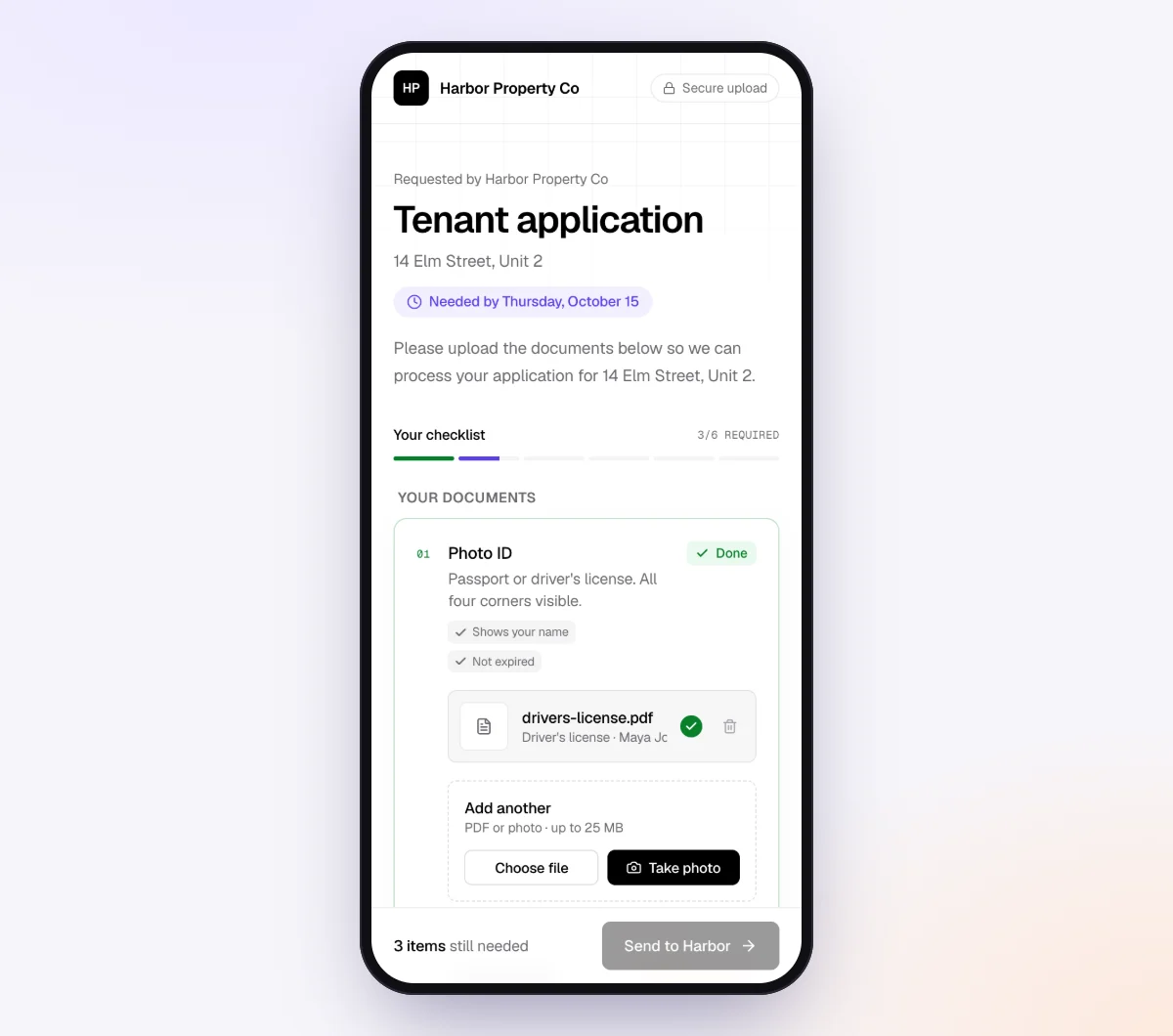
Each upload is checked within seconds by document checks. For a PDF, the check looks at whether it is the right document, readable, every page and covering the right period. For an Excel or CSV file, it reads the first rows of the sheet to see what the report is and whether it covers the period. When the first rows show an aging dated today, or a different report where the trial balance should be, the client gets a friendly note on the spot, while they still have the software open. The check reads the report's header rows, so it catches the wrong report or period, not a wrong balance.
5. The agent chases, then you export the Evidence index
Reminders go out paced to the due date, listing only what is still missing, and the agent answers the client's questions by email and in the upload page chat from your hints and private notes. The request page shows every file with its check result, every answer, what is outstanding and an activity timeline, with "Ask for changes" on any file.
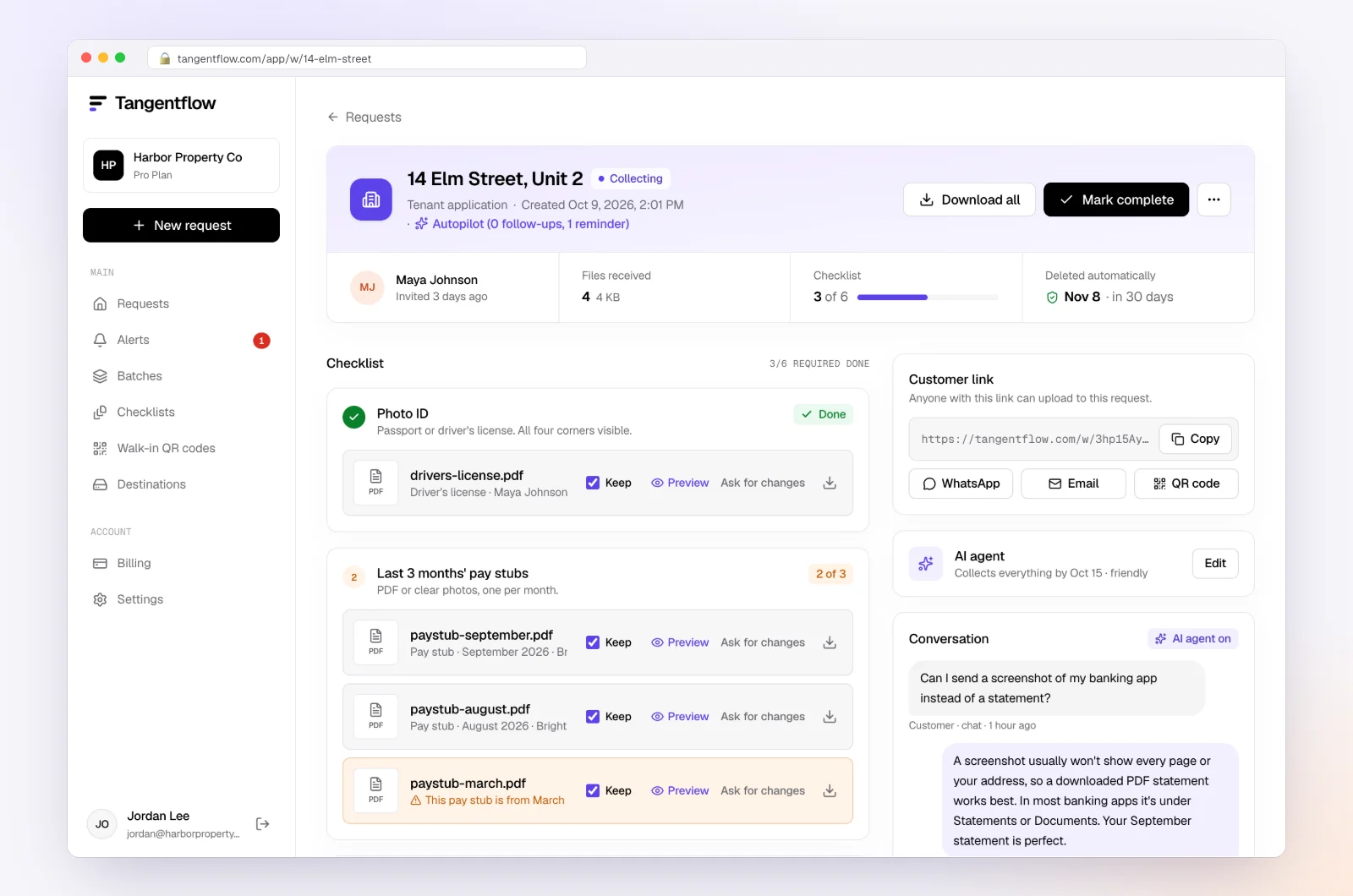
When the list is complete, download the organized ZIP package, or on Pro deliver to Google Drive or a webhook. From the request's menu, download the "Evidence index (CSV)": one row per item and file, with the item name, whether it was required, its status, the file name or the client's answer, the time received, the check result, any issue raised and the facts the check pulled out, such as the report name and period. It is a ready-made PBC tracker for the engagement file. Mark the request complete and the files are deleted 24 hours later; your audit file, not the collection tool, is the system of record.
PBC list setups by engagement
| Engagement | Add or emphasize | Drop or mark optional | Settings worth using |
|---|---|---|---|
| First-year audit, small private company | Prior-year statements and report, opening fixed asset register, all agreements | Nothing; the first year is the long one | Due date 3 weeks before fieldwork; "Notes for the agent" with who holds what |
| Recurring audit | Rollforwards, new agreements only, minutes since last year | Articles and bylaws unless amended | Reuse last year's checklist; "Only ask if" on "Any new loans this year?" |
| Review engagement | Trial balance, ledger, agings, statements and reconciliations, inquiry answers | Count sheets, invoice-level support | Fewer items, shorter window; long-text questions |
| Nonprofit audit | Grant agreements and reports, restricted fund schedule, board minutes | Inventory, sales tax | Headings by fund; "every page" on grant agreements |
| Bookkeeper preparing a client for another firm's audit | What only the client holds: statements, agreements, minutes, answers | Reports you can export from the books yourself | One request per client, due a week before the auditor's date |
For the bookkeeper in that last row, our year-end bookkeeping checklist for clients covers the client-side items, and the accounting and tax use case shows how firms run it.
When something goes wrong
| Problem | Likely cause | Fix |
|---|---|---|
| Trial balance does not agree to the ledger or agings | Reports exported on different days, or before the close | Ask for all reports re-exported on the same day after the final close |
| General ledger arrives as a huge PDF | The client clicked Print instead of Export | Set the item to "PDF or spreadsheet" and put "export to Excel" in the hint |
| Bank statement is a screenshot or an export | The client used the app, not the website | "PDF only" refuses screenshots; link the download guide in the hint |
| Aging is dated today, not period end | Default report date | The check flags the wrong period; the hint says "set the date to December 31" |
| "None" to the lawsuits question, but legal fees are high | Different understanding of "dispute" | Follow up with a specific question listing the invoices; this is your inquiry, not the agent's |
| Items trickle in after the cutoff | No consequence for the date | Hold the fieldwork date and say so; the agent hands off to you when the deadline is missed |
Check "Alerts" daily during the PBC window; handoffs and missed deadlines land there.
Free and Pro, honestly
You can run a real PBC request without paying anything.
| Free | Pro ($29/month) | |
|---|---|---|
| Open requests | 1 at a time | Unlimited |
| AI check on each file | Yes | Yes |
| AI autopilot (answers, reminders, follow-ups) | Your first request | Every request |
| Send to many clients at once (Batches) | No | Yes |
| Clients reply by email with attachments | No | Yes |
| Branding | Tangentflow badge | Your logo |
| Delivery to Google Drive or a webhook | No | Yes |
| Works with AI assistants (MCP) | No | Yes |
| File retention | 7 days | 60 days |
Both plans include unlimited checklists, QR codes and posters, ZIP export, AI summaries, the Evidence index and email delivery. Pro is billed monthly with no contract. Full details on the pricing page.
What Tangentflow does not do: SMS or text messages, a native mobile app, full legal e-signature certificates, identity verification, collecting payments, or permanent storage. If you need any of those, pair it with a tool that does. It also does not extract figures into workpapers, tie out balances, read full ledgers or evaluate audit evidence. Encryption and deletion details are on the security page.
The PBC process as a checklist
- Hold a planning call 10 to 12 weeks out and confirm entities, accounts, new debt and who produces each item.
- Build the PBC list by area, naming each item the way the client will recognize it.
- Say the format on every item: PDF for statements and signed documents, Excel or CSV for reports.
- Mark items optional or hide them behind a yes/no question so nobody is chased for a report that does not exist.
- Send the list 6 to 8 weeks before fieldwork through one private link, with a due date 2 weeks before fieldwork.
- Ask for the trial balance, ledger and agings exported on the same day, after the final close.
- Check each file the day it arrives, remind on a schedule listing only what is missing, and treat the cutoff as real.
- Export the Evidence index, move the files into your audit software and let the collection copies delete.
Frequently asked questions
What does PBC stand for in an audit?
PBC stands for "prepared by client" (some firms say "provided by client"). The PBC list is the schedule of reports, statements, agreements and answers the client must give the auditor or reviewer before and during the engagement: the client's to-do list, as opposed to the audit program, which lists the auditor's own procedures.
What is the difference between a PBC list for an audit and for a review?
A review relies mainly on inquiry and analytical procedures, so its list is shorter: trial balance, ledger, agings, statements and reconciliations, plus management's written answers. An audit list adds source documents, agreements, minutes, counts and legal information for tests of detail.
What format should PBC items be in?
Statements and signed documents as PDF, because the PDF carries the opening and closing balances and the signatures. Reports such as the trial balance, general ledger and agings as Excel or CSV, so you can sort, filter and foot them. In Tangentflow, set those items to "PDF or spreadsheet" and statements to "PDF only."
Can Tangentflow read a trial balance or ledger and tie it out?
No. For Excel and CSV files the check reads the first rows of the sheet to tell what the report is and whether it covers the right period, so the wrong report or date is flagged while the client is still on the page. Footing, tying out and evaluating the evidence happen in your audit software, by you.
Does using a collection tool change the auditor's responsibilities?
No. The auditor evaluates the evidence and documents the work under the applicable standards, whether the files arrived by email, portal or link. Tangentflow collects the items and confirms each one looks like what was asked for; its check result is a note on arrival, not an audit procedure.
Is there a free way to try this on one engagement?
Yes. The Free plan gives you one open request at a time with the full AI agent on your first request, enough to run one PBC list end to end. Try it free, or read how bookkeepers use Tangentflow.