Guides
How to Download Bank Statements as a PDF (2026)
How to download bank statements for your bookkeeper as PDFs, with steps for Chase, Bank of America, Wells Fargo, Capital One, RBC, TD, Scotiabank, BMO, CIBC.
By Bibin MathewUpdated 19 min read
The short answer
Sign in to your bank's website, open the Statements or Statements & documents section, pick the account and the month, and save the PDF. Send your bookkeeper the official monthly statement, every page, not a screenshot, a custom date range or a CSV export, because they need the opening and closing balance to reconcile. Most big US and Canadian banks keep up to 7 years of statements online for open accounts; for closed accounts or older years, call the bank. Never share your banking password with anyone, including your bookkeeper.
Your bookkeeper asked for "last month's bank statements as PDFs," and now you are signed in to your bank, looking at a list of transactions, wondering whether this is the statement. It usually is not. The statement is a separate document that the bank produces once per statement period, and it hides a click or two away from the screen you see first.
This guide shows you how to download bank statements for your bookkeeper: what to send, where each major US and Canadian bank keeps statements, how far back you can go, closed accounts, credit cards and business accounts. Bookkeepers can send it to clients as is.
If you are the bookkeeper, our companion post on how to get bank statements from clients every month covers your side: choosing a method, view-only access, the accounts list and email templates. This one is the page you link in your request.
The short version: what your bookkeeper actually needs
Before the clicks, here is what a usable statement looks like. If you send exactly this, you will not hear back with "can you resend?"
| Your bookkeeper needs | Why | What people send by mistake |
|---|---|---|
| The official monthly statement as a PDF | It is the bank's record of the period, with the opening and closing balance | A screenshot of the app, or a photo of the screen |
| Every page | Fees, interest and the balance summary are often on the last page | Page 1 only |
| The full statement period | The closing balance has to match the period your bookkeeper is closing | "Last 30 days" or a custom date range |
| One file per account, per period | Each account is reconciled on its own | Every account merged into one long file, or one page per account |
| Every account used for the business | A missed account means months get reopened later | Only the main checking account |
| Credit card statements, by statement date | Cards usually close mid-month, not on the 30th | The card's recent activity screen |
Remember: statement, PDF, every page.
How to download a bank statement PDF: the steps that work almost everywhere
Every bank in this guide follows roughly the same pattern. If your bank is not listed, these steps will still get you there.
- Sign in on a computer if you can. Statements are easier to find and save there than in the app.
- Find the statements section. Look for Statements, Statements & documents, eStatements or Documents, either in the main menu or on the account's own page.
- Pick the account. If you have several, the statements page usually has an account dropdown.
- Pick the period. Choose the year, then the statement for the month your bookkeeper asked for.
- Open the PDF and save it. Use the download or save button in the PDF viewer. On a phone, use the Share button and choose Save to Files (iPhone) or save to your downloads (Android).
- Name the file so it is obvious. For example,
Chase-checking-4410-2026-09.pdf. Your bookkeeper will thank you. - Send it the way your bookkeeper asked, usually by uploading it to their secure link, not by email.
Step by step for major US banks
Paths below are for personal online banking unless noted. Business banking screens can differ; see the section on business vs personal accounts further down.
How to download a Chase bank statement PDF
Per Chase's paperless FAQ:
- On chase.com: sign in, open the Main Menu at the top left, and choose Statements & documents. Pick the year and the account, then open or save the statement.
- In the Chase Mobile app: tap Profile & Settings at the top right, then Statements & documents under Document manager. Choose Statements, then the account, the year and the statement. It opens as a PDF you can save.
Chase says you can access up to 7 years of statements, depending on the account type.
Bank of America
Per Bank of America's digital banking help:
- In Online Banking: sign in, open the Accounts tab, then Statements & Documents. Choose the account and the statement to view or download.
- Older statements: from the same page, use Request statements. Bank of America says electronic copies arrive in 24 to 36 hours and stay available for a week, and paper copies by mail take 7 to 10 business days.
Bank of America says it keeps statements for up to 7 years.
Wells Fargo
Per Wells Fargo's online statements page and statement FAQs:
- In Wells Fargo Online: sign in and go to Statements and Documents. Select the account and the time period, then open the statement and save it as a PDF.
How far back depends on the account: up to 7 years for deposit accounts such as checking and savings, up to 2 years for credit cards, lines of credit and personal loans, and up to 12 months for auto loans. Wells Fargo's FAQ also notes that the Account Activity screen shows only the past 60 to 90 days of transactions, which is another reason to send the statement rather than a screenshot of recent activity.
Capital One
Per Capital One's online bank statements help page:
- On capitalone.com: sign in, click the account, then click View statements.
- In the Capital One Mobile app: tap the account, scroll to the bottom and tap Statements.
Capital One says you can see up to 7 years of statements online for active accounts, and you must be enrolled in paperless statements to view them online. Some savings products produce statements quarterly if there is no activity, so a quiet month may have no savings statement.
Step by step for major Canadian banks
RBC Royal Bank
Per RBC's statement tutorial:
- In RBC Online Banking: from the Accounts Summary page, select Statements/Documents at the top right. On the Account Documents page, choose the account and use the dropdown to pick the statement period.
- In the RBC Mobile app: tap More in the navigation bar, then Statements under Services, and choose the account.
RBC's eStatement help describes an archive of up to 7 years, which may start from the date you switched to eStatements. If you cannot find a statement, RBC's tutorial points you to its phone support.
TD Canada Trust
Per TD's EasyWeb tutorial:
- In EasyWeb: sign in and choose Statements and Documents from the account dropdown at the top of the screen. Use Get statements & documents by account to pick the account, then Filter by year, and click a statement to open it as a PDF you can save.
TD says you can access up to 7 years of past statements online. If the app path is not obvious, use EasyWeb on a computer.
Scotiabank
Per Scotiabank's help article on viewing statements:
- In Scotia online banking or the Scotia app: go to your Accounts page, select the bank account, then choose Documents and the statement you want.
Scotiabank says you can retrieve up to 7 years of account statements.
BMO
BMO's personal online banking and app keep statements with each account; open the account and look for Statements or eStatements. For business clients, BMO's Online Banking for Business quick start guide gives this path:
- In BMO Online Banking for Business: under the Account Information tab, open the eStatements menu and select Account Statements. Choose the From and To dates and the accounts, click Search, then click the link in the Statement Date column to open the PDF.
BMO describes up to 7 years of archiving for business account statements.
CIBC
Per CIBC's eStatements how-to guide:
- In CIBC Online Banking: on the My Accounts page, select View eStatements in the left sidebar, then choose the month. Open the statement and save it.
- In the CIBC Mobile Banking app: eStatements are available in the app too; open the account's statements and save or share the PDF.
CIBC says you can view up to 7 years of bank account and credit card eStatements.
All nine banks at a glance
| Bank | Where statements live (website) | How far back online, per the bank | Notes |
|---|---|---|---|
| Chase | Main Menu, Statements & documents | Up to 7 years, varies by account | App: Profile & Settings, Statements & documents |
| Bank of America | Accounts tab, Statements & Documents | Up to 7 years | Older copies via Request statements |
| Wells Fargo | Statements and Documents | 7 years deposit, 2 years cards, 12 months auto loans | Activity downloads are much shorter |
| Capital One | Account page, View statements | Up to 7 years, active accounts | Must be enrolled in paperless |
| RBC | Accounts Summary, Statements/Documents | Up to 7 years | Archive may start when eStatements began |
| TD Canada Trust | Account dropdown, Statements and Documents | Up to 7 years | Filter by year, click to open PDF |
| Scotiabank | Accounts, select account, Documents | Up to 7 years | Same in app and web |
| BMO | Account page, Statements/eStatements | Up to 7 years (business guide) | Business: Account Information, eStatements |
| CIBC | My Accounts, View eStatements | Up to 7 years | Bank accounts and credit cards |
These limits are for open accounts. "Up to" means your account might have less.
Statement vs transaction history vs CSV export
This is where most resends come from, so it is worth a minute. Your bank offers three different things that look similar on screen.
| Monthly statement (PDF) | Transaction history screen | CSV or spreadsheet export | |
|---|---|---|---|
| What it is | The bank's official record of one statement period | A live list of recent activity | A file of transactions for a date range you pick |
| Opening and closing balance | Yes | Usually only a current balance | No |
| Fixed period | Yes, set by the bank | No | No, whatever you choose |
| Fees and interest summary | Yes | Mixed in, if at all | Mixed in, if at all |
| Accepted by lenders, auditors and tax authorities | Generally yes | Rarely | Rarely |
| What your bookkeeper does with it | Reconciles the account to the closing balance | Nothing useful | Sometimes imports it, but still needs the statement |
Your bookkeeper's software may already pull in transactions through a bank feed. The statement proves those transactions are complete: they reconcile to its closing balance, and any gap means a missing or duplicated transaction.
Credit card statements
Credit cards trip people up for a few predictable reasons:
- The statement does not end at month-end. If your card closes on the 14th, your bookkeeper closing September may need the statements ending September 14 and October 14. Send the statements by their closing date, not by the calendar month.
- Download the full account statement. If employees have cards on the same account, the account owner's statement usually lists every cardholder. An employee's own view may show only their charges.
- Do not forget the side cards. Store cards, fuel cards, charge cards and any personal card you used for business all count. If you are unsure whether a personal card should be included, ask.
- Do not wait a year. Card statements often stay online for less time than bank statements; Wells Fargo keeps 2 years of card statements versus 7 for deposit accounts.
Business vs personal online banking
- Some banks show everything under one sign-in. You may see personal and business accounts on the same dashboard, and the statement steps above work for both.
- Others use a separate business site. Bank of America's business accounts live in Business Advantage 360, Wells Fargo has Wells Fargo Business Online, and BMO has Online Banking for Business. Each has its own statements menu, and the personal steps above may not match.
- Your user may not have statement access. In business banking, the account owner or administrator can limit what other users see. If you are not the administrator and cannot find statements, ask the person who set up the account to download them or give you access.
If your bookkeeper wants to download statements themselves, the safe way is for the owner to add them as their own user with view-only permissions, where the bank offers it.
How far back can I download bank statements?
For open accounts at the banks above, the usual answer is up to 7 years, with shorter windows for some products such as Wells Fargo's credit cards (2 years) and auto loans (12 months). A few practical points:
- The archive may start when you went paperless. Some banks show eStatements only from the date you enrolled.
- The online list may be shorter than what the bank keeps. Bank of America, for example, lets you request older statements from the same menu, so ask before assuming a statement is gone.
For catch-up work your bookkeeper may ask for a year or more at once; our catch-up bookkeeping documents checklist explains what they usually need and why.
How to get old bank statements from a closed account
Closed accounts are harder, because you often lose online access when the account closes.
- Try online banking first. Some banks keep closed accounts visible for a short time. Wells Fargo's statement FAQ, for example, says closed account statements stay viewable for about 90 days after closing.
- Call the bank or visit a branch. Have the account number (or last four digits), the date range and your ID ready. Ask for "copies of monthly statements as PDFs" if they can email or upload them, or paper copies if not.
- Ask about fees and timing. Some banks charge for research or copies of older statements, and some can take a week or more. Check the bank's fee schedule or ask when you call.
- For a business account, the right person must ask. The bank will usually deal only with an authorized signer on the account.
- Scan paper copies carefully. If statements arrive by mail, scan every page into one PDF per statement with your phone's document scanner, flat and in good light.
Statements older than about 7 years may no longer exist; ask the bank what it still has.
Sending statements to your bookkeeper in Tangentflow, step by step
If your bookkeeper uses Tangentflow, you get one private link by email that works on a phone or computer, with no account and no app. Here is what happens.
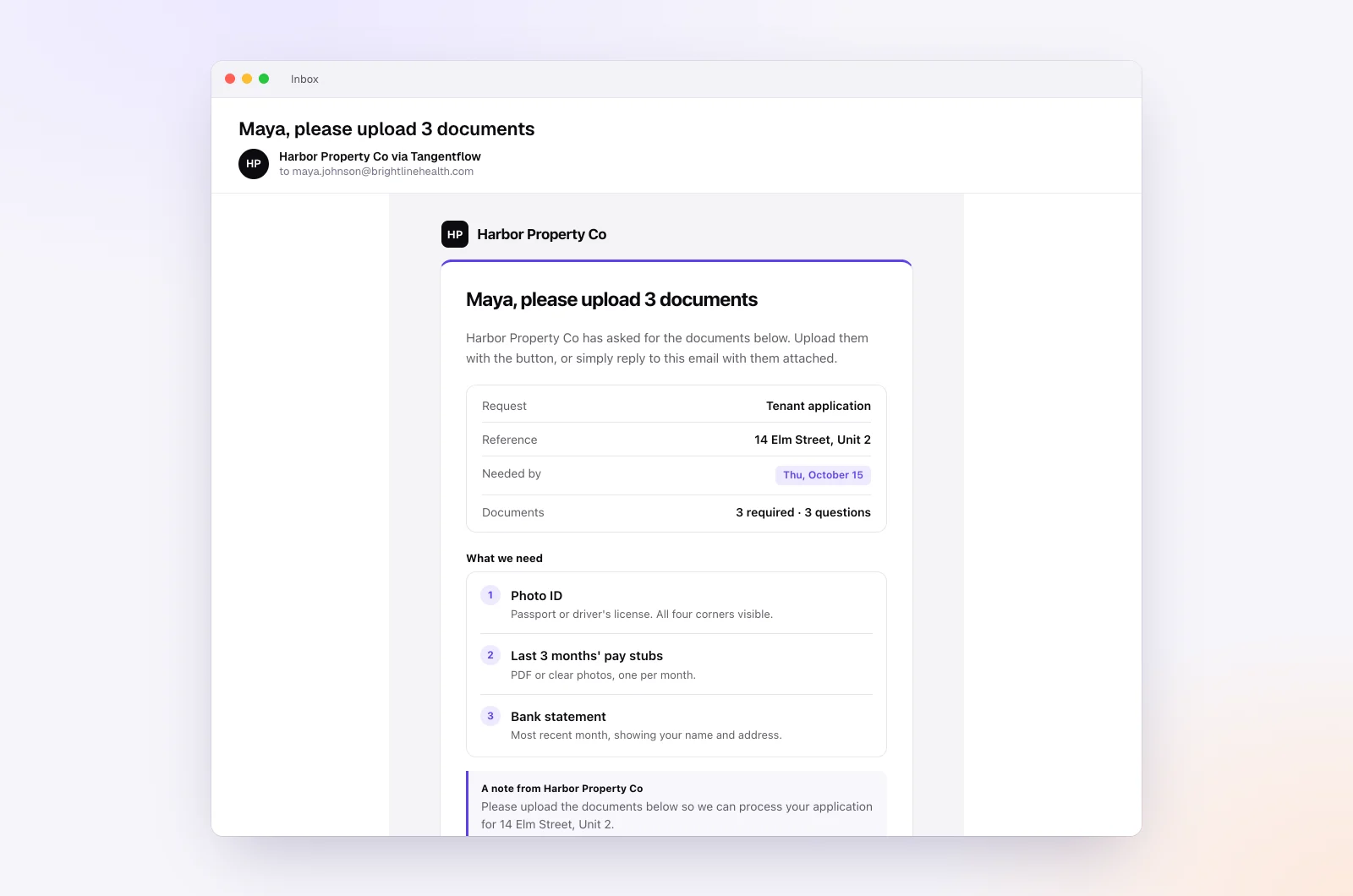
1. Open the invitation
You receive an email from your bookkeeper's business with a button to the request. If they turned on "Require an email code," you first enter a 6-digit code sent to your email, so only you can open the link.
2. Find the statements item
Most bookkeepers start from the "Monthly bookkeeping" template. You will see items like "Bank statements for the month" ("One PDF per business account") and "Credit card statements" ("If you have a business card"), along with others such as "Receipts and bills you paid." Your bookkeeper may have renamed or added items.
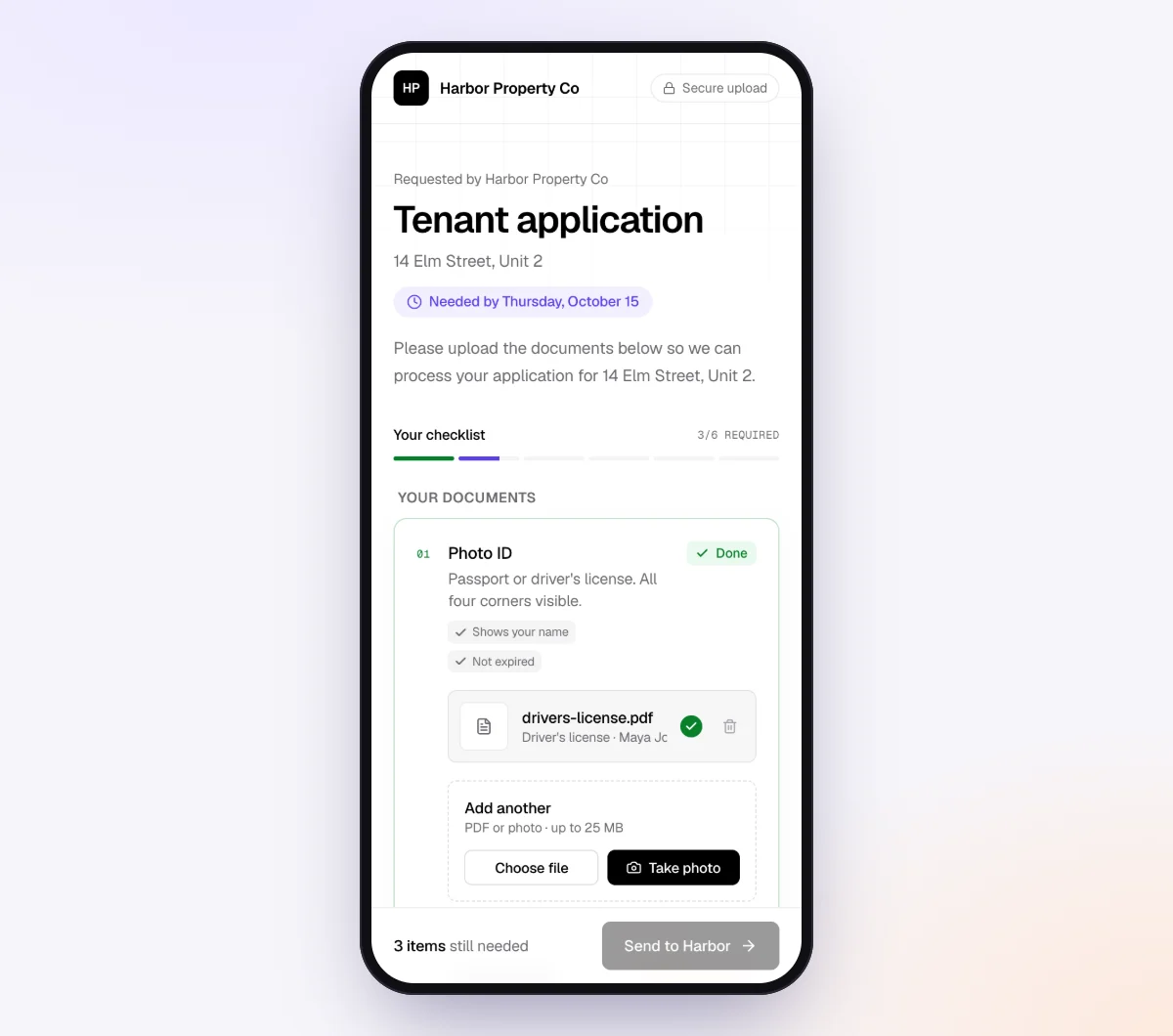
3. Upload each statement PDF
Download each statement from your bank using the steps above, then tap the item and upload the PDF. In the "Monthly bookkeeping" template, "Bank statements for the month" accepts PDFs only, so a screenshot will not go in by mistake. Files can be up to 25 MB each.
4. Fix anything the check flags, right away
Each upload is checked in seconds by document checks. If a statement looks like it is missing pages, or it looks older than the period your bookkeeper asked for, you see a friendly note explaining what to fix. Since you are probably still signed in to your bank, you can grab the right file in under a minute.
5. Ask questions in the chat
Unsure whether your savings account counts? Ask in the chat on the upload page or reply to the email. The AI collection agent answers from your bookkeeper's checklist and notes, and passes anything else to your bookkeeper.
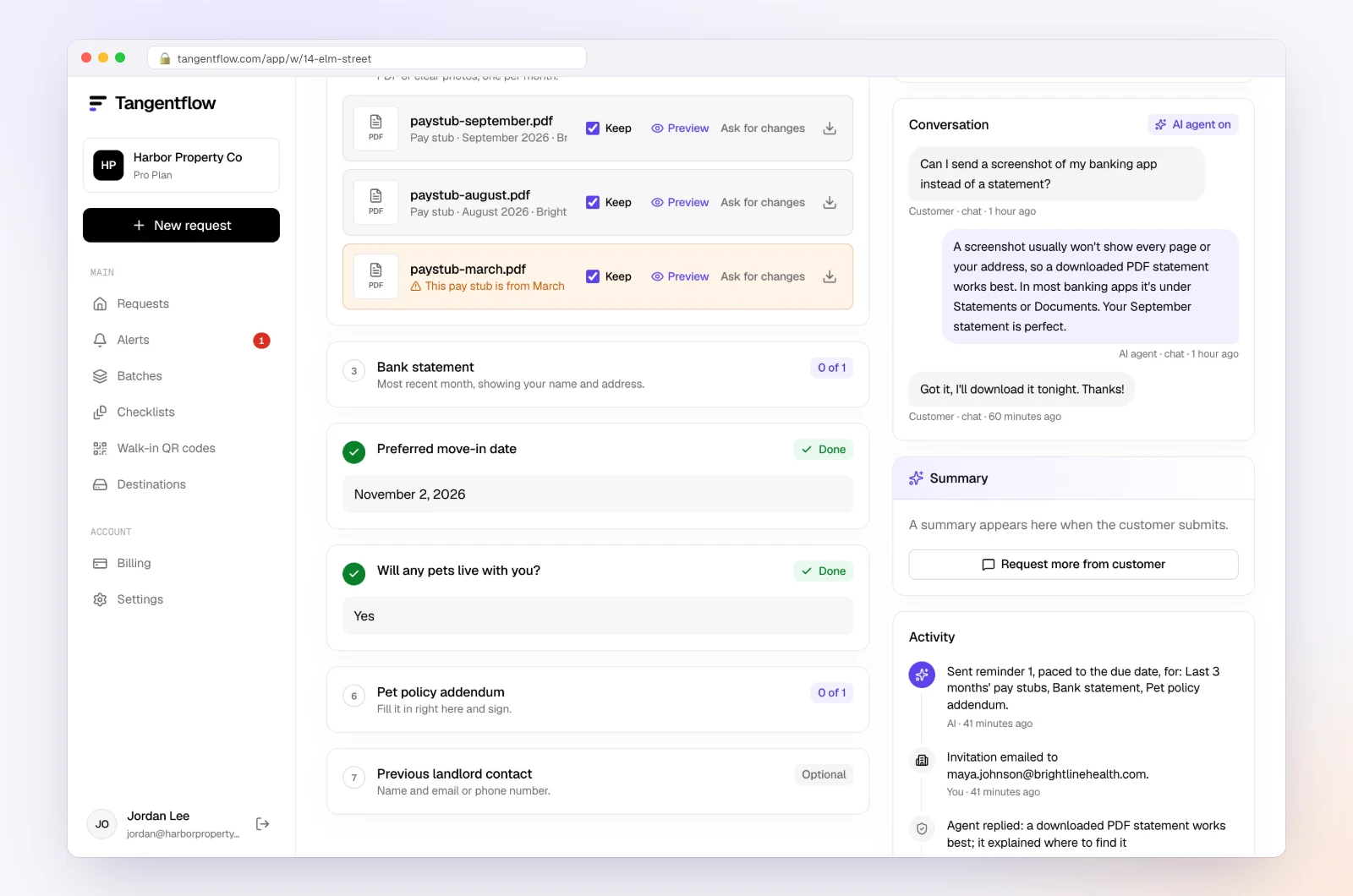
If you leave before everything is in, reminders list only what is still missing. After you send everything, the link no longer shows your files.
For bookkeepers: open "Checklists," choose "Browse templates" and pick "Monthly bookkeeping," then paste a link to this guide into the tip on "Bank statements for the month." The full setup, including monthly repeat with Batches, is in the bookkeeper-side guide and on our page for bookkeepers.
Which statements to send, by type of business
| Your situation | What to download each month | Easy to forget |
|---|---|---|
| Sole proprietor with one business account | Checking statement, business card statement | A personal card used for business |
| Contractor or trades business | Checking, every employee card on the account, equipment loan statements | The full card account statement, not one employee's view |
| Online seller | Checking, card, any account that receives payouts | A second account opened for sales tax or savings |
| Business with a line of credit | Checking, card, line of credit statement | The loan or line of credit is its own statement |
| Catch-up client | Every account for every missing month | Accounts closed during the catch-up period |
For everything else your bookkeeper may ask for, see the monthly bookkeeping checklist.
When something goes wrong
| Problem | Likely cause | Fix |
|---|---|---|
| I only see a list of transactions | You are on the activity screen | Look for Statements, Statements & documents or eStatements in the menu |
| The month I need is not there yet | The statement has not been produced | Statements appear after the period closes, often a few days later; check again in a week |
| My statement ends on the 14th | Your account or card has a mid-month cycle | Send the statements that cover the month, by their closing dates |
| I can't see statements at all | Not enrolled in paperless, or limited user access | Enroll in eStatements, or ask the account administrator |
| My bookkeeper says pages are missing | The PDF viewer saved one page, or you printed one page | Download the PDF again with the download button, not print |
| The account is closed | Online access ended | Call the bank and ask for copies |
Free and Pro, honestly
This part is for your bookkeeper. You never pay anything to upload. A bookkeeper can run a real request without paying anything.
| Free | Pro ($29/month) | |
|---|---|---|
| Open requests | 1 at a time | Unlimited |
| AI check on each file | Yes | Yes |
| AI autopilot (answers, reminders, follow-ups) | Your first request | Every request |
| Send to many clients at once (Batches), with monthly repeat | No | Yes |
| Clients reply by email with attachments | No | Yes |
| Branding | Tangentflow badge | Your logo |
| Delivery to Google Drive or a webhook | No | Yes |
| Works with AI assistants (MCP) | No | Yes |
| File retention | 7 days | 60 days |
Both plans include unlimited checklists, QR codes and posters, ZIP export, AI summaries and email delivery. Pro is billed monthly with no contract, and you can cancel any time. Full details on the pricing page.
What Tangentflow does not do: SMS or text messages, a native mobile app, full legal e-signature certificates, identity verification, collecting payments, or permanent storage. If you need any of those, pair it with a tool that does. It also does not connect to your bank, download statements for you or reconcile accounts.
Recap: downloading statements for your bookkeeper
- Sign in to your bank, ideally on a computer.
- Find Statements, Statements & documents, eStatements or Documents.
- Pick the account and the statement period your bookkeeper asked for.
- Save the official statement as a PDF, every page. Not a screenshot, not a CSV.
- Repeat for every account, card, loan and line of credit used for the business.
- Send card statements by their closing date, not the calendar month.
- Upload through your bookkeeper's secure link, not email or text.
- For a closed account or very old statements, call the bank, and never share your banking password.
Frequently asked questions
How do I download bank statements for my bookkeeper?
Sign in to your bank's website, open the statements section (often called Statements & documents or eStatements), choose the account and the month, and save the PDF. Send one PDF per account with every page, through the secure link your bookkeeper gave you.
Is a screenshot of my banking app good enough?
Usually not. A screenshot rarely shows the full statement period, the opening and closing balance or every transaction. Your bookkeeper needs the official statement PDF to reconcile your books.
Can I send a CSV or transaction export instead of the statement?
Not instead of it. An export has no opening or closing balance, so your bookkeeper still needs the statement to prove the books are complete. Send an export only if they ask for one in addition.
How far back can I download bank statements?
At Chase, Bank of America, Capital One, RBC, TD, Scotiabank, BMO and CIBC, the banks' own help pages describe up to 7 years for open accounts, depending on the account. Wells Fargo keeps 7 years for deposit accounts but less for credit cards and auto loans. For anything older, contact the bank.
How do I get statements from a closed bank account?
Try online banking first, since some banks keep closed accounts visible for a short time. Otherwise call the bank or visit a branch with the account number, the months you need and your ID, and ask about any fees for copies.
Should I give my bookkeeper my online banking password?
No. Never share your username, password or one-time codes with anyone. If your bookkeeper needs ongoing access, the business owner can add them as their own user with view-only permissions, where the bank offers it.
Why does my bookkeeper need statements if they have a bank feed?
A bank feed sends transactions, but it can miss or duplicate some and it does not give the statement's opening and closing balance for the period. Your bookkeeper reconciles to the statement to confirm nothing is missing.
Do I need an account to upload statements through Tangentflow?
No. You get a private link that opens in any phone or computer browser, with no account or app. Your bookkeeper may turn on a 6-digit email code for extra protection. Try it free if you are a bookkeeper setting this up.