Templates
Get Records From a Client's Previous Accountant: Templates (2026)
A letter to a previous accountant requesting records, a client authorization template, what to ask for, a follow-up plan and what to do if they don't reply.
By Bibin MathewUpdated 19 min read
The short answer
Get the client's signed authorization first, then send the previous accountant one short written request that lists exactly what you need, gives a date and offers an easy way to send it. Ask the client for everything they already hold, and ask the old firm only for what only the firm has, such as adjusting entries, depreciation schedules, basis and carryforward records. If there's no reply, the client should make the request in their own name, and you can rebuild from IRS transcripts or the client's CRA account while you wait.
A new client has signed with you, and before you can do anything useful you need what the last firm knows: the depreciation schedule, last year's adjusting entries, the shareholder basis worksheet, the capital loss carryover. The short answer: have the client sign a release, send the previous accountant one specific written request with a date on it, and get everything the client already holds from the client, so the old firm only sends what only it has. If nothing comes back, the client asks in their own name, and you rebuild from tax agency records in the meantime.
Most advice online is written for UK "professional clearance" letters. This guide is for CPAs, enrolled agents, tax preparers and bookkeepers in the United States and Canada who take over clients from another firm. You'll get a records list split by who holds what, copy-ready templates, a follow-up schedule, the rules that usually apply and a plan for when the old firm goes quiet.
It covers transition records only. For engagement letters, ID, system access and the rest of a new client's first month, see our client onboarding checklist for accounting firms.
Why records requests stall
A records request goes to someone who just lost a client, so it sits at the bottom of the pile. It usually stalls for one of a few reasons: no signed authorization, a vague "send everything" request, asking for things the client could download in five minutes, an unpaid bill, or no date and no easy way to send.
The fix is mostly in the order you do things and how you word the request:
- Collect from the client first: their return copies, statements, notices and anything the old firm gave them.
- Get a signed authorization naming the old firm, your firm and the records.
- Send one written request to the previous accountant with the authorization, a specific list and a date about two weeks out.
- Follow up on a schedule.
- Escalate through the client if there's no reply. The duty to return records runs to the client.
- Rebuild from tax agency records while you wait.
What records belong to the client (and what the old firm can keep)
Ask for what clearly belongs to the client, and treat anything else as a courtesy.
AICPA Code: the Records Requests interpretation
For AICPA members in public practice, the "Records Requests" interpretation (ET sec. 1.400.200) sorts records into four groups:
| Category | What it means | Examples | Generally must be provided? |
|---|---|---|---|
| Client-provided records | Records belonging to the client that the client gave the firm | Bank statements, W-2s, invoices, receipts | Yes, on request, and not held back over fees on the first request |
| Member-prepared records | Records the firm wasn't engaged to prepare but the client's books depend on | Adjusting and closing entries, supporting schedules | Yes, unless fees for that specific work product are unpaid |
| Member's work products | The engagement's deliverables | Tax returns, financial statements | Yes, with exceptions such as unpaid fees for that work product, incomplete work or litigation |
| Working papers | Everything else prepared solely for the engagement | Review notes, internal memos | No, they're the firm's property unless a law, regulation or contract says otherwise |
The firm may charge a reasonable fee for retrieving and copying, may provide records in any format usable by the client without converting them, and should comply as soon as practicable and, absent extenuating circumstances, within 45 days. Stricter state board rules come first, and many boards have their own records rules. Note that the rights belong to the client: a successor can't demand the predecessor's working papers.
IRS Circular 230, section 10.28
Practitioners subject to Circular 230 (attorneys, CPAs, enrolled agents and others who practice before the IRS) must, at the client's request, promptly return any and all records of the client that are necessary for the client to comply with their federal tax obligations. A fee dispute generally doesn't change that. Where state law lets a practitioner keep records over unpaid fees, they still have to return records that must be attached to the client's return and give reasonable access to the rest. "Records of the client" don't include documents held back until the client pays for preparing those specific documents.
Canada: provincial CPA codes
Provincial CPA codes are largely harmonized. Using CPA Ontario and CPABC numbering:
- Rule 302 requires the predecessor to respond promptly when a successor communicates with them. CPABC's guidance says it applies to public accounting engagements broadly, including T1 and T2 tax compliance.
- Rule 303 requires a predecessor, on the client's written request and on a timely basis, to supply reasonable and necessary client information to the successor. Proprietary working papers can generally be kept.
- CPABC says these duties apply regardless of outstanding fees.
Quebec has its own code, and numbering and wording vary by province, so check your provincial body's current code.
Bookkeepers and unlicensed preparers
A bookkeeper without a designation, or a preparer outside Circular 230, may not be bound by any of these rules. Then your leverage is the client's ownership of their records and goodwill, so a polite, specific request matters most.
What to request: records the client holds vs. records the old firm holds
This is the part most templates skip. Before you write to anyone, sort the list. Anything the client can get in a few minutes should come from the client.
| Record | Usually held by the client | Usually only the old firm has it |
|---|---|---|
| Filed tax returns (last 2 to 3 years) | Often, the copy they were given | The complete filed version with every statement and election |
| Bank, card and loan statements | Yes, from online banking | No |
| W-2s, 1099s, T4s, T5s | Yes | Copies only |
| IRS, state, CRA or provincial notices | Yes, if they opened them | Copies of responses the firm sent |
| Depreciation or fixed asset schedule (CCA in Canada) | Rarely | Yes |
| Shareholder basis or partner capital accounts | Rarely | Yes |
| Carryforwards (losses, credits, contributions) | Rarely | Yes |
| Year-end trial balance, general ledger, adjusting entries | Sometimes, if they have software access | Yes |
| Estimated tax or installment schedule | Partly | Yes |
| Payroll and sales tax or GST/HST filings | If they used a provider | If the firm filed them |
| Elections and acceptance letters (such as the S election) | Sometimes | Usually |
| Open issues: unfiled returns, pending notices, extensions | They may not know | Yes |
For tax transitions
Ask the old firm for the complete filed returns for the last two or three years, including state or provincial returns, and then for what carries forward:
- United States: depreciation schedules, S corporation shareholder basis support (the figures behind Form 7203), partner capital and basis information, NOL, capital loss, charitable and Section 179 carryovers, suspended passive losses, credit carryforwards and any extension filed this year.
- Canada: CCA schedules and undepreciated capital cost balances, non-capital and net capital loss balances, the shareholder loan account, GIFI data, and balances such as the capital dividend account where relevant.
How to get records from a client's previous bookkeeper
When the predecessor is a bookkeeper, the books usually live in software. Ask for:
- Ownership of the accounting file. Confirm the client owns their QuickBooks, Xero or other subscription. If the bookkeeper does, ask them to transfer ownership through the platform. Never ask anyone for passwords; the client invites you as an accountant user.
- The last reconciled date for each account, with reconciliation reports.
- The closing date and whether the books are locked.
- Adjusting entries from the CPA, if a separate firm did the tax return.
- Open items: uncleared transactions, suspense or "ask my accountant" balances, and anything they were waiting on.
- Documents stored outside the books, such as receipts in a separate app or folder, and the last payroll and sales tax period filed.
Template 1: client authorization letter to release records
Have the client sign this before you contact the old firm, and name specific years. If your firm has a standard form, use that.
AUTHORIZATION TO RELEASE RECORDS

To: [Previous firm name], [address]

I, [Client full name], [for Business legal name, as Title],
authorize [Previous firm name] to release to [Your firm name]
([your email]) copies of the following records:

- Federal and [state/provincial] tax returns for [years], with all
  schedules, statements and elections
- Depreciation / CCA schedules and fixed asset records
- [Shareholder basis / partner capital account] records
- Carryforward schedules (losses, credits, contributions)
- Trial balances, general ledgers and adjusting entries for [years]
- Copies of tax agency notices and correspondence for [years]

I also authorize [Previous firm name] to discuss these records
with [Your firm name]. This authorization is valid until [date].

Signature: ______________________   Date: ______________
Printed name and title: ______________________
Template 2: letter to previous accountant requesting records
Send it by email from your firm address with the signed authorization attached. Keep the tone collegial.
Subject: Records request for [Client name], authorization attached

Hi [Name],

[Client name] has engaged [Your firm name] for [scope, e.g. 2026
bookkeeping and their 2025 returns]. Their signed authorization
to release records to us is attached.

The client is sending us their own statements, slips and notices,
so from your firm we'd only need:

1. Complete filed returns for [years], with all schedules
2. The depreciation / fixed asset schedule as of [date]
3. [Shareholder basis / capital account] records
4. Carryforward schedules
5. The [year] trial balance and adjusting journal entries
6. A note of anything open: extensions, unanswered notices,
   estimates scheduled for this year

Whatever format you already have is perfect. You can upload them
at this private link, no account needed: [link]
or reply with attachments if that's easier.

Could you send these by [day, date]? We have [reason, e.g. a
filing deadline on (date)]. If there are copying fees, let me
know and I'll pass them to the client.

Thank you,
[Your name], [Firm name], [Phone]
Saying what the client is sending shows you aren't asking for busywork, and offering to pass along copying fees removes a common excuse. Offering an upload link keeps returns full of SSNs or SINs out of inboxes; our guide to secure ways to receive sensitive documents compares the options.
Template 3: the request to your client
Send the client their own request the same day, asking them to sign the authorization and upload their copies of the last two or three returns, any tax agency letters from the last two years and statements for the period you need. Tell them you'll ask the old firm for the depreciation schedule, year-end entries and carryforwards, so they don't go hunting for those. Our document request email templates have wording you can adapt.
A follow-up schedule that doesn't burn the relationship
Plan the follow-ups when you send the first letter.
| When | To the previous firm | To the client |
|---|---|---|
| Day 0 | Letter with authorization and list | Request for their copies and signature |
| Day 5 | Nothing | Reminder listing only what's missing |
| Day 7 | "Did this reach the right person?" | Nothing |
| Day 12 | Reminder with the list and the date | Last reminder before the date |
| Day 15 | Phone call | Update on what has arrived |
| Day 21 | Hand it to the client | Client sends the request in their own name |
| Day 30 to 45 | Final written request from the client | Rebuild what's still missing |
For how often to remind your own clients, see our client reminder schedule.
What to do when the previous accountant won't respond
Silence is common and rarely personal. Work up this ladder:
- Check the basics. Call and ask who handles records requests.
- Make it smaller. Ask only for what you can't rebuild, usually depreciation, basis and carryforwards.
- Have the client ask in their own name. "Please send my records to [your firm] by [date], per my authorization" often works when your letters haven't.
- Separate the fee question. The client decides whether to pay or dispute. Under the rules above, client-provided records generally aren't held back over fees, though some work products can be.
- Consider a complaint, only as a last resort and the client's decision. Options include the firm's state board of accountancy or provincial CPA body, and the IRS return preparer complaint process (Form 14157) where it fits. CPABC says a successor can contact its practice advisory team when a predecessor hasn't responded to the client's request. Talk to the client and your own advisor first.
- Rebuild from tax agency records and note what you couldn't get.
If the practitioner retired, died or closed the firm, ask who holds the files now.
Rebuilding when records are missing
IRS transcripts with Form 4506-T
With Form 8821 or 2848 on file, you can pull transcripts through the IRS e-Services Transcript Delivery System. The client can also get them from their IRS Online Account, by phone or by mailing Form 4506-T. For individuals, IRS.gov lists:
| Transcript | What it shows | Years available |
|---|---|---|
| Tax return transcript | Most line items from the return as filed | Current and 3 prior years |
| Tax account transcript | Filing status, taxable income, payments, later changes | Up to 9 prior years online |
| Record of account | Return and account transcripts combined | Current and 3 prior years |
| Wage and income transcript | W-2, 1099, 1098 and 5498 data | Current and 9 prior years |
Transcripts are free. A copy of the actual filed return needs Form 4506, which has a fee per return and can take up to 75 days. Businesses can use Form 4506-T for business return transcripts.
CRA Represent a Client authorization for prior years
In Canada, much of the history is in the client's CRA account, such as notices of assessment and slips on file, and an authorized representative can see much of it, depending on the account and access level. When the client authorizes you, check two settings:
- Level 1 or level 2. Level 1 lets the CRA share information with you. Level 2 also lets you ask for changes.
- All tax years or specific years. For a transition, make sure the prior years you need are covered.
The authorization lasts until it's cancelled or reaches any expiry date the client sets. Form AUT-01 gives offline access only. See "Authorize a representative" on canada.ca for current steps.
How to request records from a previous accountant in Tangentflow, step by step
Tangentflow gives each party a private link with a checklist, checks every upload, and an AI collection agent sends reminders paced to your date. Use two checklists: one for the client, one for the old firm.
1. Start from "Document collection"
Go to Checklists, choose "Browse templates" and open "Document collection." It starts with "Photo ID," "Proof of address" and "Anything else." Remove what you don't need and add items such as "Signed authorization to release records," "Your copies of 2023 to 2025 tax returns" and "Tax agency letters from the last two years." Or describe what you need in a sentence and let AI draft the list.

Fill in "What should it be?" for each file item, such as "2024 Form 1120-S, all pages," turn on every page for returns, and use "Only ask if…" for items like S corporation basis.

2. Attach the authorization for signature
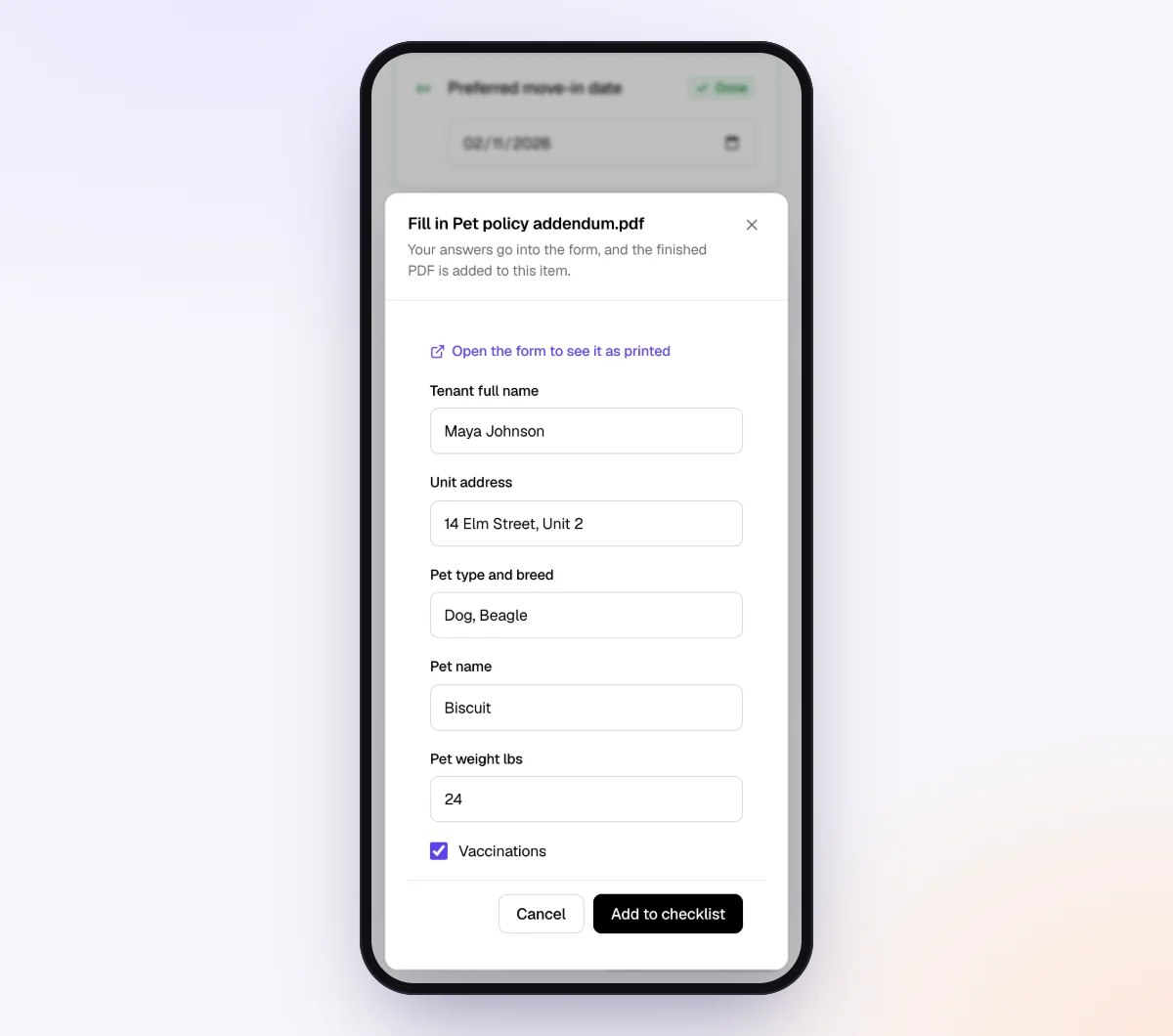
Save Template 1 as a fillable PDF and attach it to the authorization item. The client fills it in on their phone and signs with a drawn signature. See forms and e-signatures and our guide to collecting signed forms online.
3. Send a second request to the previous firm
Make a short checklist named "Records transfer, previous firm" with the items from Template 2, plus a question, "Anything open we should know about?" Mark items optional where the firm may not have them. Then go to Requests, click "New request," choose that checklist, add a reference like "Prior-firm records, Rivera Landscaping LLC," the contact's name and email, and your needed-by date. Then either:
- Leave "Email the link" on so the agent sends a branded invitation from your firm's name and handles reminders, in a professional tone.
- Turn it off and paste the link into your own Template 2 email, if you prefer a personal letter to a peer.

Use "Notes for the agent (private)" for context, such as "Previous firm mentioned an unpaid invoice. Don't discuss fees, hand off to me." Turn on "Require an email code" so only someone with access to that inbox can open the link.
4. Watch both requests
Each upload is checked in seconds. The request page shows every file, what's still missing and an activity timeline, which doubles as your record of when you asked and what arrived.
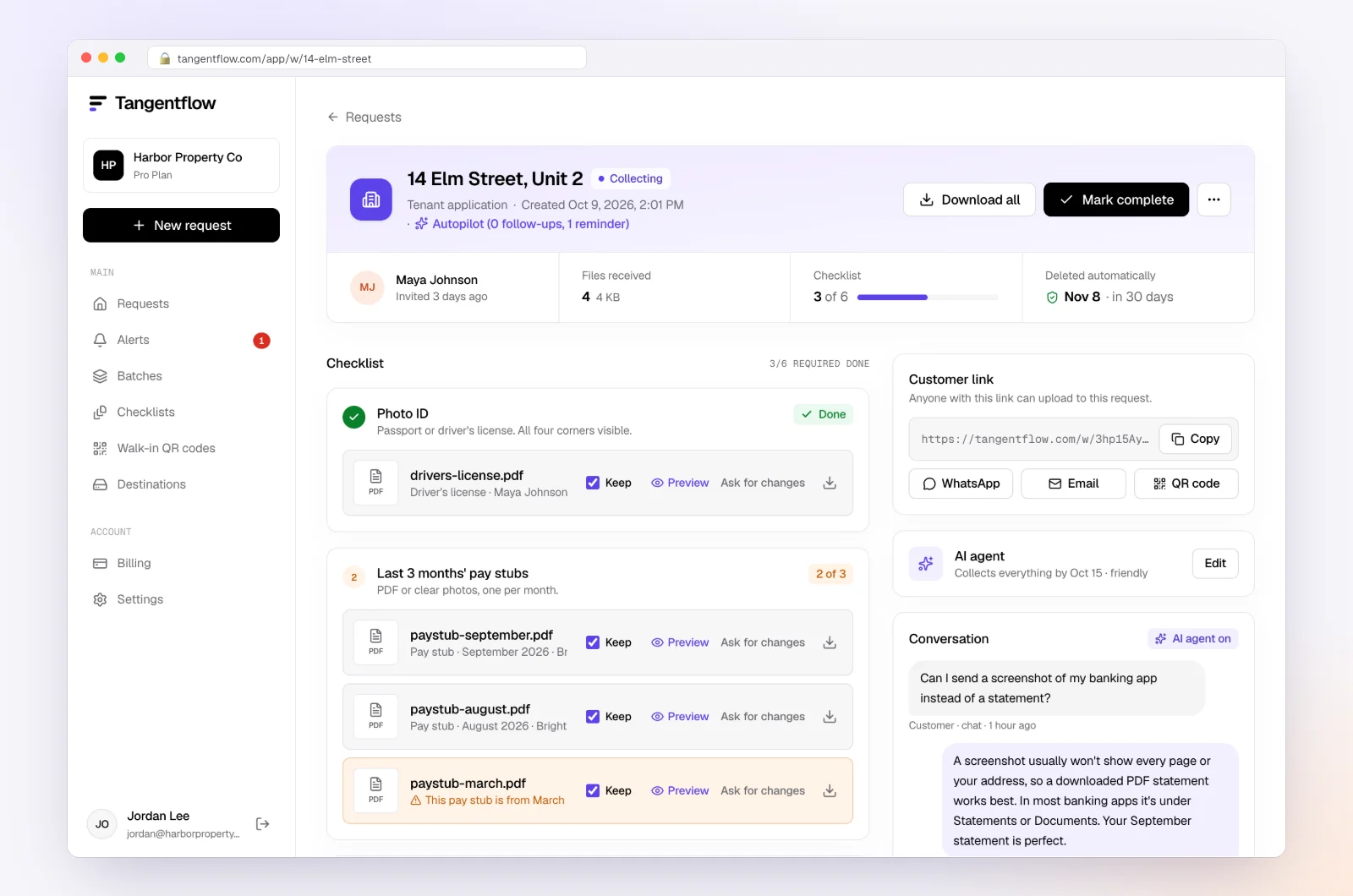
When everything is in, download the ZIP, or on Pro deliver to Google Drive or a webhook, then mark the request complete. Files are deleted 24 hours later.
Once the transition is done, move bookkeeping clients to the "Monthly bookkeeping" template. On Pro, a batch sends it to up to 100 clients, and with "Repeat every month" on, each client gets a new request on the same day every month until you stop it. Our page for bookkeepers shows the full monthly setup.
Setups by situation
| Situation | Ask the client for | Ask the old firm for | Worth turning on |
|---|---|---|---|
| Individual switching tax preparers | Return copies, notices, slips | Complete filed returns, carryovers, rental depreciation | "Every page" on returns |
| S corporation | Prior 1120-S and K-1s, payroll filings | Basis support, depreciation, trial balance, adjusting entries | "Only ask if" for basis items |
| Canadian corporation (T2) | Notices of assessment, CRA authorization | CCA schedule, loss balances, GIFI, shareholder loan | Email code on the request |
| Monthly bookkeeping client | Statements, accountant user invitation | Ownership transfer, reconciliation reports, open items | Then switch to "Monthly bookkeeping" |
More examples on our accounting and tax use case.
When something goes wrong
| Problem | Likely cause | Fix |
|---|---|---|
| Old firm says it needs the client's consent | No signed authorization attached | Send it, or have the client email the firm directly |
| Everything arrived except the depreciation schedule | It lives in their tax software | Ask for a PDF of the asset report |
| Firm cites an unpaid invoice | Fee dispute | The client decides whether to pay or dispute it |
| Old bookkeeper owns the software subscription | They set it up on their account | Ask them to transfer ownership through the platform |
| No reply after 30 days | Wrong contact or deprioritized | Call, then have the client ask in their own name |
| Link went to the wrong email address | Typo in the request | Reset the link so the old one stops working, then share it correctly |
Free and Pro, honestly
You can run a real records request without paying anything.
| Free | Pro ($29/month) | |
|---|---|---|
| Open requests | 1 at a time | Unlimited |
| AI check on each file | Yes | Yes |
| AI autopilot (answers, reminders, follow-ups) | Your first request | Every request |
| Clients reply by email with attachments | No | Yes |
| Branding | Tangentflow badge | Your logo |
| Delivery to Google Drive or a webhook | No | Yes |
| Works with AI assistants (MCP) | No | Yes |
| File retention | 7 days | 60 days |
Both plans include unlimited checklists, QR codes and posters, ZIP export, AI summaries and email delivery. Pro is billed monthly with no contract, and you can cancel any time. Full details on the pricing page. A transition usually needs two open requests at once, so on Free you'd run them one after the other.
What Tangentflow does not do: SMS or text messages, a native mobile app, full legal e-signature certificates, identity verification, collecting payments, or permanent storage. If you need any of those, pair it with a tool that does.
The whole records transfer as a checklist
- Ask the client for every record they already hold.
- Get a signed authorization naming the old firm, your firm, the records and the years.
- Send the previous accountant one written request with a specific list and a date.
- Offer an easy way to send, and offer to pass copying fees to the client.
- Follow up on day 7 and day 12, then call.
- After about three weeks, have the client ask in their own name.
- Get Form 8821 or 2848, or CRA authorization covering prior years, and rebuild what you can.
- Note what you couldn't get, move records into your system and delete other copies.
Frequently asked questions
How do I write a letter to a previous accountant requesting records?
Keep it to one page: who the client is, that you've been engaged, a signed authorization attached, a numbered list of specific records with years, a date and an easy way to send them. Mention what the client is sending directly so the old firm only handles what only it has. Template 2 above is ready to copy.
Does the previous accountant have to give records to the new accountant?
The duty generally runs to the client, not to you. AICPA members must return client-provided records on request, and Circular 230 practitioners must promptly return records the client needs for federal tax compliance. Canadian CPA codes require a predecessor to supply reasonable and necessary information to the successor on the client's written request. Check your state board or provincial body for your situation.
Can an accountant hold records until the client pays?
Generally not client-provided records. The AICPA interpretation and Circular 230 limit withholding over fees, though some work products, such as an unpaid return, may be held back in certain cases. CPABC says predecessor duties apply regardless of outstanding fees. A specific dispute is a question for the client's own advisor.
How long does the previous accountant have to send records?
The AICPA interpretation says as soon as practicable and, absent extenuating circumstances, within 45 days of the request. Circular 230 says "promptly," and Canadian codes say "on a timely basis." Your state board may set its own rule.
What if the client's records are missing completely?
Pull IRS transcripts with Form 8821 or 2848 on file, or have the client use their IRS Online Account or Form 4506-T. In Canada, get authorized through Represent a Client for the years you need. Then rebuild depreciation, basis and open items from the client's own records and note what you couldn't confirm.
Can Tangentflow send the request to the previous accountant?
Yes. Create a request for the old firm's contact with your records checklist, and either let the agent send the invitation and reminders or copy the private link into your own letter. Uploads are checked, and everything stays on one request page with a timeline.