Guides
Read-Only Bank Access for Bookkeepers: How to Set It Up (2026)
How to get read-only bank access as a bookkeeper. View-only users vs bank feeds vs statements, bank-by-bank notes, an email template and what access misses.
By Bibin MathewUpdated 19 min read
The short answer
Ask the business owner to add you as your own user in their business online banking, with view-only permission to every account you need, including statements. Use a bank feed for daily transactions, reconcile to the statement PDF, and keep a short monthly request for what access does not cover, such as other banks, loans, closed periods and explanations. Never accept the client's own username and password.
The short answer: read-only bank access for a bookkeeper means the business owner adds you as your own user in their business online banking, with view-only permission to the accounts you need, ideally including statements. You sign in with your own credentials, you cannot move money, and the owner can remove you at any time. Pair that with a bank feed for daily transactions and a small monthly request for whatever access does not cover.
With some banks, that's a five-minute job. With others, the view-only user sees activity but not statements, or the client can't find the setting and offers you their password instead.
This guide is for independent bookkeepers and small firms in the US and Canada. You get the options compared, what five major banks say about adding users, an email template, what access still won't give you, and why the client's own login is never the answer.
Your three options, plus the one to refuse
There are three legitimate ways to see a client's bank activity. Most bookkeepers use two or three of them per client.
Option 1: A view-only user in online banking
Most large US banks let the owner of a business account add other people as users, with permissions set per person and per account. Accountants and bookkeepers are one of the use cases the banks name directly. The right setup for you is:
- Your own user, with your own name and email.
- View-only on every business account, card and loan you need, not just the main checking account.
- Statements included, if the bank treats statements as a separate permission.
- No ability to transfer, pay bills, send wires or change settings.
Once it's set up, you download statements yourself and the client does nothing. The catch: it's usually business accounts only, and the setup is easy to get slightly wrong.
Option 2: A bank feed into your accounting software
A bank feed sends transactions into QuickBooks Online or Xero. It's great for daily work, but not enough for proof of the period: a feed doesn't show the bank's opening and closing balance for the statement period, and connections break and occasionally drop or duplicate transactions. QuickBooks' own help pages note that how much history comes in on the first connection varies by bank. Our guide to getting bank statements from clients covers the feed vs statement question in depth.
Option 3: Statements every month
The client downloads a PDF of each statement, every page, and sends it through one link. It works for every bank and account type, including personal and closed accounts, but the client has to act every month. Link our client-facing guide on how to download a bank statement PDF in your request.
The one to refuse: the client's own login
Some clients offer their username and password because it's faster. Say no, every time; the reasons are below.
Read-only access vs bank feed vs statements, compared
| View-only user in online banking | Bank feed into QuickBooks Online or Xero | Monthly statement PDFs | Client's own login | |
|---|---|---|---|---|
| What you get | Activity and, often, statements | Transactions in your software | The bank's record of each period, with both balances | Everything, including moving money |
| Client effort | One-time setup | One-time connection, plus reconnecting | A few minutes every month | None, which is the problem |
| Statement PDFs | Depends on the bank and permission | No | Yes | Yes |
| Accounts at other banks | No, one bank per setup | Only if each is connected | Yes, if you ask | No |
| Closed accounts and old periods | Usually not | No | Yes, from the bank on request | Sometimes |
| Can you move money? | No | No | No | Yes |
| Audit trail of who did what | Yes, your own user | Yes | Yes | No, it looks like the owner |
| Best for | Business accounts at banks that support it | Daily categorization | Every client, as backup and proof | Nothing |
The pattern most bookkeepers settle on: view-only access where the bank supports it, a feed for daily work, and a monthly request for everything else.
What each bank calls it
Feature names matter: a client searching for "add bookkeeper" often finds nothing, while "Access & Security Manager" finds the right page.
| Bank | Feature name | What the bank says | Watch out for |
|---|---|---|---|
| Chase (US) | Access & Security Manager | Owner can add an accountant or bookkeeper as an authorized user and restrict them to view-only on some or all accounts | Statement imaging is listed as administrator-only |
| Bank of America (US) | Account Management in Business Advantage 360 | Business can set individual access levels, including letting its accountant view details of all accounts, with no fee | Needs a Business Advantage deposit account and Business Advantage 360 |
| Wells Fargo (US) | Account Access Manager, Guest Users | Owner can create a Guest User with view-only access to chosen accounts, including balance, activity and statements | Owner creates and manages the Guest User's sign-in |
| RBC (Canada) | Online Banking for Business vs RBC Express | Online Banking for Business is listed with a maximum of one user; RBC Express supports multiple users | Adding you may mean a different platform |
| TD (Canada) | Web Business Banking user management | A System Administrator can add users and assign specific rights | Smaller businesses may be on another TD platform |
| Other banks and credit unions | "Users," "delegates," "sub-users" or "guest users" | Many offer it on business platforms | Ask the bank directly |
Chase. The business account management page says an authorized user "can be any trusted individual such as an accountant, bookkeeper, employee or a business partner," and the owner can "restrict a user to view-only access to some or all of your accounts." The same page lists statement imaging and check imaging among functions only the account administrator can access.
Bank of America. The Account Management page says "all you need to provide is the new user's email," that access levels can include "allowing your accountant to view details of all accounts," and that there's no fee. The client needs an open Business Advantage deposit account and Business Advantage 360.
Wells Fargo. The online banking profile FAQ says a business can create a Guest User in Account Access Manager with view-only access including "account balance, activity, and statements." Guest Users can't make transfers or payments. The owner creates and manages the Guest User's sign-in details, but it's still a separate user, not the owner's login.
RBC. The business online banking page lists Online Banking for Business with a maximum of one user and describes RBC Express as the platform for multiple users. A small RBC client may not be able to add you without changing platforms. If so, use a feed plus monthly statements.
TD Canada. TD's Web Business Banking help describes a System Administrator who can add users and assign specific rights. We couldn't confirm which rights a view-only user gets on every TD business platform, so have the client ask their TD business banking contact.
How to ask a client to set it up
Ask once, early and in writing, ideally at onboarding alongside the engagement letter. Our accounting client onboarding checklist covers access in stage 5, and the bookkeeping engagement letter template includes a clause saying you'll never ask for passwords.
A good access request:
- Names the feature at their bank, so they can search for it.
- Says exactly which permissions you want, and which you don't.
- Lists every account by name and last four digits.
- Asks them to keep sending statements until you confirm access works.
- Says plainly that you'll never ask for their password.
Email template: asking for view-only bank access
Subject: View-only bank access for [Business name]

Hi [First name],

To keep your books current without asking you for statements every
month, could you add me as a view-only user in your business online
banking? I'd have my own sign-in. I can see activity and download
statements, but I can't move money or change anything, and you can
remove me at any time.

At [Bank], this is called [feature name, e.g. "Access & Security
Manager" / "Account Management" / "Account Access Manager"].

Please add:
- Name: [Your name]
- Email: [Your email]
- Permission: view only, including statements if there's an option
- Accounts: [Checking ending 1234], [Savings ending 5678],
  [Credit card ending 9012], [Line of credit ending 3456]
- No transfer, bill pay, wire or admin rights, please.

If your bank doesn't offer this, no problem. We'll keep using the
monthly upload link. Until I confirm I can download a statement
myself, please keep uploading statements as usual.

Please never send me your own banking username, password or one-time
codes, even if it seems faster. I'll never ask for them, and anyone
who does is not me.

Thanks,
[Your name]
When access works, reply confirming which accounts you can see and listing what the client still needs to send each month.
What still has to come from the client, even with access
View-only access solves one bank. A typical small business has more than that, which is why a monthly request still matters.
| What access doesn't cover | Why | What to ask for |
|---|---|---|
| Accounts at other banks | Access is set up one bank at a time | Statement PDF for each, every page |
| Cards from another issuer | Amex, store and fuel cards are separate | Full account statement, by closing date |
| Loans and lines of credit | Often at another lender or outside your permissions | Loan statement with principal, interest and balance |
| Personal accounts used for business | No view-only option | Statement, or business lines only, as agreed in writing |
| Closed accounts and earlier periods | Online access ends or doesn't reach back | Statements from the bank or the prior bookkeeper |
| Statements where the bank restricts them | Admin-only at some banks | The PDF from the owner each month |
| New accounts opened mid-year | The owner must add you to each one | A monthly yes/no question |
| Explanations | The bank shows a transfer, not why | Answers to your transaction questions |
Two items cause most rework. First, new accounts: the owner opens a tax savings account in March and doesn't add you, so you see transfers to an account ending 7781 and nothing else. A monthly question, "Did you open or close any bank accounts, cards or loans?", catches it early.
Second, explanations. Access shows a $4,200 transfer to the owner's personal account, not whether it's a draw, a loan repayment or a reimbursement. Our post on uncategorized transactions and client questions shows how to ask.
For clients with gaps, see our catch-up bookkeeping documents checklist and how to request records from a previous accountant.
Why you should never accept the client's username and password
- It gives you the power to move money. You don't want that ability, or to be the person who could have.
- There's no audit trail that separates you from the owner. With your own user, the bank's records show who did what. Chase, for example, says Access & Security Manager provides activity reports for each user.
- The owner is usually responsible for what's done with their access. Wells Fargo's online access agreement says transactions by an authorized representative or delegate, "including those you did not want or intend, are transactions authorized by you." Sharing a login can also break the bank's terms, so read the client's own agreement.
- Multi-factor sign-in becomes a daily phone call, or the client turns it off.
- It's a liability for you. If the account is compromised, the bookkeeper holding the password is the first person anyone asks about.
- It trains clients to fall for phishing. Ask once, and a fake email "from you" can ask again.
If a client sends their password anyway
- Don't use it, not even once to "just grab the statement."
- Delete the message, and ask them to delete it from their sent folder.
- Ask them to change the password, since it's now been sent in writing.
- Send the access request email above as the safe alternative.
- Note it in the client file: what arrived, when, and that it was deleted unused.
When the engagement ends, ask the client to remove your user and confirm it in writing. Our bookkeeping client offboarding checklist has the wording.
The monthly request for what access misses, in Tangentflow, step by step
Tangentflow doesn't connect to banks. It handles the part access can't: one short monthly request, through a private link, for the statements and answers only the client can provide. An AI collection agent sends the invitation, answers questions and reminds clients about only what's missing. More on our bookkeepers page.
1. Start from the Monthly bookkeeping template and trim it
Open "Checklists," choose "Browse templates" and pick "Monthly bookkeeping." Keep "Bank statements for the month" for accounts you can't download yourself, and remove what you already cover. In "What should it be?" describe a statement PDF from the bank's website, every page, for last month, for accounts at other banks, loans and cards.

2. Add the questions as form fields
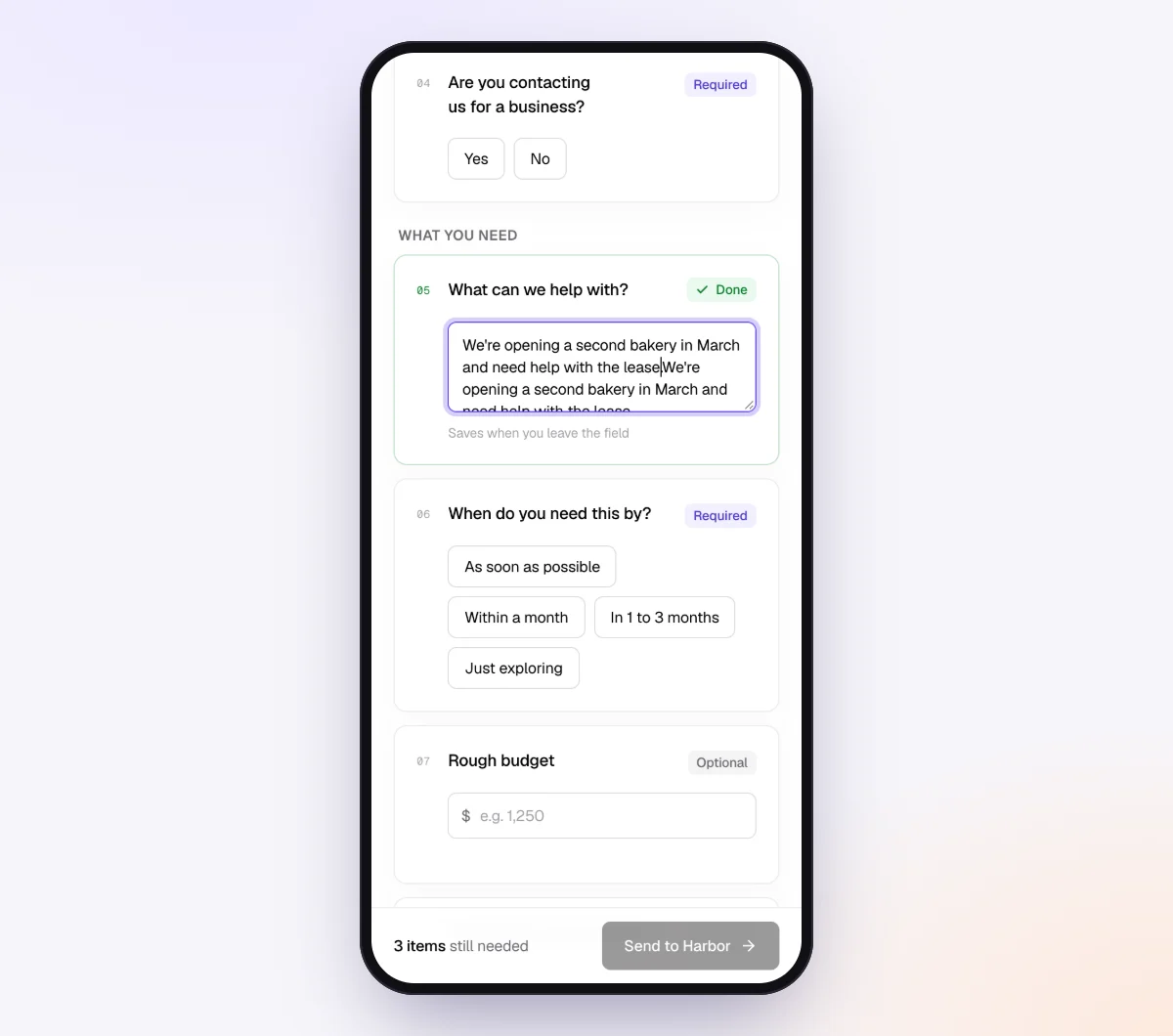
Add a yes/no "Form field": "Did you open or close any bank accounts, cards or loans this month?" Under it, add a file item, "First statement for the new account," shown with "Only ask if…" the answer is yes. Add a second yes/no, "Did you change any online banking users this month?", so you hear about it before access quietly stops working. Then add one question per transaction you need explained.
3. Create the request, or send to every client at once
For one client, go to "Requests," click "New request," choose the checklist, add a reference like "September 2026," the client's name and email, and a needed-by date. On Pro, use "Batches," choose "Send to many customers" and turn on "Repeat every month" so each client gets a fresh request on the same day each month. See bulk requests.

For extra protection, turn on "Require an email code" on the checklist: the client enters a 6-digit code emailed to them before the link opens. If a link goes to the wrong person, use "Reset link" and the old one stops working. After the client sends everything, the link no longer shows the files.
4. Uploads are checked on arrival
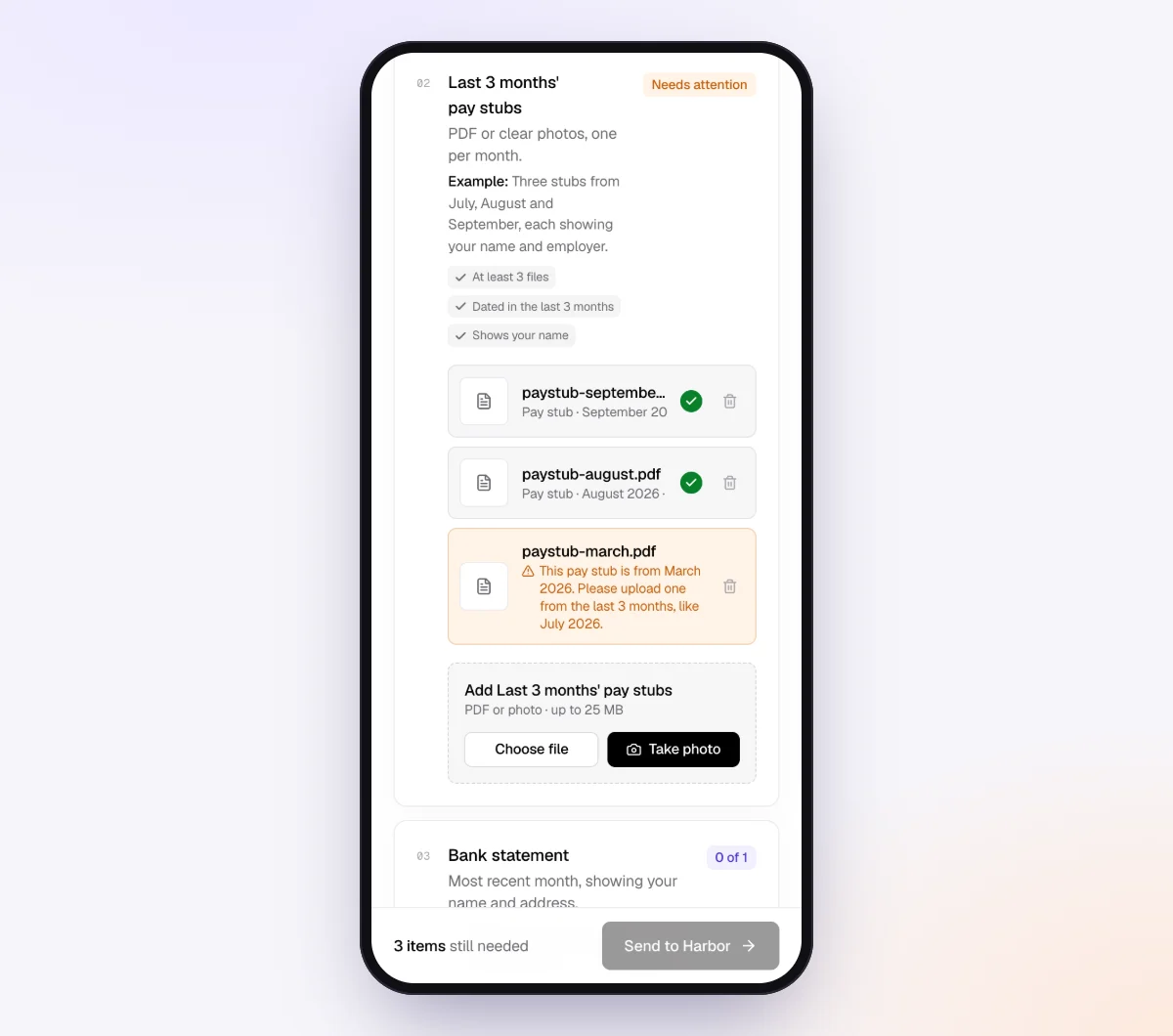
The client opens the link on a phone or computer, with no account and no app, and uploads PDFs or photos (JPEG, PNG, WebP, HEIC) up to 25 MB each. Each statement is checked in seconds by document checks: right kind of document, readable, recent enough and every page. Page one of four gets a friendly note on what to fix while the client is still signed in to their bank.
5. The agent chases and answers
In "AI autopilot," turn on "Chase until it's all in" with "Paced to each request's deadline." Reminders list only what's still missing, at most one automatic email a day. When a client asks "Don't you already have access to this?", the agent answers from your private notes, and hands off to you when a question is outside the checklist or the date passes.
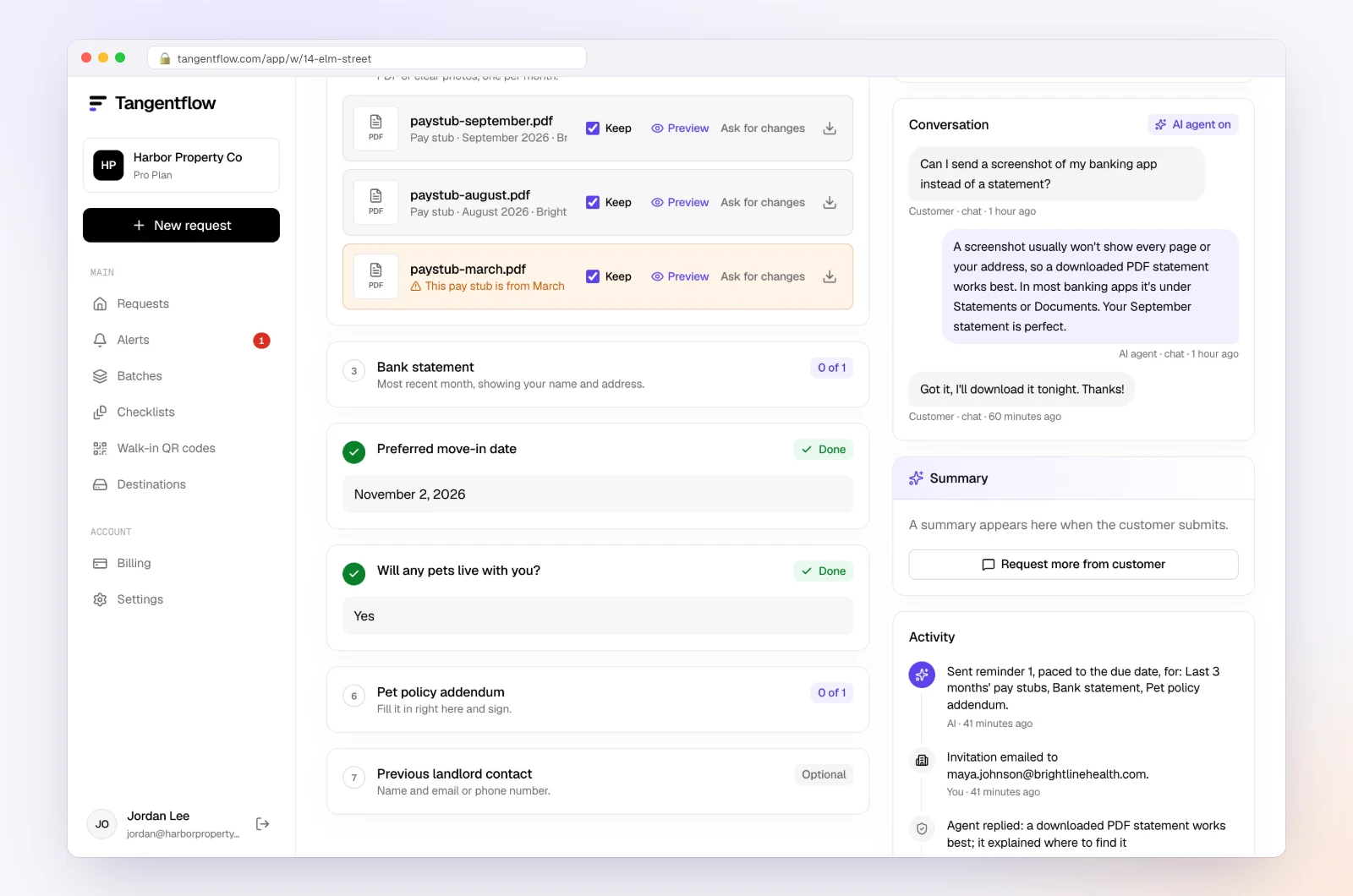
When everything is in, download a ZIP, or on Pro deliver to Google Drive or a webhook, and mark the request complete. Files are deleted 24 hours later.
Setups by type of client
| Client type | Best access setup | Still request monthly |
|---|---|---|
| Single-member LLC at one big bank | View-only user plus feed | New-accounts question, transaction questions |
| Trades and contractors | View-only at the main bank, feed for daily work | Equipment loan, fuel and store card statements |
| Sole proprietor using personal accounts | Feed only, if the client agrees | Statement PDFs every month |
| Canadian client on a single-user platform | Feed, no view-only user | Statement PDFs every month |
For the full routine, see our monthly bookkeeping checklist and month-end close checklist. For more firm types, see accounting and tax.
When something goes wrong
| Problem | Likely cause | Fix |
|---|---|---|
| You see activity but not statements | Statement permission not granted, or admin-only at that bank | Ask the client to add statement access; otherwise keep the monthly upload |
| Client says there's no such setting | Personal account, single-user platform or wrong menu | Give them the feature name; if it isn't offered, use feed plus statements |
| Access stopped working without warning | Owner changed users, platform migration or your sign-in expired | Ask the client to check users; keep the monthly "users changed?" question |
| A new account has no access | Owner didn't add you to it | Ask them to add it; request statements back to its opening date |
| Feed balance doesn't match the statement | Dropped or duplicated transactions, or timing | Reconcile to the statement and fix the feed |
| Client sent their password | Trying to save time | Don't use it, delete it, ask them to change it, send the access email |
Free and Pro, honestly
You can run a real request without paying anything.
| Free | Pro ($29/month) | |
|---|---|---|
| Open requests | 1 at a time | Unlimited |
| AI check on each file | Yes | Yes |
| AI autopilot (answers, reminders, follow-ups) | Your first request | Every request |
| Send to many clients at once (Batches), with monthly repeat | No | Yes |
| Clients reply by email with attachments | No | Yes |
| Branding | Tangentflow badge | Your logo |
| Delivery to Google Drive or a webhook | No | Yes |
| Works with AI assistants (MCP) | No | Yes |
| File retention | 7 days | 60 days |
Both plans include unlimited checklists, QR codes and posters, ZIP export, AI summaries and email delivery. Pro is billed monthly with no contract, and you can cancel any time. Full details on the pricing page.
What Tangentflow does not do: SMS or text messages, a native mobile app, full legal e-signature certificates, identity verification, collecting payments, or permanent storage. If you need any of those, pair it with a tool that does. It also does not connect to banks or bank feeds, sign in to online banking, download statements for you, reconcile accounts or replace QuickBooks Online, Xero or your other bookkeeping software.
Recap: read-only bank access as a checklist
- Keep a list of every account, card and loan per client, with last four digits only.
- Ask the owner to add you as your own user, view-only, on every account you need.
- Name the feature at their bank: Access & Security Manager, Account Management, Account Access Manager or the equivalent.
- Ask for statement access, and confirm you can download a full statement PDF.
- Have the client connect bank feeds, and reconcile to the statement, not the feed.
- Never accept the client's username, password or one-time codes, and say so in writing.
- Send a monthly request for other banks, loans, cards, closed periods and explanations.
- Ask every month whether any account was opened or closed, or any user changed.
- Check every quarter that access still works.
- When the engagement ends, have the client remove you and confirm it.
Frequently asked questions
Can a bookkeeper get read-only access to a client's bank account?
Often, for business accounts. The owner adds you as your own user with view-only permission, for example through Chase's Access & Security Manager, Bank of America's Account Management or Wells Fargo's Account Access Manager. Personal accounts and some single-user business platforms don't offer it.
Does view-only access include bank statements?
It depends on the bank and the permissions set. Wells Fargo says Guest Users can see statements, while Chase lists statement imaging among administrator-only functions. Download a full statement yourself before you stop asking the client for PDFs.
Is a bank feed enough, or do I still need statements?
You still need statements. A feed gives you transactions but not the bank's opening and closing balance for the period, and connections can drop or duplicate transactions. Use the feed for daily work and reconcile to the statement.
Should I ever use my client's online banking password?
No. It gives you the ability to move money, leaves no audit trail separating you from the owner, and can break the bank's terms. Ask for your own view-only user, or monthly statements if the bank doesn't offer one.
How do I ask a client to give me view-only bank access?
Send a short email naming the feature at their bank, the permissions you want (view only, including statements, no transfers), every account by last four digits, and a line saying you'll never ask for their password. Ask them to keep sending statements until access is confirmed.
What do I still need from the client if I have bank access?
Statements from other banks and card issuers, loan statements, personal accounts used for business, closed accounts and older periods, plus explanations for unusual transactions. Also ask monthly about new accounts.
Do Canadian banks offer view-only access for bookkeepers?
Some do, depending on the bank and platform. RBC lists its standard Online Banking for Business with one user, with RBC Express for multiple users, and TD's Web Business Banking lets a System Administrator add users with specific rights. Have the client ask their business banking contact.
Can Tangentflow connect to my client's bank?
No. Tangentflow doesn't connect to banks or sign in anywhere. It sends each client a private link for what your access doesn't cover, checks each upload and reminds them about what's missing. Try it free with one client's monthly request.