Checklists
Bookkeeping Client Offboarding Checklist (2026)
A bookkeeping client offboarding checklist for US and Canadian bookkeepers: notice, final invoice, records handback, software access and copy-ready exit emails.
By Bibin MathewUpdated 19 min read
The short answer
Whether the client leaves or you let them go, offboarding comes down to five things: written notice with a clear last day of work, a final invoice that settles work in progress, one last request for anything outstanding, a clean handback of the client's records, and removing your access to their software and accounts. Put it all in a short disengagement letter, get a signed acknowledgment, and keep a dated record of what you sent and what you received. Then decide what you must keep under your own retention rules and delete the rest.
Every bookkeeper has an onboarding checklist; few have one for the other end. When a client says "we're moving to a firm that does our taxes too," or you finally decide the client who sends March's statements in July isn't worth it, the exit gets improvised. Nobody is sure who owns the QuickBooks subscription, and six months later you're still an admin on the books of a business you no longer work with.
This guide is for independent bookkeepers and small bookkeeping firms in the US and Canada. It covers both situations: the client who leaves and the client you let go. You'll get a phase-by-phase checklist, what records to hand back, how to remove your access to QuickBooks Online, Xero and bank accounts, a disengagement letter template, and three copy-ready emails: a polite exit, a firm exit after repeated missed documents, and a handover confirmation.
Two kinds of offboarding
Most of the checklist is the same either way. What changes is who starts it and how careful the wording needs to be.
| Client leaves | You let the client go | |
|---|---|---|
| Who starts it | The client, often by email or a one-line message | You, in writing |
| Typical reasons | New firm, bringing work in-house, selling or closing the business, cost | Chronic late documents, unpaid invoices, scope creep, a poor fit |
| Biggest risk | Records and access drift for months because nobody owns the handover | The client disputes the final invoice or says they were never warned |
| What protects you | A handover confirmation they sign | A record of what you asked for and when, plus a clear final notice |
When to let a bookkeeping client go
It's a business decision, not a personal one. The usual signs: documents are late most months despite a clear policy, invoices are paid late or argued over, scope keeps growing with no change to the fee, the client asks for something you're not comfortable with (like backdating entries), or the work no longer fits your practice.
How to fire a bookkeeping client who won't send documents
Before you get here, you should already have tried the softer steps: a due date, reminders, a deferral rule and a pause. Our late document policy for bookkeepers covers those steps and their wording, so this guide picks up where that one stops.
When the pause hasn't worked:
- Check your record: when you asked, when you reminded, what arrived. If you can't show it, send one more dated request first.
- Re-read your engagement letter for the notice period, how work in progress is billed and what happens to records.
- Decide your last day of work and what you'll finish before it. "We'll complete the books through [Month], provided documents arrive by [date]" beats "we'll wrap things up."
- Send the firm exit email below with the disengagement letter, then run the rest of this checklist as you would for a friendly exit.
The bookkeeping client offboarding checklist
Work through it in order. The slow parts are waiting for final documents and for software transfers to be accepted.
Phase 1: Decide and give notice
- Re-read the engagement letter for notice, termination and records clauses.
- Pick a last day of work and the last period you will complete.
- Send the exit email and disengagement letter in writing.
- Ask who the next bookkeeper or accountant is, and whether you should talk to them.
- Stop recurring requests, reminders and scheduled tasks for this client.
Phase 2: Money and work in progress
- List which months are reconciled, partly done or not started.
- Send a final invoice that names the periods it covers.
- Apply or refund any retainer, in writing, and cancel autopay on your side.
Phase 3: The final collection
- Send one last request for what you need to finish the agreed periods.
- Give a firm needed-by date, earlier than your last day of work.
- Ask for a signed acknowledgment of the disengagement letter.
Phase 4: Hand back the records
- Prepare the handover package and send it through a secure channel.
- Include an open items list for the next bookkeeper.
- Send a handover confirmation listing what you delivered and how.
Phase 5: Remove your access
- Transfer any software subscription you own for the client.
- Leave QuickBooks Online, Xero, bank portals, payroll and receipt apps.
- Withdraw or have the client cancel tax agency authorizations.
- Delete the client's entries from your password manager.
Phase 6: Close the file
- Decide what you must keep, for how long, and where.
- Delete every other copy: inboxes, downloads, collection tools, phone photos.
- Write a closing note: dates, what was delivered, open items, reason for leaving.
What records to hand back to a client when you stop working with them
The short version: the client's own records and the work they paid for go back to the client. Your internal working notes generally don't have to. The AICPA's Records Requests interpretation, IRS Circular 230 section 10.28 and provincial CPA codes set specific rules; we summarize them in our guide to requesting records from a previous accountant, the same exchange seen from the other side. If you hold no designation they may not bind you, but they're a sensible standard. For a bookkeeping client, they usually play out like this:
| Record | Usually goes back to the client? | Notes |
|---|---|---|
| Statements, receipts and bills they sent you | Yes | Client-provided records. Returning them regardless of fees is the safe default |
| The ledger itself (QuickBooks, Xero file) | Yes, by transferring ownership or access | Make sure they can reach it after you leave |
| Reports, reconciliations and filings you prepared and were paid for | Yes | Export as PDF for the periods you completed |
| Adjusting entries and supporting schedules | Usually yes | The next bookkeeper needs them to continue the books |
| Work for periods that are unpaid | Check your engagement letter and advisor | Rules differ; client-provided records are treated differently from your work product |
| Your internal notes, checklists, review comments | Generally no | Your working papers, unless a law, rule or contract says otherwise |
A standard handover package
For a typical monthly client, this covers what the next person will ask for:
- Trial balance, balance sheet and profit and loss as of the last completed period.
- Reconciliation reports for each account and general ledger detail for the current year.
- An open items list: uncleared transactions, suspense balances, unanswered questions.
- Fixed asset, loan, payroll and sales tax (or GST/HST) schedules and filings you prepared.
- Client-provided documents you still hold, organized by month.
- A note on which apps feed the ledger and which rules you set up.
Removing your access: QuickBooks, Xero, banks and tax agencies
This is the phase that drifts. Do it on your last day of work.
QuickBooks Online: transfer the primary admin role
QuickBooks Online calls the owner role primary admin (older articles say "master admin"). If you hold it, transfer it before you leave. Intuit's help article "Transfer primary admin access back to your QuickBooks Online client" describes these steps:
- The client must already be a user on the company with the Company admin role.
- As the current primary admin, go to Settings, then Manage users.
- In the Action column next to the client, choose Make primary admin.
- The client accepts the invitation by email to finish the transfer.
The article also says you must be the client's lead accountant. If the client is on your QuickBooks Online Accountant wholesale billing, transfer the primary admin role first, then remove them from wholesale billing; the client then adds their own payment details to keep editing. Afterward, remove your accountant access or ask the client to remove your firm in Manage users. Menus change, so follow Intuit's current article for your country.
Xero: transfer the subscription
In Xero, the person who pays is the subscriber. If that's you, transferring the subscription changes who pays; the data stays where it is. The transfer starts from the organization's Subscription and billing settings with Request transfer, where you enter the new subscriber's name and email, and they accept it. Partner or practice-paid plans may need extra steps. Check Xero Central for the current steps, then remove yourself as a user once the transfer is accepted.
Banks, payroll and other apps
Ask the client to remove you from bank and card portals. If you connected a bank feed with your own credentials, the client should reconnect it with theirs. In payroll, payment and receipt apps, remove your user and transfer or cancel anything in your name.
Tax agency authorizations
If you hold an IRS Form 8821 or 2848 authorization, follow the current IRS instructions to withdraw or have the client revoke it. In Canada, a client can cancel a representative authorization in their CRA account; check CRA guidance for how a representative removes themselves. State and provincial agencies have their own forms.
Unpaid invoices and work in progress
Money is what turns a clean exit into a dispute. Bill work in progress the way your engagement letter says; if it's silent, decide before you send notice whether you'll finish and bill the current month or stop and bill what's done. Name the periods on the final invoice ("Bookkeeping through August 2026"), refund unused retainers promptly, and keep fees and records in separate paragraphs of your emails. If the invoice goes unpaid, escalate calmly: a reminder, a statement, a call, then a conversation with your advisor.
Record retention after disengagement
There are two retention questions, and they belong to different people.
What the client must keep is the client's responsibility. The IRS generally points businesses to the period a return can be examined, often three years and longer in some cases (four years for employment tax records). The CRA generally expects business records to be kept six years from the end of the last tax year they relate to. Say so in your handover confirmation so the client doesn't assume you're keeping everything for them.
What you keep depends on your engagement letter, your state board of accountancy or provincial CPA body (if you hold a designation), your professional liability insurer and privacy law. In Canada, PIPEDA and provincial laws expect you to keep personal information only as long as you need it; many US states have data security rules. Keep what you must in one place, delete every other copy, and note what you kept and why. If unsure, ask your advisor rather than keeping everything forever.
Disengagement letter template for bookkeepers
Adapt this and have it reviewed. Save it as a fillable PDF if you want the client to sign it online.
[Your business name]
[Date]

[Client name]
[Client business name]

Re: End of bookkeeping services

Dear [Client name],

This letter confirms that our bookkeeping engagement dated [engagement
letter date] will end on [last day of work].

Work we will complete: bookkeeping through [last period], provided
[documents] are received by [date].

Final invoice: covering [periods], sent on [date]. [Your retainer of
$X will be applied / refunded.]

Records: by [date] we will return [handover package] via [method].

Software and access: we will transfer [the QuickBooks Online primary
admin role / the Xero subscription] to [name] and remove our access to
[systems] by [date]. Please change any passwords we may have known.

After [last day of work], we are no longer responsible for your
bookkeeping, filings or deadlines, including [payroll / sales tax /
GST/HST filings, if relevant]. Please make sure someone is in place to
handle them.

We will keep copies of [what you keep] for [period] as required by
[our policy / professional rules], and delete other copies.

Please sign below to acknowledge receipt of this letter.

[Your name]

Acknowledged: ____________________   Date: ____________
[Client name]
Copy-ready exit emails
The polite exit
For a client who's leaving, or when you're ending things for fit or capacity.
Subject: Wrapping up your bookkeeping with [Business name]

Hi [First name],

Thank you for letting me know. [Or: I've decided to narrow the clients
I work with, and can't continue your bookkeeping after [date].]

Here's how I'd like to wrap up so nothing falls through the cracks:

1. I'll finish your books through [Month], as long as I have the last
   few items by [date]. I'll send a short list with a private upload link.
2. I'll send your final invoice for [periods] on [date].
3. By [date], I'll return your records and transfer [QuickBooks /
   Xero] to you, then remove my access.

The attached letter sets this out. Please sign and return it with the
documents. I'm happy to send the handover package to your new bookkeeper.

[Your name]
The firm exit after repeated missed documents
Only after the steps in your late document policy, and only if your engagement letter allows it.
Subject: Ending our bookkeeping engagement on [date]

Hi [First name],

We've asked for your documents for [Month], [Month] and [Month] on
[dates], and paused work on [date] as set out in our engagement letter.
We still haven't received them, so I'm ending our engagement
effective [last day of work].

Before then:

- If the documents for [Month] arrive by [date], I'll complete that
  month. Otherwise, the books will be handed back as they stand,
  completed through [last completed month].
- Your final invoice for [periods] will follow on [date].
- I'll return your records and transfer [QuickBooks / Xero] to you by
  [date], and remove my access.

The attached letter confirms this. After [last day of work], I won't
be handling any filings or deadlines for your business.

I wish you well.

[Your name]
The handover confirmation
Once records and access have moved. It's your record that the job ended cleanly.
Subject: Your records and handover, [Business name]

Hi [First name],

Your bookkeeping handover is complete. Here's a summary for your files:

Delivered on [date] via [method]:
- Financial statements, reconciliations and ledger through [Month]
- Open items list ([number] items still to resolve)
- Your original statements and receipts, organized by month

Software and access:
- [QuickBooks Online primary admin / Xero subscription] transferred to
  [name] on [date]
- My access removed from [list] on [date]

Still open:
- [Unreconciled account / unanswered questions / upcoming filing]

Please keep your business records for as long as the IRS / CRA and
your state or province require. Thank you again.

[Your name]
For more wording you can adapt, see our document request email templates.
A final offboarding request in Tangentflow, step by step
Tangentflow's role here is modest: one last request that collects what's outstanding and gets the disengagement letter signed, with a dated record of both. It doesn't transfer software, send invoices or deliver your handover package to the client.
1. Start from the "Monthly bookkeeping" template
Go to Checklists, choose "Browse templates" and open "Monthly bookkeeping." It starts with "Bank statements for the month," "Credit card statements," "Receipts and bills you paid," "Sales or invoices you issued," "Payroll report" and "Anything unusual this month?" Keep what you need to close the final months, delete the rest, and rename it "Final close and handover."

2. Add the offboarding items
- A file item, "Signed disengagement letter." Under the attachment option choose "Form to fill in," upload your letter as a fillable PDF and tick signed.
- A question, "Who should we send your records to?", as a short text answer.
- A yes/no question, "Have you accepted the QuickBooks or Xero transfer?", so you know when to remove your access.
Fill in "What should it be?" on each file item and set every page on statements.

3. Create the request
Go to Requests and click "New request." Choose the checklist, add a reference like "Final close, Rivera Landscaping LLC" (an illustrative name), the client's name and email, and a needed-by date a few days before your last day of work. Leave "Email the link" on for the agent to send the invitation, or turn it off and paste the link into your exit email.

Use "Notes for the agent (private)" for context, such as "This client is leaving. Be brief and polite. Don't discuss fees, hand off to me." Turn on "Require an email code" if you want the link to open only after the client enters a 6-digit code sent to their email.
4. The client signs and uploads on their phone
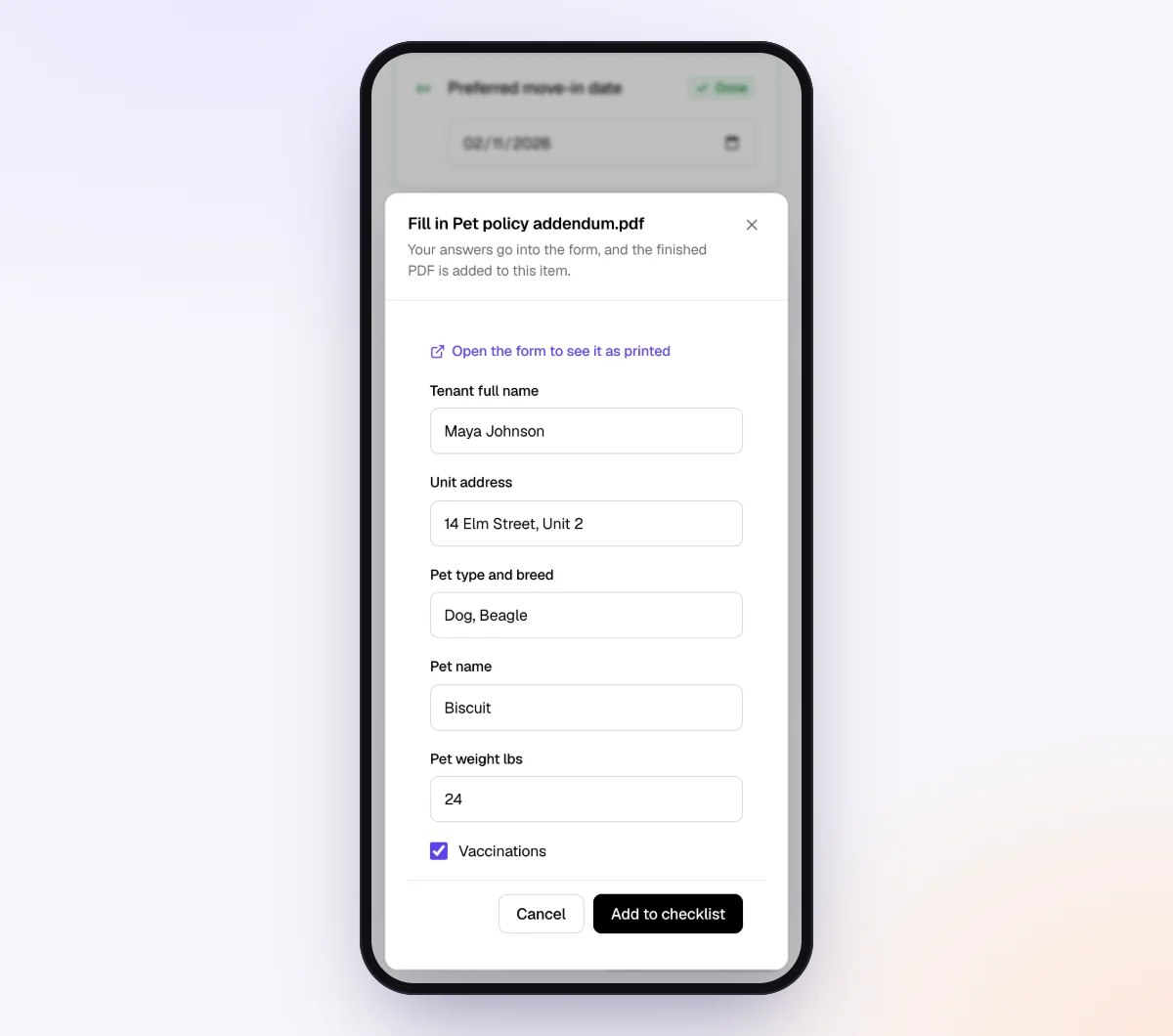
The client uploads the last statements, then fills in and signs the letter online with a drawn signature. No account, no printer. More in forms and e-signatures and our guide to collecting signed forms online.
5. Keep the record, then let it go
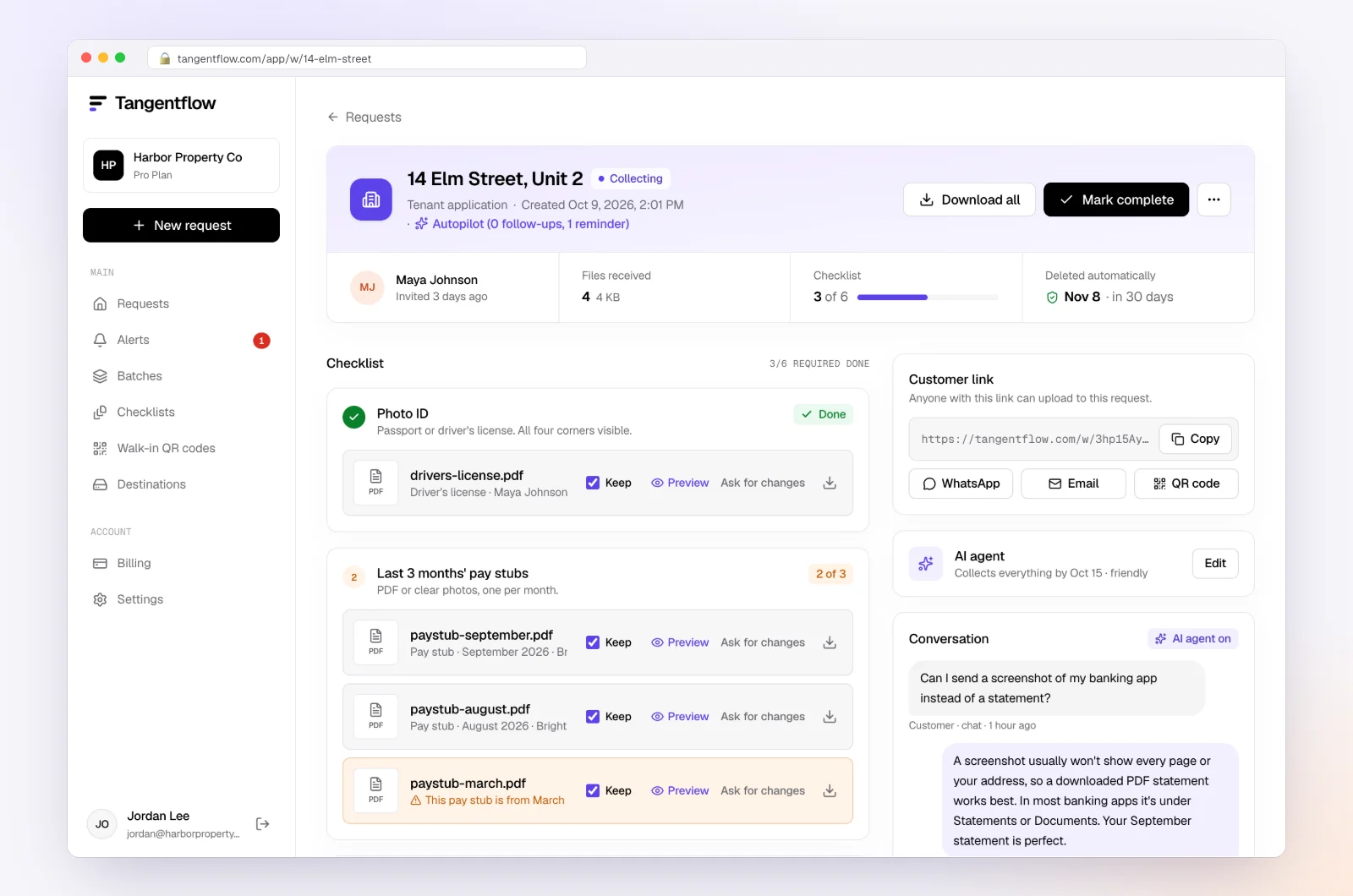
Each upload is checked in seconds. The request page shows every file with its check result, what's missing and an activity timeline, your dated record of what you asked for and when it arrived. If the date passes, the agent hands off to you.
Download the ZIP for your file and mark the request complete; files are deleted 24 hours later. Once the client has sent everything, their link no longer shows the files.
If the client is in a repeating monthly batch, note that "Stop repeating" on the batch page stops the whole series, so stop it and start a new repeating batch without them. Our page for bookkeepers shows the monthly setup.
Offboarding setups by situation
| Situation | Final request should include | Watch for |
|---|---|---|
| Client moving to a new firm | Last statements, signed letter, new firm's contact | Agree who finishes the current month |
| Business sold or closed | Final statements, closing date, who holds records now | Final payroll and sales tax filings; who's responsible |
| You let go for late documents | Only the months you agreed to finish, signed letter | Firm date; return records as they stand if nothing arrives |
| You hold the software subscription | Yes/no question confirming the transfer was accepted | Client's billing details, so they don't get locked out |
When something goes wrong
| Problem | Likely cause | Fix |
|---|---|---|
| Client won't accept the QuickBooks or Xero transfer | Missed the email or doesn't want to pay | Resend, explain they may lose access, set a date, note it |
| Client asks for "everything" from years before you | They don't know where records are | Send what you hold; point them to their bank and prior accountant |
| Client never signs the letter | Avoidance | Your dated emails are still a record; proceed with the handover |
| You're still on a bank portal months later | Only the client can remove you | Email them a short request and keep it on file |
| The link went to the wrong email address | Typo | Reset the link so the old one stops working, then share it correctly |
Free and Pro, honestly
You can run a final offboarding request without paying anything.
| Free | Pro ($29/month) | |
|---|---|---|
| Open requests | 1 at a time | Unlimited |
| AI check on each file | Yes | Yes |
| AI autopilot (answers, reminders, follow-ups) | Your first request | Every request |
| Clients reply by email with attachments | No | Yes |
| Branding | Tangentflow badge | Your logo |
| Delivery to Google Drive or a webhook | No | Yes |
| Works with AI assistants (MCP) | No | Yes |
| File retention | 7 days | 60 days |
Both plans include unlimited checklists, QR codes and posters, ZIP export, AI summaries and email delivery. Pro is billed monthly with no contract, and you can cancel any time. Full details on the pricing page.
What Tangentflow does not do: SMS or text messages, a native mobile app, full legal e-signature certificates, identity verification, collecting payments, or permanent storage. If you need any of those, pair it with a tool that does.
The whole offboarding as a checklist
- Re-read the engagement letter and pick a last day of work.
- Send the exit email and disengagement letter in writing.
- Decide which work in progress you'll finish.
- Send one final request for outstanding documents and the signed letter, with a date.
- Send the final invoice naming the periods, and settle any retainer.
- Prepare and deliver the handover package securely.
- Transfer the QuickBooks Online primary admin role or Xero subscription.
- Remove your access to the ledger, banks, payroll and apps.
- Withdraw or have the client cancel tax agency authorizations.
- Send the handover confirmation.
- Keep what your rules require, delete every other copy, and write a closing note.
Frequently asked questions
What should a bookkeeping client offboarding checklist include?
Written notice with a last day of work, a final invoice covering work in progress, one last request for outstanding documents, a handover of the client's records, removal of your access, and a handover confirmation.
How do I fire a bookkeeping client who won't send documents?
Apply a clear late document policy and pause work in writing first. Then send a short, factual notice with a last day of work, say which months you'll finish if documents arrive by a date, and hand back the records as they stand if they don't. Don't use records as leverage.
What records do I have to give back to a client?
The client's own records, such as statements and receipts, and the deliverables they paid for, such as reconciliations and financial statements, generally go back. Your internal working papers generally don't. CPAs and practitioners under Circular 230 or provincial CPA codes have specific rules, so check yours.
How do I remove myself from a client's QuickBooks Online?
If you're the primary admin, transfer the role first (Settings, Manage users, Make primary admin) and have the client accept. Move them off your wholesale billing if they're on it, then remove your accountant access or ask the client to. Menus change, so follow Intuit's current help article.
Can I keep a client's records until they pay my final invoice?
Be careful. The AICPA's Records Requests interpretation and IRS Circular 230 limit what members and practitioners can hold back, especially client-provided records, and state or provincial rules can be stricter. Even if no code binds you, it tends to escalate disputes. Ask your advisor first.
How long should I keep a former client's files?
It depends on your engagement letter, professional body, insurer and privacy law. Keep what you must in one place and delete the rest. Remind the client that their own IRS or CRA record-keeping duties are theirs.
Can Tangentflow handle the whole offboarding?
No. It handles the final request: outstanding documents, the disengagement letter signed on an attached fillable PDF, and a dated record. Software transfers, invoices and the handover package happen in your own tools.