Guides
Client Got an IRS or CRA Letter? Documents to Request (2026)
What to request when a client gets an IRS or CRA letter: the complete notice, common notice tables, a documents matrix by issue, authorization and response plan
By Bibin MathewUpdated 21 min read
The short answer
Before anything else, get the complete notice from the client: every page, both sides, as a PDF, so you can read the notice or letter number, the tax year, the date printed on it and the response date. Then request the records that match the issue, such as the missing 1099 or T-slip and the client's own records for unreported income, receipts and proof of payment for a disallowed expense, or the bank statement showing a disputed payment. Get the client's authorization filed with the agency so you can speak for them, collect everything through one private link rather than email photos, and assemble a response package before the date printed on the notice.
The email arrives at 9:40 on a Tuesday. Subject line: "I got a letter." Attached is a blurry photo of page one, taken at an angle on a kitchen counter, with a thumb over the notice number. The client wants to know if they are in trouble and whether you can fix it today.
You cannot answer that yet. The short version: get the complete notice first, as a PDF. Read the notice number, the tax year and the response date. Then request the specific records that match the issue, get your authorization on file with the agency, collect everything through one private link rather than email, and assemble a response package before the date printed on the notice.
This guide is for tax preparers, bookkeepers and small accounting firms in the United States and Canada: tables of common IRS notices and CRA letters, a documents matrix by issue, the authorization step in both countries, a response package checklist, a timeline, and a step-by-step setup in Tangentflow.
Step one is always the complete notice
A photo of page one tells you the client is scared. It does not tell you what the agency wants, which year it covers, or when the response is due. Ask for, and insist on:
- Every page, both sides. The response form, the payment voucher and the "if you disagree" instructions are usually on the later pages.
- Every enclosure. An IRS examination letter may come with a report of proposed changes. A CRA letter may list the receipts they want.
- A PDF, not a photo. The scan feature in the iPhone Notes app or the Google Drive app makes a flat, readable PDF in under a minute. An angled photo cuts off the margins, where the identifiers live.
- Any earlier letters the client ignored. A second reminder means there was a first one, and it usually explains the issue better.
From the complete notice, write down five things: the notice or letter number (CP2000, LTR 525, or a CRA reference number), the tax year or period, the date printed on the notice (deadlines count from this date, not from when the client opened it), the response or payment due date, and the amount proposed or due. Both agencies print the identifying number in the upper right corner; if that corner is cut off in the photo, you do not have the notice yet.
Common IRS notices and what to request for each
These are the notices a small practice sees most. Read the notice page on irs.gov for current instructions, and use the response options printed on the client's copy.
| Notice | What it is | What to request from the client |
|---|---|---|
| CP2000 | Third-party income data does not match the return; proposes changes; not a bill, but a response may be required | Response form; every W-2, 1099, 1098 and K-1 for the year; the filed return; records for any disputed income |
| CP2501 | Also a third-party mismatch inquiry; not a bill, but the IRS says you must respond | Same as CP2000, plus the client's explanation of the gap |
| CP14 | Balance due; pay by the due date on the notice or set up a plan | Proof of any payment made (bank statement, canceled check, confirmation number); the filed return |
| CP501 | Reminder that a balance is still owed; warns of a federal tax lien | The earlier CP14; proof of payment; any payment plan letter |
| CP503 | Second reminder about the same balance | Everything above, plus whether the client can pay |
| Letter 525 | General 30-Day Letter after a mail audit; Form 4549 enclosed; 30 days from the letter date to agree or appeal | The enclosed report; the original audit letter and everything already sent; records for each changed line |
| Other examination letters | Request for records on specific items before changes are proposed | The records it lists, item by item |
The pattern: mismatch notices are about slips the IRS already has from someone else, balance-due notices are about proof of payment, and examination letters are about substantiation.
Common CRA letters and what to request for each
CRA letters are less standardized by number. Most arrive as a "review" from one of the CRA's programs and name the program, the tax year and a reference number. These are the three a small practice meets most, plus the GST/HST review on the business side.
| CRA letter | What it is | What to request from the client |
|---|---|---|
| Pre-assessment review | Deductions or credits checked before the Notice of Assessment is issued | Receipts or slips for each item named (RRSP, T2202, donations, medical, child care); the return as filed |
| Processing review | Same idea, after the Notice of Assessment; clients call it "a letter asking for receipts" | Receipts for each claim listed, exactly as described; the Notice of Assessment |
| Matching program | Return compared with slips filed by employers and banks (T4, T5, T3, T4A); a slip is missing or differs | Every slip for the year, including any the client forgot; the client's explanation |
| GST/HST review | A GST/HST return, often a refund claim, reviewed before or after assessment | Typically the supplier invoices it asks for, sales records and bank statements for the period |
The CRA says to send the requested documents, or a written explanation if one is not available, within the time frame indicated in the letter, quoting the reference number from the upper right corner. If the client cannot meet the date, call the number at the bottom of the letter. Documents go in through My Account, through Represent a Client once you are authorized, or by mail to the address in the letter. For whether a GST/HST invoice will hold up, see GST/HST receipt requirements for input tax credits.
The documents matrix: what to request by issue
Notice numbers vary, but the issues repeat. Request only the rows that apply.
| Issue raised | Request from the client |
|---|---|
| Unreported or mismatched income | The missing slip (1099-NEC, 1099-K, 1099-B, 1099-R, or T4, T4A, T5, T3, T5008); the client's own income records; brokerage statements showing cost basis; any corrected slip |
| Disallowed or questioned expense | Receipts and invoices; proof of payment (statement line, canceled check); the mileage log for vehicle claims; the lease or loan agreement for vehicle or equipment claims |
| Dependents, child care or education credits | Child care receipts with the provider's tax ID or SIN; 1098-T or T2202; proof the dependent lived with the client (school or medical records, lease); custody agreement if separated |
| Payment disputes ("I already paid") | Bank or card statement line showing the payment cleared; confirmation number; canceled check image; any payment plan letter |
| Business income and gross receipts | Sales records, payment processor reports, bank statements for the period, invoices issued, the books |
For records a prior preparer may still hold, see how to get records from a client's previous accountant; for receipts the client cannot find, a signed missing receipt form documents what you know, though it is not a substitute for the receipt the agency asked for.
The authorization step: before you can talk to the agency
Neither agency will discuss a client's account with you on the strength of a forwarded email. Make the authorization part of the first request, so it is in motion while the documents arrive.
United States: Form 2848 and Form 8821
| Form 2848, Power of Attorney and Declaration of Representative | Form 8821, Tax Information Authorization | |
|---|---|---|
| What it does | Authorizes an individual to represent the taxpayer before the IRS and to receive and inspect confidential tax information | Authorizes a person or firm to inspect and receive confidential tax information for the tax types and years listed |
| Who can be named | Someone eligible to practice before the IRS, such as a CPA, attorney or enrolled agent | Any individual, corporation, firm, organization or partnership the taxpayer designates |
| Lets you argue the client's position | Yes | No, information access only |
Read both forms on irs.gov and confirm which one your license allows; a bookkeeper who is not a CPA, attorney or enrolled agent generally cannot represent a client under a 2848 but can be named on an 8821 to pull transcripts. The signed form belongs on the same checklist as the notice.
Canada: Represent a Client
Authorization runs through the CRA's Represent a Client service. The CRA lists three ways to set it up:
- The client authorizes you directly in My Account or My Business Account, the fastest route. The client needs your RepID, or your GroupID or business number for a firm.
- You submit a request through Represent a Client (or EFILE software for business accounts), and the client confirms it in their own CRA account.
- Form AUT-01, mailed to the CRA, for offline access only (phone, mail, fax and in person), sent within six months of the date it is signed.
Both online routes require the client to already have a CRA account, so start that on day one, and check canada.ca for the level of access to request.
How to collect the response documents securely
A notice package contains the client's SSN or SIN, account numbers and income figures. Email photos are the worst channel for it: unreadable at the margins, scattered across inboxes and phones, kept for years. Ask for PDFs through one private link per client, so the notice, slips, receipts and signed authorization land in one place and you can see what is missing. Keep taxpayer numbers out of email entirely; the number is on the notice and does not need to travel separately.
| Method | Reads the whole notice? | Shows what is missing? | SSN or SIN exposure |
|---|---|---|---|
| Client emails a photo of page one | No | No | High, copies everywhere |
| Practice portal with login | Usually | Sometimes | Lower, if the client remembers the password |
| Private upload link with checklist and checks | Yes, page count is enforced | Yes | Lower, files deleted after the job |
For the principles behind a safer setup, see secure ways to receive sensitive documents and our security page. For statements, see getting bank statements from clients on why a PDF statement, not an app screenshot, is the version worth collecting.
Assembling the response package
Build the package the way the agency reads it: the notice first, then each issue in the order the notice lists them.
- The complete notice on top, with the response form filled in and signed if there is one
- Client name, taxpayer number and notice or reference number on every page you add
- A one-page cover letter: agree, partly agree or disagree, then each issue in order
- Supporting documents in the same order, labeled by issue, with a reconciliation where numbers need to tie
- Amended forms only if the notice instructions call for them
- Proof of authorization (2848, 8821 or Represent a Client) if you are sending on the client's behalf
- A copy for your file and one for the client, proof of sending, and a calendar entry for the follow-up
Use the response method printed on the notice: for many IRS notices, the IRS Document Upload Tool with the access code on the notice, fax or mail to the address on page one; for CRA reviews, Submit documents through My Account or Represent a Client, or mail to the address in the letter, never an address from a search result.
A timeline from "I got a letter" to the response date
Every deadline is counted from the date printed on the notice, not from the day the client opened it. The rhythm below is a planning guide, not a rule from either agency.
| When | What happens |
|---|---|
| Day the client calls | Reply the same day with one request: the complete notice as a PDF plus any earlier letters. Nothing else yet |
| Within 1 to 2 days | Read the notice, confirm it is genuine, record the number, year, printed date, response date and amount. Handle or refer out |
| Same day | Send the issue-specific checklist and the authorization form in one request, with a needed-by date well ahead of the response date |
| The following week | Documents arrive and are checked as they land; gaps are chased now, not the week before the deadline |
| Well before the response date | Reconcile, draft the cover letter, assemble, review with the client, send by the method on the notice, keep proof, calendar a follow-up |
If the date cannot be met, call the number on the notice before the date and document the call. The CRA says to call the number at the bottom of its letter; the IRS asks you to contact them before the deadline.
When to refer out
A document checklist does not make every notice yours to handle. Hand the matter to a tax lawyer, or a CPA or enrolled agent with representation experience, when the letter mentions criminal investigation, fraud or a special agent; when the amount is large relative to the client's finances or several tax years are open; when the notice starts a court clock, such as a statutory notice of deficiency; or when the issue involves foreign accounts, trusts or residency outside your practice area, or your license does not allow you to represent the client in that forum.
The complete notice and the records are still the package the specialist will ask for first, so collect them before the referral.
How to collect notice response documents in Tangentflow, step by step
Tangentflow is a document collection tool with an AI collection agent: you build a checklist, send one private link per client, and the agent invites, answers questions and reminds until everything is in. It does not talk to the IRS or the CRA, draft your response or file anything.
1. Build a notice-response checklist
Go to Checklists and choose "Add your own items one by one." Start with the same first item every time: "The complete IRS or CRA letter", with "What should it be?" set to "the letter from the tax agency, including the response form and any enclosures." Set it to "PDF only" with "every page" ticked, and add the tip: "Use the scan feature in your phone's Notes or Google Drive app to make one PDF."
Then add the items for the issue from the matrix above: slips and the filed return (PDF only) for a mismatch; receipts (photos accepted, since receipts are often paper), statements (PDF only) and the mileage log for a disallowed expense; the bank statement showing the payment (PDF only) for a payment dispute. Add a "Form to fill in" item for the authorization form with "signed" ticked, and a yes/no question for the CRA Represent a Client confirmation.

Save this as your base checklist and remove the items that do not apply for each new notice.
2. Protect the request
Notice documents carry taxpayer numbers, so turn on "Require an email code" for this checklist. The client enters a 6-digit code sent to their email before the link opens, so a forwarded link is not enough. If a link goes to the wrong address, use "Reset link" and the old link stops working. After the client sends everything, the link no longer shows the files.
3. Create the request with the issue context
Click "New request," choose the checklist, and add a reference such as "Nguyen, CP2000, 2024." Enter the client's name and email, and set a needed-by date well ahead of the date printed on the notice.
Use "Notes for the agent (private)" for the context the client will ask about: "CP2000 for 2024, 1099-K from Square not on return. Client is anxious; reassure that this is a proposed change, not a bill. Do not discuss what they owe, hand off to me." The client never sees the notes.

4. The client uploads from their phone
The client gets an invitation from your business name with a button to their private link. On their phone they see each item, what is done and what is missing. No account, no app, which matters when someone is stressed and wants to deal with it tonight.
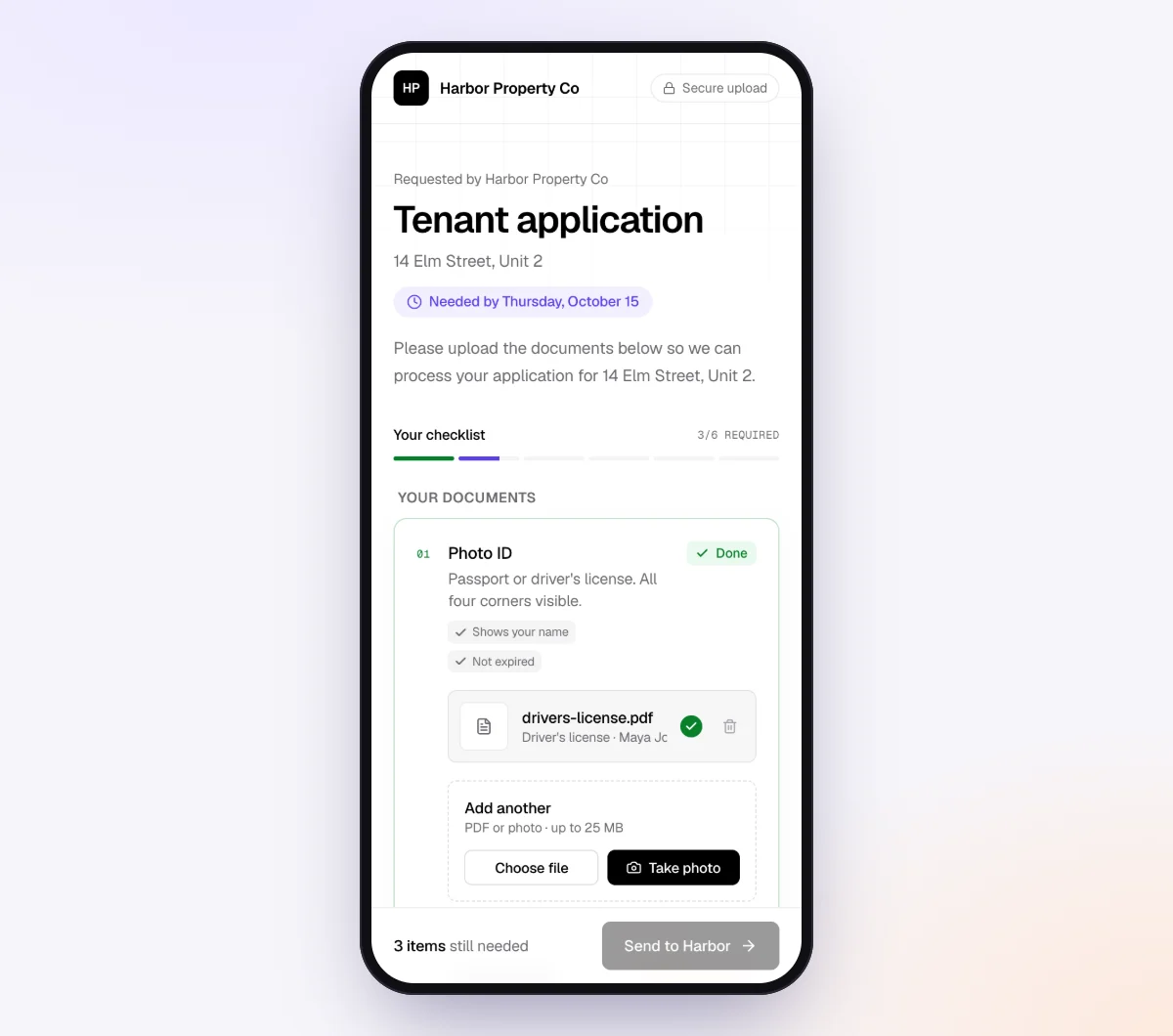
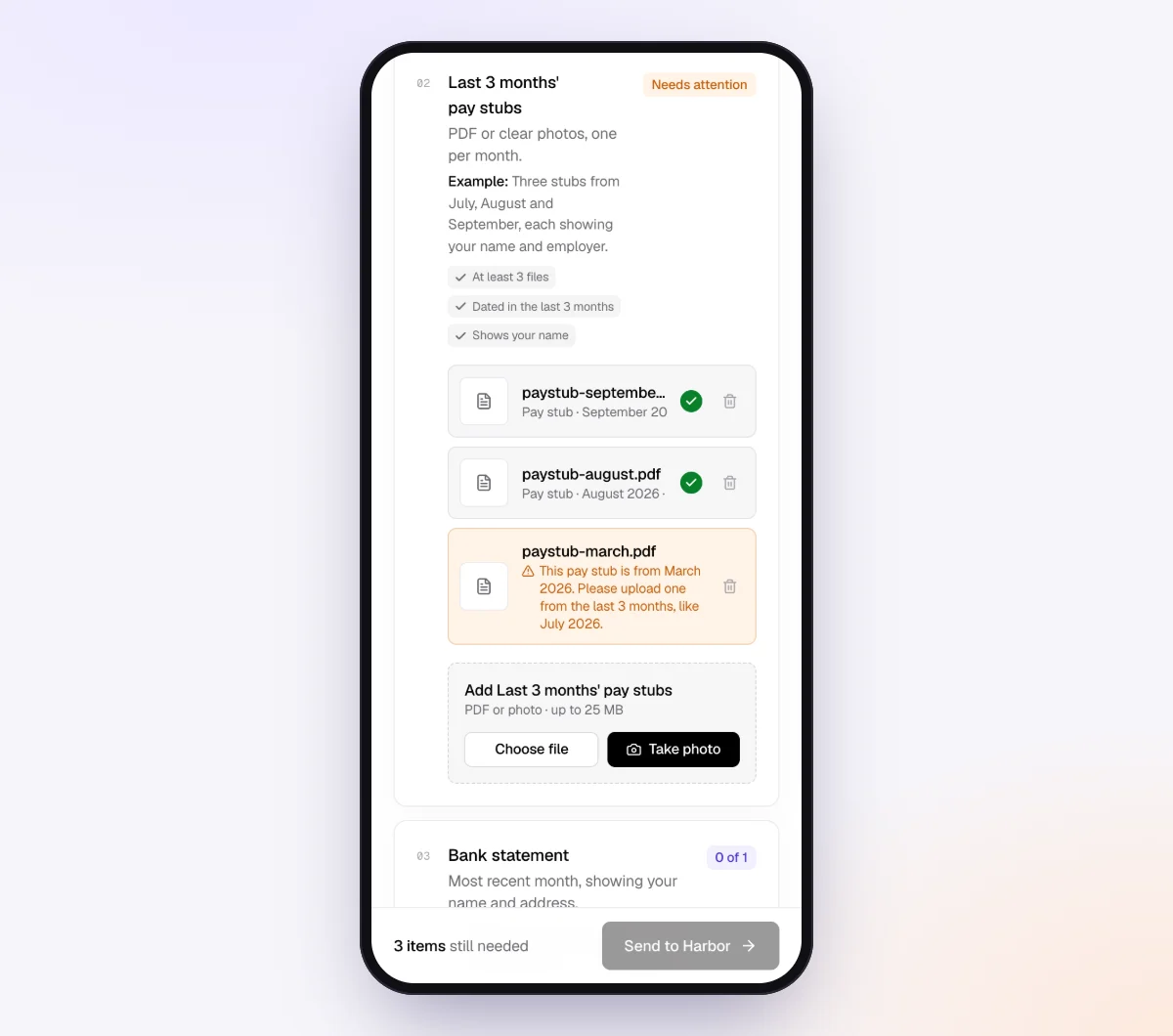
Each upload is checked in seconds by document checks: the right kind of document, readable, the right year, complete. Page one of a four-page notice gets a friendly note asking for the rest while the letter is still in hand; a 2023 statement against a 2024 request is flagged on the spot.
5. The agent chases to the deadline, then you export the index
In the checklist's "AI autopilot" settings, turn on "Chase until it's all in" and choose "Paced to each request's deadline." Reminders are spaced out when there is time, closer as the needed-by date nears, at most one automatic email a day, each listing only what is still missing. Turn on "Follow up on anything missing" so a client who submits without the bank statement is asked for exactly that.
When the list is complete, download the organized ZIP, or on Pro deliver to Google Drive or a webhook. From the request's menu, download the "Evidence index (CSV)": one row per item and file, with the item name, status, file name or answer, time received, check result and extracted facts: your index of what came in and when.
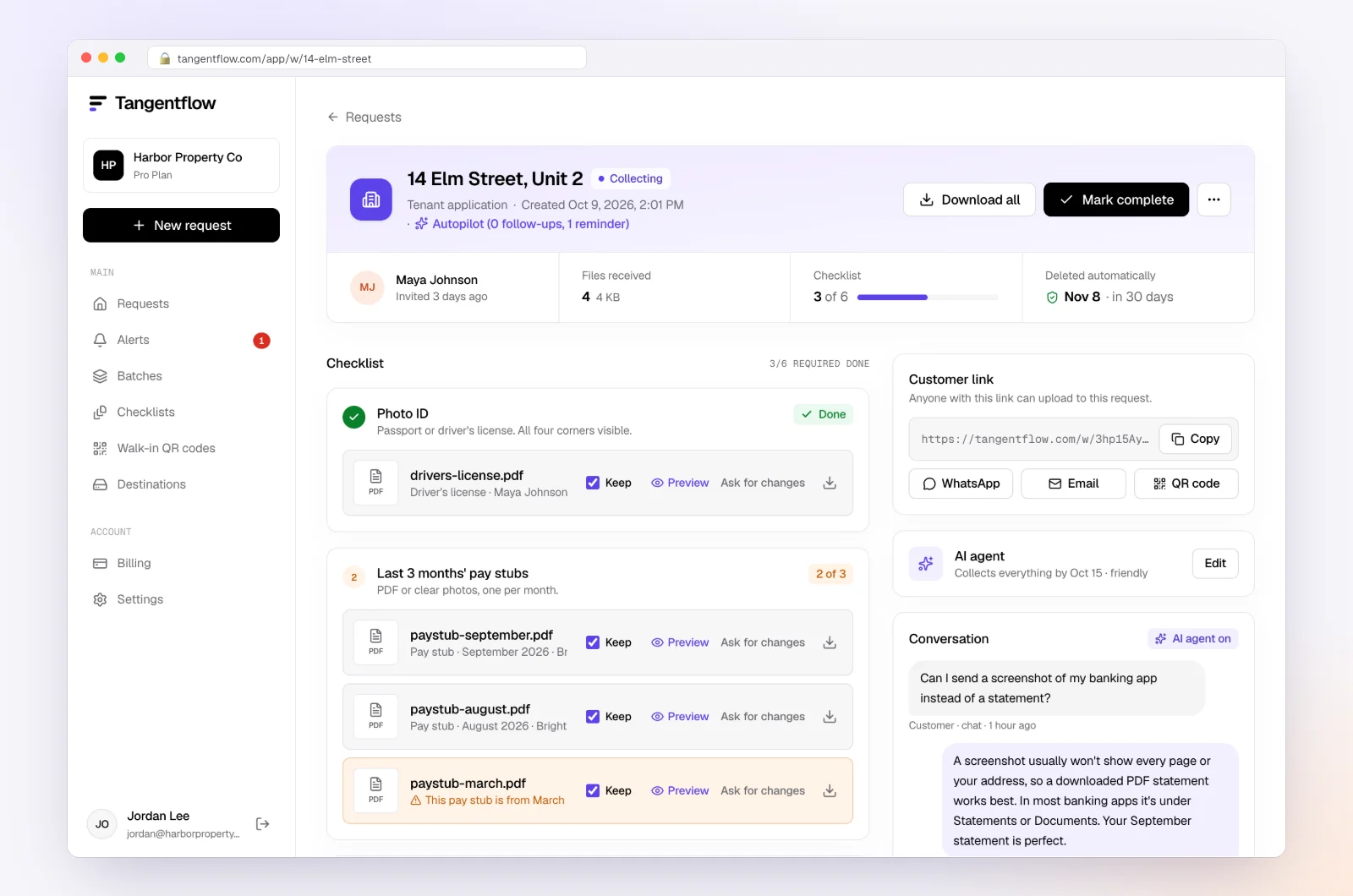
Mark the request complete once the package is sent, and the files are deleted 24 hours later. The copy you keep lives in your practice file.
Setups by notice type
Each is the base checklist with the issue items swapped and a line in the agent's private notes.
- IRS CP2000 or CP2501: every slip for the year (PDF or photo), the filed return (PDF only), the processor or brokerage annual statement, Form 8821 or 2848 to sign. Note: "Proposed change, not a bill. Do not quote amounts."
- IRS CP14, CP501 or CP503: bank statement showing the payment (PDF only), payment confirmation, any payment plan letter. Note: "Hand off to me on payment plan questions."
- CRA processing or pre-assessment review: receipts for each claim named (photos accepted), the Notice of Assessment (PDF only), the Represent a Client confirmation question. Note: "Only the items named in the letter."
- CRA GST/HST review: supplier invoices requested (photos accepted), sales records ("PDF or spreadsheet"), bank statements for the period (PDF only). Note: "Invoices must show the supplier's GST/HST number."
For the wider lists, see the business tax return documents checklist and the client tax document checklist. More on firms using Tangentflow under accounting and tax and tax preparers.
When something goes wrong
| Problem | Likely cause | Fix |
|---|---|---|
| Client keeps sending page one | Thinks the rest is boilerplate | The page check flags it; add a tip that the response form is on the later pages |
| Client sent the wrong year's statement | Did not read the tax year on the notice | The check flags the date; put the year in the item name ("2024 statements") |
| Client cannot find the slip | Issuer sent it electronically or to an old address | Have them download it from the payer's portal; IRS transcripts show what was reported once an 8821 or 2848 is on file |
| Response date is days away | Client sat on the letter for weeks | Call the number on the notice before the date to ask for more time, and document the call |
Check "Alerts" daily; handoffs and missed deadlines show up there.
Free and Pro, honestly
You can run a real notice request without paying anything.
| Free | Pro ($29/month) | |
|---|---|---|
| Open requests | 1 at a time | Unlimited |
| AI check on each file | Yes | Yes |
| AI autopilot (answers, reminders, follow-ups) | Your first request | Every request |
| Clients reply by email with attachments | No | Yes |
| Branding | Tangentflow badge | Your logo |
| Delivery to Google Drive or a webhook | No | Yes |
| Works with AI assistants (MCP) | No | Yes |
| File retention | 7 days | 60 days |
Both plans include unlimited checklists, QR codes and posters, ZIP export, AI summaries, the Evidence index and email delivery. Pro is billed monthly with no contract, and you can cancel any time. Full details on the pricing page.
What Tangentflow does not do: SMS or text messages, a native mobile app, full legal e-signature certificates, identity verification, collecting payments, or permanent storage. It also does not contact the IRS or the CRA, draft or file a response, or tell you how to answer a notice. If you need any of those, pair it with a tool or a professional that does.
The whole process as a checklist
- Reply to "I got a letter" the same day with one request: the complete notice as a PDF, plus any earlier letters.
- Confirm the notice is genuine on irs.gov or canada.ca.
- Record the notice number, tax year, printed date, response date and amount.
- Decide whether to handle it or refer it out.
- Pick the matrix rows that match the issue, and nothing else.
- Add the authorization step: Form 2848 or 8821 to sign, or the CRA Represent a Client confirmation.
- Send one private link with a needed-by date well ahead of the response date; keep taxpayer numbers out of email.
- Let reminders run, paced to that date, and fix flagged uploads the same week.
- Assemble the package in the notice's order, send it by the method printed on the notice, and keep proof.
- Export the Evidence index, file the package, let the collection copies delete, and calendar the follow-up.
Frequently asked questions
My client sent a photo of the first page of an IRS notice. What should I ask for first?
The complete notice as a PDF, including the response form and any enclosures. Until you can read the notice number, tax year, printed date and response date, you do not know what is being asked or when it is due.
What documents are needed to respond to a CP2000?
The complete notice and its response form, every W-2, 1099, 1098 and K-1 for that year, the return as filed, and the client's own records for any income the IRS lists that the client disputes. The IRS asks you to state whether you agree or disagree and include supporting documentation for each line the notice proposes to change.
What is the difference between Form 2848 and Form 8821?
Form 2848 is a power of attorney that authorizes someone eligible to practice before the IRS to represent the client and receive their confidential information. Form 8821 only authorizes a person or firm to inspect and receive the client's tax information; it does not allow representation. Choose based on who will actually respond to the notice.
How does a Canadian bookkeeper get authorized to speak to the CRA for a client?
Through the CRA's Represent a Client service. The client can authorize you directly in My Account or My Business Account using your RepID, GroupID or business number, or you can submit a request in Represent a Client that the client confirms in their own account. Form AUT-01 is the mail option for offline access only.
How long does my client have to respond to a CRA review letter?
The CRA says to reply within the time frame indicated in the letter, so the date printed on the letter is the one that counts. If the client cannot meet it, the CRA says to call the number at the bottom of the letter. Do not rely on a day count from a blog post, including this one.
Can clients just email me the notice and their receipts?
They can, but they should not. The notice carries the client's SSN or SIN, and emailed photos scatter across inboxes and phones and stay for years. Ask for PDFs through one private link, and if something has already arrived by email, save it, delete the email and send the link.
Does Tangentflow respond to the IRS or CRA for me?
No. Tangentflow collects the notice, the records and the signed authorization through one private link, checks each file as it arrives and reminds the client until the list is complete. Deciding how to respond and sending the package is your work or a specialist's.
When should I refer a notice to a tax lawyer or CPA?
When the letter mentions criminal investigation or fraud, when the amount is large or several years are open, when it starts a court clock, when it involves foreign accounts or residency outside your practice area, or when your license does not allow you to represent the client in that forum. Collect the complete notice and the records first; that is the package the specialist will ask for.