Checklists
GST/HST Receipt Requirements for Input Tax Credits (2026)
GST/HST receipt requirements for input tax credits: what a receipt must show under $100, $100 to $499.99 and $500+, and what to ask clients when it falls short.
By Bibin MathewUpdated 19 min read
The short answer
Under $100, a receipt only needs the supplier's name, the date and the total. From $100 to $499.99 it also needs the supplier's GST/HST registration number and the tax charged, or a note that tax is included with the rate. At $500 or more, add the buyer's name, the payment terms and a description of what was bought. These tiers replaced the old $30 and $150 thresholds in April 2021, so when a client's receipt falls short, ask them for a full invoice from the supplier before the claim is filed.
Short answer: under the current Input Tax Credit Information (GST/HST) Regulations, the information a receipt needs depends on its total. Under $100, you need the supplier's name, the date and the total. From $100 to $499.99, add the supplier's GST/HST registration number and the GST/HST charged (or a statement that tax is included, with the rate). At $500 or more, add the buyer's name, the payment terms and a description of what was bought. These thresholds have applied since April 21, 2021. If a client's receipt is missing something, ask them to get a full invoice from the supplier before the return is filed.
The hard part is the client. You find a $640 hardware store receipt with no business name on it, or a $180 contractor invoice with no GST/HST number, and have to explain the problem to a client who thinks "a receipt is a receipt."
This guide is for bookkeepers and small firms with Canadian clients who claim input tax credits (ITCs). It covers what each receipt must show, what does and does not count as support, and what to send a client when a receipt falls short.
The current ITC thresholds: under $100, $100 to $499.99, $500 and over
The rules sit in section 3 of the Input Tax Credit Information (GST/HST) Regulations (SOR/91-45). They set out the "prescribed information" a registrant needs to have before claiming an ITC. The CRA summarizes them on its input tax credits page.
The tier depends on the total shown on the document, not on any single line. A receipt for one $40 item and one $70 item has a total of $110, so it is in the middle tier.
| Information the documents must show | Under $100 | $100 to $499.99 | $500 or more |
|---|---|---|---|
| Supplier's name, or the name they do business under (or an intermediary's) | Yes | Yes | Yes |
| Invoice date, or the date tax was paid or payable if there is no invoice | Yes | Yes | Yes |
| Total amount paid or payable | Yes | Yes | Yes |
| Supplier's GST/HST registration number | No | Yes | Yes |
| GST/HST charged, shown separately, or a statement that tax is included plus the total tax rate | No | Yes | Yes |
| Which items are taxable, when the receipt mixes taxable and non-taxable items | No | Yes | Yes |
| Buyer's name, business name, or authorized agent's name | No | No | Yes |
| Terms of payment | No | No | Yes |
| A description of each item or service, enough to identify it | No | No | Yes |
A few details in the regulation are worth knowing:
- The tiers stack. A $500 invoice needs everything in the first two columns plus the last three rows.
- Tax shown separately or included. At $100 and up, the receipt can show the GST/HST amount, or say tax is included and give the rate.
- Marketplaces. The name and number can belong to an intermediary that facilitates the sale, which is why some platform receipts show the platform's number.
- The information does not have to be on one piece of paper. CRA's GST/HST Memorandum 8.4 says the evidence for an ITC does not need to be in a single document. A supplier's statement of account plus a till receipt can together cover everything.
The old $30 and $150 thresholds are out of date
Before April 21, 2021, the tiers were under $30, $30 to $149.99 and $150 or more. Federal Budget 2021 raised them to $100 and $500, effective April 21, 2021. The practical effect is that businesses now need less information for smaller purchases: a $75 lunch receipt no longer needs the restaurant's GST/HST number, and a $300 invoice no longer needs the buyer's name.
The old numbers are still everywhere. When we checked in October 2026, several well-ranked receipt app blogs still listed $30 and $150, and CRA's GST/HST Memorandum 8.4, published in 2012, still uses the older thresholds. The regulation on Justice Laws is the current text.
| Before April 21, 2021 | From April 21, 2021 | |
|---|---|---|
| Basic tier (name, date, total) | Under $30 | Under $100 |
| Registration number and tax required | $30 to $149.99 | $100 to $499.99 |
| Buyer's name, terms, description added | $150 or more | $500 or more |
What a receipt needs to show for an ITC, as a client checklist
Clients do not need to read the regulation. They need a short list they can check at the till or when a supplier sends an invoice. Here is a version you can paste into an email or onboarding guide.
Every receipt, any amount:
- The store or supplier's name
- The date
- The total you paid
Anything $100 or more (including tax), also:
- The supplier's GST/HST number (9 digits, then "RT" and 4 more digits, like 123456789 RT0001)
- The GST/HST amount, or a line saying tax is included and at what rate
Anything $500 or more (including tax), also:
- Your business name on the invoice (ask at the counter, or add it to your supplier account)
- The payment terms (for example "paid in full," "paid by Visa" or "net 30")
- What you bought, described clearly enough to identify it, not just "materials"
GST/HST registration numbers on receipts
The supplier's registration number is the item most often missing from mid-sized receipts, especially from small contractors, independent shops and anyone who writes invoices by hand.
What it looks like. A GST/HST account number is the business's 9-digit Business Number followed by "RT" and a 4-digit reference number. On receipts it is often labeled "GST/HST #," "HST Reg. No." or "BN."
How to check a number. The CRA has an online tool called the GST/HST Registry. You enter the first nine digits of the number, the business name as it appears on the receipt, and the transaction date. It confirms whether that supplier was registered for GST/HST on that date. The CRA points to this tool so that ITC claims only include tax charged by someone who is registered.
Why it matters. Tax charged by a supplier who is not registered generally cannot be claimed as an ITC. Small unregistered suppliers often charge no GST/HST at all: no tax charged, no ITC to claim.
Can you claim ITCs with a credit card statement?
Generally, no. GST/HST Memorandum 8.4 says a monthly credit card statement does not on its own count as sufficient documentary evidence for an ITC. A statement line shows a merchant name, a date and an amount. It does not show the supplier's registration number, the tax charged or what was bought.
There is a narrow exception in the memorandum: where no other document is issued with a credit card receipt, such as in some hospitality settings, the credit card receipt itself (the slip from the merchant, not the bank statement) can be enough, as long as it contains the required information.
| Document | Usually enough for an ITC? | Why |
|---|---|---|
| Itemized till receipt with GST/HST number | Yes, up to $499.99 | Has name, date, total, number and tax |
| Supplier invoice in the business's name | Yes, any amount | Built to carry all the required details |
| Merchant credit card slip with full details | Often, if the details are on it | The regulation lists credit card receipts as supporting documentation |
| Online order confirmation or emailed invoice | Often | Counts if it shows the required details for its tier |
| Monthly credit card or bank statement | No, on its own | No registration number, tax amount or description |
For income tax, a statement plus a note is sometimes better than nothing. For the ITC, the CRA wants the supplier's details.
Are photos of receipts acceptable to the CRA?
Generally, yes, if the image is a complete and readable copy. The CRA's page on acceptable format and imaging paper documents says an image can take the place of a paper document when it is an accurate reproduction, gives the same information as the paper, and does not obscure significant details.
- Legibility is everything. A photo with the GST/HST number or tax line cut off is missing the information the ITC depends on.
- Destroying paper has conditions. The CRA says images become the permanent record, and the paper can be destroyed, if you follow Canadian General Standards Board imaging standards. Otherwise keep the originals, and ask the client's tax advisor before telling anyone to throw paper away.
Records that start out electronic, like emailed invoices, must be kept in electronic form even if you also print them. The CRA's business records page says records are generally kept for six years from the end of the last tax year they relate to.
Quebec: GST and QST receipts
Clients in Quebec claim GST through the CRA's ITC rules above, and claim QST through Revenu Québec as input tax refunds (ITRs). A few notes, with a hedge: confirm the details on Revenu Québec's own pages, since their rules are administered separately.
- Two numbers. Quebec suppliers usually show a GST number and a separate QST number. A QST number is 10 digits followed by "TQ" and 4 more digits.
- Similar tiers. Revenu Québec's invoice guidance uses the same bands as the federal rules, with the registration numbers required from $100 and the buyer's name and payment terms required from $500. Check Revenu Québec's "Preparing Invoices" page for the current list.
- Checking a QST number. Revenu Québec offers an online service, Validate a QST Registration Number, separate from the CRA's GST/HST Registry.
- Names matter. Ask clients to get invoices of $500 or more in the exact legal or operating name of the business.
What to ask clients for when the GST number (or anything else) is missing
This is where most of the work happens. Each gap has a specific fix, and most of them come from the supplier, not the client's memory.
| What is missing | Tier where it matters | What to ask the client for |
|---|---|---|
| Supplier's GST/HST number | $100 and up | A full invoice from the supplier, or a supplier statement of account or quote that shows the number |
| GST/HST amount or "tax included" line | $100 and up | An itemized receipt or invoice instead of the card slip |
| Business name on the invoice | $500 and up | A reissued invoice in the business name; a business account with the supplier for next time |
| Payment terms | $500 and up | An invoice marked paid, or the payment confirmation that goes with it |
| Description of what was bought | $500 and up | The itemized invoice, not a one-line "materials" receipt |
| The receipt itself | Any amount | A reprint, the online order history, or a re-sent invoice from the supplier |
Some rules that keep this manageable:
- Prioritize by the tax at stake. Chasing $12 of GST is not the same as chasing a $4,000 invoice. Agree a cut-off with the client.
- Ask for supplier fixes early. Reissuing an invoice is easy within weeks and hard a year later.
- Set a standing rule. "For any purchase of $500 or more, ask for an invoice in the business name" prevents most gaps at the till.
- Keep the claim window in mind. The CRA says ITCs can generally be claimed up to the return for the last reporting period ending within four years after the period they became available (shorter for some large businesses). A late invoice can usually go on a later return, so do not hold the whole return for one. Confirm timing with the client's advisor.
Message: a receipt is missing the GST/HST number
Subject: One invoice needed before we file your GST/HST return

Hi [First name],

For us to claim the GST/HST back on this purchase, the receipt needs
the supplier's GST/HST number, and this one doesn't show it:

- [Date], [Supplier], [Amount]

Could you ask [Supplier] for a full invoice? Most suppliers can email
one in a few minutes. The number looks like 123456789 RT0001.

Upload it here, no account needed:
[link]

If we can't get it by [date], we'll leave this GST/HST out of
the [period] return and can add it to a later one if the invoice arrives.

Thanks,
[Your name]
For softer versions and wrong-file messages, see our document request email templates. For handling clients who are late with receipts in general, see how to get clients to send receipts on time.
Collecting ITC-ready receipts in Tangentflow, step by step
Tangentflow does not read GST/HST numbers or decide whether an ITC is allowed. It gets the documents from the client each month, checks that each upload is the right kind of document, readable and recent enough, and chases what is still missing. More on how it fits a practice on our bookkeepers page.
1. Start from the "Monthly bookkeeping" template
Open "Checklists," choose "Browse templates" and pick "Monthly bookkeeping." It includes "Bank statements for the month," "Credit card statements," "Receipts and bills you paid," "Sales or invoices you issued," "Payroll report" and the question "Anything unusual this month?" For Canadian GST/HST registrants, the receipts item is the one to tune.

2. Make the receipts item ask for ITC-ready documents
Open "Receipts and bills you paid" in the checklist editor. Set "What should it be?" to something like "receipt or supplier invoice showing the supplier's name, date and total," keep the date rule, and shorten the client checklist above into the hint: "For anything $100 or more, the receipt must show the supplier's GST/HST number. For $500 or more, ask for an invoice in your business name."
Add a second file item, such as "Supplier invoices of $500 or more," with an "Example" describing a full invoice in the business name. Then add a yes/no "Form field" like "Did any purchase this month come without the supplier's GST/HST number?" and use "Only ask if…" to show a follow-up item, "Replacement invoices from suppliers," only when the answer is yes.

3. Send it to every client on the same day each month
For one client, click "New request," choose the checklist, add a reference such as "Northside Plumbing, October 2026," and set a needed-by date. For your whole book, open "Batches," choose "Send to many customers" and upload or paste your client list. Batches are part of Pro, up to 100 clients per sheet, and you can schedule the send up to 30 days ahead. Turn on "Repeat every month" and the same clients get a new request on the same day each month, with the same gap to the needed-by date, until you stop it from the batch page. Details on bulk requests.
Use "Notes for the agent (private)" on a request for context like "Needs a reissued Westside Lumber invoice for Sep 14."
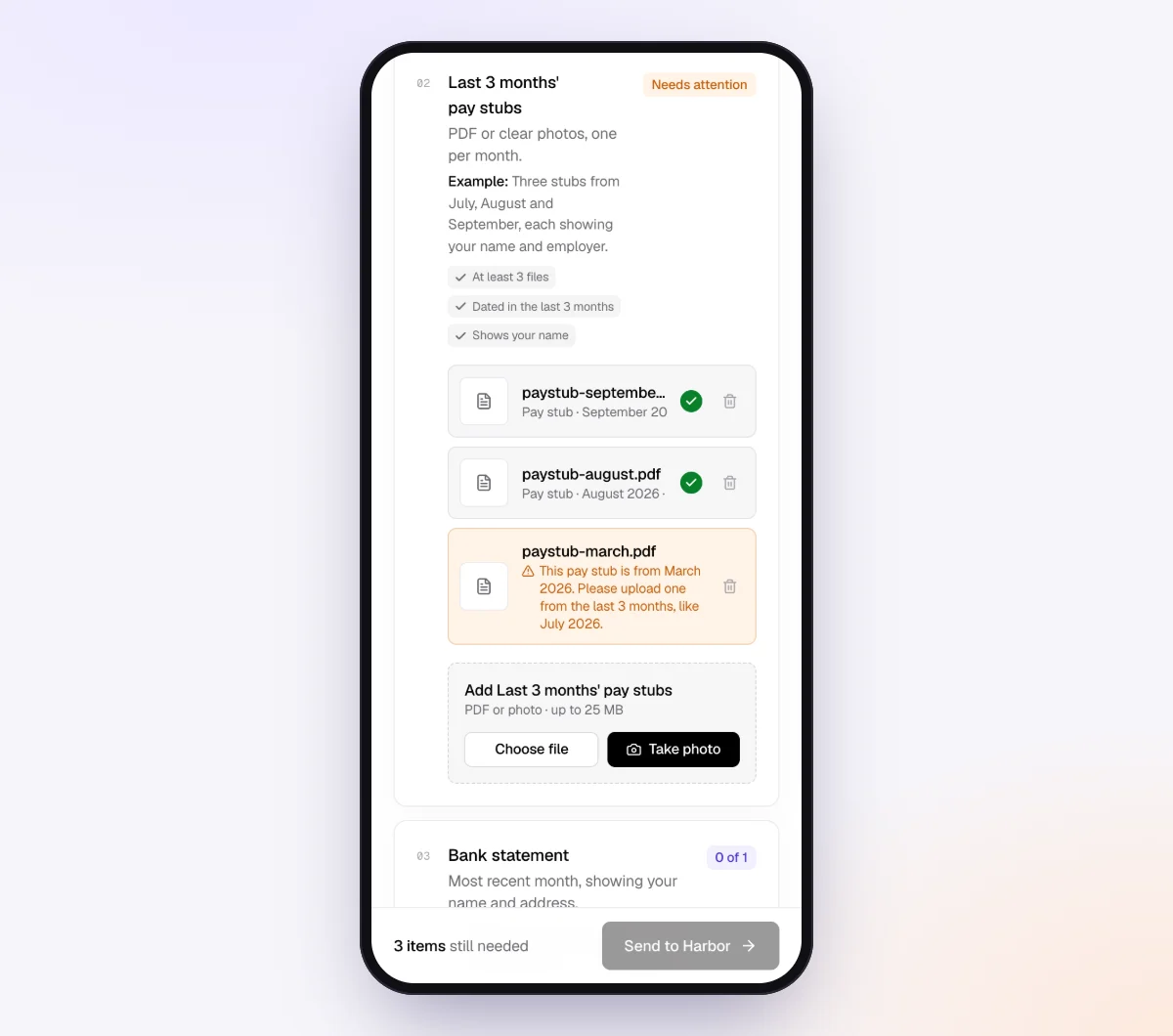
4. Unreadable receipts are caught while the client is still there
Each client opens a private link on their phone, with no account and no app. Every upload goes through document checks in seconds. If a photo is blurry, too dark or cut off, the client sees a friendly note and can upload a better one before leaving. That matters for ITCs: a cropped photo often loses the line with the registration number or tax.
5. The agent chases what is still missing
The AI collection agent sends the invitation from your business name, then reminds the client on a schedule paced to the needed-by date: spaced out early, closer near the date, at most one automatic email a day, and never right after the client was active. Each reminder lists only what is still missing. Clients can ask questions like "Does the Visa slip count?" and the agent answers from your checklist and private notes, or hands off to you when a question is outside the checklist.
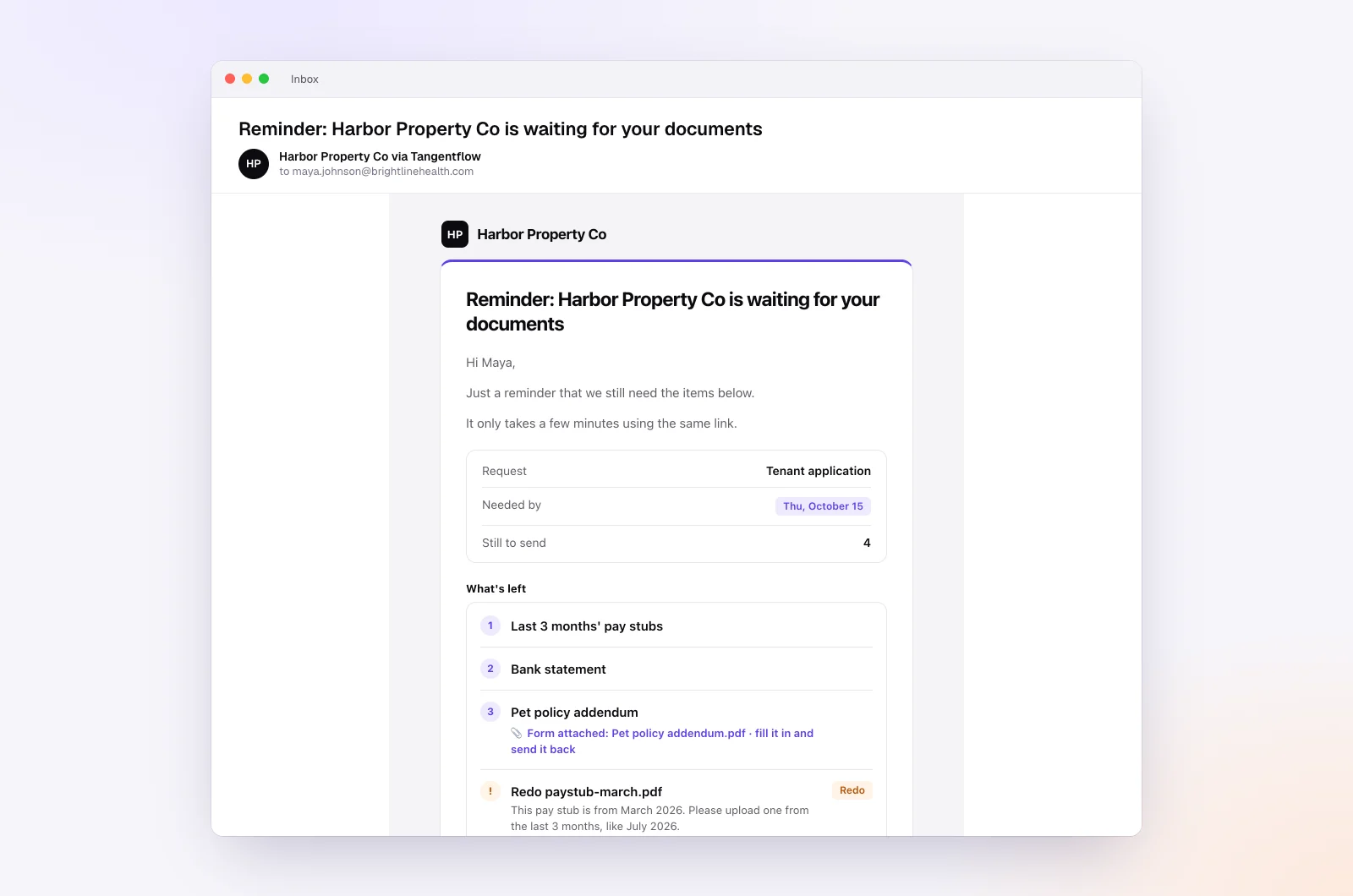
On Pro, clients can reply with an invoice attached and it is filed under the right item. When everything is in, use "Ask for changes" on any single file, then download a ZIP or, on Pro, deliver to Google Drive or a webhook.
Setups by type of client
Start from "Monthly bookkeeping" for each group and adjust the receipts items. Send each group its own batch.
| Client type | Receipts that cause ITC gaps | What to add to the checklist | Learn more |
|---|---|---|---|
| Trades and contractors | Big-box and lumber yard receipts over $500 without the business name | "Supplier invoices of $500 or more" item with a tip about a business account | Home services |
| Consultants and sole proprietors | Software subscriptions from foreign vendors, restaurant receipts | Hint asking for the emailed invoice, not the card slip | Accounting and tax |
| Online sellers | Marketplace and shipping receipts showing a platform's details | "Example" showing a full order invoice with tax lines | Document checks |
| Quebec clients | Receipts missing the QST number or the business name | Hint naming both GST and QST numbers | Accounting and tax |
When something goes wrong
| Problem | Likely cause | Fix |
|---|---|---|
| Client sends the card statement instead of receipts | Thinks the statement is enough | Explain in the hint that a statement has no GST/HST number or tax line |
| GST/HST number cut off in the photo | Long receipt photographed in one shot | The check flags unreadable photos; add a tip to take two overlapping photos |
| Supplier has no GST/HST number on any invoice | Small supplier not registered | If no tax was charged, there is no ITC to claim; if tax was charged, check the GST/HST Registry |
| Registry does not confirm the number | Typo, wrong name, or the supplier is not registered | Ask the supplier to confirm their number in writing, and raise it with the client's advisor |
| $500+ invoice in the owner's personal name | Bought on a personal account | Ask the supplier to reissue it in the business name |
| Supplier will not reissue | Closed or unresponsive | Note it on the file and let the client's tax advisor decide how to treat the claim |
Check "Alerts" daily during close week. That is where handoffs and missed dates show up. Our month-end close checklist covers where the GST/HST liability check fits in the rest of the close.
Free and Pro, honestly
You can run a real request without paying anything.
| Free | Pro ($29/month) | |
|---|---|---|
| Open requests | 1 at a time | Unlimited |
| AI check on each file | Yes | Yes |
| AI autopilot (answers, reminders, follow-ups) | Your first request | Every request |
| Send to many clients at once (Batches) | No | Yes |
| Clients reply by email with attachments | No | Yes |
| Branding | Tangentflow badge | Your logo |
| Delivery to Google Drive or a webhook | No | Yes |
| Works with AI assistants (MCP) | No | Yes |
| File retention | 7 days | 60 days |
Both plans include unlimited checklists, QR codes and posters, ZIP export, AI summaries and email delivery. Pro is billed monthly with no contract, and you can cancel any time. Full details on the pricing page.
What Tangentflow does not do: SMS or text messages, a native mobile app, full legal e-signature certificates, identity verification, collecting payments, or permanent storage. If you need any of those, pair it with a tool that does. It also does not verify GST/HST or QST registration numbers, calculate ITCs, connect to bank feeds or replace your bookkeeping software.
The ITC receipt routine as a checklist
- Use the current tiers: under $100, $100 to $499.99, and $500 or more, including tax.
- Under $100: supplier name, date and total.
- $100 and up: add the supplier's GST/HST number and the tax charged, or a "tax included" statement with the rate.
- $500 and up: add the buyer's name, payment terms and a description of each item.
- Do not rely on monthly credit card or bank statements for ITCs.
- Accept clear photos, and keep electronic invoices in electronic form.
- Check new suppliers' numbers in the CRA's GST/HST Registry, and QST numbers with Revenu Québec.
- Ask for reissued invoices from suppliers early, prioritized by the tax at stake.
- Collect receipts on the same day every month, and keep the claim window in mind for late ones.
Frequently asked questions
What does a receipt need to show for an input tax credit?
Under $100, the supplier's name, the date and the total. From $100 to $499.99, also the supplier's GST/HST registration number and the GST/HST charged, or a statement that tax is included with the rate. At $500 or more, also the buyer's name, the payment terms and a description of what was bought.
Are the ITC thresholds still $30 and $150?
No. Those were the thresholds before April 21, 2021. Budget 2021 raised them to under $100, $100 to $499.99, and $500 or more. Some older pages, including CRA's 2012 GST/HST Memorandum 8.4, still show the old numbers, so check the regulation on Justice Laws.
Can I claim ITCs with just a credit card statement?
Generally not. CRA's GST/HST Memorandum 8.4 says a monthly credit card statement alone is not sufficient documentary evidence. Ask the client for the receipt or invoice, which carries the supplier's registration number and the tax charged.
Are photos of receipts acceptable to the CRA?
Generally yes, when the image is complete, accurate and readable. The CRA says imaged documents can replace paper when they give the same information and nothing significant is obscured. Whether the paper can be destroyed depends on meeting imaging standards, so check with the client's tax advisor.
How do I check a supplier's GST/HST registration number?
Use the CRA's GST/HST Registry online. Enter the first nine digits of the number, the business name from the receipt and the transaction date, and it confirms whether the supplier was registered on that date. For QST numbers, use Revenu Québec's Validate a QST Registration Number service.
What should I ask a client for when the GST number is missing?
Ask them to get a full invoice from the supplier, which most businesses can email quickly. The number may also be on the supplier's quote or statement of account, since the information does not have to be on a single document. If it cannot be found, leave that GST/HST out of the return and let the client's tax advisor decide.
Does Tangentflow check GST/HST numbers on receipts?
No. The AI check confirms each upload is the right kind of document, readable and recent enough, and flags blurry or cut-off photos so the client can retake them. Verifying registration numbers and deciding whether an ITC is allowed stays with you and the client's advisor.