Checklists
Construction Bookkeeping Documents Checklist for Clients (2026)
A construction bookkeeping documents checklist by job, month and year: contracts, change orders, pay apps, sub invoices, lien waivers, retainage and WIP inputs.
By Bibin MathewUpdated 21 min read
The short answer
Ask contractor clients for three sets of documents. Per job: the signed contract, estimate or budget, every change order, pay applications, subcontractor invoices, material receipts with the job number, lien waivers and the completion sign-off. Per month: bank, card, loan and equipment finance statements as PDFs, payroll reports with hours by job, fuel and vehicle records and insurance invoices. Per year: W-9s or Canadian contractor details and certificates of insurance from every sub, an equipment list and the estimated cost to complete each open job. Send one request per job or per month, show the subcontractor items only when the client says they used subs, and let crews photograph receipts from the truck.
Construction books fail at the job level, not the month level. A remodeler's bank statement can reconcile perfectly while the kitchen on Maple Street shows a 40 percent margin that is really 12, because three sub invoices, a change order agreed by text and a $2,300 lumber run on the owner's personal card never made it to the job.
This checklist is for independent bookkeepers and small firms in the US and Canada who serve general contractors, trades and remodelers. It is organized the way construction paperwork actually arrives: by job, by month and once a year. You get a client-facing request list for each, a table showing how the list changes by type of contractor, a plain explanation of lien waivers, fixes for the problems that come up most, and a way to collect each set in Tangentflow without a 40-email thread per job.
Why contractor paperwork needs its own checklist
A regular small business has one stream of documents. A contractor has that stream plus a second one that runs per project, and the two have to be tied together: costs belong to jobs, revenue is earned in pieces (deposits, draws, retainage, final payment), subcontractors bring their own paperwork, and equipment sits between jobs. The fix is not a longer monthly email. It is three short lists, each sent at the moment the documents exist.
The per-job document set
Send this list when a job is awarded and keep it open until the job closes, so the client adds pay apps and sub invoices to the same request as they happen.
| Document | What to ask for exactly | Why you need it |
|---|---|---|
| Signed contract | The customer-signed agreement, every page, including the payment schedule and allowances | Sets the contract value and billing terms your revenue follows |
| Estimate or budget | The internal estimate by cost code or phase, as PDF or spreadsheet | The baseline for job costing and the estimated cost to complete |
| Change orders | Every signed change order with amount and date, plus a note on anything agreed verbally or by text | Revenue and cost change with each one; unbilled change orders are the most common lost revenue |
| Pay applications or invoices to the customer | Each progress bill or pay application, with the schedule of values if there is one, and which customer payment matched it | Ties deposits and draws in the bank to the work billed, and shows retainage still outstanding |
| Subcontractor invoices | Every sub invoice with the sub's name, the job, the period and the amount | Direct job cost, and the trigger for lien waivers and year-end slips |
| Lien waivers | The waiver received from each sub or supplier for each payment, conditional or unconditional | Confirms which payments cleared the chain and that the job's payables are really settled |
| Material receipts and supplier invoices | Receipts with the job number written on them or in the upload note, including anything paid personally | The bulk of direct costs, and the item most often missing |
| Equipment rentals, permits and inspection fees | Rental invoices with dates, and receipts for permit and inspection fees billed to the job | Small job costs that are usually paid by card and never coded |
| Job completion sign-off | The customer's acceptance, final invoice and the date of substantial completion | The date revenue is final and the start of warranty and lien deadlines |
Ask for the job number on every item, even if the client's "job number" is just the customer's last name.
Change orders deserve their own line
A homeowner asks for a second outlet, the electrician says "sure," and nobody writes it down. Add a yes/no question to every monthly request: "Did the customer ask for anything that was not in the original contract?" A yes with no signed change order is an unbilled change you found before the final invoice went out.
Pay applications and retainage, described plainly
On larger jobs, billing runs through pay applications rather than ordinary invoices. The common format (the AIA G702 and G703 forms are the best-known example, though many GCs use their own version) has a cover sheet summarizing the contract and a continuation sheet with a schedule of values: each line of work, its scheduled value, work completed to date, materials stored and the percentage complete. Three figures matter to the books: work completed to date, which drives how much revenue has been earned; retainage, the portion the customer holds back from each payment (commonly 5 to 10 percent) until the job is substantially complete; and current payment due, which is what should show up in the bank. Retainage receivable that nobody tracks is money the client forgets to collect.
WIP schedule inputs: ask for the estimate to complete
A work-in-progress (WIP) schedule needs four numbers per open job: contract value including approved change orders, estimated total cost, cost to date and billed to date. Three come from the books. The fourth has to come from the client, because only the person running the job knows that the framing is done but the tile is going to run long. Ask for it as a short form answer, not a document: "What do you expect the total cost of this job to be when finished?" and "Roughly what percent complete is it today?" Quarterly is good. Year-end is essential.
The monthly document set
This is the standard close list with a construction layer on top. If you already use our monthly bookkeeping checklist, keep it and add the construction rows.
| Document | Ask for | Construction note |
|---|---|---|
| Bank statements | Every business account, full statement as PDF, every page | The statement, not the transaction export, has the opening and closing balances |
| Credit card statements | Every card used for the business, PDF, every page | Include the owner's personal card if materials go on it |
| Loan statements | Each term loan, line of credit and SBA or BDC loan statement | Lines of credit float with job draws; you need the month-end balance |
| Equipment and vehicle finance statements | Each truck, trailer, skid steer or tool loan or lease statement | Splits the payment into interest and principal and confirms the asset list |
| Payroll reports | Payroll register and tax liability report, plus hours by job or a job allocation | Labor is the largest cost on many jobs and the hardest to code after the fact |
| Fuel and vehicle records | Fuel receipts or fleet card statement, repairs, and mileage or vehicle use notes | Needed for vehicle expense and for any job allocation |
| Insurance invoices | Liability, workers' comp, auto and umbrella invoices or the premium finance statement | Premiums often finance monthly and get coded as a loan payment by mistake |
| Receipts for uncoded transactions | Receipts for the specific transactions you cannot identify or assign to a job | Ask as a short list of dates and amounts, not "all receipts" |
| Customer payments and sub payments | Which deposits belong to which job, and any sub paid without an invoice | Keeps revenue on the right project and catches subs paid by e-transfer |
Payroll is the item most worth pushing on. A payroll register gives the total labor cost, not which jobs the hours went to. If the payroll or time-tracking app can export hours by job, ask for it every month as a PDF or spreadsheet. If not, ask for a rough split by job in a form field.
The yearly document set
Collect these in the fall. By January the subs have been paid and have no reason to answer; in October the client still has leverage.
| Document | Ask for | Note |
|---|---|---|
| W-9 from every US sub and vendor | Signed Form W-9, current revision, before the first payment | US. Needed for 1099-NEC, generally required at $2,000 or more paid in 2026 |
| Contractor details from every Canadian sub | Legal name, business number or SIN, address, GST/HST number | Canada. Needed for T5018 (construction) or T4A slips at $500 or more |
| Certificates of insurance from every sub | Current ACORD 25 or Canadian equivalent naming the client as certificate holder, plus endorsements where the contract requires them | Before each sub starts, and again at each renewal |
| Equipment and vehicle list | Every owned vehicle, trailer and major tool with purchase date and cost, and what was sold or scrapped | Fixed asset register and depreciation |
| Year-end WIP inputs, retainage and holdbacks | For each open job: contract value with change orders, estimated total cost, percent complete, retainage still owed to the client and holdbacks the client owes to subs | Needed for the WIP schedule and the tax return; receivables and payables the statements do not show |
The W-9 and COI items have their own guides: how to collect W-9 forms from vendors, how to collect certificates of insurance from subcontractors, and for Canadian clients, how to collect contractor information for T4A and T5018 slips.
Lien waivers: what to collect and why they vary
A lien waiver is a sub's or supplier's statement that, having been paid a certain amount, they give up the right to put a lien on the property for that amount. The owner wants them, the GC wants them from every sub before releasing payment, and for your client they are proof that a payment cleared the chain. There are four kinds, and the words matter:
| Type | When it is signed | What it means |
|---|---|---|
| Conditional waiver on progress payment | Before a progress payment clears | Waives lien rights for that amount only if the payment is actually received |
| Unconditional waiver on progress payment | After a progress payment has cleared | Waives lien rights for that amount, no conditions |
| Conditional waiver on final payment | Before the final payment clears | Waives all remaining lien rights if the final payment is received |
| Unconditional waiver on final payment | After the final payment has cleared | Waives all lien rights on the job |
Rules vary by state. About a dozen US states, including California, Texas and Arizona, prescribe the exact statutory wording a lien waiver must use, and a waiver on the wrong form may not hold up. Point the client to their state's forms and their lawyer, not to a template found online.
Canada uses holdbacks instead of retainage, and lien legislation by province. Under Ontario's Construction Act, for example, the payer must hold back 10 percent of the value of work and materials until the lien period expires; rates, periods and release rules differ between provinces. Lien waivers are less common in Canada. For a Canadian client, ask for the holdback schedule on each job (how much is held from the client, how much the client holds from subs, and expected release dates) and check your province's construction or builders' lien legislation.
How the list changes by type of contractor
| Solo trade (electrician, plumber, painter) | Remodeler with subs | GC with progress billing | Canadian contractor | |
|---|---|---|---|---|
| Unit of a "job" | Often the month, or the customer | The project | The contract | The project |
| Per-job set | Invoice to customer, material receipts, permit fees | Full list, with change orders and sub invoices | Full list plus pay applications, schedule of values, retainage records | Full list, with a holdback schedule instead of lien waivers |
| Lien waivers | Rarely, unless working under a GC | From each sub on each payment, per state form | From every sub and supplier, conditional and unconditional, on every draw | Holdback records under provincial lien law |
| Payroll by job | Owner's time only, or none | Crew hours by project | Hours by project and cost code | Crew hours by project |
| Year-end tax slips | W-9s for the occasional helper | W-9s and 1099-NEC for every sub at $2,000 or more (2026) | W-9s, 1099-NEC, often 1099-MISC for rents | T5018 at $500 or more when construction is more than half of revenue, otherwise T4A |
| COIs from subs | Occasional | From each sub before start | From each sub, with endorsements, tracked to renewal | From each sub, plus WSIB or provincial workers' comp clearance where required |
Four ways to collect construction documents, compared
| Method | Effort for you | Client experience | Job-level organization | Reminders and checks |
|---|---|---|---|---|
| Email and text | High, you sort every thread by hand | Easy, which is the problem | None | Manual |
| Shared folder per client | Medium | Fine from a desk, poor from a truck | Only if the client files correctly | Manual |
| Construction software with a document module | Low once set up, but the client must adopt it | Good for the office, mixed for crews | Strong, tied to jobs | Some reminders, few checks |
| Request link per job or month (Tangentflow) | Low, one checklist per set | Opens on a phone, no account, photo from the truck | Each request is a job or a month | AI agent reminders, instant check on each file |
Email breaks at the first remodeler with four subs, nobody opens a shared folder at a lumber yard, construction software is a hard sell for a two-person trade, and a request link does the collecting part only, without job costing, estimating or billing.
How to collect construction bookkeeping documents in Tangentflow, step by step
The idea is simple: one request per job, and one request per month, each with a short checklist, and a QR poster for receipts from the truck.
1. Build three checklists
Go to Checklists and create a "Per-job documents" checklist with the items from the per-job table. Start from the "Monthly bookkeeping" template for the monthly set and from "Year-end documents" for the yearly set, and add the construction rows.

For each file item, fill in "What should it be?" in the client's words: "the invoice your subcontractor sent you for this job, every page." Set the file type to match the document:
- "PDF only" for bank, card, loan and equipment finance statements, because the statement carries the balances an export does not.
- "PDF or spreadsheet" for the estimate, the hours-by-job export and any job cost or schedule-of-values export, so Excel and CSV files are accepted and the AI check reads the first rows to confirm what the report is and which period it covers.
- Photos for receipts, change orders and signed waivers, since those come from a phone.
Turn on "every page" for statements and contracts, and set a high maximum count on sub invoices and receipts.

2. Add the questions that shape each request
Add form fields: a short text field for the job name, a yes/no for "Did you use subcontractors this month?", a dollar amount for the expected total cost of the job, and a yes/no for "Did the customer ask for any work not in the original contract?"
Then use "Only ask if" so the subcontractor invoice and lien waiver items show only if the client answered yes to using subs, and the change order item only if there was extra work. A solo painter never sees a lien waiver item; a remodeler with four subs does.
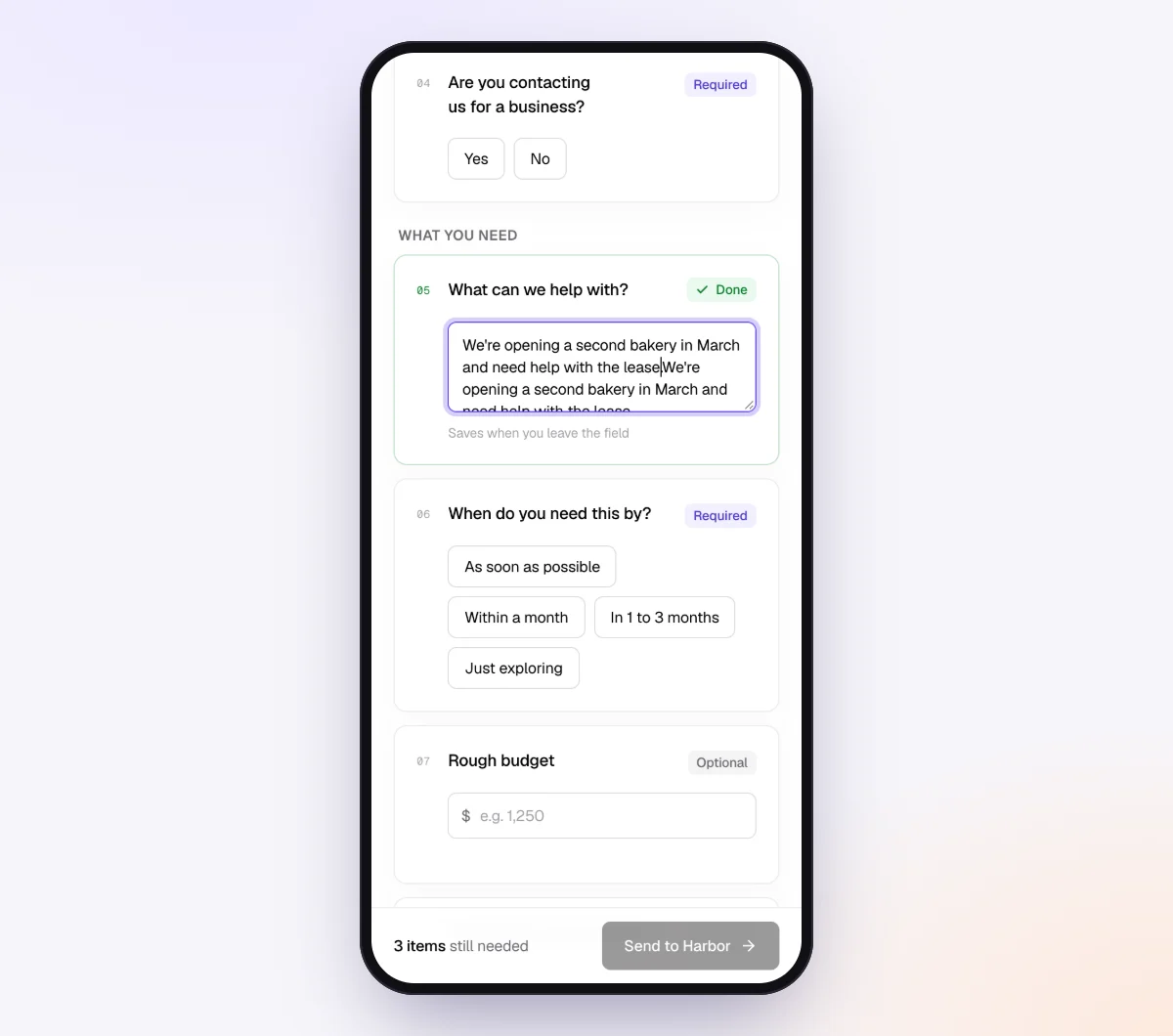
Use "Notes for the agent (private)" per client for context such as "Jobs are named by the customer's last name. Subs are paid by e-transfer, always ask for the invoice."
3. Send one request per job and one per month
Click "New request," choose "Per-job documents," and use the reference field for the job: "Nguyen kitchen, 14 Maple St." Set the needed-by date to the expected completion date plus a week, and leave "Email the link" on so the agent sends the invitation. The request stays open until the final sign-off is in.

For the monthly set, open "Batches" on Pro, choose "Send to many customers," paste your contractor clients from a sheet, and turn on "Repeat every month." Every client gets a new monthly request on the same day each month until you stop it. Batches only skip clients with an open request from the same checklist, so an open job request never blocks the monthly one.
4. Put a QR poster in the truck for receipts
Open "Walk-in QR codes," pick a short "Receipts from the field" checklist (one photo item and a short text field for the job name), and print the poster. Tape one inside each truck door. A crew member scans it, snaps the receipt at the counter, types the job name and is done. Each scan starts its own small request, so receipts arrive the day they are spent rather than in a shoebox in March.

5. Let the checks and the agent do the chasing
Each upload is checked in seconds by document checks: the right document type, readable, the right period, every page. A blurry receipt photographed on a dashboard gets a friendly note asking for a retake while the receipt is still in hand. A card statement uploaded under the bank statement item, or a September statement in November's request, is flagged the same way.
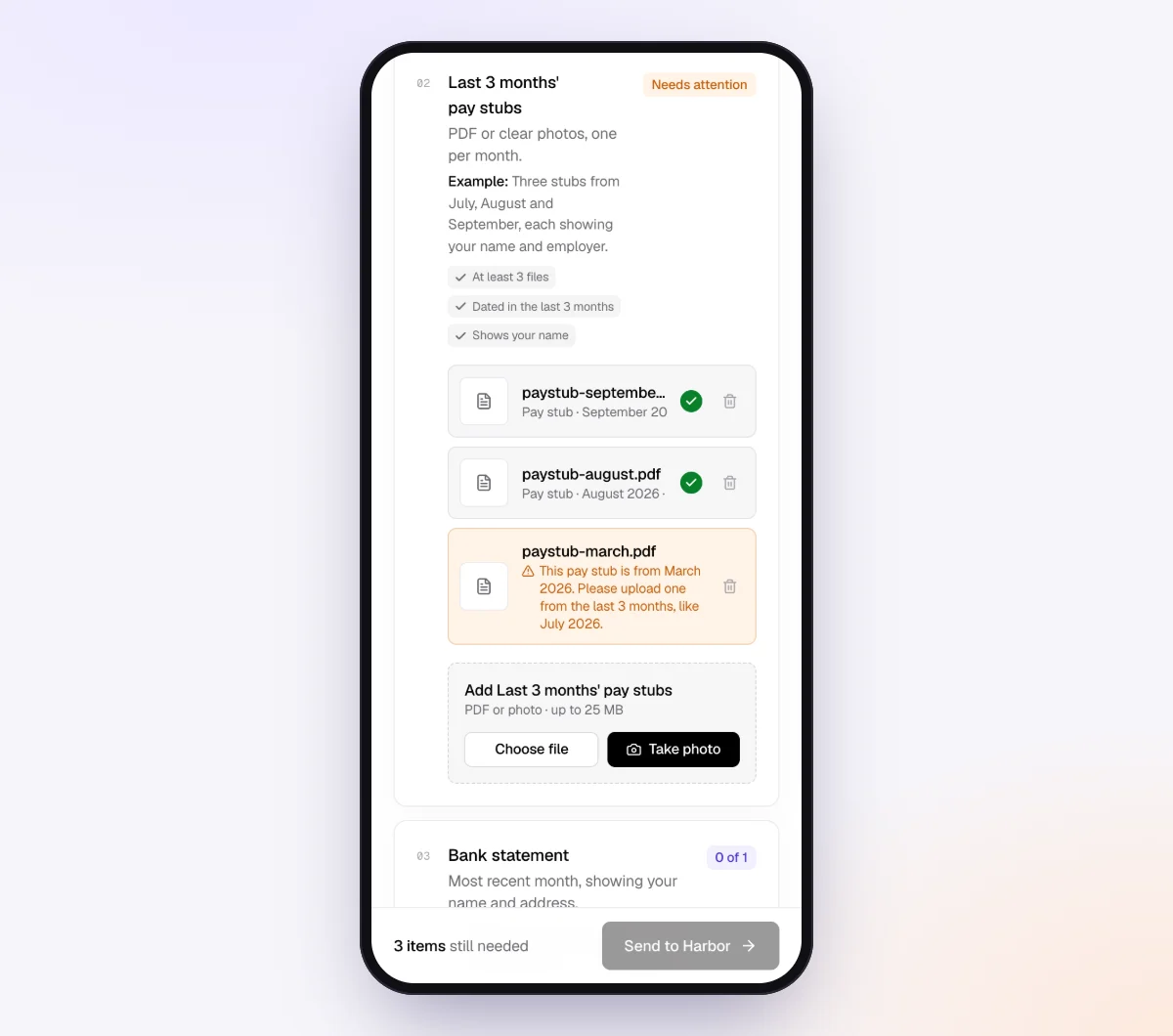
In the "AI autopilot" settings, turn on "Chase until it's all in" and choose "Paced to each request's deadline." Reminders go out spaced to the date, at most one a day, each listing only what is still missing. When the client replies "my tile guy never sends invoices," the agent answers from your checklist and notes, or hands off to you. On Pro, clients can reply to the email with files attached and each one is filed under the right item.
When a request is complete, download the organized ZIP, or on Pro deliver it to Google Drive or a webhook. From the request's menu, "Evidence index (CSV)" gives one row per item with the file, check result, extracted facts and the client's answer, a quick way to carry job names, dates and amounts into your working papers. Files are deleted 24 hours after you mark the request complete.
When something goes wrong
| Problem | Likely cause | Fix |
|---|---|---|
| Receipts live in the truck and arrive in a bag at year-end | No easy way to send them in the moment | Print the truck poster; a receipt photographed at the counter is a receipt you have |
| Receipts arrive with no job on them | The client does not think in job numbers at the lumber yard | Make the job name a required short text field on the receipt item, and say so in the tip ("Write the customer's last name") |
| A sub will not send invoices | Paid by e-transfer or cash and sees no reason to | Have the client hold payment until the invoice and waiver are in; add "Did you pay any sub without an invoice?" as a yes/no so you at least know |
| Change orders were agreed by text message | The client treats extras as favors, not billable work | Ask "Did the customer ask for anything not in the contract?" every month, and have the client upload a screenshot of the text as the record until a signed change order exists |
| Blurry receipt photos | Taken on a dashboard in low light | The check flags it at upload; add a tip about a flat surface and the whole receipt in frame |
For the receipt problem in general, our guide to collecting expense receipts from employees covers the crew side. For loan and equipment finance paperwork, see loan documents for bookkeepers.
Free and Pro, honestly
You can run a real request without paying anything.
| Free | Pro ($29/month) | |
|---|---|---|
| Open requests | 1 at a time | Unlimited |
| AI check on each file | Yes | Yes |
| AI autopilot (answers, reminders, follow-ups) | Your first request | Every request |
| Clients reply by email with attachments | No | Yes |
| Batches, including "Repeat every month" | No | Yes |
| Branding | Tangentflow badge | Your logo |
| Delivery to Google Drive or a webhook | No | Yes |
| Works with AI assistants (MCP) | No | Yes |
| File retention | 7 days | 60 days |
Both plans include unlimited checklists, QR codes and posters, ZIP export, AI summaries and email delivery. Pro is billed monthly with no contract, and you can cancel any time. Full details on the pricing page.
What Tangentflow does not do: SMS or text messages, a native mobile app, full legal e-signature certificates, identity verification, collecting payments, or permanent storage. If you need any of those, pair it with a tool that does. It also does not do job costing, estimating or progress billing, and it does not sync with your accounting software. See Tangentflow for bookkeepers, Tangentflow for contractors and the home services use case for the setups on each side.
The whole process as a checklist
- Agree with each client on what a "job" is: the project, the contract or the month.
- Build three checklists: per job, per month and year-end.
- Ask for the job number on every file.
- Set statements to "PDF only" and estimates and job cost exports to "PDF or spreadsheet."
- Add yes/no questions for subs and change orders, and hide the dependent items with "Only ask if."
- Ask for the estimated cost to complete on every open job at least quarterly.
- Open one request per job when it is awarded; send the monthly request on the same day each month, repeating automatically.
- Print a QR poster for the truck so receipts are photographed at the counter.
- Collect W-9s or Canadian contractor details and certificates of insurance from every sub before the first payment.
- Match every lien waiver to a payment and every pay app to a deposit, and track retainage or holdbacks separately.
- Send the year-end request in October, not January.
Frequently asked questions
What documents does a contractor need to give their bookkeeper?
Three sets. Per job: the signed contract, estimate, change orders, pay applications, subcontractor invoices, material receipts with the job number, lien waivers and the completion sign-off. Per month: bank, card, loan and equipment finance statements, payroll reports with hours by job, fuel and vehicle records and insurance invoices. Per year: W-9s or Canadian contractor details and certificates of insurance from every sub, an equipment list and the estimated cost to complete each open job.
What is the difference between a conditional and an unconditional lien waiver?
A conditional waiver gives up lien rights only if the payment it names is actually received, so it is safe to sign before a check clears. An unconditional waiver gives up lien rights outright and should only be signed after payment has cleared. Both come in progress and final versions, and some states require specific statutory wording.
What is retainage, and how does it differ from a holdback?
Retainage is the portion of each progress payment, often 5 to 10 percent, that a customer or GC holds back until the job is substantially complete. In Canada, provincial lien legislation requires a holdback (10 percent in Ontario, for example) released when the lien period expires. Both are billed amounts not yet collected, tracked separately from ordinary receivables and payables.
What do I need from a contractor for a WIP schedule?
For each open job: the contract value including approved change orders, the estimated total cost at completion, cost to date and billed to date. The books supply cost and billings; the client supplies the contract value and the estimated cost to complete. Ask for that estimate at least quarterly and always at year-end.
Do I still need W-9s from subs now that the 1099-NEC threshold is $2,000?
Yes. The threshold rose to $2,000 for payments made in 2026, but you rarely know at the first payment whether a sub will pass it by December, and you cannot file without the taxpayer number. Collect the W-9 before the first payment and decide about the 1099 at year-end.
What is a T5018 and which contractor clients need to issue one?
The T5018 is the CRA slip for payments to construction subcontractors. A business issues them when more than half of its income comes from construction and it paid a subcontractor $500 or more in the period; they are due within six months of the period's end. Businesses below the construction test report fees on T4A slips instead. Confirm the current rules on Canada.ca.
How do I get receipts from a crew that is always in the truck?
Make it possible to send a receipt in the ten seconds after it is printed. In Tangentflow, print a QR poster from "Walk-in QR codes" and tape it inside the truck door; a scan opens a one-item request where the crew member photographs the receipt and types the job name. The AI check flags blurry photos on the spot.
Can Tangentflow do job costing or sync with QuickBooks?
No. Tangentflow collects documents and answers, checks each file and delivers an organized package or a CSV evidence index. Job costing, billing and the accounting entries happen in your accounting software. It also does not send SMS.