Checklists
Restaurant Bookkeeping Documents Checklist for Clients (2026)
A restaurant bookkeeping documents checklist for clients: POS sales reports, delivery payouts, vendor statements, tips and payroll, by month, quarter and year.
By Bibin MathewUpdated 21 min read
The short answer
Each month, a restaurant client should send one POS sales summary for the whole month with sales tax and tips shown separately, the card processor statement, one payout report per delivery platform, bank and credit card statements as PDFs, month-end statements from food and beverage vendors, payroll reports that show tips, and the rent and utility bills. Add a gift card liability report, catering deposits and a liquor inventory count where they apply, put sales tax filings on a quarterly rhythm and licenses, leases and insurance on a yearly one. Ask for full-month reports rather than daily Z-reports or screenshots, and send the same request on the same day every month.
A restaurant's bank statement is almost useless on its own. You see a card processor deposit every day or two, a "DOORDASH" deposit on Thursday, a Sysco payment that matches no invoice, and a payroll run bigger than the hours suggest because tips are in it. None of those lines tell you what was sold, how much was sales tax or tips, or what the platform kept before it paid out.
This guide is for independent bookkeepers and small firms in the United States and Canada taking on restaurant, cafe, bar or food truck clients. It is a client-facing request list: what you ask the owner or manager for, by how often you need it. It is not an internal close checklist; for that, see our month-end close checklist. You get the monthly list by source, with what each report is, where clients find it in Square, Toast or Clover, and the wrong version they send most often, then a frequency table, tips in both countries, Canadian notes, setups for four kinds of food business and a Tangentflow setup.
The monthly restaurant bookkeeping documents checklist
Restaurants add four things a bank statement cannot show: sales tax on almost every ticket, tips passing through, platforms selling on the restaurant's behalf, and inventory bought on account. Here is the monthly request at a glance; the sections that follow explain each item.
| Item | What you need | Accept as | Only if |
|---|---|---|---|
| POS sales summary | Whole month, sales tax and tips as separate lines | PDF or spreadsheet | Always |
| Sales tax report from the POS | Taxable sales and tax collected, by rate | PDF or spreadsheet | Always |
| Merchant processor statement | Gross card volume, fees, net deposits | PDF or spreadsheet | Always |
| Delivery platform payout reports | One per platform, covering the month | PDF or spreadsheet | Client uses delivery apps |
| Bank statements | Every business account, every page | PDF only | Always |
| Credit card statements | Every business card, every page | PDF only | Client has a business card |
| Food and beverage vendor statements | Month-end statement per major vendor | PDF or photo | Always |
| Payroll reports | Summary and tip detail for every pay run | PDF or spreadsheet | Client has employees |
| Rent, lease and utility bills | Rent invoice, utilities, services | PDF or photo | Only when something changed |
| Liquor invoices and inventory count | Distributor invoices and the month-end count sheet | PDF, spreadsheet or photo | Client serves alcohol |
| Gift card liability report | Sold, redeemed and outstanding balance at month-end | PDF or spreadsheet | Client sells gift cards |
| Catering and event deposits | Contract or invoice for each deposit received | PDF or photo | Client does catering or events |
| Anything unusual this month? | Equipment, loans, owner draws, refunds, new sales channel | Answer | Always |
This is the restaurant layer on top of our general monthly bookkeeping checklist. Bank statements and receipts work the same way; the POS, delivery and vendor items are new.
POS sales summary with sales tax and tips split
What it is. One report for the whole month: gross sales, discounts and comps, refunds, net sales, sales tax collected, tips, and totals by payment type. It drives the revenue entry, the sales tax and tips liabilities and the cash expectation. If you get only one document from a restaurant client, make it this one.
Where clients find it. Square: Reporting > Reports > Sales Summary in the web Dashboard. Toast: Reports > Sales > Sales summary in Toast Web. Clover: Sales Overview under Reporting in the web Dashboard.
The wrong version. Thirty daily Z-reports as photos, a dashboard screenshot, or a report run for "last 30 days" instead of the calendar month.
Sales tax report from the POS
What it is. Taxable sales, exempt sales and tax collected by rate, which matters where a city adds to a state rate or alcohol is taxed differently from food. In Canada the same report shows GST, HST, PST or QST.
Where clients find it. Next to the sales summary under Reports, named Taxes, Sales tax or Tax summary.
The wrong version. The client's filing confirmation without the underlying POS report.
Merchant processor statement
What it is. The monthly statement from whoever processes cards. Deposits hit the bank net of fees; only the statement shows the fees and chargebacks.
Where clients find it. The processor's dashboard under Payments, Deposits, Transfers or Banking, or an emailed PDF.
The wrong version. The deposits list alone, which shows net amounts and no fees.
Delivery platform payout reports, one per platform
What it is. Each platform collects the customer's money, keeps commission and fees, sometimes remits sales tax itself (this varies by state and province, so read the tax lines), and pays the restaurant the rest. The payout report is the only place you see gross order value, commission, promotions, refunds and the net paid; booking the deposit as revenue understates sales and hides the commission. Our guide to payout reports for bookkeepers explains the same logic for online stores.
Where clients find it. DoorDash: Merchant Portal > Financials > Statements (monthly). Uber Eats: the Payments tab in Uber Eats Manager, weekly, with a CSV per week. Grubhub: the financials area of Grubhub for Restaurants. SkipTheDishes works the same way.
The wrong version. A screenshot of the earnings tile, the weekly summary email, or four weekly files that do not quite cover the month.
Bank and credit card statements as PDF
What it is. The statement, not a transaction export, for every business account and card, every page, because the statement has the opening and closing balances.
Where clients find it. Online banking, under Statements and documents; our guide to getting bank statements from clients has download paths for common banks.
The wrong version. An app screenshot, a CSV export, or page one of six. Ask about every account at onboarding; restaurants often have a separate tips or sales tax account.
Food and beverage vendor statements and invoices
What it is. Restaurants buy on account from broadline distributors (Sysco, US Foods, Gordon Food Service) plus produce, bakery, dairy, coffee and beverage suppliers. A vendor's month-end statement lists every invoice, credit and payment, so a $4,212.80 bank payment can be matched to the eight invoices it covered.
Where clients find it. The distributor's online portal under Invoices or Account; smaller suppliers email a statement or leave paper invoices with the delivery.
The wrong version. A photo of the top invoice on the pile, or an order confirmation. Canadian clients also need invoices that meet CRA's rules for input tax credits; see GST/HST receipt requirements for ITCs, and for the habit side, getting clients to send receipts.
Payroll reports, including tip allocations
What it is. For each pay run with a pay date in the month: the payroll summary, the tax liability report, and the tip detail showing cash tips reported by employees and card tips paid through payroll. See our guide to payroll reports for bookkeepers for report names by provider.
Where clients find it. The payroll provider's Reports section, plus the POS tip report if a manager keys tips in from it.
The wrong version. Individual pay stubs, or the journal for only one of two pay runs.
Rent, lease and utility bills
What it is. The rent invoice or lease schedule (base rent, common area maintenance, percentage rent), plus utilities, waste, grease trap, linen, hood cleaning and pest control. Most are on autopay, so the bill is the only evidence of what the charge was for.
The wrong version. Nothing, because it is on autopay. Set rent up once from the lease and keep the recurring items optional, "only if the amount changed."
Liquor license, invoices and inventory counts
What it is. Alcohol has its own cost line, its own suppliers (distributors in the US, provincial liquor boards or licensed distributors in much of Canada), often its own tax treatment and an annual license. A month-end count lets you book actual cost of goods rather than purchases.
Where clients find it. Distributor invoices on paper or by email; the count on a sheet or as an inventory app export.
The wrong version. A count taken a week after month-end, or purchases with no count at all.
Gift card liability report
What it is. Cards sold are a liability until redeemed. The POS gift card report shows cards sold, redeemed and the outstanding balance. Without it, December sales are overstated and January understated.
The wrong version. The gift card sales line from the sales summary, with no redemptions and no closing balance.
Catering deposits and event contracts
What it is. Deposits for a future wedding, holiday party or catering order are not revenue yet. You need the contract or invoice showing the event date and amount received.
The wrong version. Nothing, because the money is in the bank and looks like a sale. A monthly yes/no question with a conditional upload item catches it.
The request list by frequency
Keep the monthly request short and let quarterly and yearly items appear only when due.
| Frequency | Items | Notes |
|---|---|---|
| Daily data you only need monthly | Z-reports, cash drawer counts, tip-out sheets, delivery slips | Ask for the monthly roll-up; the daily records stay at the restaurant and are requested only when something does not tie out |
| Monthly | Everything in the table above | Same day every month, needed-by date about a week later |
| Quarterly | Sales tax filing and payment confirmation, GST/HST or PST return (Canada), payroll tax filings (Form 941 in the US, PD7A confirmations in Canada), estimated tax payments | Add to the monthly request in the month after quarter-end |
| Yearly | Liquor license renewal, health permit, business license, lease amendments, insurance declarations, equipment loans, year-end inventory count, W-9 or T4A vendor information, Form 8027 inputs where they apply, year-end gift card balance | Send with the year-end bookkeeping checklist |
| At onboarding | Prior-year financials and return, chart of accounts, every account, card, processor and platform, lease, loans, liquor license | One-time; see the accounting client onboarding checklist |
Tips: what to collect, and why it differs by country
Tips are where restaurant books go wrong most often, and the rules differ between the US and Canada.
United States. Employees must report cash tips to their employer unless tips for the month with that employer come to less than $20; card tips are already visible through the POS, and the payroll report should show both. Reported tips are wages for withholding. A mandatory service charge (an automatic 18 percent on a party of eight) is not a tip and is treated as regular wages, so the POS report should let you tell them apart. Large food or beverage establishments (tipping customary, more than 10 employees on a typical business day in the prior year) file Form 8027 and may have to allocate tips if reported tips fall below 8 percent of gross receipts, so your yearly items should include gross and charged receipts from the POS. A federal tip deduction for employees also took effect for 2025 with new W-2 reporting expected from 2026 forms; check current IRS guidance.
Canada. CRA distinguishes controlled tips, which the employer controls or possesses before paying out (a mandatory service charge, a pool the employer distributes), from direct tips, which the customer gives straight to the employee. Controlled tips are pensionable and insurable, so CPP and EI are deducted and they appear on the T4; direct tips are the employee's own income to report. Card tips can be either, depending on how the employer handles them. Quebec has its own rules through Revenu Québec.
In both countries the monthly documents are the same: the POS tip report, any tip pool or tip-out records, and the payroll tip detail. Card tips collected should equal card tips paid out.
Canadian notes: GST/HST, PST and liquor
- GST/HST on food. Basic groceries are zero-rated, but restaurant meals, prepared food and beverages are generally taxable at the province's rate. Ontario has a point-of-sale rebate of the provincial part of HST on qualifying prepared food and beverages sold for $4 or less, which the POS must be configured for. Ask for the POS tax report by rate monthly and the GST/HST return each filing period.
- Provincial sales taxes. British Columbia, Saskatchewan and Manitoba have PST and Quebec has QST, with different treatment of restaurant food and alcohol. Point the client to their provincial finance ministry's restaurant page.
- Liquor. Who may sell to a licensee, how it is taxed and what records are kept are provincial. Ask for the license yearly, the invoices and count monthly, and point the client to their provincial liquor authority for anything else.
Collection setups for four kinds of food business
The same checklist does not fit a coffee cart and a three-location group.
| Single-location cafe | Bar | Food truck | Multi-location group | |
|---|---|---|---|---|
| POS reports | One sales summary, one tax report | Food and alcohol split, tax by rate | Phone-based POS summary | One per location, or consolidated plus detail |
| Processor | Integrated (Square, Toast, Clover) | Integrated or separate terminal | Mobile reader | One statement per merchant ID |
| Delivery platforms | One or two | Rarely | Sometimes; event bookings instead | All three plus a direct ordering app |
| Vendors | Roaster, bakery, dairy, one distributor | Liquor distributors or board, ice, bar supplies | Commissary rent, propane, cash-and-carry receipts | Several distributors per location |
| Payroll and tips | Small team, tips through payroll | Tip pool, cash tips, tip-outs | Owner-operated, one or two staff | Payroll and tips by location |
| Special items | Gift cards, catering deposits | Liquor count, cover charges, license | Event deposits, permits, fuel | Intercompany transfers, shared costs |
| Who sends it | The owner | Owner or manager | The owner, from a phone | Office manager or one per location |
| Cadence | One monthly request | Monthly, count due the 1st | Monthly, phone-friendly | One per location per month, same day |
For the group, send one request per location with the location in the reference.
Collecting restaurant documents in Tangentflow, step by step
Tangentflow covers the "client sends the reports" route: one private link per client per month, a checklist naming each report, and an AI collection agent that sends the request, reminds about what is missing and answers "which report?" questions from your notes. More on how it fits a practice on the bookkeepers page.
1. Start from the "Monthly bookkeeping" template
Open "Checklists," choose "Browse templates" and pick "Monthly bookkeeping." It already includes "Bank statements for the month," "Credit card statements," "Receipts and bills you paid," "Sales or invoices you issued," "Payroll report" and "Anything unusual this month?" Save a copy named "Restaurant monthly."

2. Add one item per report, in the client's words
In the checklist editor, add the restaurant items from the table above. For each one:
- Put the report name and menu path in "What should it be?": "Sales summary for the whole of last month from your POS. In Square: Reporting > Reports > Sales Summary."
- Set "Accepted as" to "PDF or spreadsheet" for the POS, processor, delivery, payroll and gift card reports. Keep bank and card statements on "PDF only," because the statement, not the export, has the opening and closing balances.
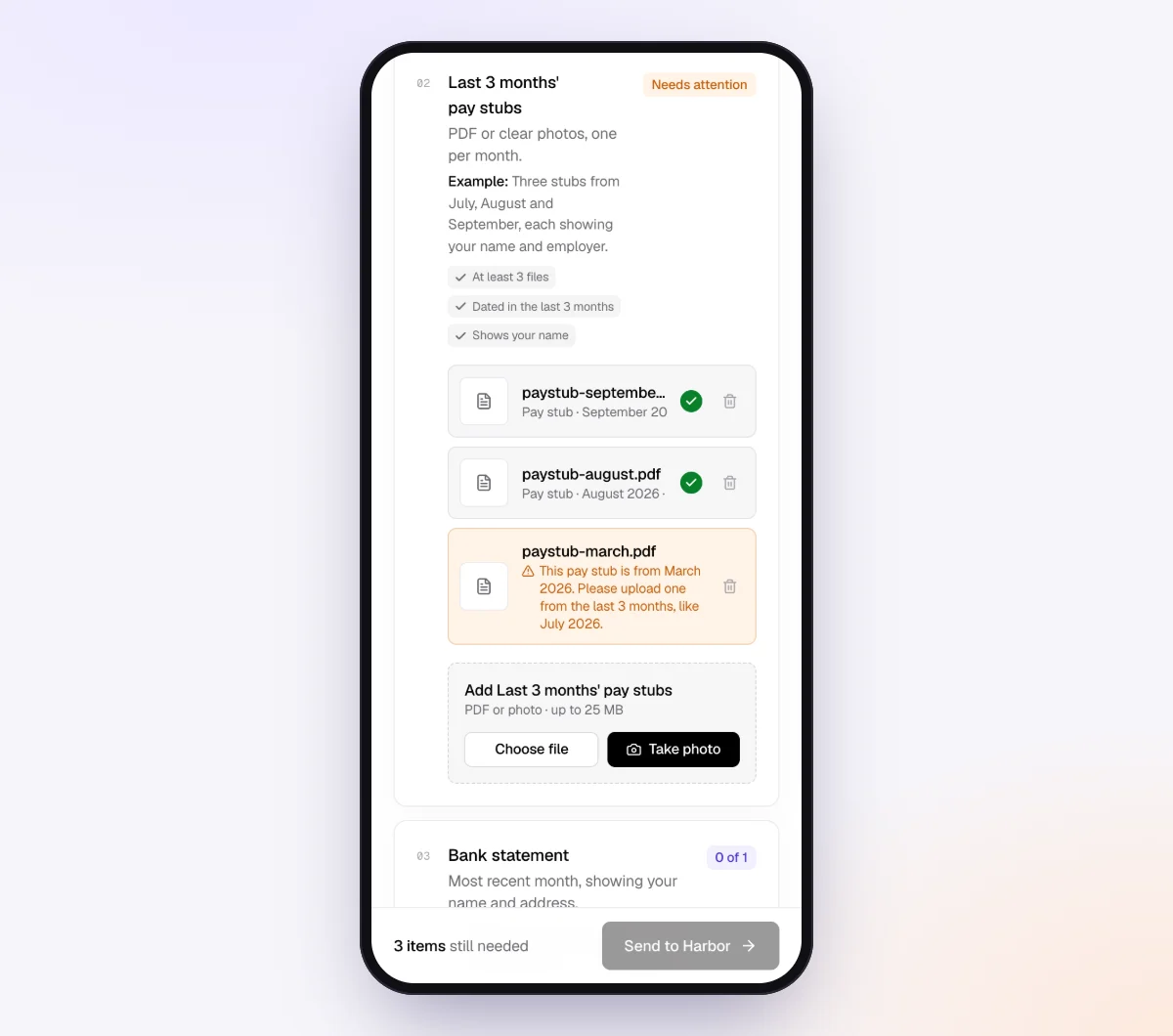
- Add a date rule such as "dated in the last 2 months," an "Example" ("One file, one month, with the date range at the top") and a tip for the common mistake ("Not the daily closeout reports, and not a screenshot").

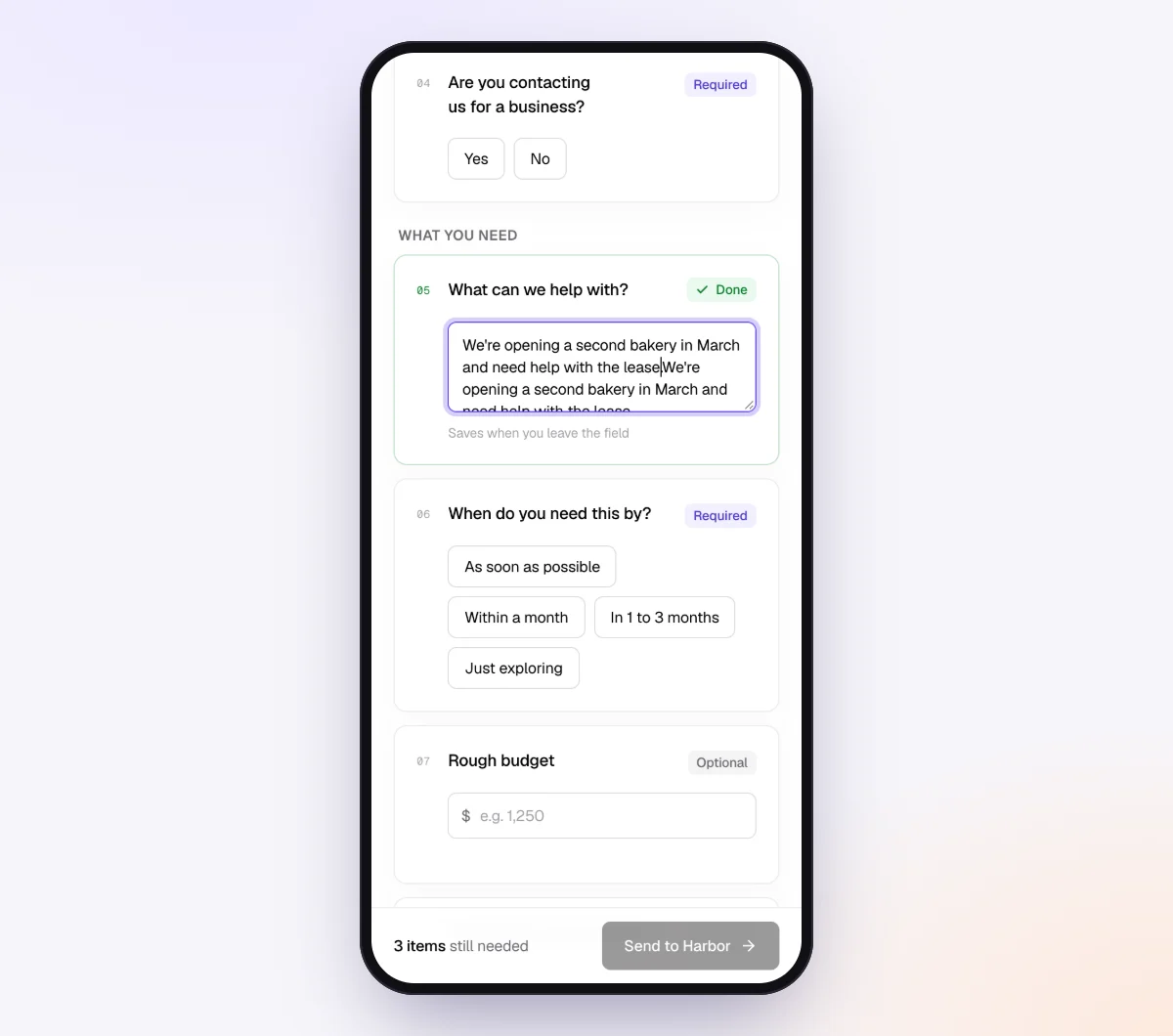
3. Use questions to hide what does not apply
Add form fields for the yes/no questions: "Do you use any delivery apps?", "Do you serve alcohol?", "Did you sell gift cards this month?", "Did you take deposits for future events?" and "Did you open or close any accounts?" Set "Only ask if" on the delivery, liquor, gift card and catering items so they appear only when the answer is yes; a cafe with no bar never sees a liquor count. A "Tick all that apply" field listing DoorDash, Uber Eats, Grubhub and SkipTheDishes lets you name each platform's report in the tip.
4. Send it to every restaurant client on the same day each month
Open "Batches," choose "Send to many customers," pick the restaurant checklist and upload or paste your client list: name, email, a reference such as "Maple Street Cafe, October 2026," a needed-by date and notes. Extra columns such as "POS: Toast, delivery: DoorDash" become context for the agent. Schedule the send for the first business day of the month and turn on "Repeat every month" so the same clients get a new request on the same day each month until you stop it. Batches are part of Pro, up to 100 clients per sheet; see bulk requests. For one client, use "New request."

Payroll reports list employee names and pay, so consider "Require an email code" on the checklist: the client enters a 6-digit code emailed to them before the link opens. If a link goes to the wrong person, "Reset link" stops the old one working, and after the client sends everything the link no longer shows the files.
5. Wrong reports are caught at upload, and the agent handles the rest
The manager opens the link on a phone, with no account, and sees only the items that apply. Each upload is checked in seconds by document checks against what the item should be and how recent it is. A daily Z-report where the monthly summary belongs, a bank app screenshot or a payout report from the wrong month gets a friendly note while the POS is still open in the next tab. For a CSV or Excel export, the check reads the first rows to confirm the report and the period. It does not reconcile anything.
Reminders are paced to the needed-by date and list only what is still missing. When the manager replies "Do you need the Uber Eats report if it goes into the same bank account?", the agent answers from your checklist and "Notes for the agent (private)", or hands off to you. When everything is in, download the organized ZIP or, on Pro, deliver to Google Drive or a webhook; the "Evidence index (CSV)" in the request's menu lists each file with its check result.
When something goes wrong
| Problem | Likely cause | Fix |
|---|---|---|
| Client only has daily Z-reports | Nobody has used the web dashboard, only the terminal's end-of-day print | Show them once how to run a date-range report and put the path in the item tip. If the POS has no monthly report, accept the Z-reports as a photo set, minimum count equal to days open |
| Delivery reports come by week, not month | Uber Eats and others pay and report weekly | Ask for every weekly report touching the month, split the straddling week by order date or by days, and note the method. DoorDash's monthly statement avoids the problem |
| Cash sales with no POS | A cart, a pop-up or an old register | Ask for a daily cash sheet (opening float, sales, payouts, deposit) as a photo per day or one spreadsheet, and match deposits |
| Vendor payment matches no invoice | One payment covered several invoices | Ask for the vendor's month-end statement rather than individual invoices |
| Payroll report has no tip detail | Tips entered as a lump or paid in cash outside payroll | Request the POS tip report and tip-out sheets, and raise it with the client's advisor |
| The report is a screenshot | It was the quickest thing on a phone | Set the item to "PDF or spreadsheet" and add the tip "export, don't screenshot"; the check flags it |
| Report covers "last 30 days" | Default date range in the POS | Add an example that says "1st through the last day"; the check reads the date range on the first page or first rows |
| Owner says "just log in to the POS" | They want to hand you their login | Ask for the POS's read-only or accountant role, never the owner's password, and still request the monthly files |
Check "Alerts" daily for handoffs and missed dates. For chronically late clients, see our late document policy guide and reminder schedule guide. For the questions that follow the documents, see uncategorized transactions client questions.
Free and Pro, honestly
You can run a real request without paying anything.
| Free | Pro ($29/month) | |
|---|---|---|
| Open requests | 1 at a time | Unlimited |
| AI check on each file | Yes | Yes |
| AI autopilot (answers, reminders, follow-ups) | Your first request | Every request |
| Send to many clients at once (Batches) | No | Yes |
| Clients reply by email with attachments | No | Yes |
| Branding | Tangentflow badge | Your logo |
| Delivery to Google Drive or a webhook | No | Yes |
| Works with AI assistants (MCP) | No | Yes |
| File retention | 7 days | 60 days |
Both plans include unlimited checklists, QR codes and posters, ZIP export, AI summaries and email delivery. Pro is billed monthly with no contract, and you can cancel any time. Full details on the pricing page.
What Tangentflow does not do: SMS or text messages, a native mobile app, full legal e-signature certificates, identity verification, collecting payments, or permanent storage. If you need any of those, pair it with a tool that does. It also does not connect to POS systems, payroll providers or delivery platforms, or categorize anything.
The restaurant documents checklist, in short
- List every POS, processor, delivery platform, account and card the client has, and ask monthly whether anything changed.
- Request one POS sales summary for the full month with sales tax and tips split, plus the tax report by rate.
- Request the processor statement and one payout report per delivery platform.
- Request bank and card statements as PDFs, every page.
- Request month-end vendor statements and the invoices behind unmatched payments.
- Request payroll reports for every pay run with tip detail, and the POS tip report.
- Add liquor invoices and a count, a gift card report and catering deposits only where they apply; keep rent and utilities optional.
- Put sales tax and payroll filings on a quarterly rhythm, and licenses, leases and insurance on a yearly one.
- Name the exact report and menu path, and describe the wrong version.
- Send the same request on the same day every month, due about a week later.
Frequently asked questions
What documents does a restaurant bookkeeper need each month?
A full-month POS sales summary with sales tax and tips split out, the POS sales tax report, the card processor statement, one payout report per delivery platform, bank and credit card statements as PDFs, month-end vendor statements, payroll reports with tip detail, and rent and utility bills, plus a liquor count, gift card report and catering deposits where they apply.
Do I need daily Z-reports or is the monthly summary enough?
The monthly summary from the POS web dashboard is enough, as long as it covers the full calendar month and shows the date range. Z-reports are the daily audit trail; the client keeps them, and you ask for specific days only when the monthly report does not tie to deposits.
Which DoorDash, Uber Eats or Grubhub report does a bookkeeper need?
The payout or earnings report showing gross order value, commission and fees, promotions, refunds, any sales tax the platform handled, and the net paid. DoorDash publishes a monthly statement under Financials; Uber Eats reports weekly in the Payments tab of Uber Eats Manager, so ask for every week touching the month; Grubhub's statements are in its restaurant portal.
How do tips show up in restaurant bookkeeping documents?
Card tips appear in the POS sales summary and the processor deposits, then leave through payroll or cash tip-outs. You need the POS tip report, any tip pool or tip-out records and the payroll tip detail, and card tips collected should equal card tips paid out. How tips are taxed is a question for the client's advisor.
What if the client pays staff tips in cash?
Ask for the POS tip report showing card tips collected and a record of the cash paid out each shift, and check that the two agree. In the US, employees are still expected to report those tips to the employer; in Canada, how the employer handles them decides whether they are controlled or direct tips. Point the client to their advisor for the treatment.
What is different for Canadian restaurant clients?
Restaurant meals are generally subject to GST or HST, with provincial variations such as Ontario's point-of-sale rebate on small prepared food purchases, and some provinces charge PST or QST on top. Liquor rules are provincial, and CRA treats controlled tips as pensionable and insurable while direct tips are the employee's own.
Can I collect these restaurant reports in Tangentflow?
Yes, as PDFs, photos, Excel or CSV files, in the same monthly request as bank statements and receipts. Start from the "Monthly bookkeeping" template, add one item per report, set report items to "PDF or spreadsheet" and bank statements to "PDF only," and use "Only ask if" for items that apply to some clients only. Tangentflow does not connect to the POS or categorize anything.