Checklists
Month-End Close Documents to Get From Clients (2026)
Month-end close documents to get from clients, by business type, with a day-of-month timeline, one request that asks for everything and fixes for common gaps.
By Bibin MathewUpdated 28 min read
The short answer
Every client sends the same core set at month end: a PDF of every bank, card and loan statement, receipts for what you cannot categorize, the payout or sales report for each platform they sell through, a payroll report for each pay date, and a one-line answer on anything unusual. Add a short set of extras by business type, such as POS reports for restaurants or lien waivers for contractors. Send one request on the same day each month, a few days after statements post, with one needed-by date and one link, and keep the client-specific transaction questions out of it so the request never changes.
The month-end close has two halves. The second half is yours: reconcile, review, adjust, report, lock. The first half belongs to the client, and it is the half that decides when you finish. If the card statement, the payroll register and the Shopify payout report arrive on the 4th, you close on the 10th. If they trickle in through the 18th, you close on the 24th, and the client wonders why their reports are late.
This guide covers the documents side of the close: exactly what to ask each client for at month end, how that list changes by type of business, which day of the month to ask, how to ask once instead of five times, and what to do about the gaps that show up every month. It is for independent bookkeepers and small accounting firms in the United States and Canada who close books for small business clients monthly.
It pairs with two other posts. The month-end close checklist is the task list for your side of the close. The monthly bookkeeping checklist is the general monthly list with email templates and record-keeping basics. This post is about the request itself: what goes on it for each kind of client, when to send it, and how to keep it the same every month.
The core set every client sends
Whatever the business, five kinds of documents come in every month. Everything else is an add-on by business type.
| Document | Format to ask for | Why you need it | What arrives instead |
|---|---|---|---|
| Bank statements, every business account | PDF from the bank's website, every page, one file per account | The only source of the opening and closing balance you reconcile to | App screenshot, page 1 of 4, a CSV export with no balances |
| Credit card and loan statements | PDF, every page, named by statement closing date | Card closes mid-month; loan statement gives the principal and interest split | "I use the bank feed for the card," a payment confirmation email |
| Receipts for what you cannot categorize | Photo or PDF with vendor, date, total and a one-line note | Supports the expense and tells you what it was for | Forty receipts you did not need, zero for the ones you did |
| Sales and payout reports | PDF, Excel or CSV export per platform, for the full month | Gross sales, fees, refunds and the net deposit, so clearing accounts tie out | "The deposits are in the bank account" |
| Payroll report per pay date | PDF or spreadsheet from the payroll provider | Gross wages, withholdings, employer taxes and net pay to book and tie out | A single employee's pay stub, or last month's summary |
| One line on anything unusual | An answer, not a file | Large purchases, new loans, refunds, owner draws, new accounts | Silence, discovered in the reconciliation |
The last row is a question, not a document, and it is the cheapest item on the list. A one-sentence answer in the request saves a week of guessing later.
Month-end close documents by business type
The core set is the floor. Here is what to add for the kinds of clients most small practices serve. Keep one checklist per group, so a restaurant never sees "lien waivers" and a contractor never sees "tip report."
| Client type | Add to the core set each month | Format | Why it matters at close |
|---|---|---|---|
| Service business (consultant, agency, salon, trades without jobs) | Invoices issued or an invoicing system export; the "anything unusual" answer | PDF or spreadsheet | AR review, owner draws, uncategorized items |
| Online store | One payout report per platform (Shopify, Stripe, PayPal, Amazon, Etsy, Square); a sales and sales tax summary for the month; inventory purchases | PDF or spreadsheet | Clearing accounts net to zero, sales tax liability ties out |
| Restaurant, cafe or retail with a POS | POS sales summary for the whole month with sales tax and tips shown separately; card processor statement; delivery platform payouts; month-end vendor statements | PDF or spreadsheet | Cash sales, tips, tax collected and food cost |
| Contractor or trades with jobs | Subcontractor invoices and payments; material receipts with the job name; change orders signed this month; lien waivers received; equipment finance statements | PDF or photo | Job costing, retainage, AP and loans |
| Any client with employees | Payroll register or journal for every pay date; the provider's tax payment or remittance report; new hire or termination notice | PDF or spreadsheet | Payroll tie-out and liability check |
| Rental property owner | Rent roll or property manager statement; mortgage statement; repair invoices by property | Rental income by property, mortgage interest split | |
| Nonprofit | Donation platform payout report; grant receipts and restrictions; board-approved budget changes | PDF or spreadsheet | Restricted vs unrestricted funds, grant tracking |
| Canadian GST/HST registrant | GST/HST, PST or QST collected and paid details; filing and payment confirmation in filing months | Tax liability ties to the return | |
| Client with loans or a line of credit | Lender statement for each loan; the closing statement for any new loan | Principal and interest split, new liabilities |
Three of these rows cause most of the trouble. For online stores, the bank deposit is not the sale: it is gross sales minus fees, refunds and chargebacks, so without one payout report per platform the clearing account never nets to zero. Our guide to Shopify, Stripe and Amazon reports names the exact report for each platform. For restaurants, the POS summary replaces the invoice export, and it must show tips and sales tax separately, because tips are a liability, not revenue; the restaurant bookkeeping documents checklist has the full list. For contractors, most documents are per job rather than per month, and asking for them monthly, grouped by job, is what keeps the year-end WIP schedule from becoming archaeology; see the construction bookkeeping documents checklist. For payroll and loans, the payroll reports and loan documents posts name the exact reports by provider and loan type.
The questions that belong on the request
Five answers save more time than any document. Put them on the same request, as yes/no or short-text questions, so the client answers them while they are already uploading.
| Question | Why it is on the request | If yes, ask for |
|---|---|---|
| Did you open or close any bank accounts, cards or loans this month? | An unknown account reopens closed months | The first statement, every page |
| Did you use a personal card or account for business this month? | Those lines never show up in the business statements | The statement or the business lines |
| Any large purchase over [threshold], new equipment or vehicle? | Capitalize vs expense, and the loan behind it | The receipt or invoice and any finance agreement |
| Any refunds given, deposits received for future work, or money moved to or from you personally? | Owner equity, deferred revenue and clearing items | A one-line note on each |
| Did anyone start or stop working for you, employee or contractor? | Payroll and 1099 or T4A tracking | Their W-9 or contractor details |
Ask them every month, in the same words, even when the answer is almost always no. Clients answer a familiar yes/no in three seconds; they ignore a new paragraph.
When to ask: a day-of-month timeline
The right day to send the request is the day the documents exist. Send on the 1st and half the statements are not out yet, so the client opens the link, finds nothing to upload and forgets about it. Here is when the usual documents become available, and what that means for your calendar.
| Document | Usually available | Who controls the timing |
|---|---|---|
| Bank statements on a calendar-month cycle | First 1 to 5 business days of the new month | The bank |
| Credit card statements | A few days after the card's own closing date, often mid-month | The card issuer |
| Payroll register and tax report | The day each pay run processes | The payroll provider |
| Platform payout and sales reports | Any time after month-end, exported by the client | The client |
| POS sales summary | Any time after month-end | The client |
| Receipts | Already in the client's phone, email or glovebox | The client |
| Loan and line of credit statements | Around the statement date, often month-end | The lender |
| Sales tax and GST/HST filing confirmations | On or after the filing date, which varies by jurisdiction and filing frequency | The client and the tax agency |
Statement timing drives the schedule. A request on business day 1 is early for statements and exactly right for payout reports, POS reports and receipts. Most practices settle on one of two patterns:
| Business day | Pattern A: one request on day 1 | Pattern B: one request on day 3 |
|---|---|---|
| 1 | Request goes out, needed by day 7. Client sends receipts, reports and answers now; statements as they post | Nothing yet |
| 2 to 3 | Statements post; client uploads them to the same link | Request goes out, needed by day 8. Most statements already exist, so the client can finish in one sitting |
| 4 | First reminder, listing only what is still missing | Client uploads |
| 5 to 6 | You reconcile accounts whose statements are in; build the transaction question list | First reminder, listing only what is still missing |
| 7 | Documents due. Send the batched transaction questions, due day 10 | You reconcile what is in; build the question list |
| 8 | Reconcile the rest | Documents due. Send the transaction questions, due day 11 |
| 10 to 11 | Answers due; unanswered items stay parked | Answers due |
| 12 to 15 | Review, report, lock | Review, report, lock |
Pattern A gets receipts and reports moving earlier. Pattern B gets more clients finishing in one sitting, which matters for clients who will not come back to a link twice. Either works, as long as it is the same every month. For cards that close mid-month, name the two statement dates you need, expect the second to land after your due date, and reconcile the card when it arrives rather than holding the close for it.
For the reminder cadence between send and due date, see our client reminder schedule. For the task side of the same calendar, the month-end close checklist has the day-by-day close.
How to ask once for everything
The request that gets answered fastest is the one the client has seen before. Every change to it costs a month of confusion. A few rules keep it stable:
- One request per client per month, with one needed-by date. Not a statements email, a receipts email and a payroll email.
- Fixed items in the client's words, each with the format you want: "PDF, every page" for statements, "export from Shopify" for payouts, "photo is fine" for receipts.
- Questions in the same request, not in a separate email. Yes/no answers decide which documents are needed, so ask them first and show the follow-up items only when the answer is yes.
- One link, no account. Clients upload from their phone the moment they think of it. Anything that needs a password gets done "later."
- The client-specific list stays out of it. The transactions you could not categorize change every month and are different for every client. That list goes out separately, a few days after the main request, once you have categorized what you can. Our guide to asking clients about uncategorized transactions covers how to write it.
- The same subject line every month. "September bookkeeping: please send by Tuesday, October 7" tells the client what it is before they open it.
Here is a monthly request that follows those rules. Replace the bracketed parts and keep everything else fixed.
Subject: [Month] bookkeeping for [Business name]: please send by [day, date]

Hi [First name],

Time to close [Month]. Please upload these by [day, date], and your
reports will be ready by [date]:

Statements (PDF from the bank website, every page, one file per account)
- Checking ending [last 4], statement for [Month]
- Card ending [last 4], statements ending [date] and [date]
- Line of credit ending [last 4]

Reports
- [Shopify / Stripe / Square] payout report for [Month]
- Payroll report for each pay date in [Month]

Receipts
- Receipts for anything over $[threshold], and for anything you
  bought that I would not recognize from the bank line

Three quick questions on the upload page: new accounts or cards,
personal card used for business, anything unusual.

Upload here from your phone, no account needed: [link]

Thanks,
[Your name]
The account list in the middle is the only client-specific part, and it changes only when the client opens or closes an account. If your collection tool lets you store it per client, you never retype it.
The usual gaps, and how to handle them
The same five gaps show up every month in almost every practice. Each one has a fix for this month and a prevention for next month.
| Gap | What arrives | Ask for instead | Prevent next month |
|---|---|---|---|
| Missing or partial statement | Page 1 of 4, an app screenshot, a CSV, or nothing for an account you know exists | The PDF from the bank website, every page, named by account and statement date | Put the download path for the client's bank in the item; accept PDF only for statements; keep an accounts list per client |
| Receipt without context | A photo of a Home Depot receipt for $412 with no job, no category, no reason | The same receipt plus one line: what it was for and which job or client | Make the receipt item ask for a short note, or add a text field next to it; set a threshold so small items never need a receipt |
| Wrong payroll report | One employee's pay stub, a year-to-date summary, or the invoice from the payroll company | One register or journal per pay date plus the tax payment report | Name the report by the provider's own label in the item hint; ask for "one per pay date" so the count is checked |
| Deposits instead of payout reports | "The money is in the bank" | The payout or settlement report for the month showing gross, fees, refunds and net | Explain in the hint that the deposit is net of fees; one item per platform |
| Unanswered questions | The documents arrive, the questions do not | A one-line answer per question, by a date | Make the questions required on the upload page; set a default for silence and tell the client what it is |
Missing statements
The statement gap has three causes, each with its own fix. The client does not know where the PDF lives: give them the two-line path for their bank inside the request. The client has an account you do not know about: the monthly new-accounts question catches it, and an accounts list per client (bank, last four digits, closing date) keeps it caught. The card closes mid-month: name the statement dates, not the month. Our guide to getting bank statements from clients covers all three, including view-only bank access where the bank offers it.
Receipts without context
A receipt proves the expense happened. It rarely proves what it was for. Ask for the context with the file: a one-line note, and for contractors the job name. If a receipt is gone for good, a signed note from the client with the date, vendor, amount and business purpose is better than nothing; our missing receipt form template is a starting point, and the client's tax advisor should confirm what is acceptable.
Payroll reports
Payroll gaps are naming problems. The client hears "payroll report" and sends the payroll company's invoice, or their own pay stub. Use the provider's own words in the request ("the Payroll Journal from Gusto for each pay date"), ask for one per pay date so a two-run month needs two files, and ask separately for the tax payment or remittance report. In quarter-end months add the filed Form 941 in the US or the CRA remittance history in Canada, and confirm current rules on the IRS and CRA pages, since they depend on the employer's schedule.
Silence
The client uploads everything and answers nothing. Make the questions required, keep them to five, and set a default for silence in writing: "Unanswered transactions stay in a holding account and show on your report as 'awaiting your answer.'" If lateness is a pattern, the late document policy for bookkeepers has wording for due dates and catch-up fees.
Four ways to send the monthly document request, compared
| Method | Setup effort | Client effort | Shows what each client still owes | Reminders | Checks files on arrival | Same request every month |
|---|---|---|---|---|---|---|
| Email with a list | None | Low, but files scatter | No, you track it in a sheet | Manual | No | Only if you copy and paste carefully |
| Shared folder per client | Low | Medium | No | Manual | No | The folder is the same; the ask is not |
| Practice portal or receipt app | Medium to high | Medium to high (login or app) | Partly | Some | Some | Usually |
| Private link with a checklist and an AI agent (Tangentflow) | Low | Low, no account | Yes, per client, per item | Paced to each client's date, listing only what is missing | Yes, every file | Yes, with a monthly repeat |
Email stops working at ten clients with five items each, because nobody can say who still owes what. Shared folders fix the scatter but not the tracking. Portals work when clients log in for other reasons. A private link with a fixed checklist fits the month-end request because the request is the same every month and the chasing is the expensive part.
Month-end close documents in Tangentflow, step by step: "Repeat every month"
Tangentflow runs the first half of the close: one checklist per client group, one request per client per month, a check on every file as it arrives, and an AI collection agent that reminds each client about only what they still owe. The worked example below follows an illustrative practice with 24 clients in three groups: 14 service businesses, 6 online stores and 4 restaurants.
1. Start from the "Monthly bookkeeping" template
Open "Checklists", choose "Browse templates" and pick "Monthly bookkeeping." It comes with "Bank statements for the month" (PDF only, every page, one per account), "Credit card statements" (optional, every page), "Receipts and bills you paid" (photos are fine), "Sales or invoices you issued" (optional), "Payroll report" (optional) and "Anything unusual this month?" as a long-answer question. That is the core set from the top of this guide, ready to go.

2. Make one checklist per client group
Save the template once per group and add the items from the business type table. For the online store group, add a "Payout reports" item set to "PDF or spreadsheet", with "What should it be?" reading "Shopify or Stripe payout report for last month, exported from the platform," and a higher maximum count for clients on several platforms. For the restaurant group, add "POS sales summary for the month" and "Delivery platform payouts," also "PDF or spreadsheet." Keep statements on "PDF only", so an app screenshot cannot be uploaded to that item at all.
Then add the five questions as "Form field" items: a yes/no "Did you open or close any bank accounts, cards or loans this month?" with a file item "Statement for the new account" that uses "Only ask if…" so it appears only on a yes, and the same pattern for personal card use and new hires. Give the receipt item an "Example" ("a photo of the receipt with the total readable, plus one line on what it was for").

Spreadsheet items accept Excel and CSV files as well as PDFs, and the AI check reads the first rows of the sheet to confirm what the report is and whether it covers the month. Statements stay PDF only, because the statement, not the export, carries the opening and closing balances.
3. Send each group as a batch and turn on "Repeat every month"
Open "Batches", choose "Send to many customers", pick the group's checklist and name the batch, for example "Service clients close." Upload an Excel file or CSV, or paste rows from Excel or Google Sheets: name, email, reference, needed-by date and notes. The notes column is where each client's account list goes ("Chase checking 4410, Chase Ink 1002 closes on the 14th"), and extra columns such as "sells on Shopify and Etsy" become context the agent can use when a client asks "do you need the Etsy report too?"
Choose "Schedule" and pick the morning of business day 3 (or day 1, if you prefer pattern A), up to 30 days ahead. Set the needed-by date five days later. Then turn on "Repeat every month." The preview under the toggle reads back the schedule in plain words: on the 3rd of every month at 8:00 AM, 14 customers get a new request, needed by 5 days later. Repeat the batch for the online store group and the restaurant group, each with its own checklist.
A few things worth knowing about the repeat:
- It runs on the same day of the month at the same time, in your business's time zone. If the first send is on the 29th, 30th or 31st, the series runs on the 28th so it works in every month.
- Each month's needed-by date keeps the same gap in days from the send date, and each month's batch is named after the first one with the month added ("Service clients close · Nov 2026").
- Every month is a new request for every client on the list, even a client still finishing last month's. Nothing waits on a late client.
- Stop it any time with "Stop repeating" on the batch page; requests already sent carry on. To change the client list, stop the series and start a new batch with the updated sheet.
- Emails only go out between 8 a.m. and 8 p.m. in your time zone, so a late scheduled time sends the next morning.
Batches and the monthly repeat are part of Pro, up to 100 clients per batch. Details on bulk requests. For a single client, click "New request", choose the checklist, add a reference such as "Maple Street Bakery, October 2026" and set the needed-by date.
4. Clients upload from their phone, and problems are caught on the spot
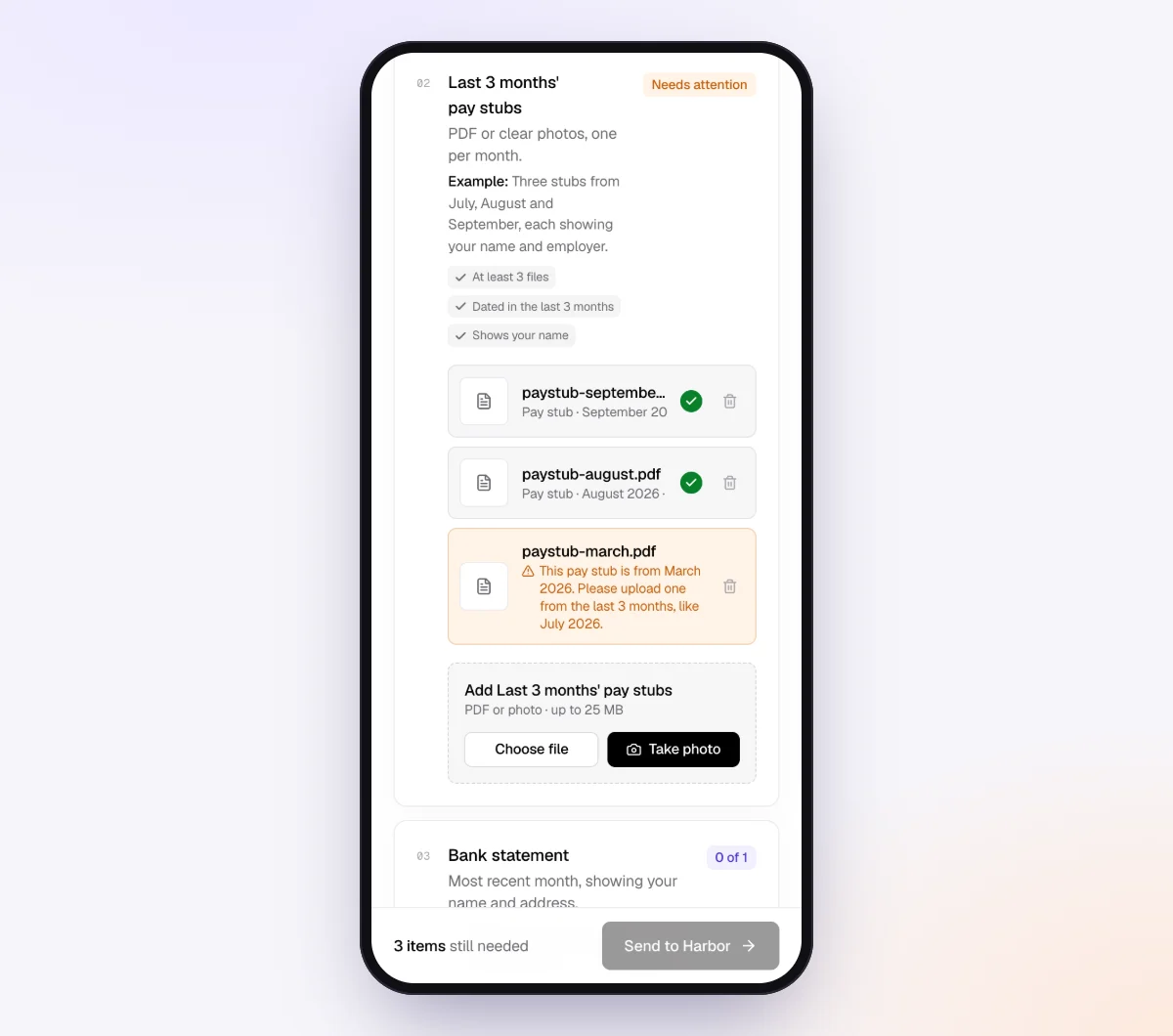
On the 3rd, each client gets a branded invitation from your business name and opens their checklist on a phone, with no account and no app. They see each item, what is done and what is still missing, and the three questions at the top. Every upload is checked in seconds by document checks: the right kind of document, readable, recent enough, every page, and for spreadsheet items, whether the sheet looks like the report for the month.
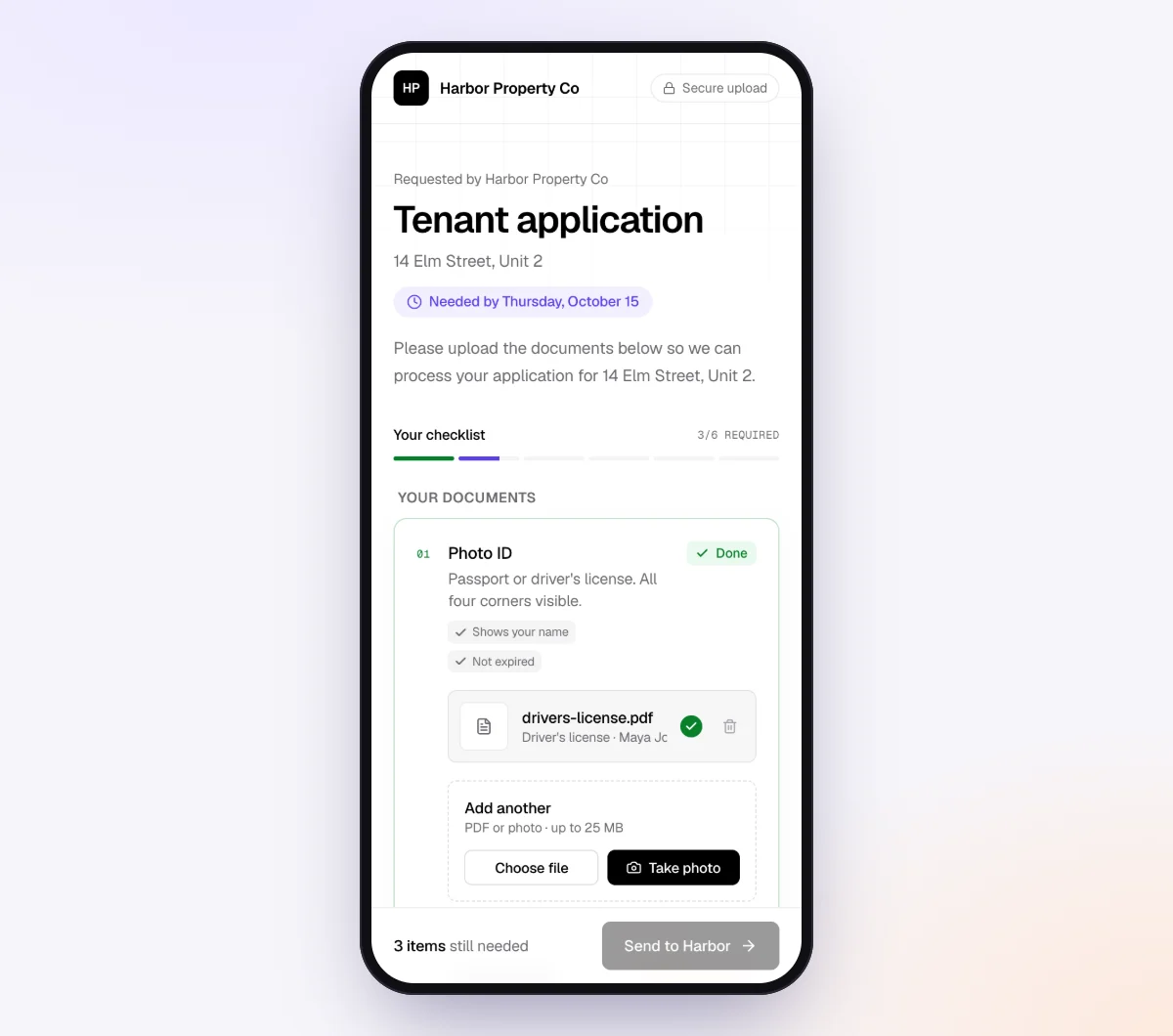
A client who uploads page one of a four-page statement, or September's statement for an October request, sees a friendly note telling them what to fix while they are still signed in to their bank.
5. The agent chases what is missing, you reconcile what is in
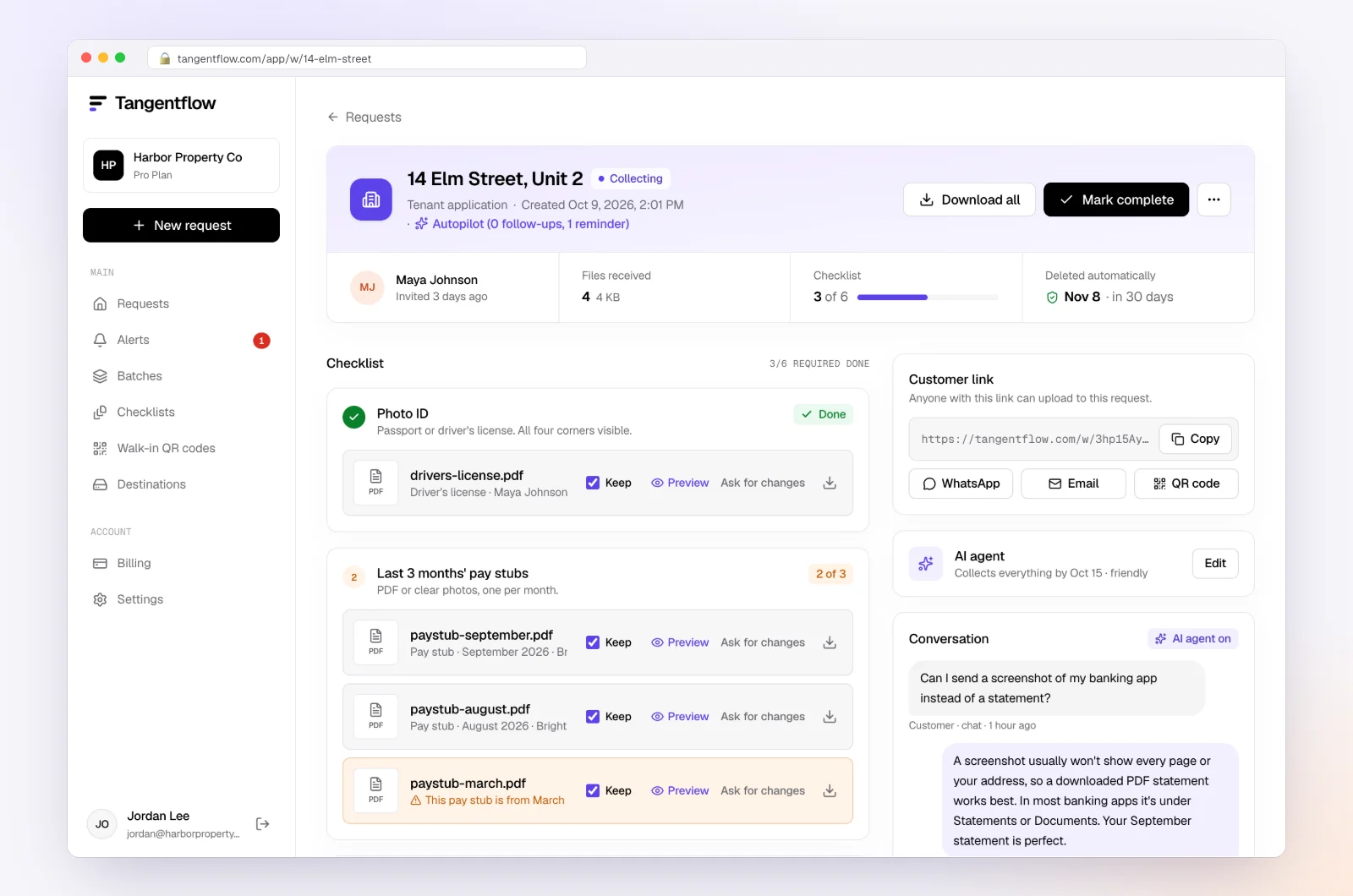
In the "AI autopilot" settings, turn on "Chase until it's all in" and choose "Paced to each request's deadline." Reminders get closer as each client's date nears, at most one automatic email a day, never right after the client was active, and each lists only what is still missing. Clients can ask questions by email reply or in the upload page chat, and the agent answers from your checklist and the private notes on their request, or hands off to you when a client is upset, asks something outside the checklist or misses the date. On Pro, clients can reply with statements attached, and each file is checked and filed under the right item.
The request page is your "documents received" column: every file with its check result, what is still missing, the answers to your questions and an activity timeline. Use "Ask for changes" on any single file. From the request's menu, "Evidence index (CSV)" gives you one row per item, file, check result, extracted facts and answer for your close workpapers, and "Download CSV" on the batch page gives the whole group's status in one sheet. When a client's month is in, download the ZIP, or on Pro deliver to Google Drive or a webhook, then mark the request complete. Files are deleted 24 hours later.
More on how this fits a practice on our page for bookkeepers and the accounting and tax use case.
Setups by type of client
| Client group | Items beyond the core set | Format settings | Settings worth turning on |
|---|---|---|---|
| Service businesses | Invoicing export | "PDF or spreadsheet" on the invoices item | Short needed-by gap, 4 to 5 days |
| Online stores | One payout item per platform, sales tax summary | "PDF or spreadsheet", higher maximum count | Payout item required, "sells on" column in the batch sheet |
| Restaurants and retail | POS sales summary, processor statement, delivery payouts, vendor statements | "PDF or spreadsheet" for reports, "PDF only" for statements | Vendor statements optional with a tip |
| Contractors | Sub invoices, material receipts with job name, change orders, lien waivers | Photos allowed for receipts, a text field for the job name | Yes/no for new equipment with "Only ask if…" |
| Clients with payroll | Payroll register per pay date, tax payment report | "PDF or spreadsheet", minimum count per pay date | "Require an email code" on the checklist |
| Canadian GST/HST registrants | GST/HST, PST or QST details, filing confirmation in filing months | "PDF only" | Optional tax item with a tip about filing months |
"Require an email code" is an optional checklist setting: the client must enter a 6-digit code emailed to them before the link opens. It is worth turning on for checklists that collect payroll reports with employee details. If a link ever goes to the wrong person, use "Reset link" on the request and the old one stops working. After the client sends everything, the link no longer shows the files.
When something goes wrong
| Problem | Likely cause | Fix |
|---|---|---|
| Client tries to upload an app screenshot as a statement | Does not know where the PDF lives | The statement item is PDF only, so the screenshot cannot go there; put the bank's download path in the item tip |
| Statement is page 1 of 4 | Saved one page | "Every page" on the item flags it on upload, while the client is still in their banking |
| Payroll item has one file for a month with two pay dates | Client sent the summary, not the registers | Set the minimum count and name the report in the hint; "Ask for changes" on the file |
| Payout report is a screenshot of the dashboard | Client did not export | "PDF or spreadsheet" rejects a photo on that item; the hint names the export |
| The client list changed | A client left or joined mid-series | "Stop repeating," then start a new batch with the current sheet; a new client gets a single "New request" this month |
| Client is frustrated by reminders | Busy month | The agent stops and hands off to you; reply personally and agree a date |
| Documents are in, questions unanswered | Questions were optional | Make the form fields required; the agent follows up on anything missing after submit |
Check "Alerts" daily during close week. Handoffs and missed dates show up there, so you only spend time on the clients who need a person.
Free and Pro, honestly
You can run a real request without paying anything.
| Free | Pro ($29/month) | |
|---|---|---|
| Open requests | 1 at a time | Unlimited |
| AI check on each file | Yes | Yes |
| AI autopilot (answers, reminders, follow-ups) | Your first request | Every request |
| Send to many clients at once (Batches), with monthly repeat | No | Yes |
| Clients reply by email with attachments | No | Yes |
| Branding | Tangentflow badge | Your logo |
| Delivery to Google Drive or a webhook | No | Yes |
| Works with AI assistants (MCP) | No | Yes |
| File retention | 7 days | 60 days |
Both plans include unlimited checklists, QR codes and posters, ZIP export, AI summaries and email delivery. Pro is billed monthly with no contract, and you can cancel any time. Full details on the pricing page.
What Tangentflow does not do: SMS or text messages, a native mobile app, full legal e-signature certificates, identity verification, collecting payments, or permanent storage. If you need any of those, pair it with a tool that does. It also does not connect to banks or bank feeds, download statements for you, reconcile accounts, categorize transactions or replace QuickBooks Online, Xero or your other bookkeeping software.
The month-end document request as a checklist
- Start every client's list from the same core set: statements, receipts, payout or sales reports, a payroll report per pay date, and one line on anything unusual.
- Add the extras for each business type, and keep one checklist per client group.
- Put the five questions on the request, in the same words every month, and show follow-up items only on a yes.
- Set the format per item: PDF only for statements, PDF or spreadsheet for reports, photos fine for receipts.
- Send on the same business day each month, a few days after statements post, with one needed-by date a few days before you start reconciling.
- Keep the client-specific transaction list out of the monthly request and send it separately, a few days later.
- Keep an accounts list per client, including card closing dates.
- Remind only about what is still missing, and let a check on arrival catch partial statements and wrong reports.
- Set a default for unanswered questions and close on time with the gaps marked.
- Turn the routine into a monthly repeat so the request goes out without anyone remembering to send it.
Sources
Official pages for the forms and rules named in this guide. Links checked on October 24, 2026; rules and rates change, so confirm on the official page before relying on them.
- CRA, GST/HST for businesses: registering, charging, filing and input tax credits
- IRS Form 941: employer's quarterly federal tax return
Frequently asked questions
What documents do I need from clients for a month-end close?
A PDF of every bank, credit card and loan statement for the period, receipts for transactions you cannot categorize from the bank line, the payout or sales report for each platform they sell through, a payroll register for each pay date, and a short answer on anything unusual. Add extras by business type, such as POS reports for a restaurant or subcontractor invoices and lien waivers for a contractor.
What should I ask clients for at month end if they have employees?
One payroll register or journal for every pay date in the month, showing gross wages, each withholding, employer taxes and net pay, plus the provider's report of the tax amounts debited and remitted. In quarter-end months, add the filed Form 941 in the US or the CRA remittance history in Canada. Name the report in the provider's own words so you get the register, not a pay stub.
When should I send the month-end document request?
Most practices send on business day 1 or business day 3 of the new month, on the same day every month. Day 1 gets receipts and platform reports moving while statements post; day 3 means most statements already exist, so clients can finish in one sitting. Set the needed-by date two or three business days before you start reconciling in earnest.
How do I ask clients for everything in one request?
Use a fixed checklist of named items in the client's words, each with its format, plus the handful of yes/no questions, all behind one link that opens on a phone without an account, with one needed-by date. Keep the list identical from month to month, and send the client-specific transaction questions separately a few days later.
What is the difference between this list and a month-end close checklist?
This is the client-facing list: what you need from each client, and when. A month-end close checklist is your own task list once the documents are in: reconcile, review, adjust, report and lock. Our month-end close checklist covers that side, day by day.
What do I do when a client sends receipts with no explanation?
Ask for the context with the file: a one-line note on what it was for, and for contractors the job name. Set a threshold below which you do not need a receipt, and send a separate batched list of the transactions you still cannot place. If a receipt is gone for good, a signed note with the date, vendor, amount and business purpose is a fallback, subject to what the client's tax advisor accepts.
Can I automate the monthly request to all my clients?
In Tangentflow, yes, on Pro. Upload or paste your client sheet once per client group, pick that group's checklist, schedule the send and turn on "Repeat every month." The same clients get a new request on the same day each month, with the same gap to the needed-by date, until you click "Stop repeating." Each month is a new request, even for a client still finishing last month's.
Can Tangentflow pull statements or reconcile the accounts for me?
No. It does not connect to banks, payroll providers or sales platforms, and it does not reconcile or categorize anything. It sends each client a private link with your checklist, checks each statement and report as it is uploaded, reminds clients about only what is missing and gives you the complete set sooner. Try it free on one client's month-end request.