Guides
Stop Chasing Clients for Documents With an AI Agent (2026)
How to stop chasing clients for documents: why it happens, a chase sequence with timing and wording, reminders that don't annoy, and what an AI agent does.
By Bibin MathewUpdated 20 min read
The short answer
Chasing is a process problem, not a client problem: a vague ask, no date, reminders sent when you remember, and questions with nowhere to go. Fix it with a specific checklist, one private link, a needed-by date and a short reminder sequence paced to that date, each reminder listing only what is still missing. Automate that sequence with an AI collection agent that also answers routine questions and hands over to you when a client asks for an extension, an exception or anything the checklist cannot settle. Keep the call, the judgment and the relationship for yourself.
Ask a bookkeeper what they would drop first if they could, and it is rarely the reconciliation. It is the Tuesday afternoon spent writing "just following up on the statements" for the third time, to a client who is not ignoring you so much as never quite getting around to it. The work itself takes an hour. Getting the documents to do the work takes a week of nudges.
This guide is for independent bookkeepers, small accounting firms and tax preparers in the US and Canada who want to stop chasing clients for documents without becoming the firm that spams them. It explains why chasing happens, lays out a chase sequence you can copy (timing and wording), shows how to automate it without irritating anyone, and then looks honestly at what an AI document collection agent does and does not do, with Tangentflow's agent as the worked example. There is a section on when a person still has to step in, because sometimes they do.
Why chasing happens
Most late documents are not caused by a difficult client. They are caused by a request that was easy to put off. Before you add a fourth reminder, be honest about which of these is doing the damage.
| What you see | What is usually behind it |
|---|---|
| Client sends three items and stops | The list was long, they did the easy ones, and nothing told them what was still open |
| "Which statement did you mean?" | The item was named in your words ("bank recs support"), not theirs ("your checking account statement") |
| Silence for two weeks, then everything at once | There was no date, so the request sat behind everything that had one |
| Reminder goes unanswered | It repeated the whole original list, so the client assumed it was a copy of the first email |
| A question arrives, then nothing | They were unsure about one item and waited instead of sending the rest |
| Files come by text on a Sunday night | The upload path needed a login or a desktop, and the phone camera did not |
Each cause has a plain fix, and they stack: a specific checklist with items named the way the client would name them, each with a count and a rule; one private link that opens on a phone with no account and shows what is left; a calendar date with one line about why it matters; reminders on a schedule that list only what is still missing; and a place to ask questions that gets an answer the same day.
If that list looks familiar, it is the foundation of our guide on how to get accounting clients to respond faster. The rest of this post is about the chasing part specifically: what a good sequence looks like, and how to stop sending it by hand.
What a good chase sequence looks like
A chase sequence is the set of messages a client gets between your first request and the date you need everything. Done well, it feels like a helpful assistant keeping a list. Done badly, it feels like a parking ticket.
The principles are short:
- Pace to the deadline, not to a fixed interval. Space reminders out when there is time and bring them closer as the date nears.
- Each reminder lists only what is still missing. Never the full original list.
- Skip anyone who was just active. If the client uploaded something yesterday, today's reminder is noise.
- One email a day at most, during working hours. A 6:40 am reminder reads as pressure.
- Say the date every time, in the subject line if you can.
- Invite a reply. The fastest way to unblock a stuck client is to let them ask the one thing they are unsure about.
- Stop when the date passes. After the deadline, the next step is a phone call or a decision about the work, not reminder number seven.
A chase sequence for a two-week monthly request
Here is a sequence for a monthly bookkeeping request sent on the 1st with a needed-by date of the 15th. It matches the two-week schedule in our client reminder schedule guide. Wording is kept short on purpose; longer versions are in our document request email templates.
| Day | Message | Subject line | Opening line and contents |
|---|---|---|---|
| Day 0 | Invitation | September documents for Acme Landscaping, needed by Oct 15 | "Here is everything we need to close September." Full checklist, the link, the date, one sentence on why the date matters. |
| Day 4 | First nudge | Still needed for September: 3 items (by Oct 15) | "Quick one. Three items are still open, listed below." Only the missing items, same link, the date. Light tone. |
| Day 9 | Second nudge | 2 items left for September close, Oct 15 | "We have the statements, thank you. Two items left." Acknowledge what arrived, list the two, same link. |
| Day 12 | Firm reminder | Needed by Wednesday: payroll report and sales tax return | "Wednesday is the cutoff for the September close." Name the day, the consequence (close moves to next month), the items. |
| Day 14 | Last call | Last call: September close is tomorrow | "Anything we don't have by tomorrow rolls into October." Items left, the link, an offer to call if something is stuck. |
| Day 15+ | Stop emailing | (none) | Call the client, or apply your late document policy. Do not send a sixth reminder. |
Notice that the first nudge comes on day 4, not day 1, and that the gaps close as the date approaches: five days, then three, then two. That shape is what "paced to the deadline" means.
If you stop here and run this by hand with calendar reminders, you will already chase less. The next section is for when that stops scaling.
How to automate reminders without annoying clients
Automation gets a bad name because of how most of it works: a fixed interval, a template that repeats the whole request, no awareness of what the client did yesterday. Clients can tell. The goal is to automate the sequence above, not to send more email.
Before you trust a tool with your clients, check that it can do five things: derive reminder timing from each request's needed-by date rather than a global "every 3 days"; build each reminder from the live state of the request so it lists only what is missing; skip anyone active in the last day; cap itself at one email a day inside working hours in your time zone; and stop at the deadline with an alert to you instead of a seventh email to the client. A consistent sender name and the same private link throughout matter too, because clients need to recognize the email to trust it.
Three ways to run the sequence, compared
| By hand with calendar reminders | Rule-based reminders (portal or email tool) | AI collection agent | |
|---|---|---|---|
| Timing | Whenever you remember | Fixed interval you set | Paced to each request's date |
| Content | You write it from what is missing | A template, often the full list | Only what is still missing, written per client |
| Skips active clients | If you notice | Usually not | Yes |
| Answers client questions | You do, when you see them | No | Routine ones from the checklist; the rest to you |
| Knows when to stop | You decide | Runs the count out | Stops at the deadline and alerts you |
| Setup | None | Per sequence | Once per checklist |
| Cost | Your time | Often bundled with practice software | Free to start, $29/month Pro in Tangentflow |
Rule-based reminders are a real improvement over nothing. They fail on the two things clients notice most: repeating the full list and emailing someone who uploaded yesterday. An AI agent fixes both because it works from the live state of the request rather than a template, and it can answer the reply when a client writes back.
What an AI document collection agent does, and does not do
An AI document collection agent is software that runs a document request end to end: it sends the invitation, watches what arrives, reminds the client about what is still missing, answers routine questions, follows up on anything wrong, and hands the request to a person when a judgment is needed. It is the difference between a tool that stores files and a tool that gets them.
The table below uses Tangentflow's AI collection agent as the example. The quoted phrases come from the product's own help documentation for the agent, so each row is something you can switch on today, not a roadmap.
| It does | It does not |
|---|---|
| Email the invitation from your business name, with the checklist, any forms and the needed-by date | Send text messages. It works by email and the upload-page chat only |
| Pace reminders to each request's deadline, "never under a day or over four apart, at most six, with a last one in the final 30 hours" | Remind anyone "within a day of being active" |
| Email clients only between 8am and 8pm in your business's time zone, at most once a day across all your requests | Send three emails in a morning because three requests are open |
| List what is still needed in each reminder, with forms attached | Repeat the full checklist |
| Answer questions by email reply or in the upload-page chat, "from the checklist only": what each item is, accepted file types, how recent it must be | Invent "requirements, deadlines, prices or policies" |
| Fill in a checklist question when the client states the answer in a message | Move a due date, grant an extension or waive anything |
| Follow up after a submission with something missing, up to 1 to 5 times (default 2), then hand over | Keep chasing forever. Reminders and follow-ups both have caps |
| Hand over to you when a client asks for "a deadline extension, an exception, a complaint, a change to what is needed, money, legal questions, cancelling, or anything it is unsure about" | Promise the client anything while handing over |
| Email you once when a due date passes with items missing, then stop reminding, and log every action in the request's Activity timeline | Ask for "passwords, full card numbers or PINs" |
Two details deserve a closer look, because they are where "automated" and "annoying" part ways.
Pacing. With "Paced to each request's deadline," the agent shares the time left until the needed-by date over the reminders still to send, so they are days apart early in a 30-day request and closer in the last week, inside the guardrails quoted above. If you prefer a fixed rhythm, the alternative is "On a fixed schedule," every 12 hours to a week, at most 1 to 10 times.
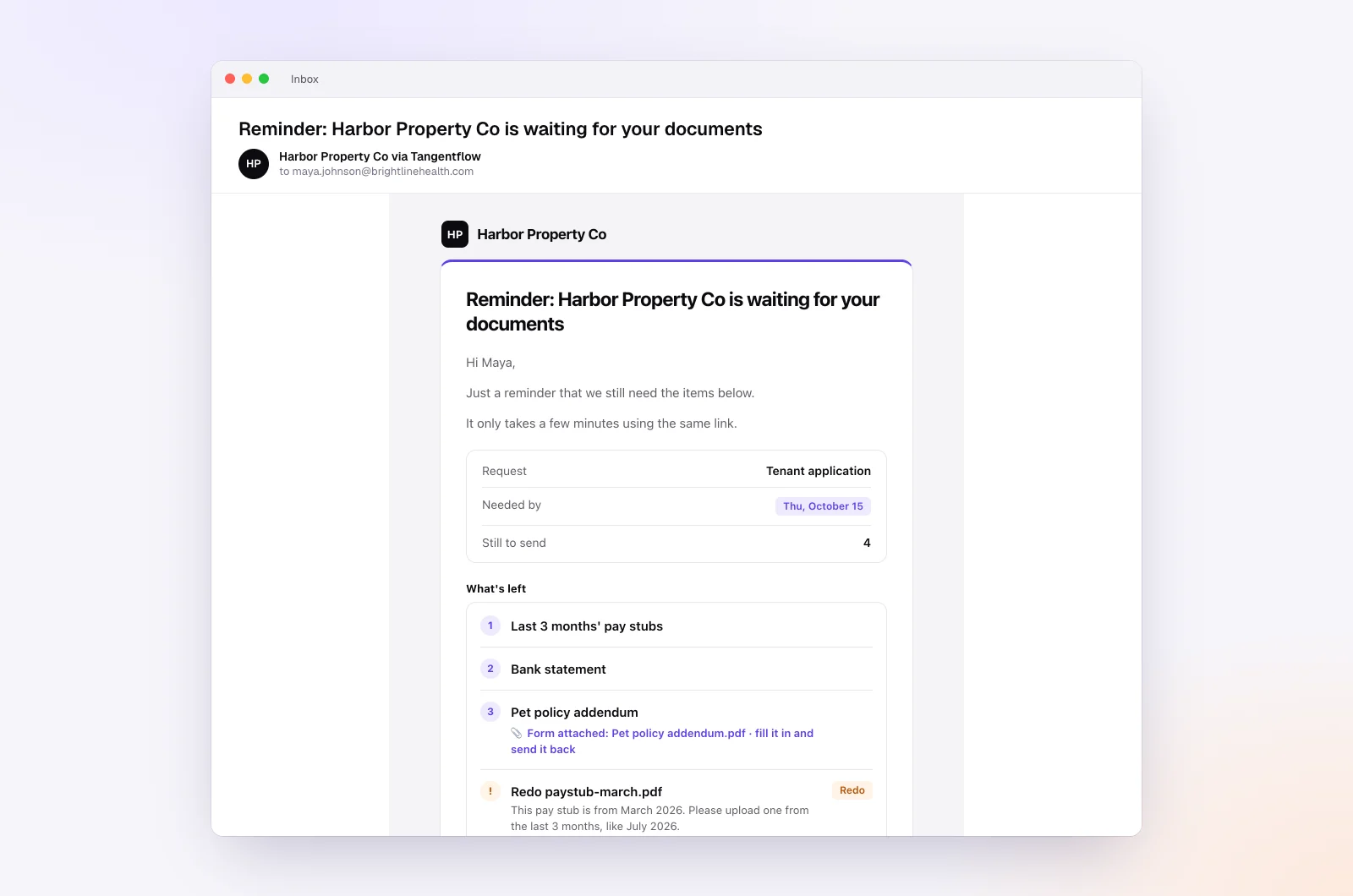
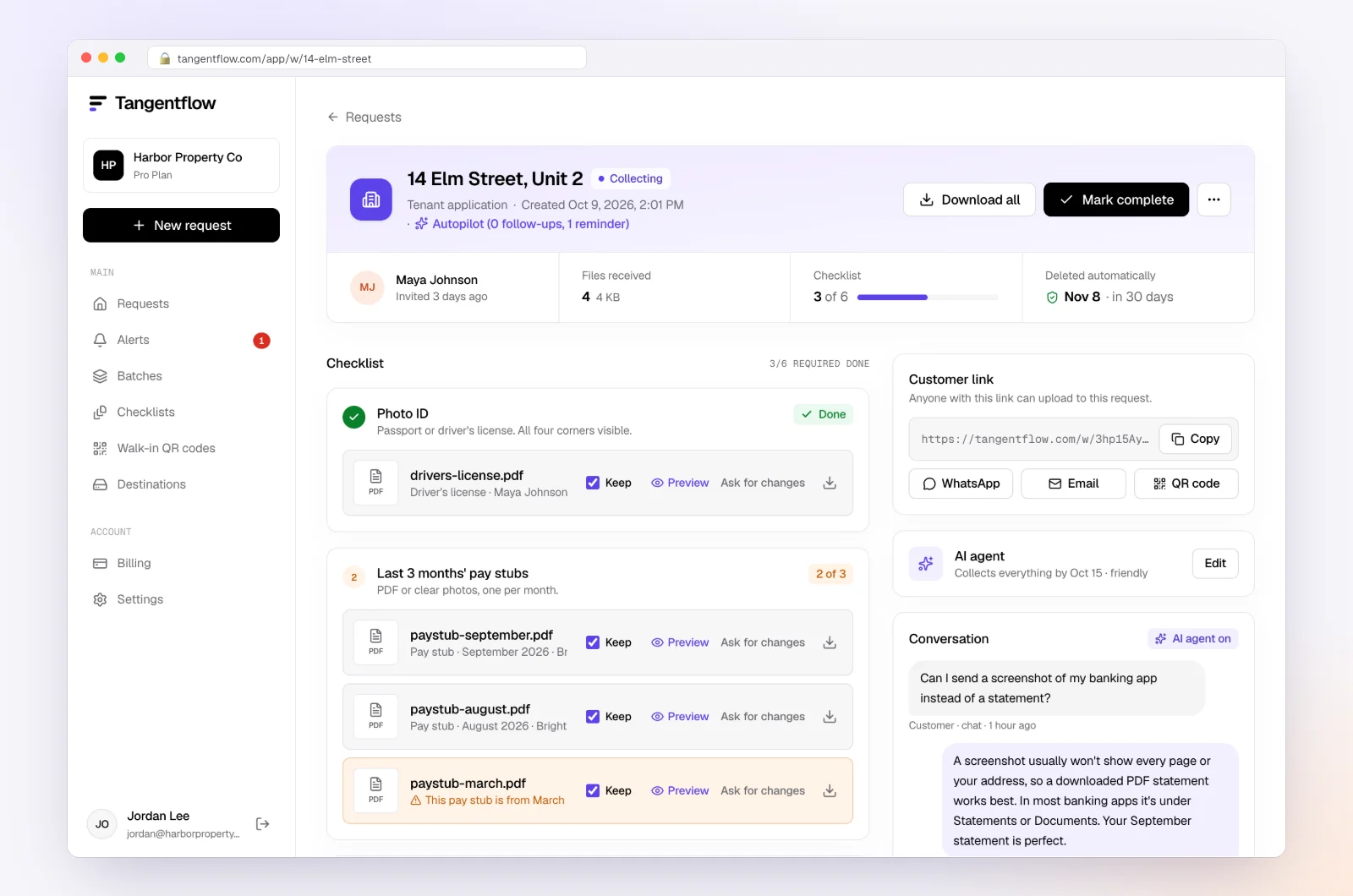
Hand-off. When the agent passes a conversation to you, it "tells the customer your team will get back to them and promises nothing." You get an email headed "needs a person" with what the client wrote and why the agent stopped, and the request's Conversation card shows "Over to you" under the message. Hand-offs and missed due dates are emailed to you at once; routine steps go in an 8am summary.
Stop chasing clients for documents in Tangentflow, step by step
Here is the full setup for a bookkeeper with monthly clients, from checklist to hand-off. It takes about fifteen minutes the first time and nothing after that.
1. Start from the "Monthly bookkeeping" template
Go to Checklists, click Browse templates and pick Monthly bookkeeping. Adjust the items to match your engagement: bank and credit card statements as "PDF only" with "every page," a payroll report as "PDF or spreadsheet," a sales tax return, and a yes/no question such as "Any new loans, leases or large purchases this month?" with "Only ask if" revealing the follow-up item. Fill in "What should it be?" for each file item in the client's words. Our monthly bookkeeping checklist walks through the items.
2. Turn on the agent and set the pace
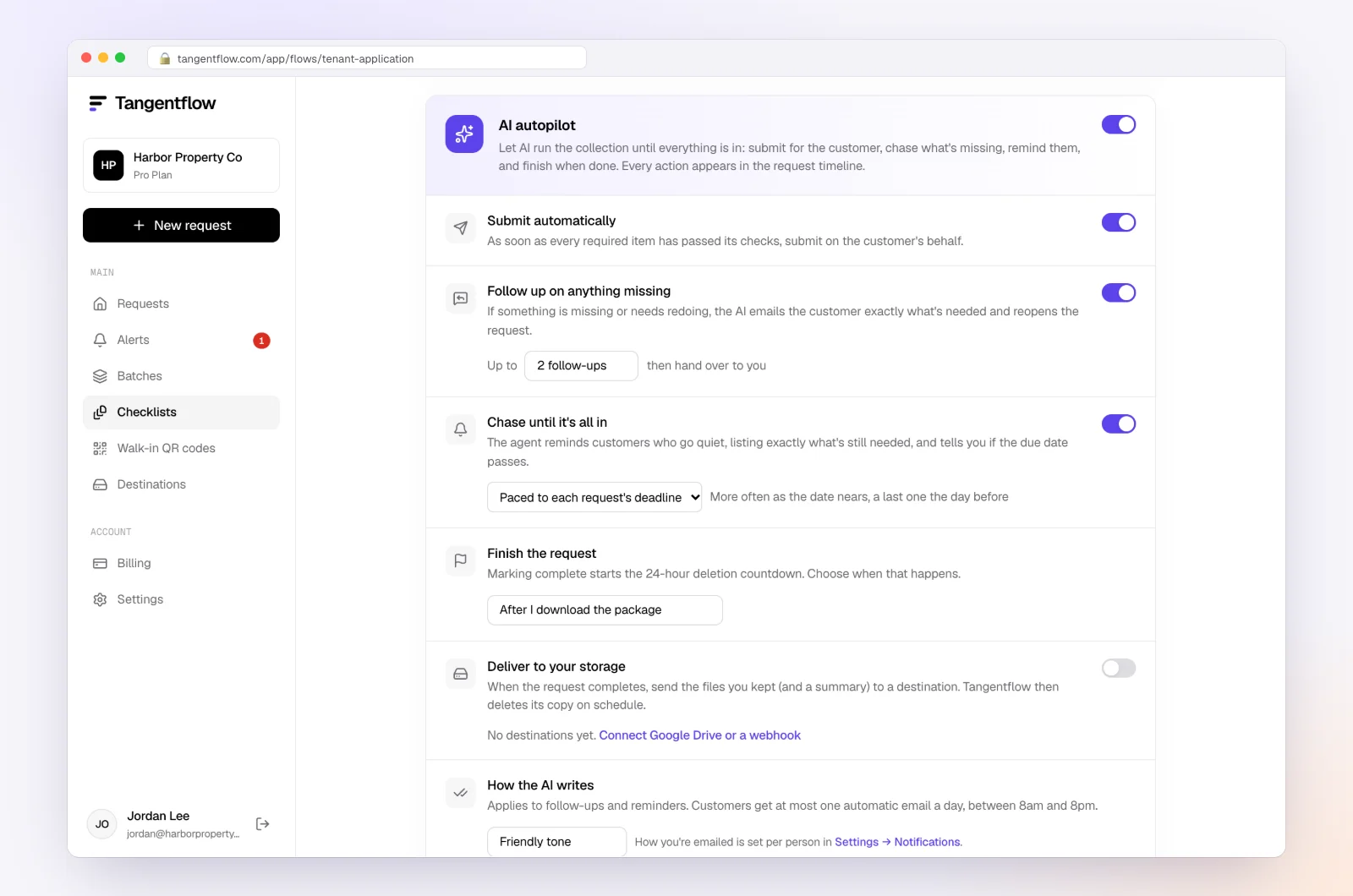
Scroll to AI autopilot on the same checklist and switch it on. Then set the rows below it:
- Chase until it's all in, with Paced to each request's deadline.
- Follow up on anything missing, with the default of 2 follow-ups.
- Submit automatically, so a request with every required item in and passed is submitted for the client.
- How the AI writes: Friendly for most clients, Professional for corporate ones, Brief for the client who hates long emails. Add a line of guidance in the instructions box, for example "Mention that anything received after the needed-by date moves to next month's close. Never mention fees."
Click Save changes. Every request made from this checklist now follows these settings.
3. Create the request with a real date
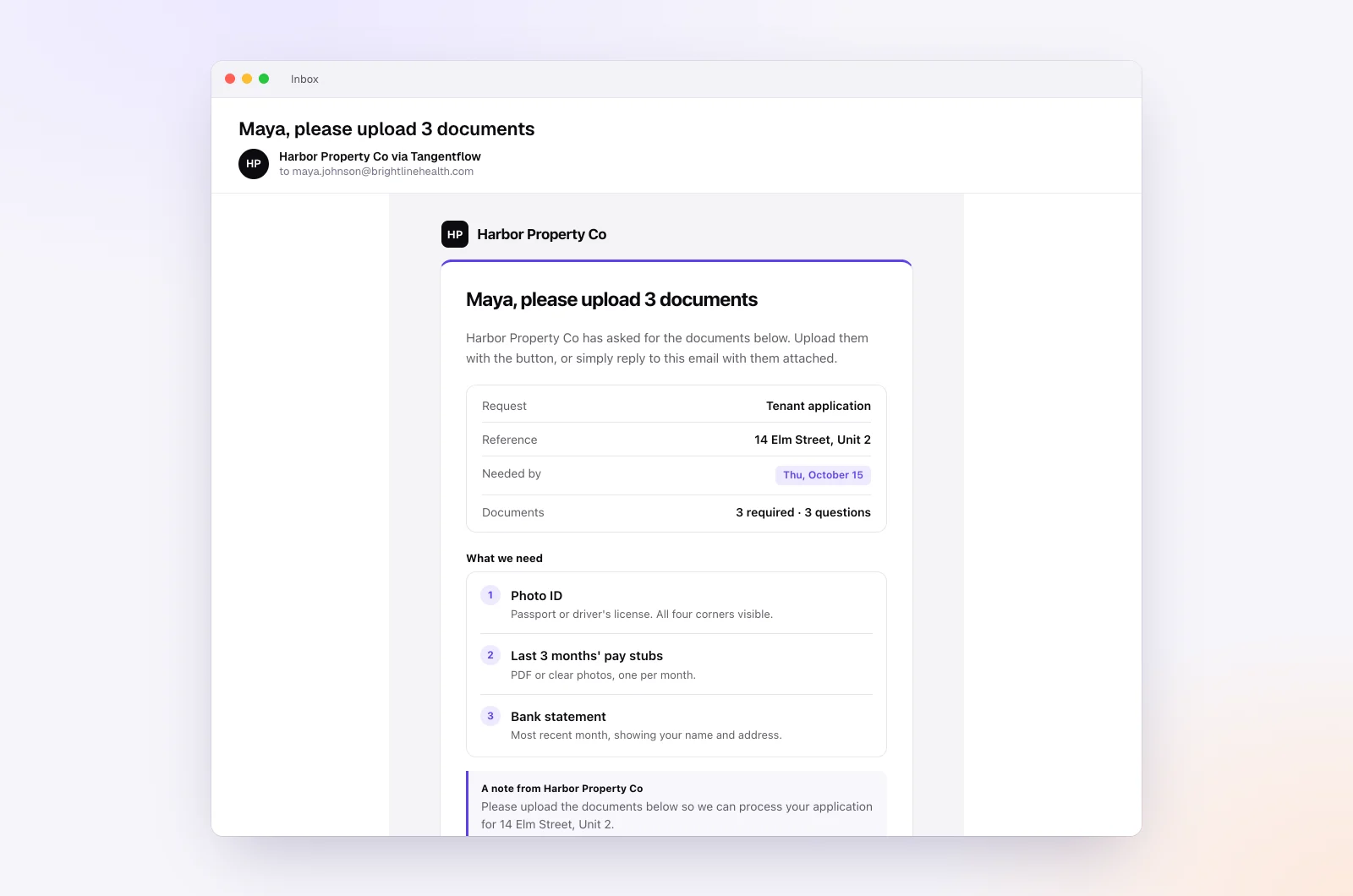
Go to Requests, click New request, choose the checklist, add a reference such as "Acme Landscaping, September 2026," the client's name and email, and the needed-by date. Leave "Email the link" on. The invitation goes out at once from "Your business via Tangentflow," listing the checklist, attaching any forms, showing the Needed by date and carrying the private link.
For a client-specific exception, open the collapsed AI agent section in the dialog and add "Notes for the agent (private)", for example "Owner's spouse handles the books, address replies to Dana." Only what differs from the checklist is saved.
4. The client uploads, asks, and gets an answer
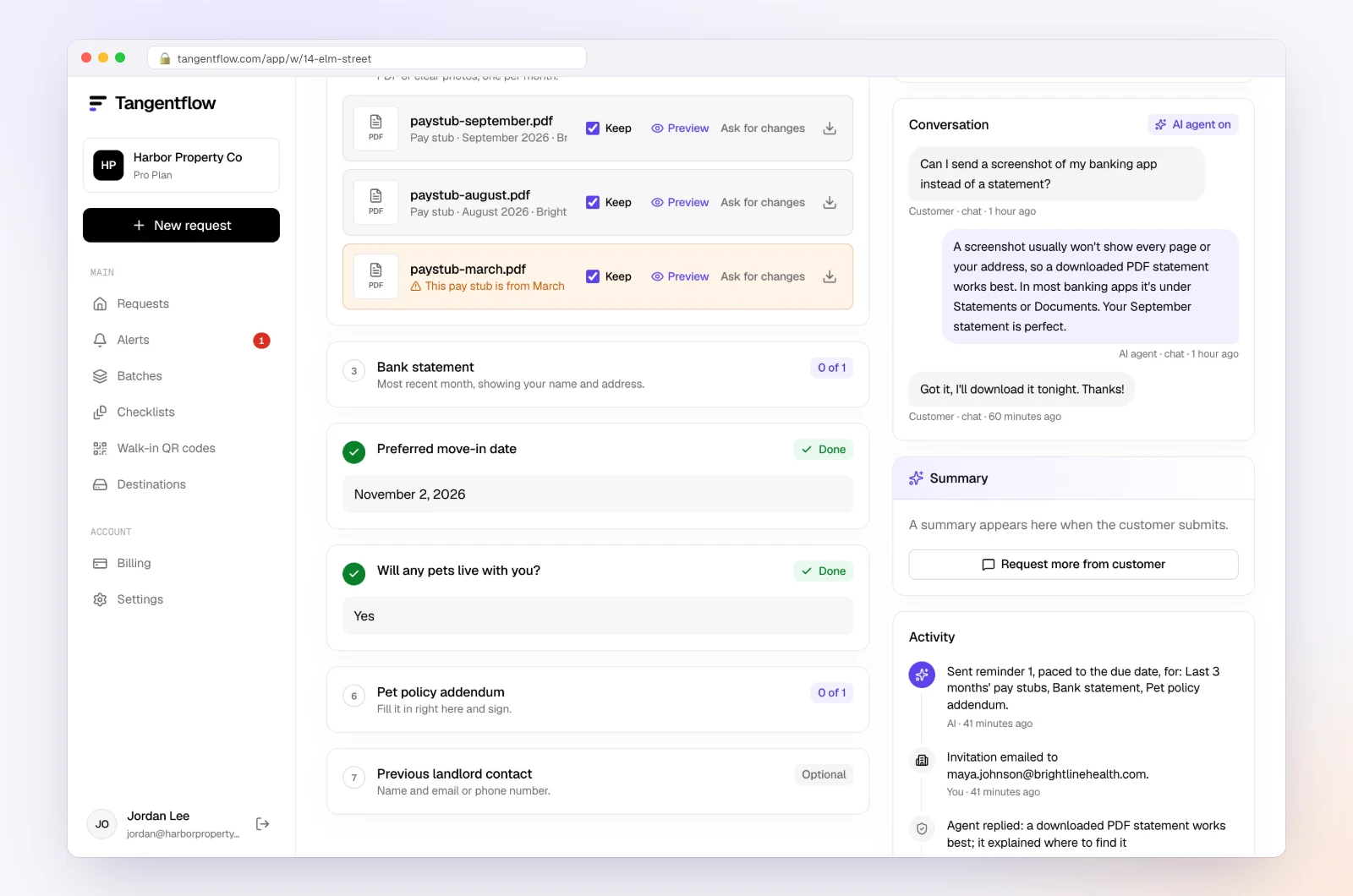
The client opens the link on their phone, sees what is needed and what is still open, and uploads from their camera or files. Each upload is checked in seconds by document checks: right document, readable, the right month, every page. If a statement is missing its last page, the client sees a note while the file is still in front of them. Questions go in the chat headed "Questions? Ask the [your business] assistant," or in a reply to any email, and the agent answers from the checklist. If the client writes "yes, we took out a truck loan in September," the agent fills in that answer and the loan item appears.
5. Reminders go out, paced to your date
You do not write them. Each reminder lists what is still needed, with forms attached, arrives between 8am and 8pm in your time zone, and never lands within a day of the client being active. The request page shows every one in the Activity timeline, alongside each upload and its check result.
6. You step in only on a hand-off
When a client asks for more time, disputes an item, asks about fees or says something the agent is unsure about, you get an email headed "needs a person" and the request shows "Over to you." If the date passes with items missing, you get one "missed the due date" email and the reminders stop. Either way, that is your cue to call, extend the date on the request or apply your late document policy. When everything is in, download the ZIP package or let it deliver to your storage, mark it complete, and the files delete 24 hours later.
When to keep a human in the loop
An agent that chases well is not the same as an agent that should handle everything. Here is where a person still belongs, and how the agent is built to get out of the way.
Anything that changes the deal. Extensions, exceptions ("can I send the credit card statement next month?"), fee questions, scope changes and cancellations are all hand-off triggers. The agent never moves a due date or invents a policy, so it cannot say yes even when yes is the right answer. That is on purpose: a client who hears "we'll get back to you" from the agent and then hears from you the same afternoon has had a good experience.
The upset client. A complaint is a hand-off, full stop. Tone matters more than speed here, and the right response is a phone call, not a well-worded email from anyone.
The client who does not read email. The agent "sends no text messages." If a client only responds to a call or a text, the agent will remind them politely up to six times and then tell you the date was missed. For that client, set the per-request Chasing to Only when they write and put a monthly call in your own calendar instead.
Judgment calls on documents. The AI check flags a statement from the wrong month or a missing page. It does not decide whether a mismatched legal name on a 1099 is a problem or a DBA. You review what came in; the check narrows where you look.
Sensitive items. If you prefer that IDs or payroll files are never processed by AI, switch the AI check off for those items. If AI document checks are off for a whole checklist, the agent does not run on it; reminders and follow-ups still go out, with template wording.
Setups by type of client
| Client type | Needed-by window | Agent settings worth changing | Notes for the agent (private) |
|---|---|---|---|
| Monthly bookkeeping, organized owner | 10 to 14 days | Defaults: paced reminders, 2 follow-ups, Friendly | "Prefers short emails." |
| Monthly bookkeeping, chronically late | 14 days, a week before your real cutoff | Professional tone, guidance line about the close moving | "Late documents move to next month's close. Don't discuss fees, hand off." |
| Year-end or tax organizer | 30 days | Paced reminders spread to the four-day maximum early on; 3 follow-ups | "Self-employed: accept tax returns instead of payslips." |
| Audit or review PBC list | 30 days | Audit / review PBC list template, Professional tone | "Controller handles this. Address replies to the controller, not the owner." |
| Client who only calls | Any | Chasing: Only when they write; agent still answers questions | "Phone client. Don't remind; I'll call." |
For dozens of monthly clients, use Batches with "Send to many customers" and "Repeat every month" so each client gets their own request, link and paced schedule on the first of the month. Details in bulk requests. The whole monthly workflow for a practice is on our page for bookkeepers.
When something goes wrong
| Problem | Likely cause | Fix |
|---|---|---|
| Client says they never got the invitation | Spam folder, or a stale address | Ask them to check spam, or copy the link from the request and send it from your own inbox |
| Reminders feel too frequent for one client | Short window with several reminders | Set Chasing to Only when they write on that request, or extend the needed-by date so the pacing spreads out |
| Reminders went out with template wording | AI document checks are off for the checklist | Turn checks back on if you want the agent's wording; otherwise template reminders still go out |
| Agent handed off something you would rather it handled | The question was outside the checklist | Add the answer to the item's tip or to "Notes for the agent (private)" so next time it can answer |
| Client asked for an extension and heard "we'll get back to you" | Correct behavior; the agent never moves a date | Extend the date on the request yourself, after which reminders resume, paced to the new date, and reply personally |
| Link forwarded to someone else | Shared mailbox or a helpful spouse | Use Reset link on the request; the old link stops working. Turn on "Require an email code" for sensitive checklists |
Check your 8am summary each morning. That is where the hand-offs and missed dates are, so you spend your chasing time only on requests that need a person.
Free and Pro, honestly
You can run a real request, with the full agent, without paying anything.
| Free | Pro ($29/month) | |
|---|---|---|
| Open requests | 1 at a time | Unlimited |
| AI check on each file | Yes | Yes |
| AI autopilot (answers, reminders, follow-ups) | Your first request | Every request |
| Clients reply by email with attachments | No | Yes |
| Branding | Tangentflow badge | Your logo |
| Delivery to Google Drive or a webhook | No | Yes |
| Works with AI assistants (MCP) | No | Yes |
| File retention | 7 days | 60 days |
Both plans include unlimited checklists, QR codes and posters, ZIP export, AI summaries and email delivery. Pro is billed monthly with no contract, and you can cancel any time. Full details on the pricing page.
What Tangentflow does not do: SMS or text messages, a native mobile app, full legal e-signature certificates, identity verification, collecting payments, or permanent storage. If you need any of those, pair it with a tool that does.
Stop chasing: the whole process as a checklist
- Rewrite each request as a checklist of named items, in the client's words, with a count and a rule.
- Send one private link that opens on a phone with no account.
- Set a needed-by date a week before your real cutoff, with one line about why.
- Decide your chase sequence: paced to the date, only what is missing, one email a day, quiet hours, stop at the deadline.
- Automate the sequence once per checklist instead of per client.
- Give clients a way to ask questions that gets an answer the same day.
- Write client-specific exceptions into private notes so the agent can use them.
- Decide in advance what always goes to a person: extensions, exceptions, complaints, fees.
- Check the morning summary for hand-offs and missed dates, and call those clients.
- Review what arrived, deliver it to your system of record, and let the copies delete.
Frequently asked questions
How do I stop chasing clients for documents?
Make the request specific, send one private link that works on a phone, set a real needed-by date and run a short reminder sequence paced to that date, with each reminder listing only what is still missing. Then automate that sequence so you only step in when a client asks for something a checklist cannot settle.
How many reminders should I send before I call?
Four or five over a two-week window is enough: day 4, day 9, day 12 and the day before, then a call after the date passes. Tangentflow's agent caps paced reminders at six per request, with a last one inside the final 30 hours, and stops when the date is missed. Beyond that, email is not working and a phone call is the next step.
Will automated reminders annoy my clients?
They annoy clients when they repeat the full list, arrive at odd hours or land right after an upload. Reminders paced to the deadline, listing only what is missing, capped at one a day between 8am and 8pm, and skipped for anyone active in the last day read as helpful rather than pushy.
What does an AI document collection agent actually do?
It sends the invitation, reminds clients about what is still missing on a schedule paced to the deadline, answers routine questions from the checklist, follows up on anything wrong after submission, and hands over to a person when a client asks for an extension, an exception, a complaint, money or anything it is unsure about. It never invents requirements, moves a due date or asks for passwords.
Can the agent grant a client an extension?
No. The agent never moves a due date. When a client asks for more time, it tells them your team will get back to them, promises nothing, and emails you with the message and why it stopped. You extend the date on the request and reply yourself.
Can Tangentflow text my clients?
Not today. The agent works by email and the chat on the client's upload page. If a client only responds to texts or calls, set that request's chasing to "Only when they write" and keep the reminder in your own calendar.
Does the agent still work if I switch off AI document checks?
If checks are off for the whole checklist, the agent does not run on it. Reminders and follow-ups still go out with template wording, so the pacing survives even when the AI does not read the files. You can also switch checks off for single items, such as IDs, and keep the agent running on the rest.