Guides
How to Get Accounting Clients to Respond Faster (2026)
How to get accounting clients to respond faster: one ask per message, only what's missing, phone-friendly links, firm dates, a reminder cadence and when to call.
By Bibin MathewUpdated 19 min read
The short answer
Clients respond faster when the ask is small, clear and easy to finish on a phone. Put one ask in each message, list only what is still missing, send one link that opens without a login, and give a calendar needed-by date tied to a real consequence such as the close moving to next month. Remind on a schedule paced to that date, then escalate from email to a phone call to pausing work, in that order and in writing.
You sent the email on the 2nd. It asked for October statements, a few receipts and an answer about a $4,200 transfer. It is now the 16th, and you have one PDF and a reply that says "will do this weekend!" Multiply that by twenty clients and close week becomes chase week.
Here is the short version. Accounting clients respond faster when the ask is small, specific and easy to finish on a phone, with a date that means something. Most slow clients are not ignoring you. They opened your email between two other things, saw a long list with no clear first step, and put it off. The fixes are mostly about how you ask, not how often.
This guide is for independent bookkeepers, small accounting firms and tax preparers in the US and Canada who wait on clients for documents and answers. You will get the root causes, six practical tactics, an escalation ladder from email to a phone call to pausing work, engagement letter wording, and a setup in Tangentflow that does the chasing for you.
Why accounting clients are slow to respond
Before you add more reminders, look at what you are asking for. Slow responses usually come from a handful of causes, and most of them sit on your side of the email.
| Root cause | What it looks like | The fix |
|---|---|---|
| The ask is unclear | "Send me everything for October" | Named items with a count and a rule |
| Too many asks in one message | Statements, receipts, three questions and a form in one email | One ask per message, or one link that holds them all as a checklist |
| Too many places to send things | Some by email, some in the portal, some by text | One place, every time |
| It needs a computer or a login | Client has to sit down, find a password, then upload | A link that opens on a phone with no account |
| No real date | "When you get a chance" | A calendar date and the reason behind it |
| No consequence | Late documents change nothing, so they stay late | The close moves to next month, stated up front |
| One confusing item blocks everything | "Which statement? Personal or business?" | A hint on the item and an easy way to ask |
Tactic 1: One ask per message
A client reading your email on a phone will act on one clear request. Give them five and they will save the email "for later."
- For a quick question, ask only that question. "Can you confirm the $4,200 transfer on October 9?" gets a one-line reply. Buried in a list of documents, it waits until the client has time for everything.
- For a monthly document request, send one link that holds the whole checklist. That is still one ask: "Open this and send what's on it." The checklist does the splitting, so the client ticks off named items one at a time.
What to avoid is the hybrid: documents, questions and a form, all in paragraphs.
| Instead of this | Send this |
|---|---|
| "Hi! Just a few things for October: statements, any receipts, the payroll report if you ran it, and can you also tell me about the transfer to Johnson Supply and whether the new truck was a loan or cash? Also please sign the updated engagement letter. Thanks!" | Message 1: "Your October checklist is here: [link]. Needed by Friday, November 7." Message 2, separately: "Quick question: was the truck purchase on October 14 paid in cash or financed?" |
If you have several transaction questions, send them as one short numbered list with yes/no or one-word answers, rather than spreading them across a week of emails. Our guide to uncategorized transaction questions has wording for that.
Tactic 2: List only what's missing
When a client sends three of five items, your next message should mention two items, not five. Repeating the full list hides their progress and makes them wonder whether you received what they sent.
A good follow-up has:
- The items still missing, by name.
- What was wrong with anything you need redone ("page 2 of the Chase statement is missing").
- The same link and the same needed-by date.
A line of thanks for what already arrived helps too: "Got your bank statements, thank you. Two things left." For wording you can copy, including missing-page and wrong-document follow-ups, see our document request email templates.
Tactic 3: Make it doable on a phone without a login
Many small business owners read your email in a truck, a kitchen or a waiting room. If your request needs a laptop and a password reset, it waits until the weekend.
A request is phone-friendly when:
- It opens without an account. A private link, not a portal login they last used in April.
- It accepts photos. A clear photo of a receipt is usually fine for a monthly close. Say so.
- Each item says where to find the document. "Download the PDF statement from your bank's website or app" saves a reply asking which one.
- It remembers progress. Two things now, the rest tonight, same link.
If clients already ignore a portal you pay for, the cause is usually split between the login and the request itself. We cover how to tell which, and what to keep the portal for, in why clients won't use your client portal.
Tactic 4: A firm needed-by date tied to a consequence
"When you get a chance" is not a date. A client weighing your email against everything else in their week needs a calendar date and a reason. The reason is what makes the date firm.
| Weak | Firm |
|---|---|
| "As soon as possible" | "By Friday, November 7" |
| "We need these to stay on track" | "By November 7 so your October reports are ready by the 15th" |
| "Please send soon" | "Anything after November 7 moves to next month's close" |
The consequence must be something you will actually do. The most common one in monthly bookkeeping is deferral: documents that arrive after the due date are processed in the following month's close. It costs the client time, not money, and protects your schedule for everyone else. Rush and catch-up fees are a separate decision; our late document policy for bookkeepers compares the options.
Set the date earlier than your real deadline to leave room for one round of fixes, use the same day every month for monthly clients, and repeat it in every message. If a client needs more time, agree a new date and write it down rather than letting it drift.
Tactic 5: A reminder cadence (how many reminders to send a client)
There is no magic number, but there is a pattern that works: space reminders out when the date is far away, bring them closer as it approaches, send a last one the day before, and skip any reminder right after the client was active. Never more than one a day, and never at 11 p.m.
| Request | Window | Reasonable number of reminders |
|---|---|---|
| Single quick question | 2 to 3 days | 1, then a call |
| Monthly bookkeeping documents | About 1 week | 3 to 4, the last the day before |
| Quarterly or catch-up documents | 2 to 3 weeks | 4 to 5, paced to the date |
| Year-end or tax organizer | 4 to 6 weeks | 5 to 7, closer near the end |
These are starting points from common practice, not a standard. Full example schedules and copy-ready reminder emails are in our client reminder schedule guide.
Tactic 6: An escalation ladder (email, call, pause work)
Decide in advance what happens when reminders run out, write it down, and follow the same steps for every client. Here is how to follow up with unresponsive bookkeeping clients:
| Step | When | What you do |
|---|---|---|
| 1. Request | Day 1 | One link or one question, with a date and reason |
| 2. Paced reminders | Until the due date | Only what's missing, same link, same date |
| 3. Due date passes | Day after | Say what's missing and what happens now (for example, the close moves to next month) |
| 4. Phone call | A few days after the due date, sooner if stakes are high | A two-minute call to find out what's blocking them, confirmed by email the same day |
| 5. Fit conversation | After repeated misses | A different due date, a different scope or a different arrangement |
| 6. Pause work | Only if the engagement letter allows, after written notice | Stop new work until records are caught up |
At every step, keep a record of what you asked for, when you reminded and what arrived. And never hold records hostage: pausing new work is different from refusing to return what the client gave you. Ask your advisor what your obligations are when work stops.
When to call vs. email
Email is right for routine requests and reminders. Call when email has stopped working:
| Situation | Best channel |
|---|---|
| Routine monthly request or reminder | |
| No reply after two or three messages | Call |
| Client stuck on the same item twice | Call |
| Client sounds upset or confused | Call, then a short email |
| Filing deadline or a lender waiting | Call early, confirm in writing |
| Pausing work or adding a fee | Call if you can, and always in writing |
A simple call script:
"Hi [Name], it's [you] from [practice]. I'm calling about October's
paperwork. I'm only missing the Amex statement and the payroll report.
Is anything getting in the way? ... Great, I'll look for them by
Thursday. I'll send a quick email so you have the link handy."
Then send that email, so neither of you forgets what was agreed.
Clients not responding to emails? Diagnose before you chase
Sometimes the problem is the email itself. Before a fourth reminder, check these:
| Symptom | Likely cause | What to try |
|---|---|---|
| No reply to anything, ever | Wrong address, or spam | Call and confirm the address; ask them to mark your email as safe |
| Replies to you, ignores the link | Prefers plain email | Let them reply with attachments if your setup allows |
| Sends half, then goes quiet | Stuck on one item | Ask about that item specifically; add a hint |
| Late by a few days every month | Your date clashes with their month-end | Move their due date |
| Someone else does their paperwork | You are emailing the wrong person | Ask who handles it and send requests to them, with the owner's okay |
Client communication best practices for bookkeepers
Most habits that get faster responses are set at onboarding, before the first late month. Our accounting client onboarding checklist covers the rest of that setup.
- Agree one channel for documents, and stick to it yourself, even when a client texts you a photo.
- Set response expectations both ways. How fast you reply, and how fast you need answers to questions. People meet expectations they know about.
- Send on the same day each month so the request becomes routine.
- Name items the way clients do. "Your Chase business checking statement," not "bank rec support."
- Review slow clients once a quarter. Is it the date, the person, the format or the fit? Each has a different fix.
Engagement letter clauses about client responsiveness
It is much easier to point to a clause the client signed than to invent a consequence mid-month.
Here is example wording for the responsiveness part, to adapt and have reviewed. For late-document fees, use the clause in our late document policy guide rather than adding a second one.
Client responsiveness

Our work depends on timely information from you. You agree to:
- Provide the documents in our monthly request by the [7th] of the
  following month, using the link we send you.
- Answer our questions about transactions within [3] business days.
- Tell us promptly if someone else will be handling your documents.

If documents or answers arrive after these dates, the affected work
will move to the next scheduled close, and our delivery dates will
move with it. We will let you know in writing when this happens.

If we do not receive documents or answers for [two] consecutive
months, we may pause work after giving you written notice, until
your records are brought up to date.
Keep it about schedules, not blame, and explain it out loud at onboarding.
Ways to ask clients for documents, compared
How you ask shapes how fast clients answer.
| Method | Works on a phone | Login needed | Shows what's missing | Reminders | Best for |
|---|---|---|---|---|---|
| Email thread with attachments | Yes | No | No, you track it | Manual | One or two files from a regular client |
| Shared folder (Drive, Dropbox) | Somewhat | Sometimes | No | Manual | Clients who already live in that service |
| Client portal in practice software | Varies | Yes | Sometimes | Some built in | Clients who log in often for other reasons |
| Text messages | Yes | No | No | Manual | Quick nudges, not document storage |
| One private link with a checklist and AI agent (Tangentflow) | Yes | No | Yes | Paced to the date, automatic | Monthly and yearly document requests |
Getting clients to respond faster in Tangentflow, step by step
Tangentflow puts the tactics above into one setup: a specific checklist, one private link that opens on a phone with no account, a needed-by date the client sees everywhere, and an AI collection agent that reminds about only what's missing and hands the client to you when it is time to call. Our page for bookkeepers shows the full monthly workflow.
1. Start from the "Monthly bookkeeping" template
Go to Checklists, choose "Browse templates" and pick Monthly bookkeeping. It starts with "Bank statements for the month," "Credit card statements," "Receipts and bills you paid," "Sales or invoices you issued," "Payroll report" and a question, "Anything unusual this month?" The card, sales and payroll items are optional, so clients without them are not stuck.
Open each item and fill in "What should it be?", the count, a date rule and rules like every page, plus a hint such as "One PDF per business account." For transaction questions, add a "Form field" item (yes/no or short text) so the client answers on the same page. Put your due date rule in "Instructions for the customer," for example "Anything that arrives after the date below is included in next month's close."

2. Send the request with a needed-by date
Go to Requests, click "New request," pick the checklist, add a reference such as "Acme Bakery, October 2026," the client's name and email, and the needed-by date. Leave "Email the link" on, and the agent sends the invitation from your business name.

For your whole client list, use "Batches" on Pro: up to 100 clients per sheet, scheduled up to 30 days ahead. Turn on "Repeat every month" and the same clients get a new request on the same day each month, with the same gap to the needed-by date, until you stop it from the batch page. See bulk requests.
For sensitive documents, turn on "Require an email code" on the checklist: the client enters a 6-digit code emailed to them before the link opens. If a link goes to the wrong person, reset the customer's link from the request and the old one stops working.
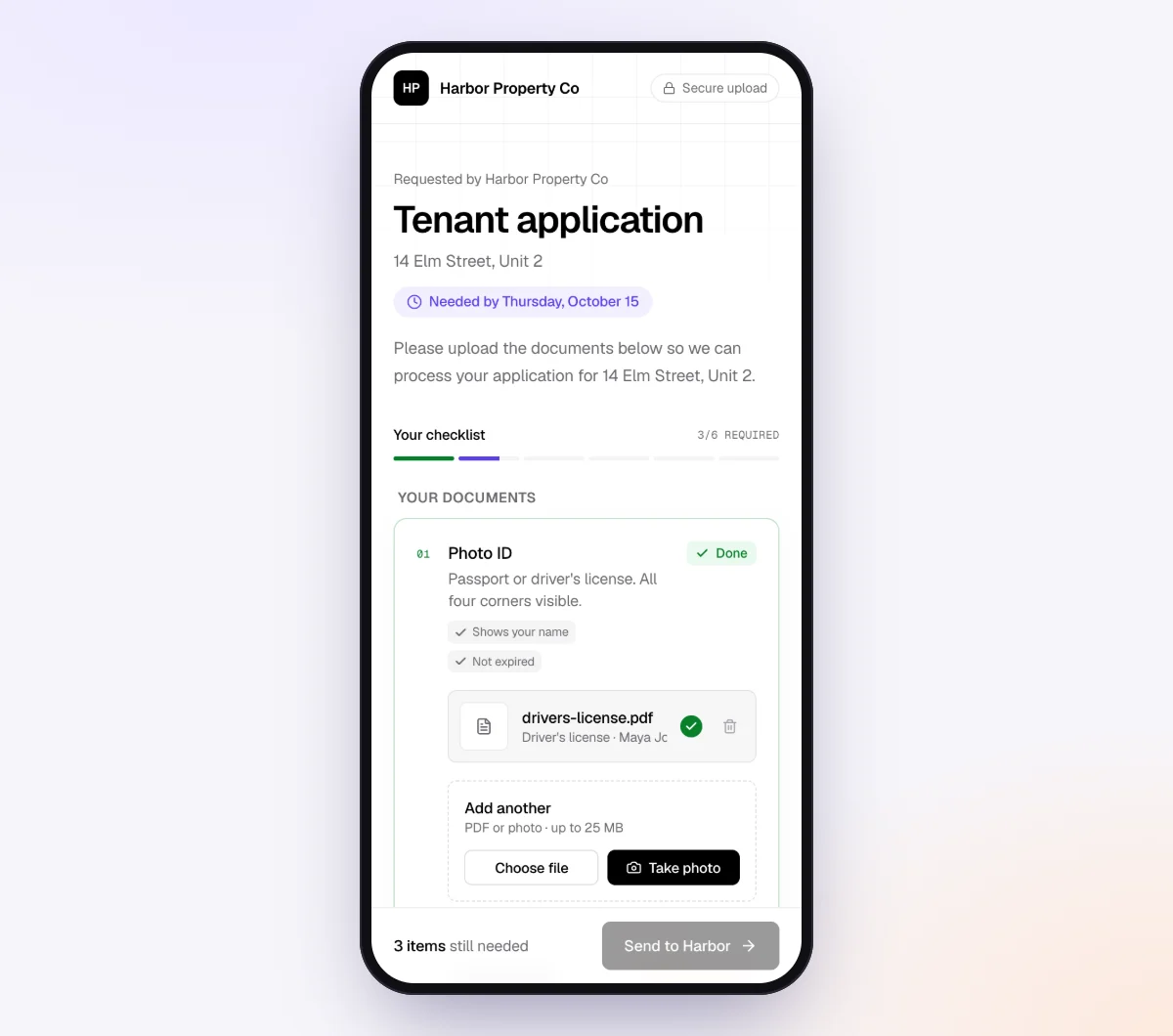
3. The client finishes it on a phone
The client taps the link and sees what is needed, what is done and what is still missing. No account, no app, and they can come back later on the same link. Each file is checked in seconds, and if something is off, such as a missing page or the wrong month, the client sees a friendly note while the statement is still open. Questions go in the chat on the upload page or by email reply, and the agent answers from your checklist and private notes.
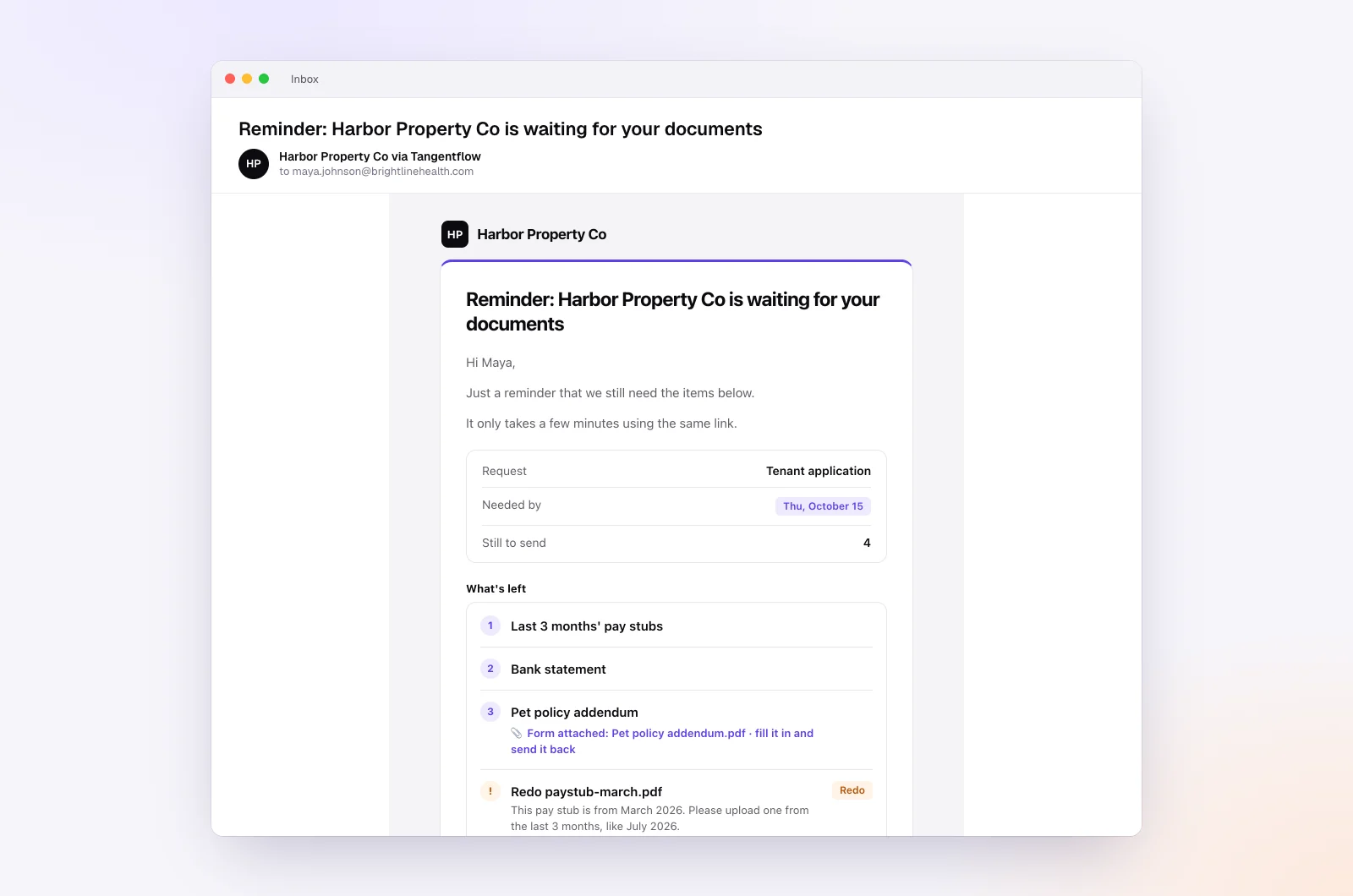
4. Let the agent pace reminders
In the checklist's "AI autopilot" settings, turn on "Chase until it's all in" and choose "Paced to each request's deadline." Reminders come closer as the date nears, at most one a day, and list only what is missing. Pick a "Friendly," "Professional" or "Brief" tone and add guidance such as "Mention that late documents move to next month's close. Never mention fees." Turn on "Follow up on anything missing" so a submitted request with gaps is reopened for exactly what's left.
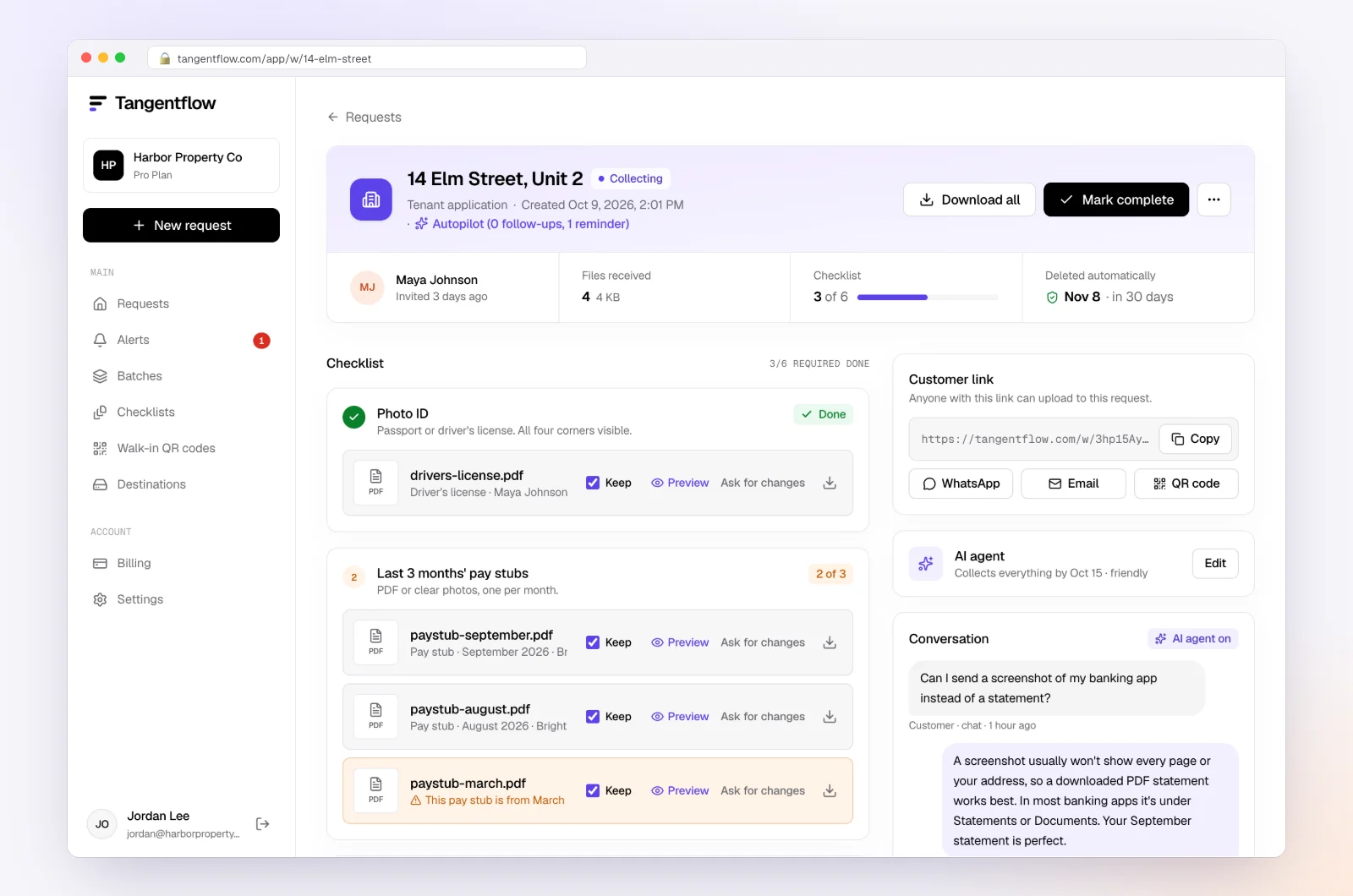
5. Step in when it's time to call
The request page shows every file with its check result, what is missing and an activity timeline of the invitation, each reminder and each upload. When the date passes with items missing, or a client is upset or asks something outside the checklist, the agent hands the request to you in "Alerts." That is your cue to call.
Setups by type of client
| Client type | What slows them down | Setup that helps | Learn more |
|---|---|---|---|
| Busy owner who works on their feet | No time at a desk | Phone-friendly link, photos accepted, short checklist | For bookkeepers |
| Late by a few days every month | Due date clashes with their month-end | Move their date; "Repeat every month" on that day | Late document policy |
| Ignores your portal | The login | No-login link for documents, portal for signing and billing | Clients won't use the portal |
| Sends half and stops | Stuck on one item | Hints on items, upload page chat, "Follow up on anything missing" | Monthly bookkeeping checklist |
When something goes wrong
| Problem | Likely cause | Fix |
|---|---|---|
| Client says they never got the request | Spam or a different inbox | Check the activity timeline; copy the link and send it yourself |
| "Will do this weekend," then nothing | Good intentions, no date | Reply with the date and the one or two items left |
| Client keeps emailing attachments | Habit | On Pro, let them reply to the request email with attachments; otherwise upload the file to the request yourself |
| Same client late three months running | Date, person, format or fit | Have the fit conversation; follow your engagement letter steps |
Free and Pro, honestly
You can run a real request without paying anything.
| Free | Pro ($29/month) | |
|---|---|---|
| Open requests | 1 at a time | Unlimited |
| AI check on each file | Yes | Yes |
| AI autopilot (answers, reminders, follow-ups) | Your first request | Every request |
| Clients reply by email with attachments | No | Yes |
| Batches, including "Repeat every month" | No | Yes |
| Branding | Tangentflow badge | Your logo |
| Delivery to Google Drive or a webhook | No | Yes |
| Works with AI assistants (MCP) | No | Yes |
| File retention | 7 days | 60 days |
Both plans include unlimited checklists, QR codes and posters, ZIP export, AI summaries and email delivery. Pro is billed monthly with no contract, and you can cancel any time. Full details on the pricing page.
What Tangentflow does not do: SMS or text messages, a native mobile app, full legal e-signature certificates, identity verification, collecting payments, or permanent storage. If you need any of those, pair it with a tool that does.
Faster client responses as a checklist
- Find the root cause of your slowest requests before adding reminders.
- Put one ask in each message, or one link that holds the whole checklist.
- Name every item the way the client would, with a count and a hint.
- In every follow-up, list only what is still missing.
- Make the request doable on a phone with no login.
- Give a calendar needed-by date with a reason and a real consequence.
- Remind on a schedule paced to the date, at most once a day.
- Call when the date passes, a client goes quiet, or the stakes are high, and confirm in writing.
- Put responsiveness, deferral and pausing in the engagement letter, reviewed by an advisor.
- Review slow clients once a quarter: date, person, format or fit.
Frequently asked questions
How do I get accounting clients to respond faster?
Make each ask small and specific, put it on one link that opens on a phone with no login, and give a calendar date tied to a real consequence such as the close moving to next month. Remind on a schedule paced to that date, listing only what is missing. Most slow responses come from unclear or bundled requests, not from clients who do not care.
What should I do when clients are not responding to emails?
Confirm the address and ask them to check spam. Then look at the request: is it one clear ask, does it work on a phone, and does it have a date? If two or three messages get no reply, stop emailing and call, then confirm what you agreed in writing.
How many reminders should I send a client?
For a monthly request with about a week's window, three or four is a reasonable start, with the last one the day before the due date. Longer windows can take a few more, spaced out early and closer near the end. Never send more than one a day, and skip a reminder if the client was just active.
How do I follow up with unresponsive bookkeeping clients?
Use the same ladder for everyone: paced reminders until the due date, a matter-of-fact note the day after, a short call a few days later, and an email confirming the new date. After repeated misses, talk about fit, and pause work only if your engagement letter allows it and you have given written notice.
When should I call a client instead of emailing?
Call when the due date has passed with key items missing, when two or three messages got no reply, when a client is stuck on the same item twice, when they sound upset, or when a filing deadline or lender is waiting. Email remains the right tool for routine requests and reminders.
What should an engagement letter say about client responsiveness?
Typically: what the client provides and by when, how quickly they answer questions, where documents go, what happens when they are late, and what happens after repeated misses. Wording and enforceability vary by state, province and professional body, so have a lawyer or your association review it.
Can Tangentflow text my clients?
No. Tangentflow sends the invitation, reminders and follow-ups by email, and answers questions by email and in the chat on the client's upload page. For clients who never read email, copy the link and text it yourself, or call.