Checklists
Quarterly Estimated Taxes: What to Get From Clients (2026)
A quarterly estimated tax checklist for clients: 2026 IRS and CRA due dates, what to collect each quarter, a reminder email and steps after a missed payment.
By Bibin MathewUpdated 20 min read
The short answer
Send each client one short request about three weeks before every due date. Ask for whatever closes the books through the end of the period, income that never touched the books, payroll or withholding changes, any big one-off events, and proof of the payments they already made. For 2026, US Form 1040-ES payments are due April 15, June 15, September 15 and January 15, 2027, and CRA instalments are due March 15, June 15, September 15 and December 15, with weekend dates moving to the next business day.
Quarterly estimated taxes are simple on paper and messy in practice. The math is quick once you have the numbers. Getting them is the hard part: March statements are still missing, a $9,000 consulting payment landed in a personal account, and nobody is sure whether the June payment was actually made.
This guide is for bookkeepers, small firms and tax preparers in the US and Canada who calculate quarterly payments for clients or simply remind them. It covers US estimated tax (Form 1040-ES) and CRA income tax instalments.
You will get a 2026 calendar, a document checklist for each quarter, reminder emails to copy, a table by client type, what to do after a missed quarter, and a setup that sends the request for you before every due date.
Why quarterly estimates go sideways
- The books are behind. If the client is two months behind on statements, the estimate is a guess.
- Income lives outside the books. Side gigs, personal Venmo or PayPal, a capital gain in a brokerage account you never see.
- Something changed and nobody told you. New payroll, a sale of equipment, a spouse's new job.
- Nobody tracks what was actually paid. "I paid it," with no confirmation, amount or date.
- The reminder goes out too late. The day before the due date leaves no time to fix anything.
Each of these is a document or an answer you can ask for in advance.
Who has to pay: the official rules in brief
You do not decide this for the client, but you should know who belongs on your quarterly list.
United States (Form 1040-ES)
According to the 2026 Form 1040-ES instructions, an individual generally must pay estimated tax for 2026 if both of these apply:
- They expect to owe at least $1,000 in tax for 2026 after subtracting withholding and refundable credits.
- They expect their withholding and refundable credits to be less than the smaller of 90% of the 2026 tax or 100% of the tax shown on the 2025 return (the 2025 return must cover all 12 months).
If 2025 adjusted gross income was more than $150,000 ($75,000 if married filing separately), the 100% becomes 110%. Farmers and fishermen have their own rules. Many states also have their own estimated tax payments with their own dates, so check the state revenue department for each client.
Canada (CRA instalments)
The CRA says an individual may have to pay instalments for 2026 if their net tax owing is more than $3,000 ($1,800 for residents of Quebec) in 2026 and in either 2025 or 2024. It is common for self-employed people, landlords, investors and people with more than one job.
The CRA sends instalment reminders (form INNS1) twice a year: in February for the March and June payments, and in August for the September and December payments. Clients can choose the no-calculation option (pay the amount on the reminder), the prior-year option or the current-year option. Quebec residents should also check Revenu Québec for provincial instalments, which have their own rules.
Official pages to bookmark:
The 2026 quarterly calendar
The US periods are not even quarters: the June payment covers two months and the January payment covers four.
US estimated tax due dates for 2026
| Payment | Income earned | Due date | Day of week | Send your request by |
|---|---|---|---|---|
| 1st | January 1 to March 31 | April 15, 2026 | Wednesday | Late March |
| 2nd | April 1 to May 31 | June 15, 2026 | Monday | Late May |
| 3rd | June 1 to August 31 | September 15, 2026 | Tuesday | Late August |
| 4th | September 1 to December 31 | January 15, 2027 | Friday | Mid to late December |
None of the 2026 dates fall on a weekend, so nothing shifts this cycle. If a due date falls on a Saturday, Sunday or legal holiday, the IRS treats a payment on the next business day as on time.
Two exceptions worth knowing, both from the 2026 Form 1040-ES:
- The January payment can be skipped if the client files their 2026 return by February 1, 2027 and pays the entire balance due with it. (January 31, 2027 is a Sunday.)
- Farmers and fishermen (at least two-thirds of gross income from farming or fishing) can pay all their estimated tax by January 15, 2027, or file and pay in full by March 1, 2027.
CRA instalment due dates
| Instalment | Due date | 2026 | 2027 (expected) | Send your request by |
|---|---|---|---|---|
| 1st | March 15 | Sunday, so on time if received Monday, March 16 | Monday, March 15 | Mid to late February |
| 2nd | June 15 | Monday | Tuesday | Mid to late May |
| 3rd | September 15 | Tuesday | Wednesday | Mid to late August |
| 4th | December 15 | Tuesday | Wednesday | Mid to late November |
The CRA's rule: when a due date falls on a Saturday, Sunday or public holiday the CRA recognizes, the payment is on time if it is received on the next business day. Farmers and fishers have a single instalment due December 31. The 2027 days assume the same schedule, so confirm on canada.ca.
Why three weeks ahead
Three weeks leaves a week for the client to respond, a week to close the books and calculate, and a few days to pay. For the US June payment the period ends May 31, only two weeks before the due date, so ask in late May and collect the final statements as soon as they post.
The quarterly estimated tax checklist for clients
These are the five groups of things you need before every due date. Not every client needs every item.
1. Everything to close the books through the period
Ask for whatever is still missing for the months in the period:
- Bank statements for every business account, through the last day of the period
- Credit card statements for every business card
- Loan and line of credit statements (to split interest from principal)
- Merchant and platform payout reports: Stripe, Square, Shopify, PayPal, Amazon, Etsy
- Receipts for large or unusual purchases
- Answers on uncategorized transactions
If you already run a monthly close, the quarterly request only needs the last month. See the monthly bookkeeping checklist and our guide to e-commerce payout reports.
2. Income that is not on the books
This most often throws off an estimate. Ask every quarter:
- Did you receive any income into a personal account? (Consulting, side gigs, cash jobs, app payouts)
- Did you sell any investments, crypto, property or business equipment?
- Did you receive any large interest, dividends or distributions?
- Did you receive rent from a property we do not manage the books for?
For a yes, ask for the document that shows the amount, such as a trade confirmation or closing statement.
3. Payroll and withholding changes
Withholding counts toward the required payments, so changes here matter:
- Did you start, stop or change your own salary through payroll? (Common for S corp owners)
- Did you or your spouse change jobs or file a new Form W-4 (US) or TD1 (Canada)?
- Payroll register or summary for the period, as a PDF, if you do not run payroll yourself
- Any pension, retirement or annuity income with tax withheld
The payroll reports guide lists what to ask for by provider.
4. Big one-off events
One event can change the whole year. Ask about anything since last quarter:
- A large contract, bonus or one-time payment
- Sale of a business asset, rental property or a big block of stock
- A major equipment or vehicle purchase
- A move to a different state or province
- A large retirement withdrawal
5. Proof of payments already made
What the client actually paid, not what they planned to pay:
- US: the confirmation for each 2026 payment, with date and amount. IRS Online Account shows payments made, and Direct Pay and EFTPS give confirmation numbers.
- Canada: confirmation of each instalment paid, plus the latest CRA instalment reminder (INNS1).
- Any overpayment from the prior year's return applied to this year's estimated tax.
- State or provincial estimated payments, tracked separately.
What changes by quarter
| Quarter | Extra things to ask for |
|---|---|
| US 1st (April 15) / CRA 1st (March 15) | Prior-year return, any overpayment applied forward, the CRA's February INNS1 reminder |
| US 2nd (June 15) / CRA 2nd (June 15) | Only two months in the US period; focus on big events and payroll changes |
| US 3rd (September 15) / CRA 3rd (September 15) | Summer one-offs, the CRA's August INNS1 reminder |
| US 4th (January 15) / CRA 4th (December 15) | Year-end bonuses, December investment sales, whether the client will file by February 1 instead (US) |
Reminder email templates
Edit these to sound like you, and keep the list short.
The quarterly request (about three weeks before)
Subject: Quick check-in for your [June 15] estimated tax payment
Hi [First name],
Your next estimated tax payment is due [June 15]. To figure out the amount, we need a few things by [Friday, May 29]:
- Statements for [list accounts] through [May 31]
- Any income that went into a personal account since [April 1]
- Any big changes: a sale, a large purchase, a new job or payroll change
- The confirmation for your [April] payment, if you have not sent it yet
Upload here: [link]. If nothing changed, just answer the questions.
We will send you the amount by [June 8], so you have a week to pay.
Thanks, [Your name]
The "amount ready" follow-up
Subject: Your [June 15] estimated payment: [amount]
Hi [First name],
Based on your books through [May 31], your [federal] estimated payment for [June 15] is [$amount]. [State: $amount, due date.]
You can pay through [IRS Direct Pay / your IRS Online Account / EFTPS / CRA My Account]. Please send us the confirmation number once it is paid.
[Your name]
For a last nudge, list only the missing items and say what you will base the estimate on without them. For timing ideas, see our guide to client reminder schedules.
Client types: what to emphasize
| Client type | Main risk | What to ask for each quarter | Watch for |
|---|---|---|---|
| Sole proprietor or single-member LLC | Self-employment income with no withholding | Business statements, payout reports, income into personal accounts | Seasonal income, equipment purchases |
| S corp owner | Distributions and K-1 income on top of salary | Payroll summary for the owner, distributions taken, business statements | Salary changes; extra withholding as an alternative to estimates |
| Landlord | Rent income with no withholding | Property manager statement, mortgage statements, repair invoices | A sale or refinance |
| Gig worker or app-based worker | Many small payouts across platforms | Payout summaries from each app, mileage log | A new platform they forgot to mention |
| Canadian self-employed | Net tax owing over $3,000 ($1,800 Quebec) | Business statements, the CRA INNS1 reminder, instalment confirmations | Which of the three CRA options the client is using |
The self-employed tax documents checklist covers the year-end side for the same clients.
Four ways to run quarterly reminders, compared
| Method | Setup effort | Tracks what's missing | Reminders | Collects files and answers | Cost |
|---|---|---|---|---|---|
| Calendar reminder plus a manual email | None | No | Manual, from memory | Attachments scatter across threads | Free |
| Practice management task with a template email | Medium | Partly | Some automation | Usually through a portal login | Often per seat |
| Client portal in your tax software | Medium to high | Partly | Some | Yes, if the client logs in | Bundled or per seat |
| Private link with checklist and AI agent (Tangentflow) | Low | Yes, per item | Paced to the needed-by date | Yes, no account | Free to start, $29/month Pro |
Quarterly requests in Tangentflow, step by step
Tangentflow sends each client a private link with a checklist, checks each upload as it arrives, and has an AI collection agent send the invitation, answer questions and chase what is missing. Set it up once, then send it before every due date.
1. Build a "Quarterly estimated tax" checklist
Go to Checklists and create a new one. Describe what you need in a sentence and let AI draft the items, or add them one by one. A good set:
- "Bank and card statements through quarter end": a file item, minimum 1, with "What should it be?" set to "PDF statement downloaded from online banking" and "every page" turned on.
- "Payout reports": a file item for Stripe, Square, Shopify or app payout summaries, as PDFs.
- "Proof of your last estimated payment": a file item for the confirmation or payment history.

Customers can upload PDFs and photos (JPEG, PNG, WebP, HEIC) up to 25 MB each. An item set to "PDF or spreadsheet" also takes Excel and CSV files, and the check reads the first rows to confirm what the report is and whether it covers the quarter. Keep bank statements on "PDF only," since the statement, not the export, has the opening and closing balances. Per client, use "Notes for the agent (private)" for what they usually forget, such as "has a personal PayPal for side work."
2. Add the questions and gate the follow-ups
Add the quarterly questions as form fields: yes/no for "Any income into a personal account this quarter?", "Any sale of investments, property or equipment?" and "Any change to your payroll or withholding?", plus a dollar amount and a date for the last payment. Then use "Only ask if" so only a client who answers "Yes" to the sale question sees "Closing statement or trade confirmation."
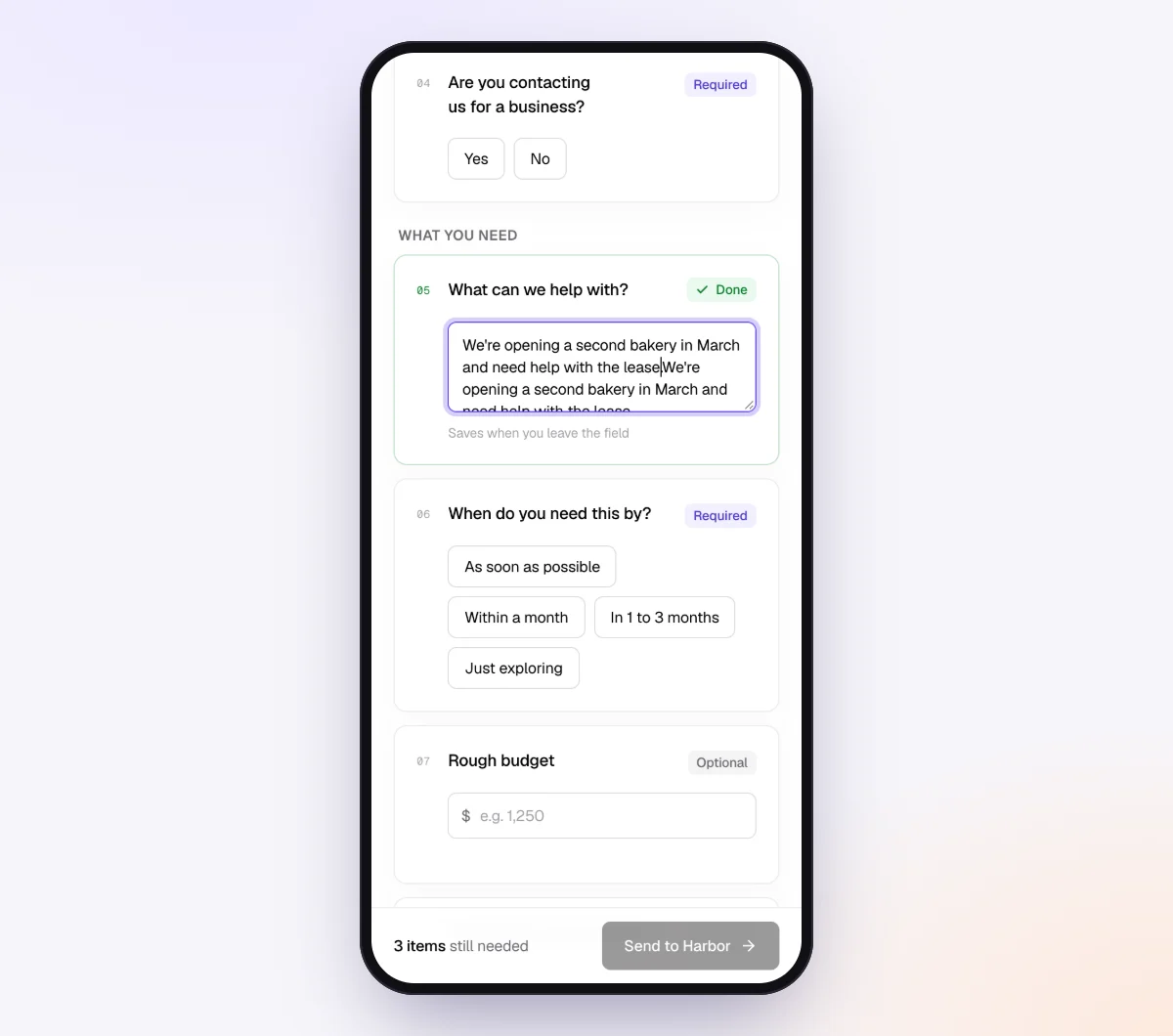
If the request holds sensitive statements, turn on "Require an email code" for this checklist. The client enters a 6-digit code emailed to them before the link opens. If a link goes to the wrong person, use "Reset link" and the old one stops working. Once the client sends everything, the link no longer shows the files. More on this in secure ways to receive sensitive documents.
3. Send it to every quarterly client with Batches
Open "Batches," choose "Send to many customers," pick your quarterly checklist and upload an Excel file or CSV, or paste rows: name, email, reference ("Q3 2026 estimate"), needed-by date and notes. Extra columns, such as "uses prior-year safe harbor" or "CRA no-calculation option," become context for the agent.
You can schedule the send up to 30 days ahead: in late October, schedule the CRA batch for mid-November with a needed-by date of November 30, and in late November, schedule the US batch for mid-December. Batches are part of Pro, up to 100 clients per batch, and skip clients who already have an open request from the same checklist, so an open monthly bookkeeping request does not block the quarterly one. More in bulk requests.
4. Let the agent chase until it's all in
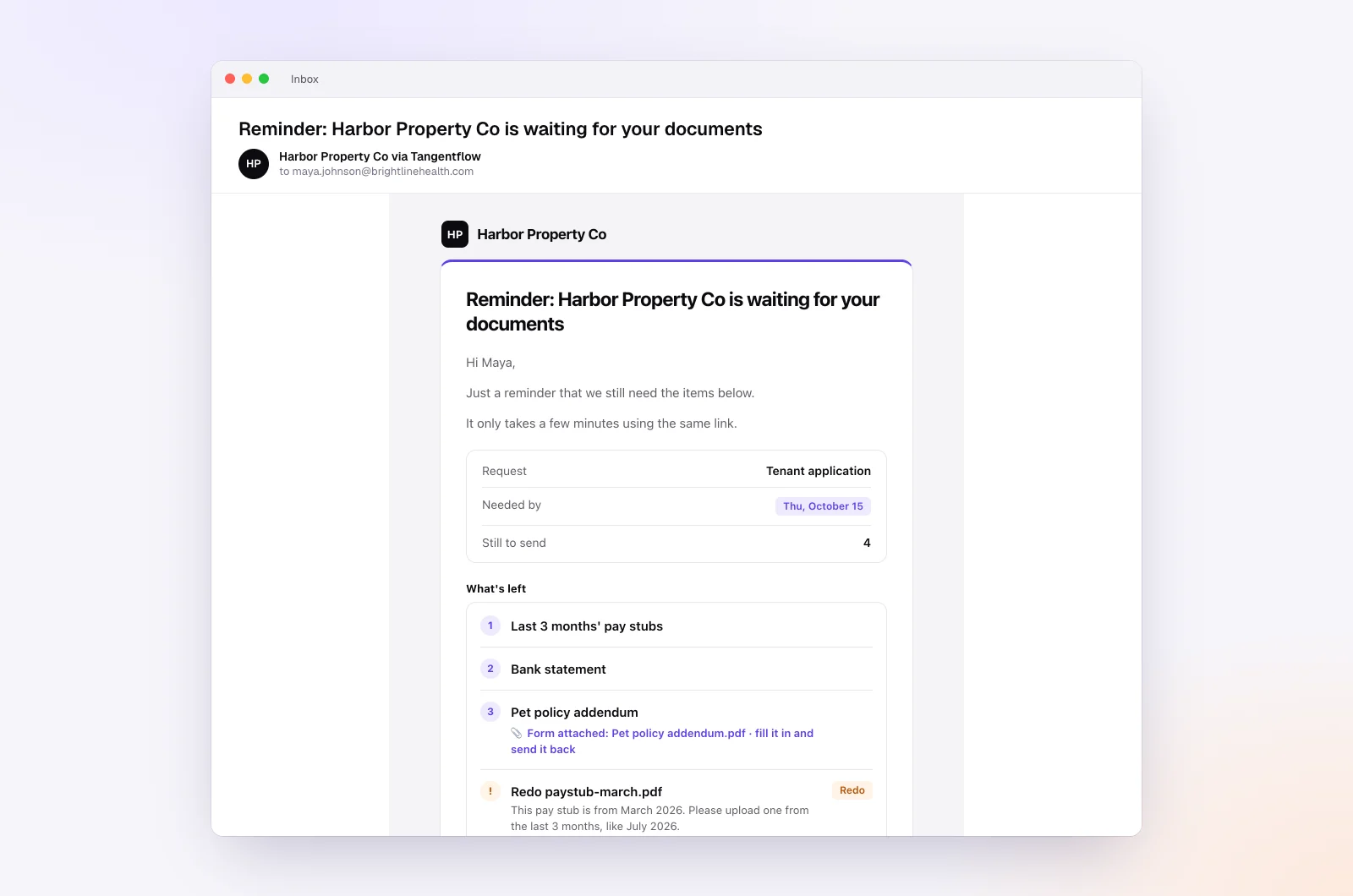
In your autopilot settings, leave "Chase until it's all in" on and pacing set to "Paced to each request's deadline." Reminders tighten as the needed-by date nears, at most one automatic email a day, each listing only what is missing.
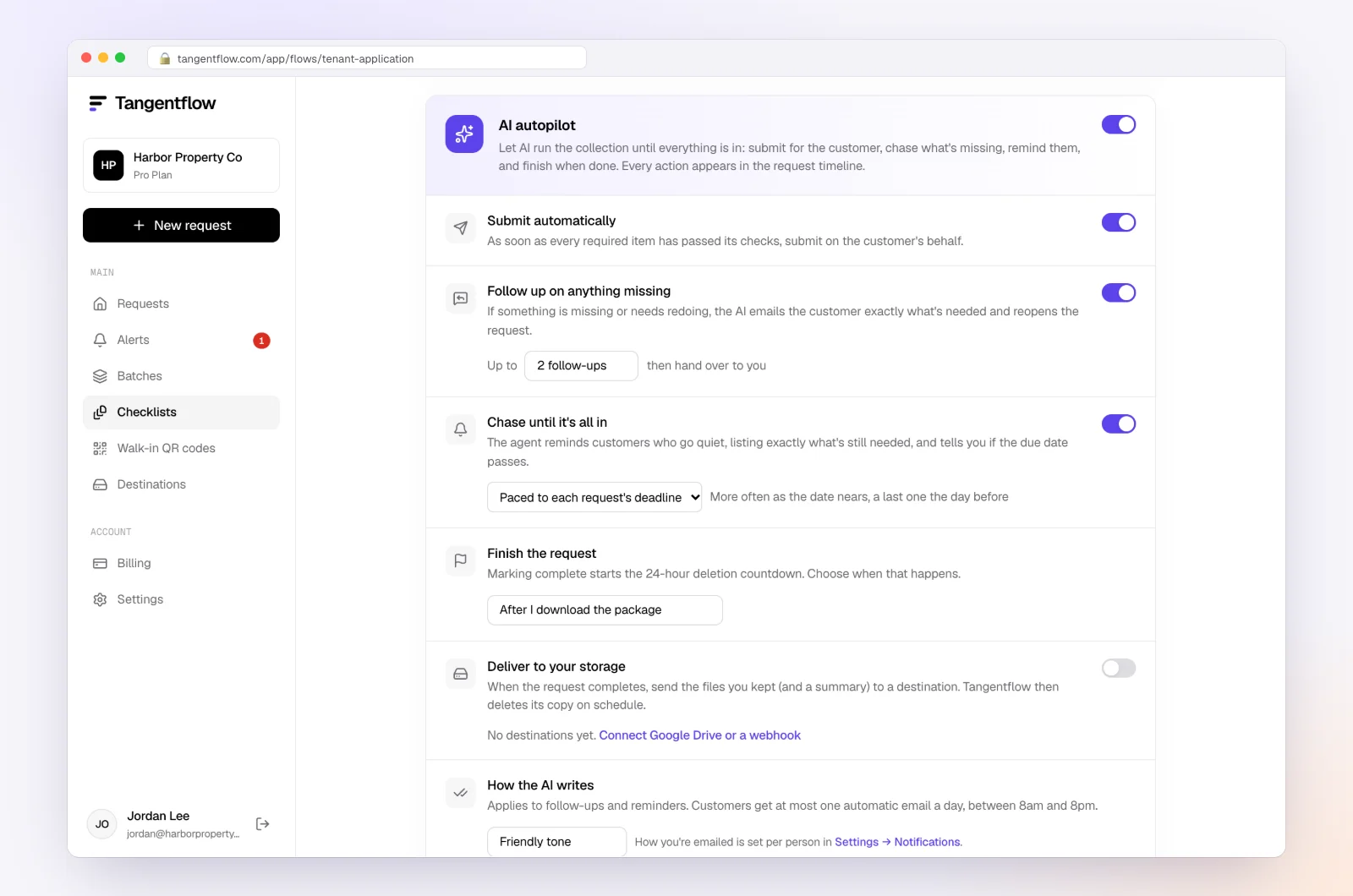
The agent answers questions from your checklist and private notes ("Does my Venmo count?") and hands anything that needs judgment, such as "How much should I pay?", to you. On Pro, clients can reply by email with attachments, and each file is checked and filed under the right item.
5. Review, calculate and close the request
Each request page shows every file with its check result, the answers, what is missing and an activity timeline. Use "Ask for changes" on any file that needs redoing, such as a statement that stops at the 20th.
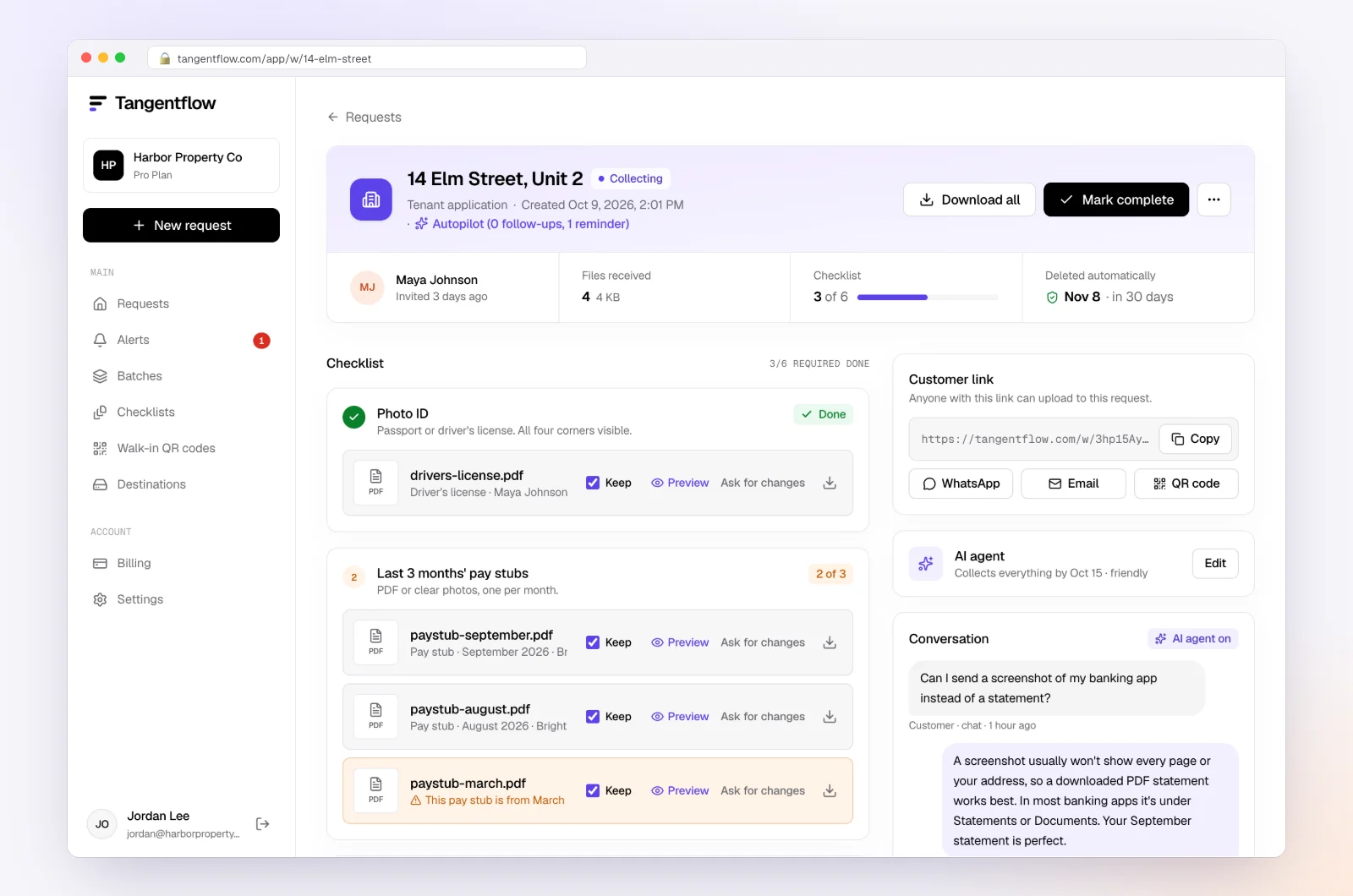
When everything is in, download the ZIP, or on Pro deliver to Google Drive or a webhook. Mark the request complete and the files are deleted 24 hours later.
Quarterly setups by practice type
Start from one checklist and adjust it with "Only ask if." More on running a practice this way for bookkeepers.
| Practice | Who gets the quarterly request | Timing | Settings worth turning on |
|---|---|---|---|
| Bookkeeper who also calculates estimates | Every client on your quarterly list | About 3 weeks before each due date | "Require an email code," needed-by date 7 to 10 days before the due date |
| Cross-border practice | US and Canadian clients | Separate batches for IRS and CRA dates | Two checklists, one per country, so dates and terms match |
| Monthly close clients | Same clients as the monthly batch | Quarterly batch alongside the monthly one | A separate quarterly checklist so the batches don't block each other |
When a client misses a quarter
Your role is to make sure the client knows and has the official information, not to say what to pay or whether a penalty applies.
- Tell the client in writing, with the due date that passed and the period it covered.
- Point them to the official pages. The IRS covers the underpayment penalty and Form 2210 on its estimated taxes page. The CRA covers instalment interest on its interest and penalty charges page.
- Refer the calculation to their tax preparer if you do not prepare their return.
- Record what happened: when you sent the request, the reminders and what was missing.
- Fix the process for next quarter: an earlier request, a shorter checklist, or a call two weeks out.
Useful context from the official sources (not advice): the 2026 Form 1040-ES says late or short payments may lead to an underpayment penalty, and clients with uneven income may be able to use the annualized income installment method in IRS Publication 505. The CRA charges instalment interest, compounded daily at the prescribed rate, on late or insufficient instalments, and says paying early or paying more on a later instalment can earn credit interest that offsets charges for the same year.
Our late document policy for bookkeepers shows how to put response times in your engagement terms.
When something goes wrong
| Problem | Likely cause | Fix |
|---|---|---|
| Client ignores the quarterly request | It arrived on top of the monthly one, or looked long | Keep the quarterly checklist to 3 to 5 items; the agent reminds on schedule, and Alerts shows who is stuck |
| Statement only runs through the 20th | Downloaded before the period closed | Use "Ask for changes" and ask for the full statement after the period ends |
| Client tries to send a CSV export | Default export from their bank or platform | For a bank account, ask for the PDF statement, which has the balances; for a platform report, set the item to "PDF or spreadsheet" and the export uploads fine |
| Client says "I paid it" with no proof | Paid from a personal account or by phone | Ask for a screenshot or PDF of the payment history from IRS Online Account or CRA My Account |
| Big sale mentioned after the payment was made | The question was not asked clearly | Make the sale question a required yes/no every quarter |
| Link went to the wrong email | Typo in the batch sheet | Reset the client's link so the old one stops working, then resend |
| Client asks how much to pay | Natural question | The agent hands it to you; answer it yourself or refer them to their preparer |
Check "Alerts" daily in the week before each due date.
Free and Pro, honestly
You can run a real request without paying anything.
| Free | Pro ($29/month) | |
|---|---|---|
| Open requests | 1 at a time | Unlimited |
| AI check on each file | Yes | Yes |
| AI autopilot (answers, reminders, follow-ups) | Your first request | Every request |
| Send to many clients at once (Batches) | No | Yes |
| Clients reply by email with attachments | No | Yes |
| Branding | Tangentflow badge | Your logo |
| Delivery to Google Drive or a webhook | No | Yes |
| Works with AI assistants (MCP) | No | Yes |
| File retention | 7 days | 60 days |
Both plans include unlimited checklists, QR codes and posters, ZIP export, AI summaries and email delivery. Pro is billed monthly with no contract, and you can cancel any time. Sending to every client at once is really a Pro workflow. Full details on the pricing page.
What Tangentflow does not do: SMS or text messages, a native mobile app, full legal e-signature certificates, identity verification, collecting payments, or permanent storage. If you need any of those, pair it with a tool that does. It also does not calculate estimated tax, make IRS or CRA payments, or replace your bookkeeping or tax software.
The quarterly routine as a checklist
- Keep a list of clients who pay US estimated tax, CRA instalments or both.
- Put the four due dates for each country on your calendar, with a reminder three to four weeks earlier.
- Send each client a short request: statements through period end, income outside the books, payroll changes, big events, proof of payments made.
- Set a needed-by date 7 to 10 days before the due date.
- Remind on a schedule, listing only what is missing.
- Close the books through the period and calculate, or pass the numbers to the preparer.
- Send the client the amount, the due date and how to pay.
- Collect the payment confirmation and record it.
- If a quarter is missed, tell the client in writing and send them to the official IRS or CRA page.
- Keep what you need in your system of record and delete other copies.
Frequently asked questions
What documents do I need from clients for quarterly estimated taxes?
Everything needed to close the books through the end of the period (bank, card and loan statements, payout reports), any income received outside the books, payroll or withholding changes, big one-off events such as a sale, and proof of the estimated payments already made. Ask for statements and reports as PDFs.
When are 2026 estimated tax payments due?
For US Form 1040-ES, the 2026 payments are due April 15, June 15 and September 15, 2026, and January 15, 2027. None of these fall on a weekend this year. The January payment is not required if the client files their 2026 return by February 1, 2027 and pays the full balance with it.
When are CRA tax instalments due?
CRA instalments are due March 15, June 15, September 15 and December 15. If a date falls on a weekend or a public holiday the CRA recognizes, the payment is on time if it is received on the next business day. Farmers and fishers have one instalment due December 31.
Who has to pay CRA tax instalments?
The CRA says an individual may have to pay instalments if their net tax owing is more than $3,000 ($1,800 for Quebec residents) in the current year and in either of the two previous years. Self-employed people, landlords, investors and people with income from more than one job are the most common cases.
How far ahead should I send the quarterly reminder to clients?
About three weeks before the due date works for most clients. It leaves a week for the client to respond, a week to close the books and calculate, and a few days for the client to make the payment.
What should I do if a client missed an estimated tax payment?
Tell them in writing, point them to the official IRS or CRA page on penalties and interest, and refer the calculation to their tax preparer if you are not preparing their return. Do not estimate the penalty for them. Then send the next request earlier.
Can Tangentflow send quarterly reminders automatically?
You schedule each quarter's batch up to 30 days ahead, and the AI agent then sends the invitation and reminders paced to the needed-by date. Batches only repeat monthly, so a quarterly request is scheduled once per quarter. Reminders go by email; there are no text messages.