Checklists
New Hire Paperwork Checklist for the US and Canada (2026)
A new hire paperwork checklist for US and Canadian employers: I-9, W-4, TD1, SIN, direct deposit, policies and contractor forms, and how to collect them.
By Bibin MathewUpdated 19 min read
The short answer
In the US, a new employee usually needs a Form I-9 (with documents you examine yourself), a W-4, a state withholding form where your state has one, direct deposit details, an emergency contact and signed policy acknowledgments, and you report the hire to your state. In Canada, it is the federal TD1 and usually a provincial TD1, the employee's SIN within three days of starting, banking details, an emergency contact and acknowledgments. Send everything except the I-9 as one checklist before day one, and handle the I-9 in person or through E-Verify's remote procedure.
Hiring someone is the good part. A new hire accepts on Tuesday, starts the following Monday, and somewhere in between you need a tax form, banking details for payroll, an emergency contact, a signed handbook acknowledgment and whatever certificate the role requires. Half of it arrives as photos in a text thread, and the forklift certificate expired last spring without anyone noticing.
This guide is for small business owners, office managers, HR teams and staffing agencies that hire in the US, Canada or both. It covers the forms most new employees need in each country, what the rules say about timing, which parts you can collect online before day one and which part you cannot, and a separate list for independent contractors. It also shows how to run the process in Tangentflow, step by step, though the checklists work with any tool, including plain email.
Why onboarding paperwork drags on
New hire paperwork has a deadline built in: the first day, or the first payroll. When it slips, it is usually because:
- The request is a pile of attachments. Five PDFs in one email, with no word on which ones apply.
- Items come back incomplete. An unsigned W-4, a void check shot at an angle, a certificate with the expiry date cut off.
- One form needs a person, not a link. The US Form I-9 has its own rules, and mixing it into a general upload request causes problems.
The fix is a written checklist per role, one place to send everything, a date earlier than the first day, and a clear line between what can be collected online and what you must handle yourself.
The new hire paperwork checklist at a glance
| Item | US | Canada | Who handles it |
|---|---|---|---|
| Employment eligibility | Form I-9, documents examined by you | No I-9 equivalent; check work authorization for SINs starting with 9 | Employer |
| Federal tax withholding | Form W-4 | Federal TD1 | New hire completes, you keep it |
| State or provincial withholding | State form, where your state has one | Provincial or territorial TD1; Quebec uses TP-1015.3-V | New hire completes, you keep it |
| Tax number | SSN (on the W-4 and I-9) | SIN, within 3 days of starting | New hire provides |
| Payroll banking | Direct deposit form or voided check | Direct deposit form or void cheque | New hire provides |
| Emergency contact | Name, relationship, phone | Name, relationship, phone | New hire provides |
| Policy acknowledgments | Handbook, IT use, safety, confidentiality | Same | New hire signs |
| Role-specific | Licenses, certifications, driver's license for driving roles | Same | New hire provides |
| Government reporting | State new hire report within 20 days (sooner in some states) | Not applicable in the same way | Employer |
US new hire paperwork, form by form
Form I-9, Employment Eligibility Verification
Every US employer must complete a Form I-9 for each person it hires, citizens included. It is the one item on this list you should not treat like an ordinary upload.
- Section 1 is completed by the employee any time after accepting the offer, and no later than their first day of work for pay.
- Section 2 is completed by you within 3 business days of the first day of work for pay, or on the first day if the job lasts fewer than 3 business days.
- The employee chooses which documents to present from the Lists of Acceptable Documents: one from List A, or one from List B plus one from List C. You cannot tell them which ones to bring or ask for more than the rules require.
- You must examine the original documents. USCIS says employers must physically examine them, with the employee present, to decide whether they reasonably appear genuine and relate to that person. A photo sent ahead of time does not count.
- The exception is E-Verify's alternative procedure. If you are enrolled in E-Verify in good standing, DHS lets you examine documents remotely: the employee sends copies (front and back), then presents the same documents during a live video call, and you check the alternative procedure box on the I-9 and keep clear copies. If you offer it at a hiring site, you must offer it to every employee there. See USCIS on remote examination for the full conditions.
- Retention. Keep each I-9 for 3 years after the date of hire or 1 year after employment ends, whichever is later.
The cleanest setup is to keep the I-9 entirely separate: Section 1 through your payroll or HR system (or on paper), and the document examination scheduled for the first morning.
Form W-4, Employee's Withholding Certificate
The Form W-4 tells you how much federal income tax to withhold. Ask for it before the first payroll.
- Use the current year's form, signed and dated.
- If a new hire does not give you one, the IRS says to withhold as if they checked "Single or Married filing separately" with no other entries.
- Keep it for at least 4 years, and do not send it to the IRS unless asked.
If your payroll provider lets employees complete the W-4 in its own portal, use that, and add a checklist question confirming it is done.
State withholding forms and notices
Most states with an income tax have their own withholding certificate, and some accept the federal W-4 instead. States without a wage income tax usually have nothing to collect. Your payroll provider will know the form for the state where the employee works, which may differ from your office's state for remote hires.
Some states also require a signed acknowledgment of a pay notice at hire. Check your state labor department.
Direct deposit authorization
Collect a direct deposit form with the bank name, routing number, account number and account type, plus a voided check or bank letter confirming the account is the employee's. Many banks offer a pre-filled form in online banking for new hires without checks. Whether you can require direct deposit varies by state, so ask your payroll advisor.
Emergency contact
Name, relationship and at least one phone number. Ask these as questions, not a form, so the answers are typed and readable.
State new hire reporting is your job
Federal law requires employers to report each new or rehired employee to the state where they work within 20 days of hire, and some states require it sooner. Many payroll providers file it for you. If yours does not, it goes on your own list, not the employee's.
Canada new hire paperwork, form by form
TD1, Personal Tax Credits Return
Canada's equivalent of the W-4 is the TD1. CRA says you must get the completed form when the employee starts work.
- Federal TD1 for every new employee.
- Provincial or territorial TD1 for the province or territory of employment (for example TD1ON or TD1BC). CRA notes it may not be needed when the employee only claims the basic personal amount, but many employers ask for both.
- Quebec employees complete the federal TD1 and Revenu Québec's TP-1015.3-V.
- If an employee does not give you a completed TD1, CRA says to deduct tax using only the basic personal amount.
- Keep the forms in the employee's file. Do not send them to CRA.
Social Insurance Number (SIN)
Service Canada's rules for employers are specific:
- Ask for the SIN within 3 days after the employee starts. They can start work before providing it.
- Do not ask for it on a job application or in an interview. Collect it only once the person is hired.
- You do not need a copy of the SIN card or confirmation letter. Employees do not have to show physical proof. Ask for the number, ideally entered directly into payroll.
- SINs that start with 9 belong to temporary residents. You must make sure the employee is authorized to work in Canada, and track the SIN's expiry date against their work permit.
Direct deposit and void cheque
Ask for a void cheque or the bank's direct deposit form (most Canadian banks offer one in online banking) showing the employee's name, transit number, institution number and account number. The emergency contact and acknowledgments work the same as in the US.
Documents for every new hire, both countries
Policy acknowledgments
Typical ones are the employee handbook, confidentiality or non-disclosure agreement, acceptable use of IT and devices, health and safety orientation, anti-harassment policy and, where it applies, a remote work or equipment agreement. Make each its own signed item so you can see exactly which one is missing. Our guide to collecting signed forms online covers the options.
Licenses and certifications
Only ask for what the role requires, and ask everyone in that role the same way.
| Role | Typical certificate or license | What to check |
|---|---|---|
| Driver, delivery | Driver's license, driving record where required | Not expired, right class |
| Warehouse | Forklift or lift truck certification | Not expired, issued to the employee |
| Healthcare support | CPR or first aid, professional registration | Current, name matches |
| Construction, trades | Trade license, safety training (for example OSHA 10 or WHMIS) | Current, name matches |
Contractor onboarding documents
Independent contractors are not employees, so there is no I-9, W-4, TD1 or payroll setup. What you need instead:
| Item | US | Canada |
|---|---|---|
| Tax form or number | Form W-9 with their TIN (SSN or EIN) | Business Number, and GST/HST number if registered |
| Agreement | Signed contractor agreement | Signed contractor agreement |
| Insurance | Certificate of insurance, if required | Certificate of insurance, workers' compensation clearance where required |
| Payment details | Bank details or invoice instructions | Bank details or invoice instructions |
| Licenses | Trade or professional license where required | Trade or professional license where required |
- Form W-9 gives you the contractor's name, entity type and taxpayer identification number. Keep it on file; do not send it to the IRS.
- The 1099-NEC threshold changed. For payments made after December 31, 2025, the reporting threshold for nonemployee compensation is $2,000 a year (it was $600), indexed for inflation after 2026. Check the IRS 1099 instructions for the current amount.
- In Canada, CRA may require you to report fees for services on a T4A slip. Check CRA's T4A guidance.
- Classification matters. Calling someone a contractor does not make them one. Ask your accountant if unsure.
In Tangentflow, the Subcontractor paperwork template covers this list, including certificates of insurance with expiry dates.
Ways to collect onboarding paperwork, compared
| Method | Setup effort | New hire experience | Security | Reminders and checks | Cost |
|---|---|---|---|---|---|
| Email attachments | None | Familiar, but forms get lost in threads | Weak, bank details sit in inboxes | Manual | Free |
| Paper packet on day one | Low | First morning spent on forms | Depends on your filing cabinet | None, problems found late | Printing |
| Payroll or HRIS self-onboarding | Medium to high | Good if they use the portal | Usually good | Reminders for its own forms | Often per employee per month |
| Full e-signature platform | Medium | Good for signing, awkward for uploads | Strong audit trail | Signing reminders | Per envelope or seat |
| Tangentflow | Low | One phone-friendly link, no account | Private link, auto-deletion | AI checks each upload, paced reminders | Free to start, $29/month Pro |
Payroll self-onboarding is often the best home for tax forms and banking, because the data goes straight into payroll, so keep using it for those. Tangentflow fits around it for certificates, policy PDFs and new hire questions. It collects documents, signed forms and answers before day one, checks each one and chases what is missing. It does not run payroll, file new hire reports or verify identity.
How to collect onboarding documents in Tangentflow, step by step
Here is how a small business or staffing agency can send the pre-start packet as one request. More on the staffing onboarding page.
1. Start from the New hire onboarding template
Go to Checklists, choose "Browse templates" and pick New hire onboarding. It includes a right-to-work ID, a tax form, bank details for payroll, optional certificates, an emergency contact and an open question for anything else.

Then adjust it:
- US hires: delete the ID / right-to-work item, since the I-9 stays out of this checklist. Rename the tax form item to "Form W-4, signed and dated" and add one for your state's form.
- Canadian hires: rename the tax form item to "Federal TD1" and add the provincial TD1 (or TP-1015.3-V in Quebec). Keep an ID item only if the role needs one, and never ask for the SIN card.
- Contractors: start from Subcontractor paperwork instead.
2. Describe each item and attach your forms
In the checklist editor, fill in "What should it be?" for each item ("void cheque or bank direct deposit form showing your name"). Turn on signed for tax forms and acknowledgments, every page for multi-page forms, "not expired" for certificates and the person's own name where it should match.

Attach your fillable PDFs (W-4, state form, TD1, handbook acknowledgment) to their items. New hires fill them in on their phone and draw their signature. See forms and e-signatures.
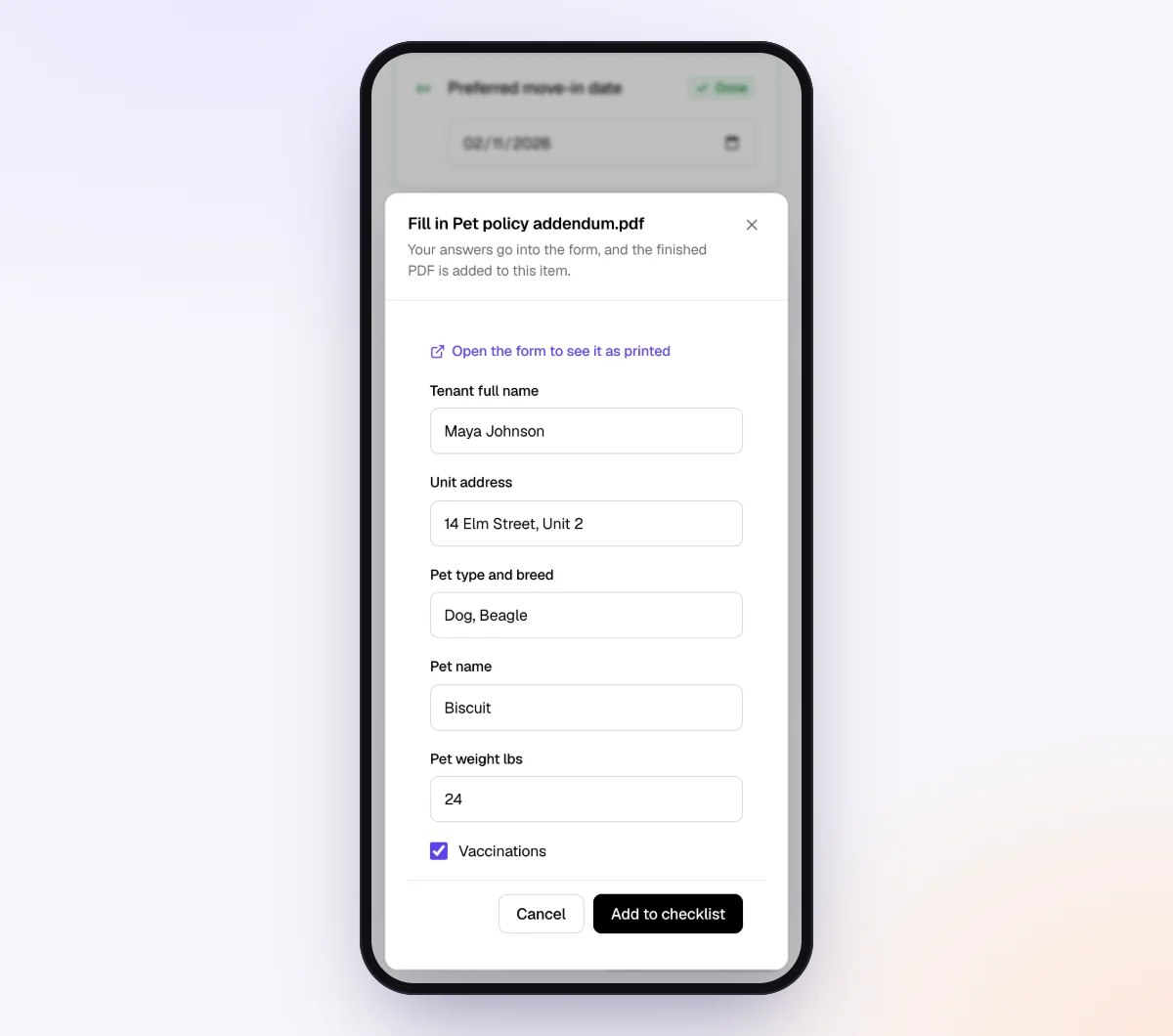
Add the emergency contact as form fields, and use "Only ask if…" for role-specific items: a yes to "Will you drive for work?" shows the driver's license item, and everyone else never sees it.
3. Lock down the sensitive items
Switch the AI check off for items holding bank details or ID if you want a person to review them only. Those files are stored, never sent to the AI provider, and marked "Received."
Turn on "Require an email code" for the checklist so the new hire enters a 6-digit code emailed to them before the link opens. If a request went to the wrong address, reset the customer link from the request page and the old one stops working. Once the new hire sends everything, the link no longer shows the files.
4. Create the request with a date before day one
Go to Requests, click "New request," choose your checklist and add a reference such as "Warehouse associate, starts Oct 20," the new hire's name and personal email, and a needed-by date a few days before the start. Leave "Email the link" on to have the agent send the invitation.

Hiring a group for a season or a new site? Use "Batches" to paste names and emails from a spreadsheet, so each person gets their own request and link. See bulk requests.
5. Review, then move everything into payroll
The new hire uploads from their phone with no account. Each file is checked in seconds by document checks, so an unsigned W-4 or an expired certificate gets a friendly note while they are still on the page. The agent reminds them about only what is missing, paced to your date, and answers questions like "Which TD1 do I need?" from your checklist and notes.
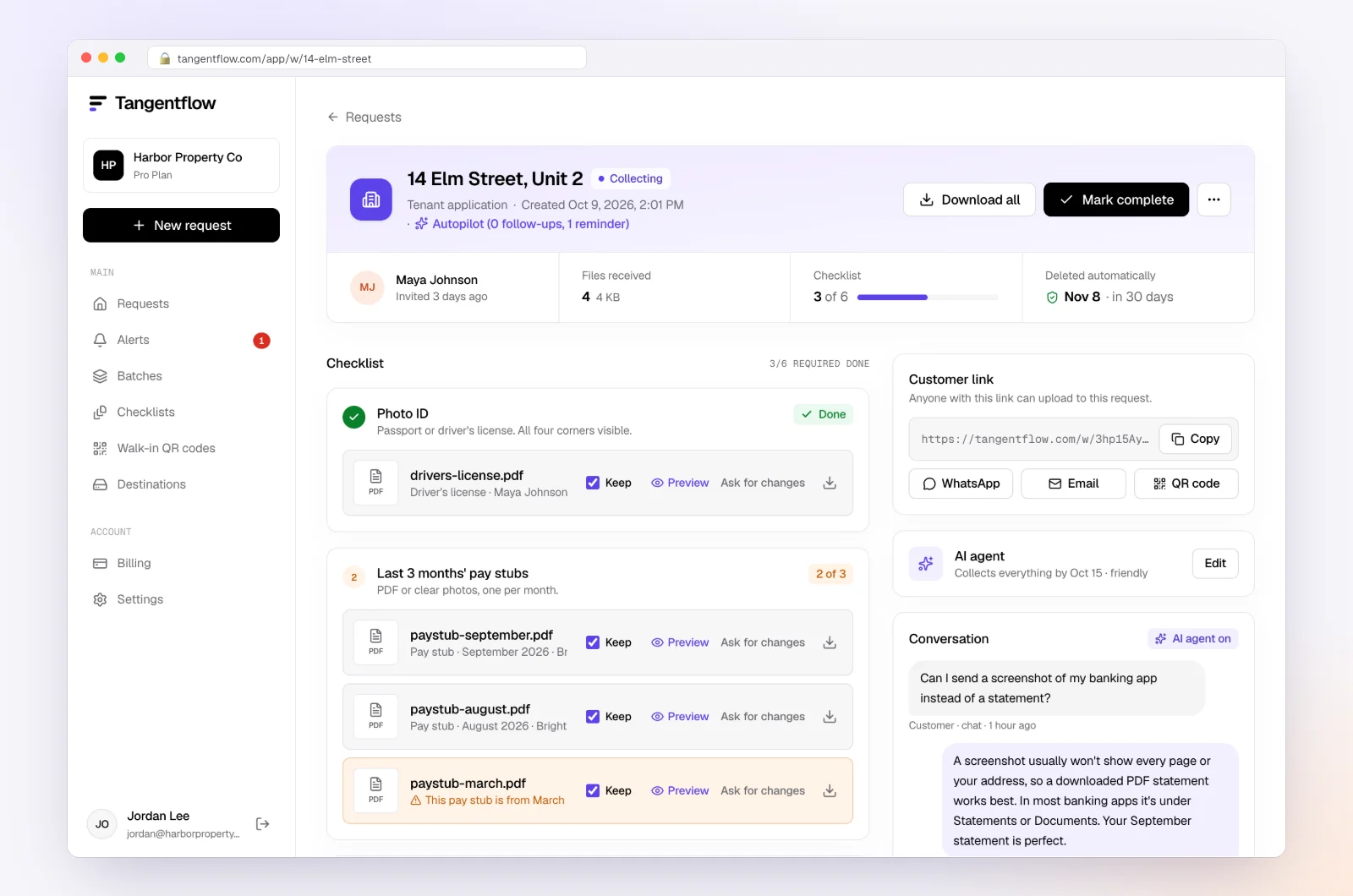
When everything is in, download the ZIP package or, on Pro, deliver to Google Drive or a webhook. Enter the tax and banking details into payroll, file the forms in the employee record and mark the request complete. The files are deleted 24 hours later.
Setups by business
| Business | Checklist items | Settings worth turning on | Learn more |
|---|---|---|---|
| Small US employer | W-4, state form, direct deposit with voided check, emergency contact, handbook acknowledgment | Signed on forms, AI check off for bank items | Forms and e-signatures |
| Small Canadian employer | Federal and provincial TD1, void cheque, emergency contact, acknowledgments | Signed on TD1s, require an email code | Staffing onboarding |
| Staffing agency | Tax forms, banking, certificates per assignment, safety acknowledgment | "Only ask if…" per role, Batches for groups | Bulk requests |
| Agencies hiring contractors | W-9 or Business Number, certificate of insurance, signed agreement | Subcontractor paperwork template | Collect signed forms online |
Timing: when each item is due
Pace the request to the earliest deadline, not the latest.
| Item | Deadline | Your needed-by date |
|---|---|---|
| I-9 Section 1 | No later than the first day of work for pay | Handle outside the checklist |
| I-9 Section 2 | Within 3 business days of the first day | Book the document examination for day one |
| W-4, state form, direct deposit | Before the first payroll | 2 to 3 business days before the start |
| TD1 forms | When the employee starts work | 2 to 3 business days before the start |
| SIN | Within 3 days after the employee starts | On or after day one, in payroll |
| State new hire report | Within 20 days of hire, sooner in some states | Your own task, not the employee's |
Our client reminder schedule guide has example reminder patterns for short deadlines.
Keeping new hire data safe
Onboarding files hold SSNs, SINs, bank account numbers and ID details. Collect less: no SIN card photos, no I-9 documents in advance, no bank statements when a void cheque will do. Keep one copy in payroll and the employee file, and delete the rest. In Tangentflow, files are deleted 24 hours after you complete a request, or when retention ends (7 days on Free, 60 days on Pro), and you can delete immediately and get a deletion certificate. Our guide to secure ways to receive sensitive documents and the security page have more.
When something goes wrong
| Problem | Likely cause | Fix |
|---|---|---|
| W-4 or TD1 came back unsigned | Photographed before signing | Turn on "signed"; the check flags it and the new hire fixes it on the spot |
| Void cheque photo unreadable | Dark room, angle | The check flags blur; add a tip about a flat surface and good light |
| Link went to the wrong email | Typo in the address | Reset the customer link, which stops the old one working |
| Start date passed with items missing | Busy or stuck | The agent hands off to you; call them and finish on day one |
| Someone uploaded ID "for the I-9" | They assumed it was needed | Tell them you will review documents in person, and delete the upload |
Free and Pro, honestly
You can run a real request without paying anything.
| Free | Pro ($29/month) | |
|---|---|---|
| Open requests | 1 at a time | Unlimited |
| AI check on each file | Yes | Yes |
| AI autopilot (answers, reminders, follow-ups) | Your first request | Every request |
| New hires reply by email with attachments | No | Yes |
| Branding | Tangentflow badge | Your logo |
| Delivery to Google Drive or a webhook | No | Yes |
| Works with AI assistants (MCP) | No | Yes |
| File retention | 7 days | 60 days |
Both plans include unlimited checklists, QR codes and posters, ZIP export, AI summaries and email delivery. Pro is billed monthly with no contract, and you can cancel any time. Full details on the pricing page.
What Tangentflow does not do: SMS or text messages, a native mobile app, full legal e-signature certificates, identity verification, collecting payments, or permanent storage. If you need any of those, pair it with a tool that does. For onboarding, that also means no Form I-9 completion, E-Verify, payroll or new hire reporting.
The whole process as a checklist
- Write one checklist per role and country before you make the offer.
- US: keep the I-9 out of it. Section 1 by day one, Section 2 within 3 business days, in person or through E-Verify's remote procedure.
- Add the W-4 and state form, or the federal and provincial TD1s.
- Add direct deposit details and an emergency contact.
- Add each policy acknowledgment as its own signed item, and certificates only for roles that need them.
- Canada: ask for the SIN within 3 days of the start, as a number, not a card photo.
- Send one private link with a needed-by date a few days before the start.
- Check each upload as it arrives and fix problems right away.
- Move tax, banking and signed forms into payroll and the employee file.
- US: file the state new hire report within 20 days, or confirm payroll does.
- Delete every other copy.
Frequently asked questions
What paperwork does a new employee need to fill out in the US?
Usually a Form I-9, a Form W-4, a state withholding form if your state has one, a direct deposit form, an emergency contact and signed policy acknowledgments. Some roles also need licenses or certifications, and some states require a signed pay notice. Check your state labor department for state-specific forms.
Can a new hire upload their I-9 documents online?
Not as a substitute for examining them. USCIS requires employers to physically examine original documents with the employee present, unless you are enrolled in E-Verify in good standing and use the DHS alternative procedure, which includes a live video call. Tangentflow does not replace I-9 verification, so handle the I-9 separately.
When is the I-9 due?
The employee completes Section 1 no later than their first day of work for pay. You complete Section 2 within 3 business days of that day, or on the first day if the job lasts fewer than 3 business days.
What forms does a new employee fill out in Canada?
The federal TD1 and usually a provincial or territorial TD1 (Quebec uses TP-1015.3-V), plus direct deposit details, an emergency contact and policy acknowledgments. You also need their SIN within 3 days after they start, but not a copy of the SIN card or letter.
What happens if a new hire never returns their W-4 or TD1?
In the US, the IRS says to withhold as if the employee is single or married filing separately with no other entries. In Canada, CRA says to deduct tax using only the basic personal amount. Payroll can still run, but withholding may not match what the employee wants.
What documents do I need from an independent contractor?
In the US, a signed Form W-9, a contractor agreement, and insurance certificates or licenses if the work requires them. In Canada, their Business Number and GST/HST number if registered, a signed agreement and any required insurance. No I-9, W-4 or TD1.
Can Tangentflow collect W-4s and TD1s with a signature?
Yes. Attach the fillable PDF to a checklist item and the new hire fills it in and draws their signature on their phone. If your payroll provider has its own self-onboarding for tax forms, you may prefer that so the data goes straight into payroll.