Guides
How to Ask Customers for Photos (and Get Usable Ones) (2026)
How to ask customers for photos you can quote from. Shot lists by trade, message and reminder templates, video tips, QR codes and how to check every photo.
By Bibin MathewUpdated 19 min read

The short answer
Ask for a named shot list instead of "send some pictures": one item per shot, a count, a plain description of what the photo should show and something for scale. Send one upload link instead of collecting photos in a text thread, ask for a short video when something moves or makes a noise, and give a date. Check every photo as it arrives so blurry, dark or wrong shots get retaken while the customer is still standing in front of the problem.
"Can you send me a few pictures?" sounds like the easiest request in the world. Then the photos arrive. One is a close-up of something that could be a furnace or a dishwasher. One is taken from across the yard at dusk. The model number you actually needed is a reflection of the customer's phone. And the whole set is scattered across a text thread, mixed in with "what time are you coming?" and a thumbs-up.
So you ask for more, wait two days, and drive out anyway.
This guide is for anyone who quotes or diagnoses from customer photos: HVAC, plumbing, roofing, remodeling, landscaping and pest control companies, auto repair, body shops and dealers, restoration contractors, movers and appliance repair techs. It works whether you collect photos by text, email or a dedicated upload link.
You will get shot lists by trade, wording non-experts follow, when to ask for video, message templates and a step-by-step setup in Tangentflow.
Why texted photos let you down
Texting is the default because everyone knows how to do it. For a single quick photo, it is fine. For a quote, it usually falls short in the same few ways.
- Compression. Photos sent as a regular text message (MMS) are often shrunk to fit carrier size limits, and messaging apps compress images to save data. The model number that was sharp on the customer's phone arrives as a smudge on yours.
- Missing angles. Customers photograph what worries them, not what you need to quote. You get the water stain, but not the ceiling around it or the bathroom above.
- No sense of scale. A crack, a dent or a hole looks the same at half an inch and at four inches. Without a coin or a tape measure in the frame, you guess.
- Scattered in threads. Photos end up on whichever phone the customer texted, mixed in with personal messages. Someone else in the office cannot find them, and nobody can tell what is still missing.
Most of these come from how the request is made, not from the customer. A good request has a named shot list with counts, plain descriptions, something for scale, video where photos fall short, one place to upload, a date and a quick check of each photo. The rest of this guide covers each part.
Shot lists by trade
Use these as starting points. Add or remove shots to match how you quote, and keep each list short enough that a customer can finish it in about ten minutes.
| Trade | Must-have shots | Video? |
|---|---|---|
| HVAC | Data plate on the outdoor unit, data plate on the furnace or air handler, wide shot of each unit, the thermostat | Yes, if it is making a noise or cycling |
| Plumbing | Wide shot of the area, under the sink with the cabinet emptied, water heater label, the leak or damage close up | Yes, for running toilets, drips and drain noises |
| Roofing | Each slope of the roof from the ground, damage close-up with something for scale, ceiling stains inside | Optional walk-around from the ground |
| Remodeling | Each wall of the room, the floor, the ceiling, existing fixtures and cabinets | Optional slow pan of the room |
| Landscaping | The yard from each corner, problem areas close up, slopes and drainage spots | Optional walk-around |
| Pest control | Signs of activity (droppings, damage, nests), possible entry points, the area wide | Yes, if the pests are visible and moving |
| Auto repair and body shops | All four corners of the vehicle, the damage close and wide, the VIN, the odometer | Yes, for engine noises and rattles |
| Dealers (trade-ins) | Four corners, interior front and back, odometer, VIN, any damage | Optional walk-around |
| Restoration | Wide shot of each affected room, source of the damage, close-ups with scale | Yes, a narrated walkthrough |
| Movers | Each room from the doorway, large or fragile items, stairs, hallways and the entrance | Yes, a slow walk through each room |
| Appliance repair | Model and serial tag, wide shot of the appliance, the problem area, any error code | Yes, for noises, leaks and error lights |
A few notes on the most useful shots:
- Data plates and labels are the single most valuable photo for HVAC, plumbing and appliance work. They give you the model, serial number and often the size or capacity, which lets you check parts and pricing before you roll a truck.
- The VIN is usually visible through the windshield at the base of the driver's side and on a sticker in the driver's door jamb. A photo of the door jamb sticker is often clearer than one through the glass.
- Roof slopes from the ground are enough for a first look. A customer never needs to climb a ladder to help you quote.
- For movers, add separate items for the piano or the glass cabinet so they are not hidden in a wide shot.
For insurance claim jobs the standard is stricter; see our insurance claim documentation checklist.
How to describe each shot so anyone gets it right
Most bad photos come from descriptions written by an expert for an expert. Write each shot like you are talking someone through it on the phone.
| What you might write | What the customer needs to read |
|---|---|
| Condenser data plate | The metal sticker on the side of the outdoor AC unit with the model and serial numbers. Get close enough that you can read the numbers on your screen. |
| Under-sink photo | Empty the cabinet under the sink and take a photo from the floor looking in, with the flashlight on. |
| Each roof slope | Stand in the yard and take one photo of each side of the roof, so we can see the whole side top to bottom. Please do not climb up. |
| Damage close-up with scale | A close photo of the damage with a coin or a tape measure next to it, so we can see how big it is. |
| Four corners | Stand at each corner of the car, far enough back to get the front or back and one full side in the same photo. Four photos total. |
| VIN | The 17-character number on the sticker inside the driver's door frame. Get close and make sure every character is readable. |
A few habits that make every description better:
- Tell them where to stand. "From the doorway," "from the sidewalk," "from the driver's side."
- Ask for light. "Turn on the lights and the phone flashlight" for anything inside a cabinet, crawlspace or engine bay.
- Ask for originals, not screenshots, which lose quality and the date the photo was taken.
- Add an example. One sample photo of a good data plate shot removes more guesswork than a paragraph of instructions.
- Split anything with "and" in it into two items, so each is counted and checked on its own.
When to ask for video instead
Ask for a short video when the problem is about movement, sound or sequence:
- A furnace that short-cycles, a drain that gurgles, a toilet that runs.
- An engine noise, a squeal on braking, a warning light that flickers.
- A walk through a home for a moving estimate or a restoration scope.
Make video requests specific too:
- Set a length. "15 to 60 seconds" is easier to say yes to than "a video."
- Say what to do on camera. "Start the dishwasher, wait for the noise, then hold the phone near the bottom panel."
- Ask them to narrate. "Say which room you are in" turns a walkthrough into something you can quote from later.
- Ask for the sound on. People mute their phones by habit, and a silent video of a noise is useless.
Phone videos are large, so they often fail to send by text or bounce by email. An upload link avoids both.
Photo request message templates
Adapt this wording. Each version points to one upload link, which you can also paste into your own text.
Text message: first request
Hi Dana, it's Marcus from Northside Heating. To quote your AC repair
without a visit, please upload a few photos here: [link]

It takes about 5 minutes. The list shows exactly which shots we need,
including the label on the outdoor unit.

If you can send them by Thursday, we can get you on Monday's schedule.
Email: first request
Subject: Photos for your quote, [reference]

Hi Dana,

Thanks for reaching out about your AC. We can usually quote this kind
of job from photos, which saves you waiting for a site visit.

Please upload them here: [link]

You will see a short list of shots, each with a description:
- 2 wide photos of the outdoor unit
- The label on the side of the outdoor unit (close enough to read)
- The label on the indoor furnace or air handler
- Your thermostat
- A short video if it is making a noise

Please send them by Thursday, October 16 so we can get you on
Monday's schedule. The link works on your phone, no account needed.

Thanks,
Marcus
Northside Heating
Reminder: still missing a few shots
Hi Dana, thanks for the photos so far. We are still missing:
- The label on the indoor furnace
- Your thermostat

Same link as before: [link]. Once those are in, we can send your quote.
Keep the first text short (the link carries the details), give a reason for the date, and in reminders list only what is still missing.
For more wording, including tone variations, see our document request email templates. For how often to follow up, see our guide to client reminder schedules.
Four ways to collect photos from customers, compared
| Method | Setup effort | Photo quality | What is missing is clear | Checks and reminders | Best for |
|---|---|---|---|---|---|
| Text messages | None | Often compressed | No | Manual | One quick photo from a regular customer |
| Email attachments | None | Good, but large files bounce | No | Manual | A handful of photos, no video |
| Shared folder (Google Drive, Dropbox) | Low | Original quality | No | Manual | Customers already comfortable with that service |
| Upload link with a shot list (Tangentflow) | Low | Original files | Yes, per item | Instant photo checks, paced email reminders | Quoting or diagnosing from photos every week |
Texts are hard to beat for one photo from a customer you know. They break down at eight specific shots plus a video. Shared folders keep originals, but files arrive as "IMG_4471.jpg" and nothing tells you the data plate is missing. An upload link with a shot list fits when photos are part of how you quote every week.
How to ask customers for photos in Tangentflow, step by step
Tangentflow turns your shot list into one private link per customer. Each photo is checked as it arrives, and an AI collection agent sends the invitation, answers questions and reminds the customer about what is missing.
1. Build your shot list
Go to Checklists and create a new one. Click "Browse templates" and pick Photos for a quote, which starts you with wide shots, close-ups of the problem and a short description of the job. Or describe what you need in a sentence ("photos to quote an AC repair") and let AI draft the items, or add your own items one by one.
Then open each item and make it specific:
- "What should it be?": what the photo must show, like "the label on the outdoor AC unit, model and serial readable." The AI check uses this.
- "At least" and "At most": the photo count, like at least 2 wide shots.
- File types: "Photos only" for labels and close-ups, "Video only" for a noise, or "Photos or videos" for a walkthrough.
- "Tip for the customer": where to stand, what to include, "please take these from the ground."
- "Example": what a good shot looks like. You can also attach an example photo as a guide.
- "Section heading": group items into "Outside" and "Inside."

Add form fields for details you would otherwise call about, like the vehicle's year, make and model or the move date. Use "Only ask if…" to show the noise video only when they answer "Yes" to "Is it making a noise?"
2. Set up video items
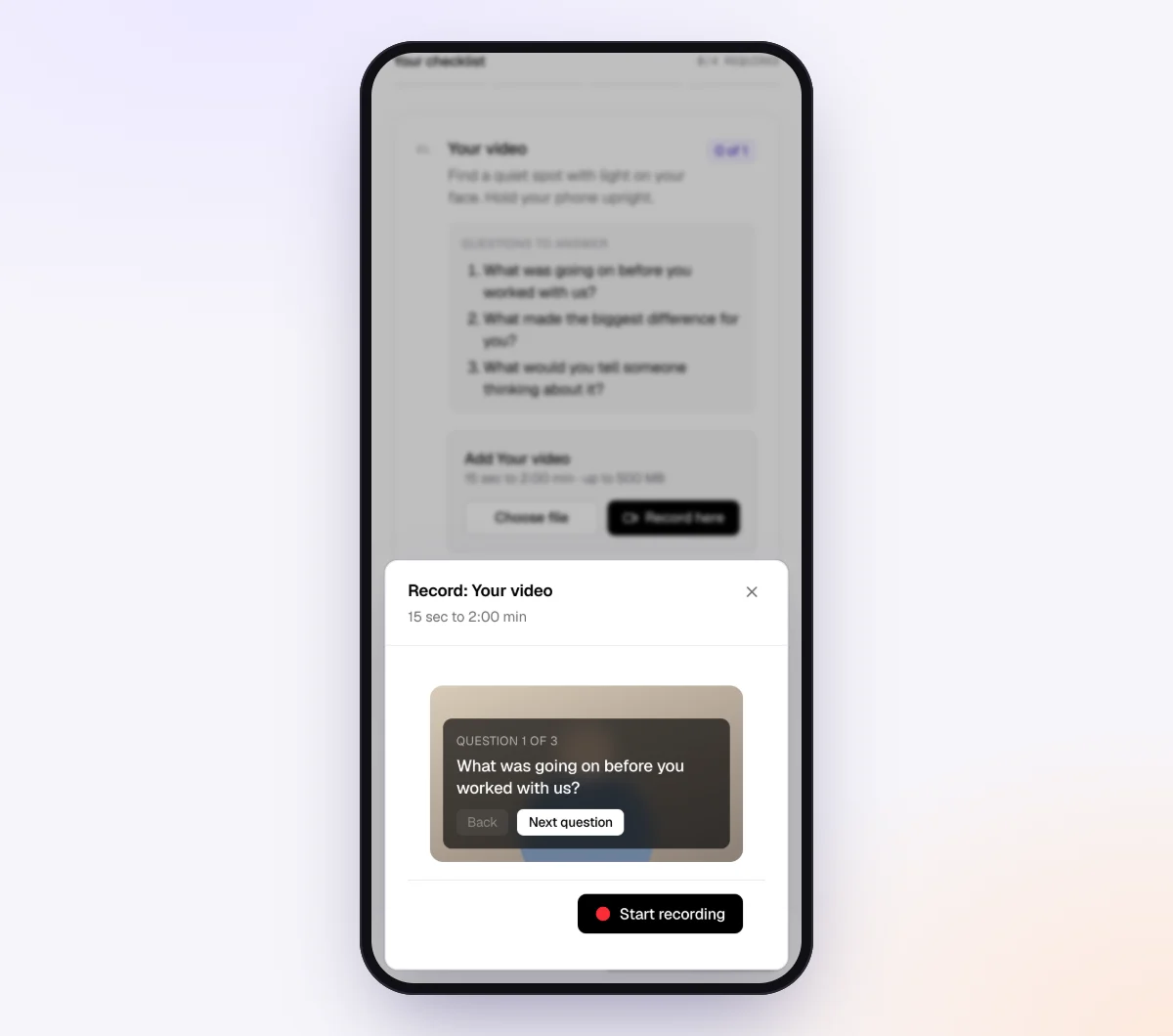
For anything that moves or makes a sound, add a video item. You can set the shape (vertical, horizontal or square), a minimum and maximum length in seconds, a minimum quality of 720p or 1080p, and "Questions to answer on camera," which are shown on screen while the customer records. For a moving estimate, that might be "Say which room you are in" and "Point out anything fragile or very heavy."
3. Send the request
Go to Requests, click "New request," choose the checklist, and add a reference (a job number, an address or "2019 Civic, rear bumper"), the customer's name and email, and a needed-by date. Leave "Email the link" on and the agent sends a branded invitation from your business name. Or copy the link and paste it into your own text message, or click "Show full screen" to show a QR code to a customer standing in front of you.
If photos include the inside of a home or a vehicle with a license plate, you can turn on "Require an email code" for the checklist. The customer then enters a 6-digit code sent to their email before the link opens.
4. The customer uploads from their phone
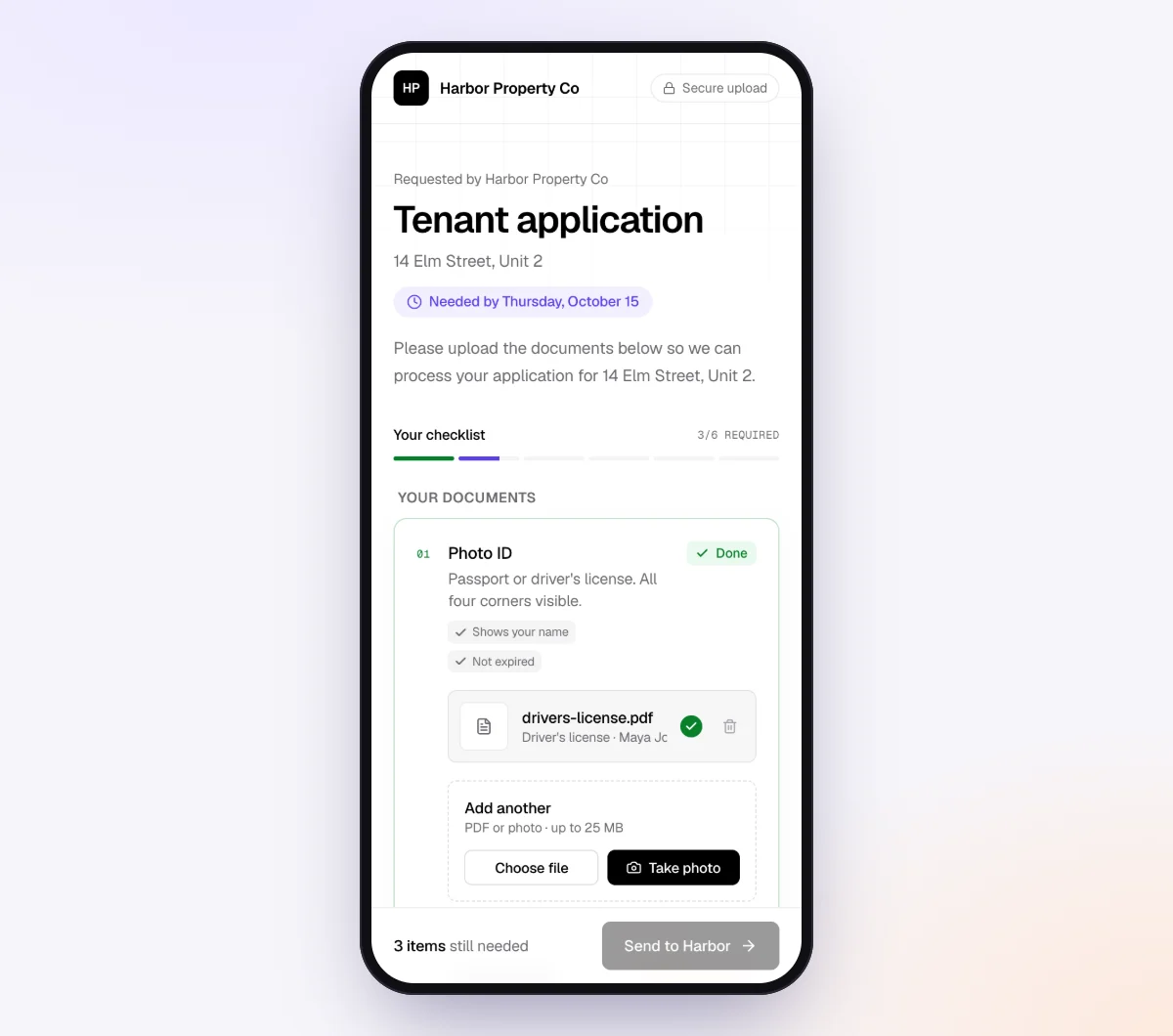
The customer opens the link in any phone browser, with no account or app. They see each shot with its description, what is done and what is missing, and upload from the camera or photo library. iPhone HEIC photos work too.
For video items, they can record right on the page with your questions on screen, preview the take and try again, or upload a video they already shot (up to 500 MB). The video's shape, length and quality are checked as soon as it is picked, before it uploads.
5. Bad photos get flagged on the spot
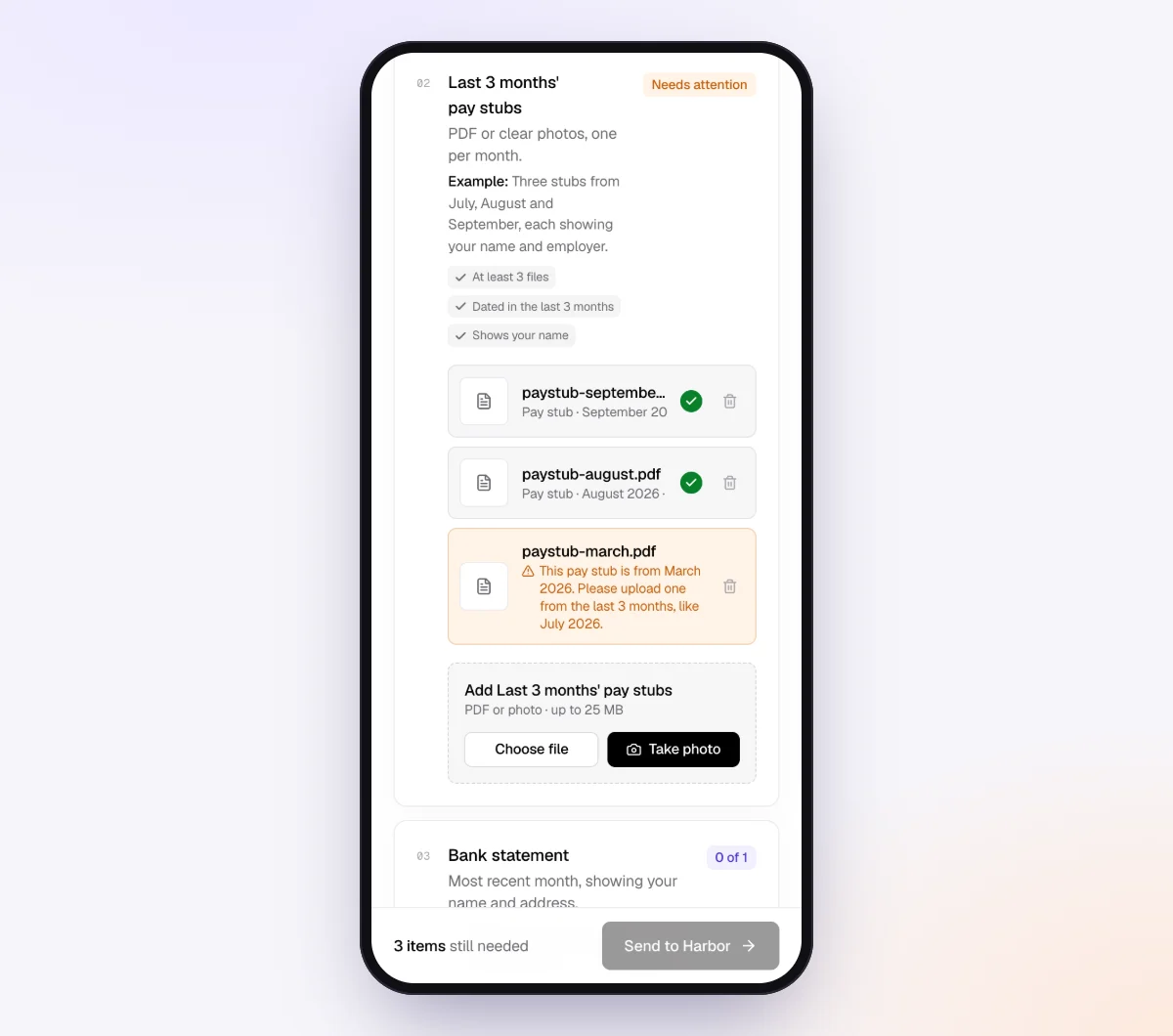
Each photo is checked in seconds by document checks: is it readable (not dark, blurry or cut off), and does it match what the item asked for? A photo of the yard under "Data plate" gets flagged. The customer sees a friendly note and can retake it while still standing next to the unit.
6. The agent follows up, you quote
The agent paces reminders to your needed-by date, listing only missing shots, and answers questions like "I can't find the label" from your checklist. On the request page, "Ask for changes" sends a single photo back for a retake. When the set is complete, download a ZIP, or on Pro send it to Google Drive or a webhook.
Checking photos before you quote
Before you price anything, run each set through a quick check:
- In focus? Zoom in on anything you need to read. A half-readable label is a wrong part waiting to happen.
- Bright enough? Dark photos hide damage.
- Right subject? The furnace label, not the water heater label. The rear bumper, not the front.
- Something for scale? If size changes the price, it needs to be in the frame.
- All shots there? Count against your list before you call the customer.
Check right away: a retake takes the customer thirty seconds while they are home, and a week later it takes a phone call and another wait.
QR codes and posters at the counter
For a service desk, showroom or home show booth, a QR code lets people start a photo request on the spot.
- Body shops: "Scan to send photos of the damage for a faster estimate."
- Dealers: "Thinking of trading in? Scan and upload a few photos."
- Parts counters, home shows and door hangers: "Scan for a quote from photos."
In Tangentflow, open "Walk-in QR codes" and print a poster for any checklist. Each scan starts its own private request, with no email address to type at the counter.

Setups for each kind of business
| Business | Key items | Settings worth turning on | Learn more |
|---|---|---|---|
| HVAC | Outdoor and indoor data plates, wide shots, thermostat, noise video | "Photos only" on labels, a 15 to 60 second video with "Only ask if…" | Home services |
| Plumbing | Under-sink, water heater label, leak close-up, drip video | Example photo of a readable label, tip about emptying the cabinet | Home services |
| Roofing | Each slope from the ground, damage with scale, interior stains | Minimum photo count, "take these from the ground" tip | Insurance restoration |
| Auto repair and body shops | Four corners, damage close and wide, VIN, odometer, noise video | Four-photo minimum on corners, year, make and model as form fields | Auto dealers |
| Movers | Each room from the doorway, large items, stairs and entrance | Video walkthrough with on-camera questions, move date as a date field | Home services |
| Landscaping and pest control | Yard from each corner, problem areas, entry points | "Photos or videos" on problem areas, short deadline in season | Home services |
| Appliance repair | Model and serial tag, appliance wide, error code, noise video | Example of where the tag usually is, "Only ask if…" for the video | Document checks |
When something goes wrong
| Problem | Likely cause | Fix |
|---|---|---|
| The label is unreadable | Too far away, glare or shaky hands | Ask them to get closer, tilt the phone to avoid glare and tap to focus. An example photo helps. |
| Everything is too dark | Taken at night, or inside a cabinet or attic | Ask for lights on and the phone flashlight, or daylight retakes for outdoor shots |
| Close-ups with no idea of size | No reference in the frame | Add "with a coin or tape measure next to it" to the item |
| Wrong unit or wrong side of the car | The description assumed knowledge | Rewrite the item in plain words with where to stand, and add an example |
| Customer cannot find the data plate | It is behind a panel or in an odd spot | Add a tip on common locations, or make that item optional and check it on site |
| Customer sent photos by text anyway | Habit | Thank them, then reply with the link for the remaining shots so the set stays together |
| Link went to the wrong person | Typo in the email address | Reset the customer's link from the request and send it to the right address |
Free and Pro, honestly
You can run a real photo request without paying anything.
| Free | Pro ($29/month) | |
|---|---|---|
| Open requests | 1 at a time | Unlimited |
| AI check on each file | Yes | Yes |
| AI autopilot (answers, reminders, follow-ups) | Your first request | Every request |
| Clients reply by email with attachments | No | Yes |
| Branding | Tangentflow badge | Your logo |
| Delivery to Google Drive or a webhook | No | Yes |
| Works with AI assistants (MCP) | No | Yes |
| File retention | 7 days | 60 days |
Both plans include unlimited checklists, QR codes and posters, ZIP export, AI summaries and email delivery. Pro is billed monthly with no contract, and you can cancel any time. Full details on the pricing page.
What Tangentflow does not do: SMS or text messages, a native mobile app, full legal e-signature certificates, identity verification, collecting payments, or permanent storage. If you need any of those, pair it with a tool that does.
The whole process as a checklist
- Write a shot list with one item per shot, not a paragraph.
- Give each shot a count and a plain description: where to stand, what must be readable.
- Ask for something for scale on every damage close-up.
- Add an example photo for the shots people get wrong most.
- Ask for a short video, with a length and instructions, when something moves or makes a noise.
- Add a few questions alongside the photos, like year, make and model, or the move date.
- Tell customers not to climb onto roofs or ladders for a photo.
- Send one link that opens on a phone with no account, and give a date with a reason.
- Remind on a schedule, listing only the shots still missing.
- Check every photo as it arrives and ask for retakes right away.
- Quote, then delete the photos you no longer need.
Frequently asked questions
What photos do I need for a remote estimate?
At minimum, a wide shot that shows the whole area or item, close-ups of the problem with something for scale, and any label or tag with the model and serial number. Add a short video if the problem involves noise or movement. The table above lists shots for each trade.
Why are the photos customers text me so blurry?
Regular text messages (MMS) and many messaging apps compress photos to keep files small, so detail like model numbers gets lost. An upload link that keeps the original file avoids this.
Should customers send photos or a video?
Photos are better for labels, damage and anything that needs to be read or measured. Video is better for noises, leaks, things that move and walkthroughs of a whole home or vehicle. Many good requests ask for both: specific photos plus one short video.
Can I send the upload link by text message?
Yes. Tangentflow emails the invitation and reminders, and you can also copy the link and paste it into your own text message. The agent itself does not send SMS today.
How do I get customers to include something for scale?
Put it in the item itself: "a close photo of the crack with a coin or tape measure next to it," plus an example photo. Instructions next to the upload button get followed far more often than a separate note.
Can Tangentflow tell if a photo is blurry or the wrong thing?
Yes. Each photo is checked in seconds for whether it is readable (not dark, blurry or cut off) and whether it matches what the item asked for. The customer sees a note and can retake it right away. You still review the photos and make the call.
Is there a free way to try this?
Yes. The Free plan gives you one open request at a time, with the full AI agent on your first request. Try it free with your next quote.