Templates
10 Testimonial Request Email Templates (2026)
Copy-ready testimonial request email templates with subject lines and timing for the first ask, video and written reviews, reminders, fixes and thank-yous.
By Bibin MathewUpdated 17 min read
The short answer
Send a short, personal email within a few days of a clear win that names the result, says exactly what you want (a 60-second video or three sentences), shows the questions, and gives one link and a date. Follow up twice at most, offer an easy way to say no, and thank them with a note on where their words will appear.
Most happy customers will give you a testimonial if you ask at the right moment, make it easy and tell them exactly what you need. Very few will go looking for a way to do it on their own. The email is where that happens, and a vague one ("Would you mind writing us a testimonial sometime?") is the main reason a warm "sure!" never turns into an actual video or review.
This post is for small businesses, agencies, freelancers, contractors and SaaS teams in the US and Canada who want testimonials without awkward chasing. Below are ten templates you can copy and adjust, with subject lines and timing for each: the first ask, a video request, a written review, a verbal-yes follow-up, two reminders, a small-change request, a thank-you, a creator reminder and an in-person ask. You will also see how to compare sending tools, what to do when requests stall, and how to let an AI agent send and time them for you in Tangentflow. Replace anything in [brackets].
What makes a testimonial request email work
The wording matters less than the structure. A request that gets a yes almost always has these traits:
- It arrives right after a win. A finished project, a solved problem, a great result. Timing does more than any subject line.
- It names the specific win. "Congrats on launching the new site" reminds them why they were happy.
- It's specific about the format. "A 60-second video" or "three sentences and a photo" is easier to say yes to than "a testimonial."
- It shows the questions. People hesitate when they don't know what they'll be asked.
- It has one link and one date. No accounts, no apps, no "reply with an attachment."
- It's short. If it needs scrolling on a phone, trim it.
- It says how you'll use it. People are more comfortable when they know where their face and words will appear.
- It makes "no" easy. "If now's not a good time, no problem" lowers pressure and, oddly, raises replies.
- It discloses any incentive. If you offer a thank-you gift, say so, and never tie it to a positive review.
If you're still deciding who to ask and which questions to use, start with our guide on how to collect video testimonials, then come back for the wording.
When to send each template
| # | Template | When to send | Goal |
|---|---|---|---|
| 1 | First ask after a win | 1 to 3 days after a milestone | Get a yes |
| 2 | Video testimonial ask | After a yes, or first ask for engaged customers | Get a recording |
| 3 | Written review with photo | For people who prefer not to be on camera | Get a quote and image |
| 4 | Follow-up after a verbal yes | Same day as the call | Turn "sure" into a link |
| 5 | Gentle reminder | 3 to 4 days after the ask | Nudge |
| 6 | Last reminder | 1 day before the date | Final nudge |
| 7 | Ask for a small change | After a submission that needs one fix | Fix one item |
| 8 | Thank you and how it will be used | Right after you receive it | Close the loop |
| 9 | Creator deliverable reminder | Before a UGC deadline | Get files on time |
| 10 | In-person ask with a QR code | At the end of an appointment or job | Capture it on the spot |
Subject lines that get opened
Short, personal and specific beats clever. Name the person or the format when you can.
| Use | Subject line | Why it works |
|---|---|---|
| First ask | Quick favor, [First name]? | Personal, low pressure |
| First ask | Congrats on [the win] (and a small ask) | Leads with their result |
| Video | Would you record a 60-second video about [business]? | Names the format and the time |
| Written | A few sentences about [project]? | Feels small |
| Reminder | Still up for sharing a few words, [First name]? | Friendly, easy to answer |
| Last reminder | Last call for your [video / review] | Clear, honest deadline |
| Small change | One small tweak to your video? | Specific, not a redo |
| Thank you | Thank you, [First name] | Simple and warm |
Avoid "Testimonial request" on its own. It sounds like a form letter, and form letters get skipped.
Templates for the first ask
1. First ask after a win
Subject: Quick favor, [First name]?
Hi [First name],

Congratulations on [the win, e.g., "launching the new site"]. It was a
pleasure working with you on it.

Would you be open to sharing a few words about your experience? It helps
other [type of customer] decide whether we're a good fit.

It takes about 5 minutes. You can record a short video or write a few
sentences, whichever you prefer: [link]

If now's not a good time, no problem at all.

Thanks,
[Your name]
2. Video testimonial ask
Subject: Would you record a 60-second video about [business]?
Hi [First name],

Thanks again for [the win]. Would you be willing to record a short video,
about 60 to 90 seconds, about your experience?

You can record right from your phone or laptop on this page, no account
or app needed: [link]

The questions will be on screen while you record:
1. What were you trying to get done before working with us?
2. What changed after you started?
3. What would you tell someone who is on the fence?

A quiet spot with light on your face is all you need, and you can watch
it back and retake it. Please hold your phone [upright / sideways].

Could you record it by [day, date]?

Thank you,
[Your name]
3. Written review with photo
Subject: A few sentences about [project]?
Hi [First name],

If video isn't your thing, a written review is just as helpful.

Here's what we'd love, by [day, date]:
- A star rating, 1 to 5
- Two or three sentences on what you needed, what we did, and how it
  turned out
- Optional: a photo of you, or of [the product / the finished project]

You can add it all here from your phone: [link]

Thanks so much,
[Your name]
4. Follow-up after a verbal yes
Many testimonials are agreed to on a call and then forgotten. Send this the same day, while the yes is fresh.
Subject: As promised, the link for your [video / review]
Hi [First name],

Thanks for saying yes on our call today. That means a lot.

Here's the link: [link]

It opens on your phone, and the questions are right there. About
5 minutes is all it takes. Would [day, date] work for you?

[Your name]
Reminder templates
Most people who don't respond aren't saying no. They're busy. Two polite reminders recover a lot of requests. More than two starts to feel like pressure, so stop there. Our client reminder schedule explains how to space reminders when you have more or less time.
5. Gentle reminder
Subject: Still up for sharing a few words, [First name]?
Hi [First name],

Just a friendly nudge on the testimonial. It takes about 5 minutes, and
you can do it from your phone: [link]

If you'd rather skip it, just let me know and I won't ask again.

[Your name]
6. Last reminder
Subject: Last call for your [video / review]
Hi [First name],

We're finalizing [the new customer stories page / our fall campaign] on
[day, date], and we'd love to include you.

If you have 5 minutes before then, here's the link: [link]

Either way, thank you for being a customer.

[Your name]
Templates after they submit
7. Ask for a small change
Subject: One small tweak to your video?
Hi [First name],

Thank you so much for recording this. It's great.

One small request: [specific change, e.g., "could you record it holding
your phone upright?" or "could you mention our name once?"]

You only need to redo that one item, here: [link]

Thanks again,
[Your name]
8. Thank you and how it will be used
Subject: Thank you, [First name]
Hi [First name],

Thank you for taking the time to share your experience. We really
appreciate it.

Here's how we plan to use it, as you agreed in the release:
- [Our website, on the customer stories page]
- [Our social media accounts]
- [A short quote in our sales materials]

We'll send you a link when it's live. If you ever want us to change or
remove it, just reply to this email.

[Your name]
Templates for creators and in-person asks
9. Creator deliverable reminder
For paid creators, the tone is different. It's a deliverable, not a favor, so be clear about what's still missing.
Subject: Reminder, [Campaign] deliverables due [date]
Hi [Creator name],

A quick reminder that final files for [Campaign] are due [day, date].

Still needed:
- #2: Testimonial-style video, vertical 9:16, 30 to 45 seconds
- #4: 5 lifestyle photos

Received, thank you:
- #1: Unboxing video

Please remember to say the code [CODE] and include the disclosure.
Upload here: [link]

If anything is getting in the way, reply and let me know.

[Your name]
10. In-person ask with a QR code
When a customer is happiest in the room, at the final walkthrough or the end of an appointment, ask then. Hand them a card or show a QR code, then send this the same day.
Subject: Thanks for today, [First name]
Hi [First name],

It was great to [finish your kitchen / see you today]. If you scanned the
code, thank you! If not, here's the link again: [link]

A 30-second video or a couple of sentences is plenty. Whenever you get
a moment this week.

[Your name]
Ways to send testimonial requests, compared
You can send every template above from your own inbox. Whether you should depends on volume.
| Method | Setup effort | Cost | Reminders | Handles video files | Best for |
|---|---|---|---|---|---|
| Your own email (Gmail, Outlook) | None | Free | Manual, calendar notes | Poorly; large files bounce | A few asks a year |
| Mail merge or CRM sequence | Medium | Often included | Automatic, but fixed schedule | No, needs a separate upload tool | Many written asks |
| Review platform requests | Low | Free to paid | Varies | Not usually | Public star reviews |
| Shared Drive or Dropbox link | Low | Free | Manual | Yes, but files arrive unlabeled | One-off videos |
| Tangentflow | Low (templates) | Free or $29/month | Paced to your date, stops when done | Yes, recorded on the page | Regular video and written testimonials |
Your own inbox is a perfectly good choice for a handful of requests. Personal emails from a real person get great response rates. The downside is that you have to remember to follow up, and video files are often too big to attach.
CRM sequences handle reminders but keep sending on a fixed schedule even after someone has submitted, unless you wire them up to stop. They also don't give the customer a place to record.
Public review sites are a different goal. If you want reviews on a public review platform, follow that platform's rules. Many prohibit offering incentives for reviews or only asking happy customers.
How to send these emails with Tangentflow
Tangentflow's AI collection agent sends the invitation, reminders and follow-ups for you, with a link where customers record a video testimonial, write and sign. Here's the setup.
1. Pick a testimonial checklist
Go to Checklists, click "Browse templates" and choose Video testimonial (video with prompts on screen, a star rating, name and role, permission to share) or Written review with photo (star rating, a few sentences, optional photo, permission to share). Edit the prompts to match your business.
2. Create the request
In Requests, click "New request." Choose the checklist, add a reference (for example "Harbor Dental website project"), the customer's name and email, and a needed-by date. Leave "Email the link" on to let the agent send it.
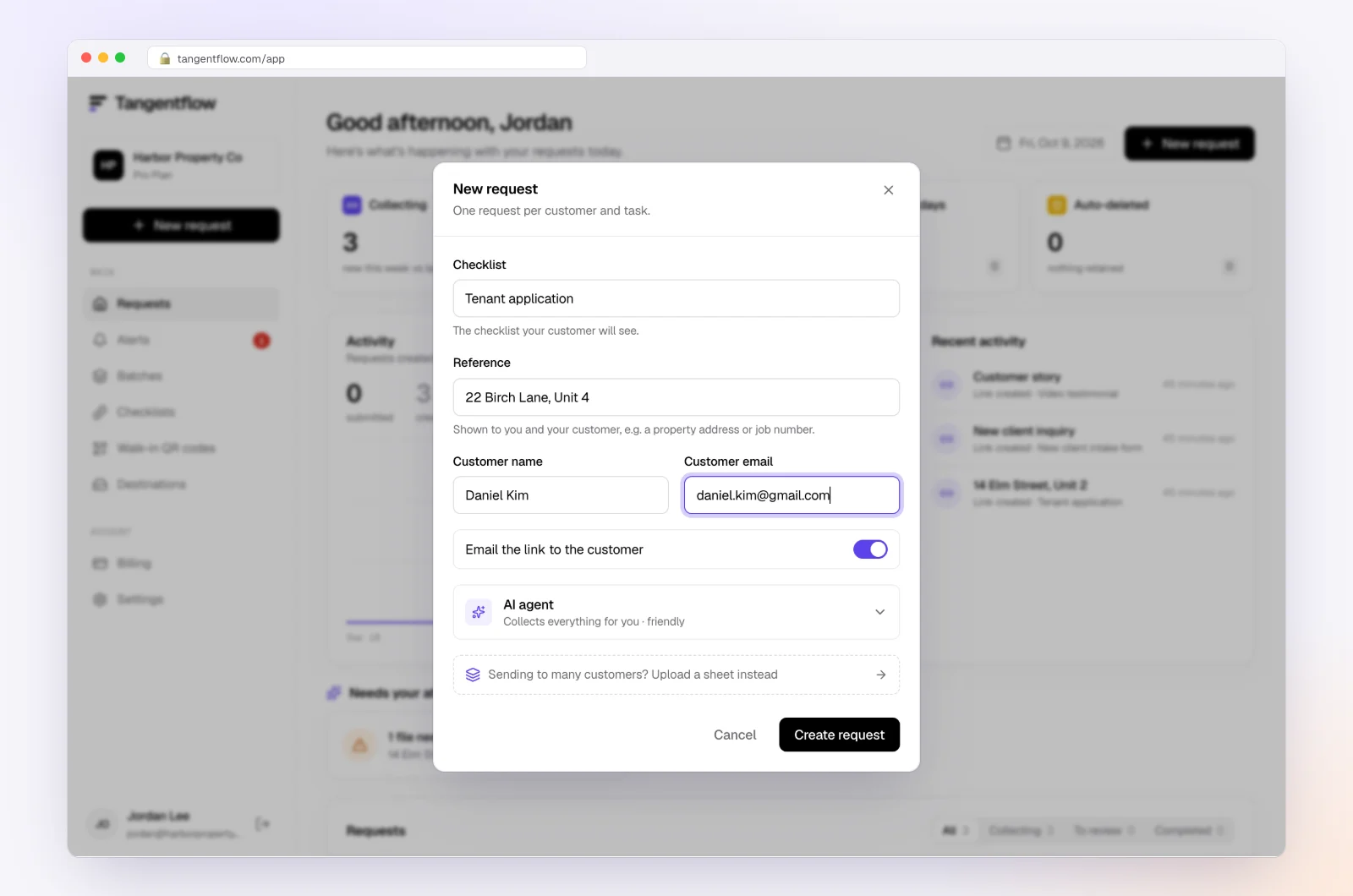
To ask a whole list of past customers at once, use Batches and "Send to many customers" (Pro): upload an Excel file or CSV, or paste rows from Google Sheets, up to 100 customers per batch.
3. The invitation goes out
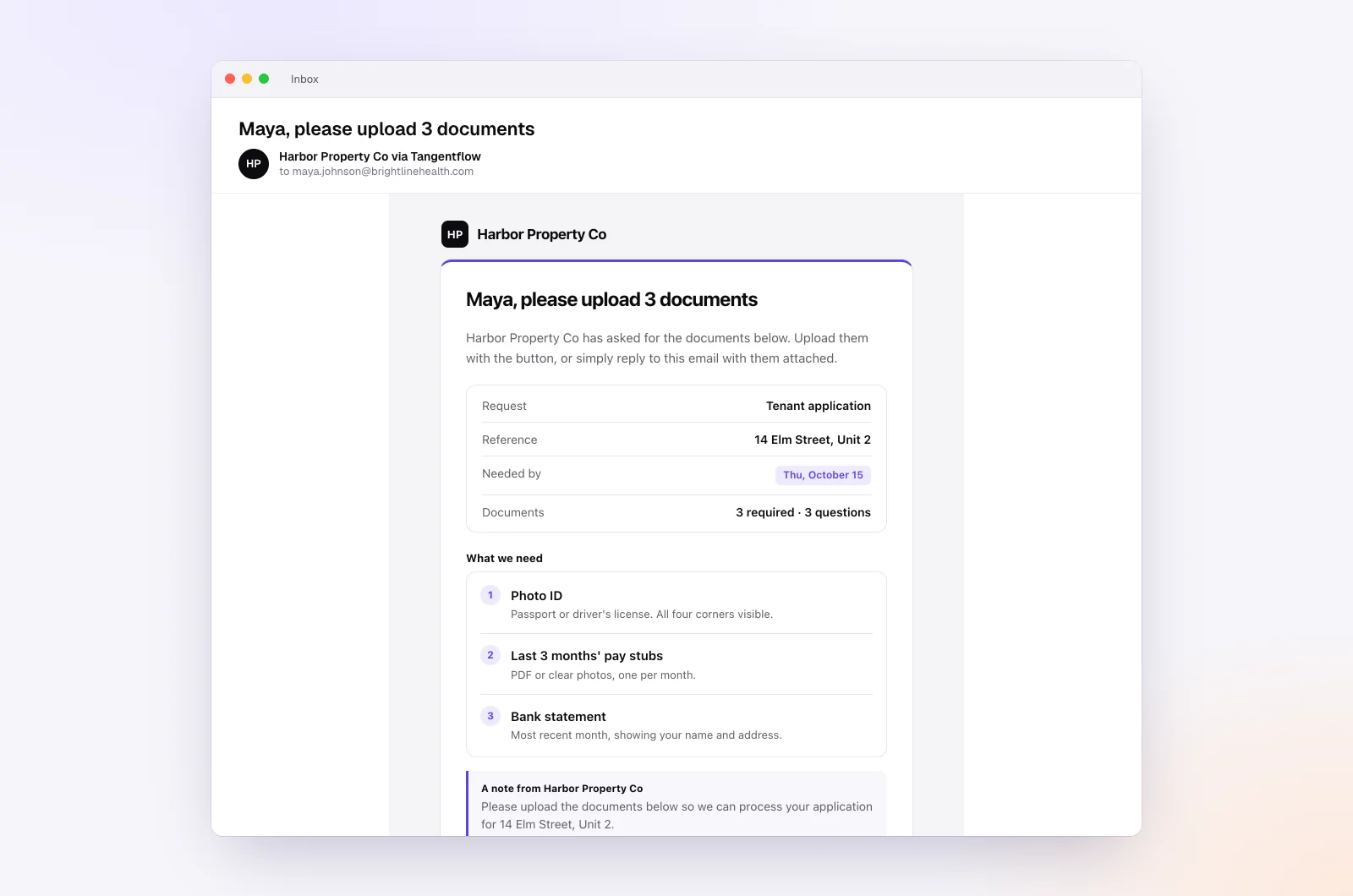
The customer receives a branded email from your business name, listing exactly what you're asking for, with one button to open their private link. No account or app needed.
4. Set the tone and reminders
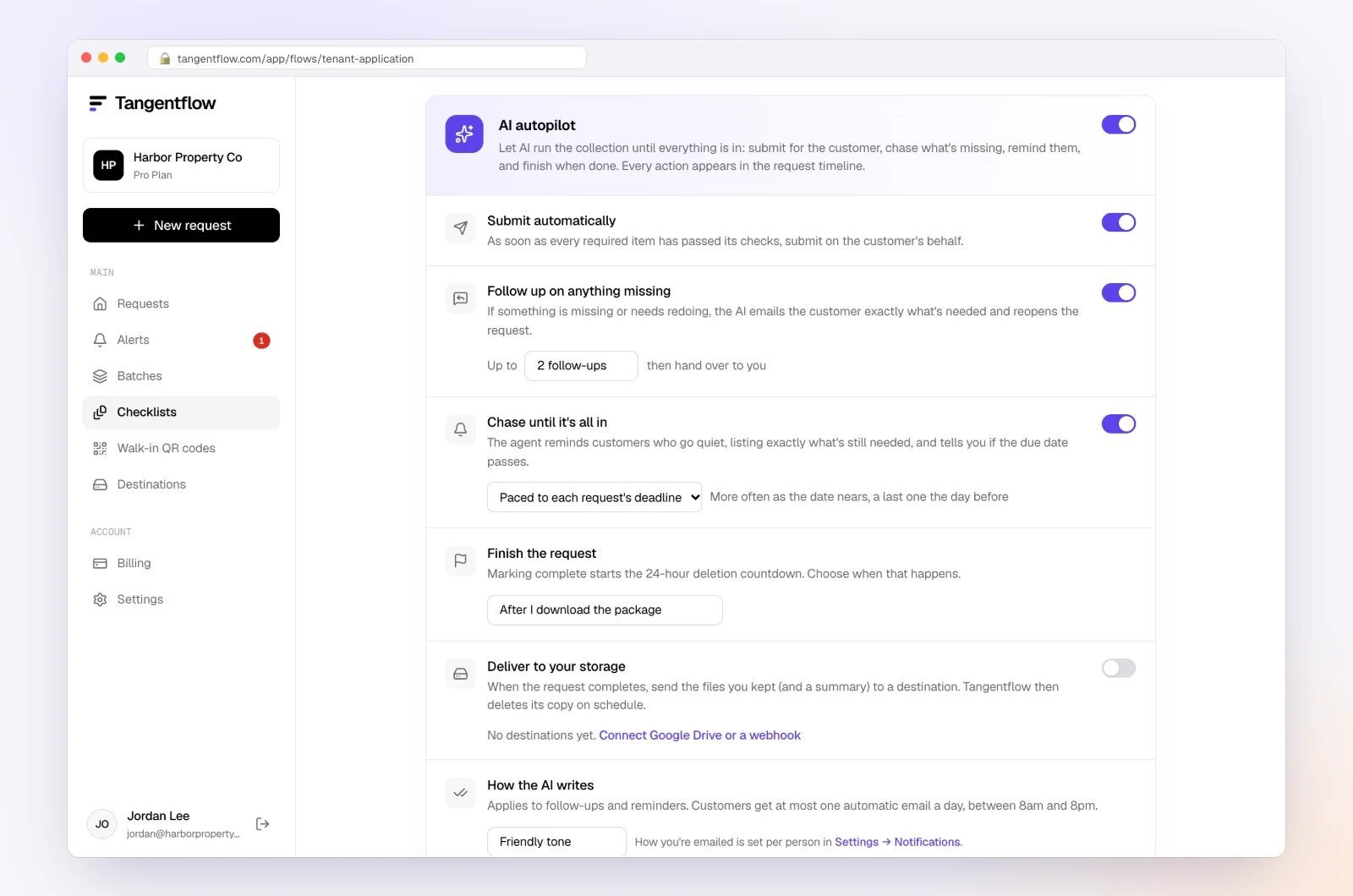
In the agent settings, choose a tone (friendly, professional or brief) and whether the agent chases or only answers questions. Reminders are paced to your needed-by date: spaced out when there's time, closer near the date, and a last one the day before. It sends at most one automatic email a day, respects quiet hours in your time zone, and skips a reminder right after the customer was active. You can also leave private notes per customer, like "prefers written, camera-shy."
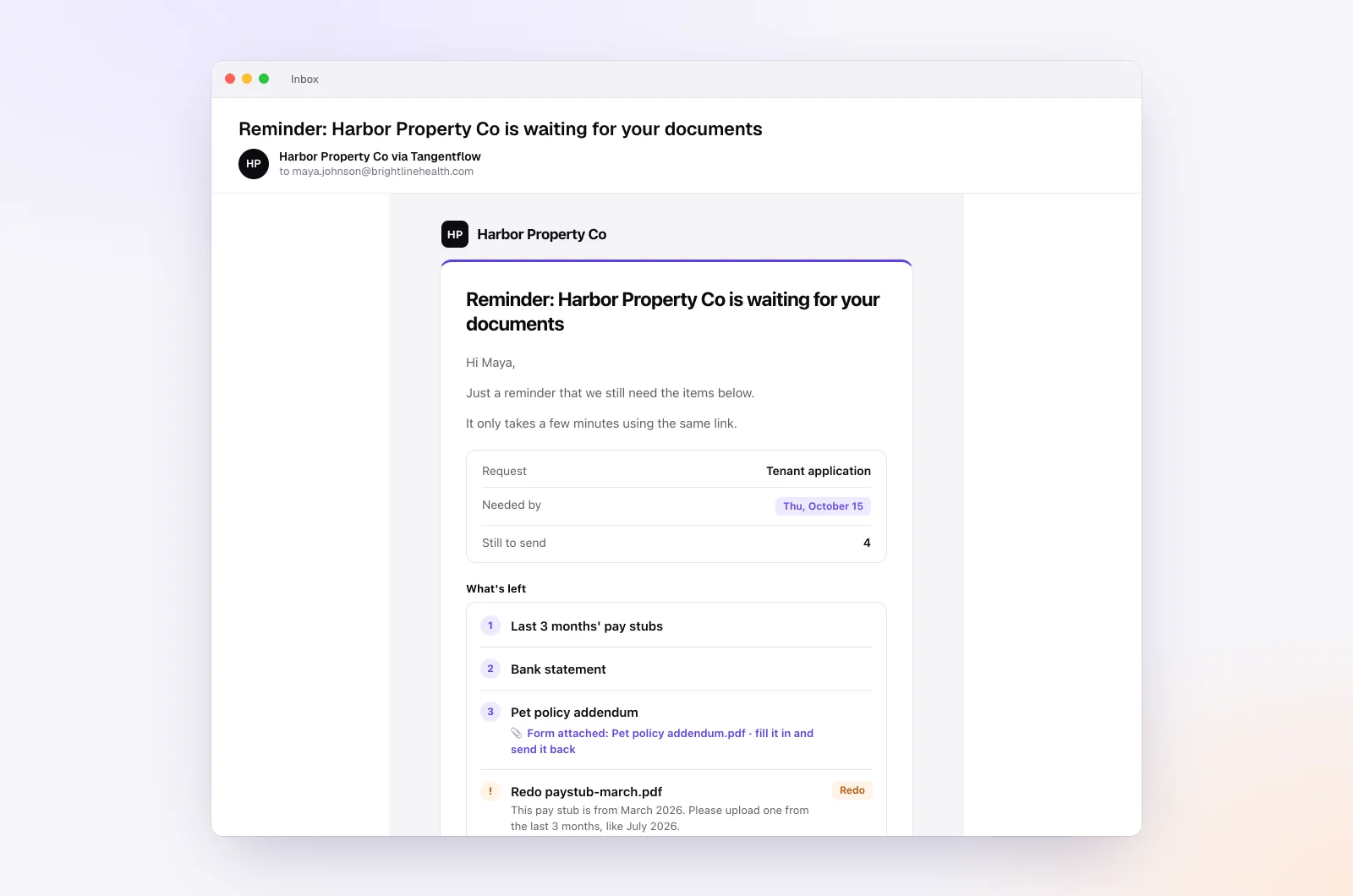
5. Reminders list only what's missing
If the customer added a rating but hasn't recorded the video yet, the reminder says exactly that. Once everything is in, reminders stop on their own. If they reply "how long should the video be?", the agent answers from your checklist. If someone is upset or asks something outside the checklist, it hands off to you.
6. Ask for changes on one file
If a video needs a fix, open the request and use "Ask for changes" on that one file with a short note. The agent emails the customer, reopens only that item and follows up on the new version. That's template 7, sent for you.
Setups for every kind of business
| Business type | What to ask for | Best template to start | Settings | Learn more |
|---|---|---|---|---|
| Agencies and consultants | Video, name and role, release | 2, then 8 | 60 to 120 seconds, horizontal | Testimonials |
| Contractors and home services | Short video at the job, before and after photos | 10 | 30 to 90 seconds, QR poster | Home services |
| Accountants and bookkeepers | Written review, star rating | 3 | Written review template | Accounting and tax |
| Property managers | Written review from tenants or owners | 1, then 3 | Optional photo | Property management |
| Brands working with creators | Videos to spec, photos, usage rights | 9 | Vertical 9:16, 1080p | UGC creators |
| SaaS and software | Video from a power user, rating | 4 after a call | 60 to 90 seconds | Testimonials |
When requests stall
| Problem | Likely cause | Fix |
|---|---|---|
| No reply at all | Sent too late, or with an invoice | Ask within a few days of a win, in its own email |
| "Sure!" then nothing | No link, no date | Send template 4 the same day with a link and a proposed date |
| Opened but not started | Video feels like a big ask | Offer the written option (template 3) |
| Started but not finished | Missing one item, like the release | A reminder that lists only what's missing |
| Video arrives sideways or too long | Specs not stated | Name the orientation and length; ask for one change (template 7) |
| Customer asks "what do I say?" | Questions not shown | Put three prompts in the email and on screen |
| Reminders feel pushy | Too many, too close | Two reminders, then stop |
| Can't use it in ads | No written permission | Get a signed release listing each use |
Incentives, disclosure and permission
Offering a small thank-you for a testimonial is common. In the US, the FTC's Endorsement Guides require that material connections, including payment, free product and discounts, be clearly disclosed wherever the endorsement appears, and incentivized reviews need that disclosure too. Offer the reward for an honest review, not a positive one, and don't only ask customers you expect to be glowing if you present the results as representative. In Canada, the Competition Act prohibits misleading representations, which can apply to endorsements that hide an incentive.
Permission is a separate question. A reply saying "sure, use it" is thin evidence, especially for paid ads. A short written release that lists each use, whether you can edit it and how long you'll use it is much clearer. The Tangentflow testimonial templates include a release the customer ticks, types their name on and signs, saved as a PDF with the request.
Free and Pro
| Free | Pro ($29/month) | |
|---|---|---|
| Open requests | 1 at a time | Unlimited |
| AI checks on each file | Yes | Yes |
| AI autopilot (emails, reminders, answers, follow-ups) | On your first request | On every request |
| Customers reply by email with attachments | No | Yes |
| Branding | Tangentflow badge | Your logo |
| Delivery | ZIP, email | Plus Google Drive or a webhook |
| Files kept | 7 days | 60 days |
Both plans include unlimited checklists, QR codes and posters, ZIP export, AI summaries and email delivery. Pro is monthly, with no contract, and you can cancel any time. See pricing.
The whole process as a checklist
- Pick customers with a specific result who match the buyers you want.
- Send the first ask (template 1 or 2) within a few days of a clear win.
- Name the win, the format and the time it takes.
- Show three questions and give one link and one date.
- Offer a written option for camera-shy customers (template 3).
- After a verbal yes, send the link the same day (template 4).
- Send a gentle reminder after 3 to 4 days (template 5).
- Send a last reminder the day before the date (template 6), then stop.
- Ask for one specific change if needed (template 7).
- Disclose any incentive and get a signed release.
- Thank them and say where it will appear (template 8).
Frequently asked questions
When is the best time to ask for a testimonial?
Within a few days of a clear win, such as a launch, a solved problem, a renewal or a high survey score. Avoid asking alongside an invoice, a complaint or a price change.
How many times should I follow up on a testimonial request?
Two reminders is usually enough: one 3 to 4 days after the ask and one just before your date. After that, let it go. It's a favor.
What should the subject line of a testimonial request say?
Keep it short and personal, and name the format if you can, for example "Would you record a 60-second video about [business]?" Avoid a generic "Testimonial request."
How long should a testimonial request email be?
Short enough to read on a phone without scrolling much. Five to eight short lines plus three questions is plenty for a video ask.
Should I ask for a video or a written testimonial?
Ask engaged customers for video first, and always offer a written review with a star rating and photo as the alternative. Some people will never be on camera, and a written quote is still valuable.
Can I offer a discount in exchange for a review?
You can, but in the US the FTC's Endorsement Guides require clear disclosure of the incentive, and it shouldn't depend on the review being positive. In Canada, the Competition Act's rules on misleading representations apply. Public review platforms often have their own stricter rules.
Can these emails be sent automatically?
Yes. In Tangentflow, the AI collection agent sends the invitation, paces reminders to your needed-by date, answers questions by email and chat, and stops when everything is in. On Free, the full agent runs on your first request; on Pro, on every request.