Guides
Best Document Collection Software for Small Businesses (2026)
Document collection software compared for small businesses in 2026: Content Snare, FileInvite, SmartVault, TaxDome, Canopy, Dropbox, Jotform and Tangentflow.
By Bibin MathewUpdated 20 min read
The short answer
The best document collection software depends on how you work. If you already run your firm on practice management software, the client portal in TaxDome, Canopy or SmartVault is usually the right call. For structured requests with reminders and no client login, look at Content Snare, Tangentflow or, for commercial lenders, FileInvite. For an occasional file, a Dropbox file request or a Jotform form is free and often enough.
Every document collection tool says it will "end the chase." Some are practice management suites with a client portal attached, some are built for commercial lenders, and some are a simple upload link. They are priced per user, per request, per return or per year, which makes them hard to compare.
This guide is for small businesses that collect paperwork from clients and want to pick a tool without a month of demos: accountants, property managers, lenders, law firms, and anyone who sends the same list of documents to many people.
We make Tangentflow, so we have a bias. Every claim about another product below comes from that company's own website or help center, checked at the time of writing (October 2026), and we left out anything we could not confirm. Prices change, so check each vendor's pricing page. Where a competitor is the better fit, we say so.
What document collection software actually does
Document collection software replaces "please email me these files" with a structured request: a list of what you need, a place for the client to upload, tracking of what is missing, reminders, and delivery to where you work. Tools split into three broad groups:
| Type | Examples | What it is |
|---|---|---|
| Practice management with a client portal | TaxDome, Canopy, SmartVault | Your whole firm runs on it, and document requests are one feature among many |
| Dedicated collection tools | Content Snare, FileInvite, Tangentflow | Built mainly around requesting and chasing files and information |
| General tools with an upload feature | Dropbox file requests, Jotform | Free or cheap, accept files, but don't manage a checklist or chase anyone |
Knowing which group you need saves the most time. If you want CRM, billing and workflows too, a dedicated collection tool will feel thin. If you only need documents in, a practice suite is a lot to adopt for one job.
Buying criteria: what to compare
Before looking at products, decide what matters to you. These six areas cover most of the differences that show up after you buy.
1. Client experience
This is where requests succeed or stall. Ask:
- Does the client need an account or password? Clients who visit once a year forget logins, then email files instead.
- Does it work well on a phone? Many clients photograph documents with their phone.
- Can they leave and come back, and see what is still missing? A visible checklist beats a blank upload box.
2. Checks on upload
Most tools accept whatever arrives. Ask: when does the client find out a file is wrong? If the answer is "when you open it three days later," expect a second round of chasing. Our guide to collecting documents from clients explains why this matters.
3. Reminders
Look at who writes them, how they are paced, whether they stop when the client is done, and whether they go by email only or by text too.
4. Security and retention
Ask how files are encrypted in transit and at rest, who on your team can see them, how long files are kept, and whether they are deleted automatically. If your contracts or regulator require certifications such as SOC 2 or HIPAA, confirm them in writing. Our post on secure ways to receive sensitive documents has a full checklist you can use on any vendor.
5. Integrations
Where do the files need to end up: Google Drive, OneDrive, Box, your tax software or your own system? Without a connection, someone downloads and re-uploads every file.
6. Pricing model
This is where tools are hardest to compare. Practice suites usually charge per user, often with seat minimums and annual billing. Collection tools often charge per plan with a limit on active requests. Add-ons may charge per return, and lending tools may need an annual contract. Free tiers cap forms, submissions, storage or open requests.
The comparison table
Here is how the eight tools line up on the criteria above. "No account" means the client can upload through a link without creating a login. Prices are starting points from each vendor's own pricing page at the time of writing (October 2026), so check their pricing page for current numbers.
| Tool | Best for | Client needs an account? | Automatic reminders | Checks files on upload | Starting price (at the time of writing) |
|---|---|---|---|---|---|
| Content Snare | Businesses collecting files and information through structured requests | No, clients get a link | Yes, multiple email schedules per request, plus SMS allowance | Not stated on pricing page | $35/month billed annually ($42 monthly), 14-day free trial |
| FileInvite | Commercial and complex lenders | No for borrowers | Yes | Not stated | Standard plan from $9,900/year |
| SmartVault | Accounting firms wanting a branded portal and document storage | Portal login, or a secure email link with SmartRequestAI | Yes, with SmartRequestAI | Not stated | $65/user/month billed annually, 2 or 3 user minimum |
| TaxDome | Accounting and tax firms wanting all-in-one practice management | Optional; firms can turn "Require login" on or off per request | Yes, email reminders on client requests | Not stated | Check their pricing page |
| Canopy | Accounting firms wanting practice management with a client portal | Portal and mobile app, with secure links for specific tasks that need no login | Yes | Not stated | $74/user/month billed annually |
| Dropbox file requests | Occasional files into Dropbox | No | No (deadlines on paid plans) | No | Included in Dropbox plans |
| Jotform | Forms with lots of questions and a few uploads | No | Not covered here | No | Free Starter plan; Bronze $39/month ($34 annually) |
| Tangentflow | Small businesses sending the same checklist to many clients, wanting the chasing done for them | No, private link per client | Yes, AI agent paces email reminders to the needed-by date | Yes, AI check on each file | Free (1 open request); Pro $29/month |
"Not stated" means we did not find it on the pages we checked, not that the feature is missing. Ask during a trial if it matters to you.
The tools, one by one
Content Snare
Content Snare is a dedicated tool for collecting files and information from clients through structured requests. According to its pricing page, clients get "a link where they can access their request at any time from any device," with no account to create.
What we confirmed on the pricing page:
- Plans (at the time of writing): Basic at $35/month billed annually or $42 monthly, then Plus, Pro and Custom tiers.
- Limits by tier: Basic allows 20 active requests, 2 users and 20 GB of storage. Plus allows 50 active requests and 5 users.
- Reminders: unlimited reminders on all plans, with multiple email reminder schedules per request and pre-made templates.
- SMS: Basic includes 40 SMS a month, Plus 100.
- Branding and integrations: custom branding starts on Plus. Zapier is included on all plans, with "premium integrations" from Plus up.
- Trial: 14 days, no credit card required.
Best for: businesses that collect a mix of files and written answers and want flexible request templates and reminders, including text messages. If SMS reminders matter to you, Content Snare is a stronger fit than Tangentflow, which is email-only.
Think about: the active request limit on each tier if you send many requests in a short season.
FileInvite
FileInvite's website now focuses on commercial and complex lending: SBA lending, commercial real estate, construction financing and multi-party deals. Borrowers "receive a secure link to their FileInvite Portal and can upload documents directly from any device without creating accounts," and the site highlights automated reminders.
From its pricing page at the time of writing:
- Standard starts at $9,900 a year, described as for lenders processing up to 100 typical commercial loans a year. Enterprise is custom priced.
- Features include PDF form filling and digital signing, automatic PDF conversion and file renaming, and email document intake with AI matching.
- Integrations with OneDrive for Business, Google Drive and Box on all plans, with SharePoint and an API on Enterprise.
- Security: SOC 2 Type II compliance and multi-factor authentication, with single sign-on on Enterprise.
Best for: commercial lenders with multi-party deals who need SOC 2, deep workflow and a sales-led setup. If you are a commercial lender, FileInvite is built for you in a way general tools are not.
Think about: for a small accounting firm or property manager, its lending focus and pricing may be more than you need.
SmartVault
SmartVault is document management and a branded client portal, aimed mainly at accounting firms, with unlimited cloud storage and clients on all plans.
At the time of writing:
- Accounting Pro and Business Pro are $65 per user per month billed annually ($85 monthly), with a minimum of 2 users (Accounting Pro) or 3 users (Business Pro).
- Accounting Unlimited is $85 per user per month annually and adds unlimited e-signatures and PDF form fillers.
- SmartRequestAI is an add-on priced per return. SmartVault says it builds each client's questionnaire from prior-year data, and is aimed at firms using ProConnect or Lacerte.
SmartVault says SmartRequestAI clients get a secure email link or use their existing portal ("No new login, nothing to learn"), and automated reminders "follow up until clients respond."
Best for: tax and accounting firms, especially on ProConnect or Lacerte, that want long-term document storage and a portal where clients keep coming back. If you need a permanent document vault, SmartVault does something Tangentflow deliberately does not.
Think about: the user minimums if you are a solo practitioner, and the per-return cost of SmartRequestAI at your volume.
TaxDome
TaxDome is all-in-one practice management for accounting and tax firms, with a custom-branded client portal and mobile app where clients exchange documents, sign and communicate with your firm.
Document requests are called client requests, to-dos that appear in the client's portal. According to TaxDome's help center, you can turn on Reminders (follow-up emails to clients who have not submitted yet) and set the days between them and how many to send. A Require login setting lets clients respond in the browser without signing in when it is off.
We could not load TaxDome's pricing page directly, so check their pricing page for current plans.
Best for: accounting firms that want to run the whole practice (pipelines, billing, signatures, client communication) in one system. If that is you, a separate collection tool is probably unnecessary.
Think about: whether you will use the rest of the suite.
Canopy
Canopy is accounting practice management with CRM, documents, a client portal, workflows, invoicing and payments. Clients use a mobile app or web portal, and firms can send secure links for specific tasks with no login required. Canopy lists automated reminders, document checklists and AI renaming of uploads.
At the time of writing, Canopy's pricing page lists Standard at $74 per user per month, billed annually, with Plus and Premium tiers above it and add-ons such as tax workflow automation. It offers a trial of the full platform.
Best for: accounting firms that want practice management and a client portal in one subscription. Like TaxDome, it is a better choice than a standalone collection tool if you want the whole suite.
Think about: per-user pricing as your team grows.
Dropbox file requests
A Dropbox file request is a link anyone can use to upload into a folder in your Dropbox. Dropbox's help center says "anyone can send a file to you, whether they have a Dropbox account or not." File requests are on all plans; deadlines need a paid plan such as Professional or a business tier, and size limits depend on your plan.
Best for: an occasional file from one person, when you already use Dropbox. It is free with an account you probably have, and it is often enough.
Think about: it does not show the client a checklist, tell you what is missing, check uploads or send reminders. Each request is a folder, so ten clients means ten requests to track yourself.
Jotform
Jotform is a form builder with file upload fields. At the time of writing, its free Starter plan allows 5 active forms, 100 submissions a month and 100 MB of upload space. Bronze is $39/month, or $34/month billed annually, with 25 forms, 1,000 submissions and 1 GB. HIPAA features are available on the Gold plan and Enterprise. Respondents don't need a Jotform account to submit.
Best for: intake forms with many questions and a couple of attachments, especially at low volume. Its conditional logic and form design are strong.
Think about: a form is a one-time submission. It doesn't track what each client still owes you, and uploads are not checked. If you came to Jotform because Google Forms made people sign in, our post on Google Forms file upload without sign-in compares the options.
Tangentflow
Tangentflow is a dedicated collection tool built around an AI collection agent. You build a checklist once, send each client a private link that opens on a phone with no account, and the agent sends the invitation, answers questions, paces email reminders to the needed-by date and follows up on anything missing. Every upload gets an instant document check: right document type, readable, recent enough, not expired, every page, the client's name, signed, front and back.
Files go out as a ZIP, by email, or on Pro to Google Drive or a webhook, and are deleted 24 hours after you complete the request. Checklists can also require an email code: the client enters a 6-digit code emailed to them before the link opens. If a link went to the wrong person, you can reset it, and once a client sends everything, the link no longer shows the files.
Best for: small businesses that send the same set of documents to many clients (tax clients, tenants, borrowers, new hires, insurance customers) and want the reminders and first-pass checks handled without adopting a practice suite.
Think about: it is email-first, with no SMS or native mobile app, it is not a permanent document store, and it does not hold SOC 2 or HIPAA certifications today. The full list is in "Free and Pro, honestly" below.
How to choose: a decision table
Start from your situation, not from the feature list.
| If this sounds like you | Look at first | Why |
|---|---|---|
| You want to run your whole accounting firm in one system | TaxDome or Canopy | Portal, billing, workflows and requests together |
| You are a tax firm on ProConnect or Lacerte and want a permanent vault | SmartVault | Document storage, branded portal, prior-year-based requests |
| You are a commercial lender with multi-party deals and need SOC 2 | FileInvite | Built for complex lending, with SOC 2 Type II |
| You need SMS reminders as well as email | Content Snare | SMS allowance included on its plans |
| You need one file from one person, occasionally | Dropbox file request | Free, no account for the uploader |
| You need a long intake form with a few attachments | Jotform | Strong forms, free tier |
| You send the same checklist to many clients and want reminders and checks done for you | Tangentflow | AI agent, instant checks, no client account, free to start |
| You need HIPAA | Check certifications carefully | Jotform lists HIPAA features on Gold and Enterprise; Tangentflow does not offer HIPAA today |
A 30-minute trial plan for any tool
Demos show the best case. Run this same plan in each tool on your shortlist, ideally two or three at most.
| Minutes | What to do | What you learn |
|---|---|---|
| 0 to 5 | Build your most common request: 4 to 6 real items, with one question | How fast setup is, and whether items can carry rules and tips |
| 5 to 10 | Send it to yourself at a personal email address you rarely use | What the invitation looks like and whether it lands in spam |
| 10 to 15 | Open it on your phone, not your laptop | Account or no account, how clear the checklist is on a small screen |
| 15 to 20 | Upload one right file, one wrong file and one blurry photo, then leave halfway | Whether anything catches the mistakes, and whether you can come back |
| 20 to 25 | Look at the request from your side | Whether "what is missing" is obvious, and how the files are organized |
| 25 to 30 | Check reminders, delivery and deletion settings | Who writes the reminders, where files go, how long they are kept |
For each tool, write down: how many taps a phone upload took, whether the wrong file was flagged, whether you could see what each client still owes, and what it will cost in your busiest month.
Running the trial in Tangentflow, step by step
Here is the 30-minute plan in Tangentflow, on the Free plan. The Free plan gives you one open request at a time with the full AI agent on your first request, which is enough to test the whole flow.
1. Start from a template
Go to Checklists and choose "Browse templates." For a general trial, pick Document collection. It ships with three items: Photo ID, Proof of address and Anything else. There are also templates such as Year-end documents, Tenant application, Mortgage application pack and Client ID check (AML / KYC) if one matches your business better. You can also describe what you need in a sentence and let AI draft the items.

2. Add your real items and rules
Open each item in the checklist editor. Fill in "What should it be?", set a count, add a date rule such as "dated in the last 3 months" or "not expired," and tick conditions like the client's own name, front and back, signed or every page. Add an "Example" and a short tip. Add one "Form field" question, and use "Only ask if…" to hide an item unless an earlier answer calls for it.

If you want to test the extra security step, turn on "Require an email code" for the checklist. The client will need to enter a 6-digit code emailed to them before the link opens.
3. Send the request to yourself
Go to Requests, click "New request," pick the checklist, add a reference, your own name and a personal email address, and a needed-by date. Leave "Email the link" on so the agent sends the invitation.

4. Be the client on your phone
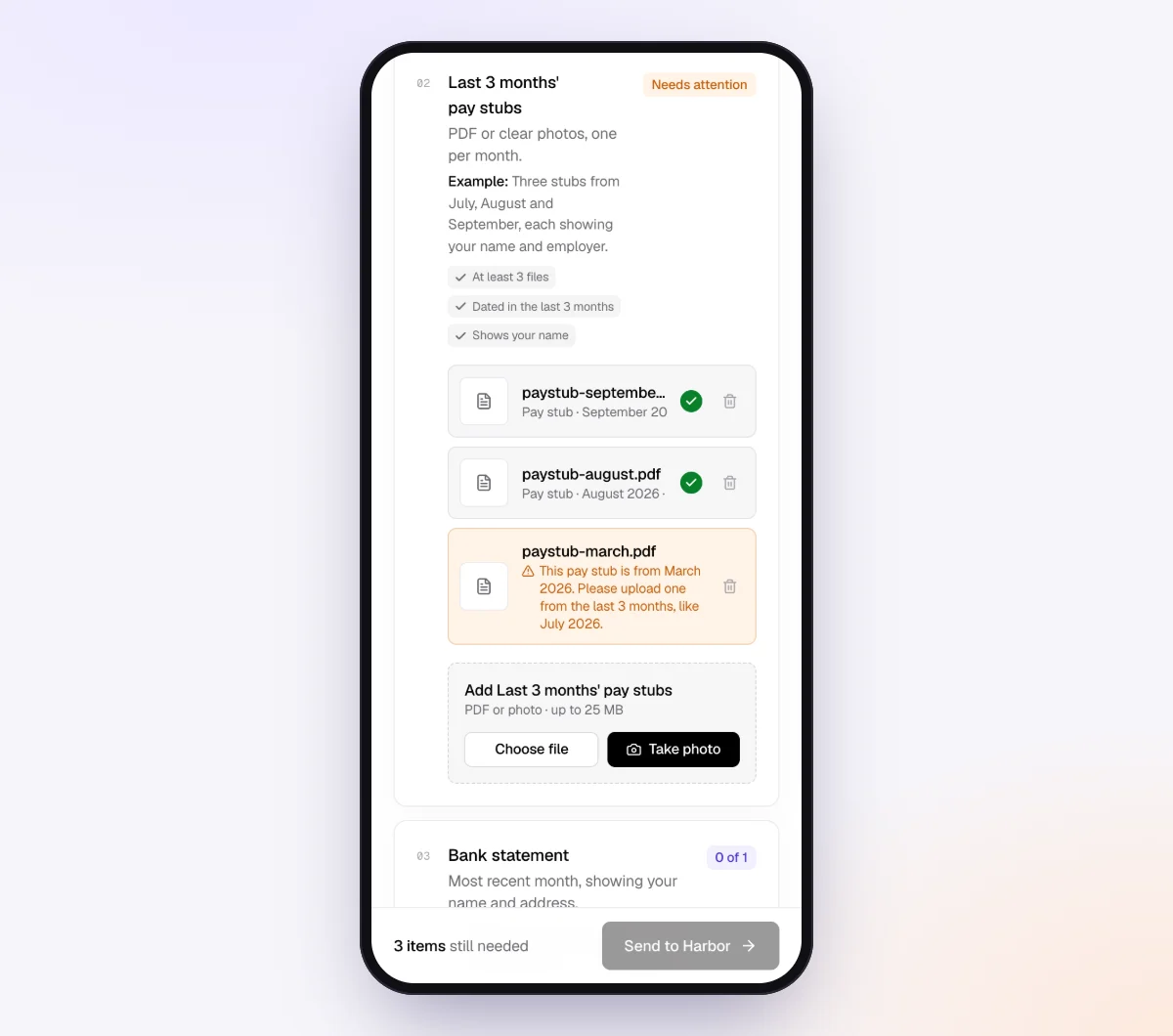
Open the invitation on your phone. You'll see the checklist, what is done and what is missing, with no account or app. Upload one correct file, one wrong document and one blurry photo, then close the page and come back through the same link.
5. Review it from your side
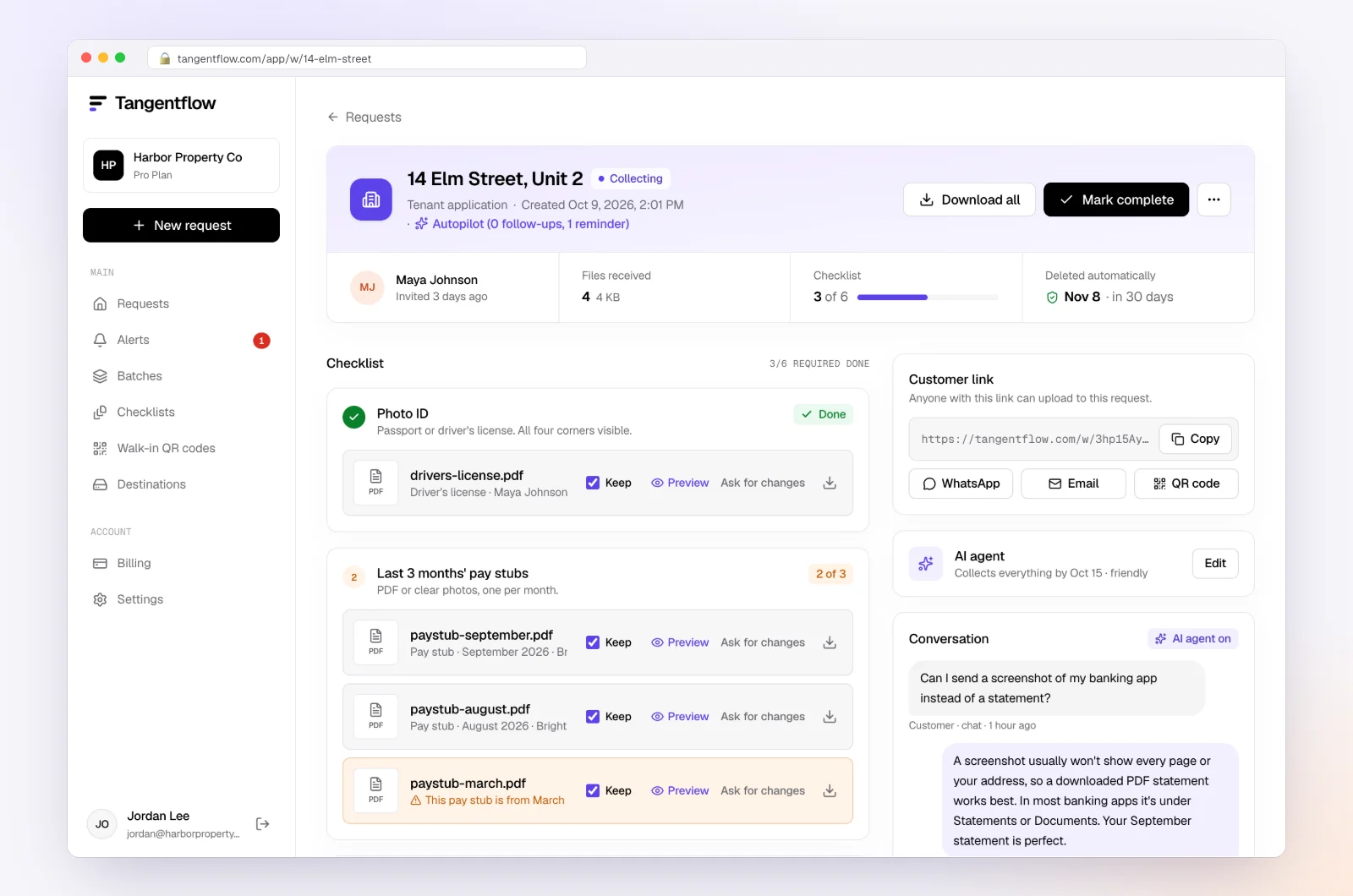
Open the request to see every file with its check result, what is missing and an activity timeline. Try "Ask for changes" on one file, download the ZIP, then mark the request complete.
Setups by business
If you shortlist Tangentflow, these are good starting points. Each maps to a template in "Browse templates."
| Business | Template to start from | Settings worth turning on | Learn more |
|---|---|---|---|
| Accountants and tax preparers | Year-end documents | "Every page," a 30-day needed-by date | Accounting and tax |
| Property managers | Tenant application | "Not expired" on ID, pay stubs "dated in the last 60 days" | Property management |
| Mortgage brokers | Mortgage application pack | Statements "dated in the last 3 months," name must match | Mortgage lending |
| Law firms | Client ID check (AML / KYC) or New client intake form | "Require an email code," AI check off for ID items if you prefer | Law firms |
When something goes wrong during a trial or rollout
| Problem | Likely cause | What to do |
|---|---|---|
| Portal clients forget their password | Annual clients with a login | Use a no-login link option where your tool offers one |
| Wrong files arrive and you find out days later | No checks on upload | Add clearer items and examples, or use a tool that checks files as they arrive |
| Too many reminders annoy a client | Fixed schedule regardless of activity | Pace reminders to the deadline and skip them after recent activity |
| Price jumps in busy season | Active request or seat limits | Price your busiest month before you commit |
| A link went to the wrong person | Typo in the email address | Reset or delete the link right away, then check with your advisor whether it is a reportable incident |
Free and Pro, honestly
You can run a real request in Tangentflow without paying anything.
| Free | Pro ($29/month) | |
|---|---|---|
| Open requests | 1 at a time | Unlimited |
| AI check on each file | Yes | Yes |
| AI autopilot (answers, reminders, follow-ups) | Your first request | Every request |
| Clients reply by email with attachments | No | Yes |
| Branding | Tangentflow badge | Your logo |
| Delivery to Google Drive or a webhook | No | Yes |
| Works with AI assistants (MCP) | No | Yes |
| File retention | 7 days | 60 days |
Both plans include unlimited checklists, QR codes and posters, ZIP export, AI summaries and email delivery. Pro is billed monthly with no contract, and you can cancel any time. Full details on the pricing page.
What Tangentflow does not do: SMS or text messages, a native mobile app, full legal e-signature certificates, identity verification, collecting payments, or permanent storage. If you need any of those, pair it with a tool that does.
Recap: choosing document collection software
- Decide which group you need: practice management, a dedicated collection tool, or a simple upload link.
- Test whether clients need an account, on a phone.
- Ask when a client finds out a file is wrong.
- Check who writes reminders, how they are paced and which channels they use.
- Confirm encryption, retention, deletion and any certifications you need.
- Make sure files reach your system of record without re-uploads.
- Price your busiest month, including seat minimums and request limits.
- Run the same 30-minute trial in two or three tools, and pick the one your least technical client could use without calling you.
Frequently asked questions
What is document collection software?
It replaces emailed attachments with a structured request: a list of what you need, a place to upload, tracking of what is missing, and reminders. Some tools are standalone; others are part of a practice management suite.
What is the best document collection software for accountants?
If you want to run your whole firm in one system, look at TaxDome or Canopy, both of which include client requests with reminders. SmartVault suits firms that want a permanent document vault and branded portal. If you only want documents in, with checks and reminders handled for you, a dedicated tool such as Content Snare or Tangentflow can be simpler.
Do clients need an account to upload documents?
It depends on the tool. Content Snare, FileInvite (for borrowers), Dropbox file requests, Jotform and Tangentflow all accept uploads through a link with no client account. TaxDome lets firms turn "Require login" off for a request, Canopy offers secure links for specific tasks, and SmartVault's SmartRequestAI uses a secure email link.
What is a good Content Snare alternative?
It depends on why you are looking. If you want full practice management, TaxDome or Canopy. If you want a lower starting price, checks on each upload and an AI agent that writes and paces reminders, Tangentflow starts free and Pro is $29/month at the time of writing. If you rely on SMS reminders, Content Snare includes an SMS allowance and Tangentflow is email-only.
What is a good FileInvite alternative for small businesses?
FileInvite now focuses on commercial and complex lending, with plans starting at $9,900 a year at the time of writing. Small businesses outside lending often need less. Content Snare and Tangentflow both offer no-login request links and reminders at a much lower starting price. Check each vendor's pricing page for current numbers.
Can I use free tools instead?
Yes, for low volume. A Dropbox file request is free with no account needed from the uploader, and Jotform has a free Starter plan. Neither shows a per-client checklist, checks uploads or chases what is missing. Tangentflow's Free plan covers one open request at a time.
Is document collection software secure enough for IDs and tax documents?
It can be safer than email, as long as the tool encrypts files, gives each client a private link and deletes files when you are done. Confirm certifications such as SOC 2 or HIPAA if your work requires them. For a full checklist, see our guide to secure ways to receive sensitive documents.