Templates
Tax Season Reminder Email Templates for Clients (2026)
Tax season reminder email templates for a full January to April sequence, with subject lines, US and Canada versions, text messages and missing-item follow-ups.
By Bibin MathewUpdated 19 min read
The short answer
Plan tax season as one sequence, not a pile of one-off emails. Send a kickoff request in late January, a nudge in February that lists only the slips still missing, a firm "last call" in March, and an extension or late-filer notice before the deadline. Use different dates and slip names for US and Canadian clients, and put the date in every subject line.
Every tax season starts with good intentions. You send the organizer in January, a third of clients reply within a week, and the rest go quiet. By mid-March you are writing the same "just checking in" email for the fortieth time, trying to remember who still owes you a 1099-B and who already texted it.
The problem is rarely the wording of any single email. It is that most firms write tax season emails one at a time, as the panic sets in, instead of planning the season as one sequence with a clear job for each message.
This guide is for accountants, tax preparers and bookkeepers in the US and Canada: a full season of emails to copy, each with subject lines and Canadian changes, plus text versions and a way to have the sequence sent for you.
For general request wording outside tax season, see our 14 document request email templates. For what to put on the list, see the client tax document checklist. For the theory of pacing reminders, see the client reminder schedule. This post is about the season: what to send, when, and how the tone changes as the deadline gets closer.
The tax season email sequence at a glance
Each email has a single job. When everything is in, send a short thank you and stop the reminders.
| # | US timing | Canada timing | Its one job | |
|---|---|---|---|---|
| 1 | Kickoff request | Last week of January | First half of February | Send the list, the link and your due date |
| 2 | Organizer reminder | About 10 days later | About 10 days later | Get the questions answered |
| 3 | February nudge | Mid to late February | Early March | List only what is still missing |
| 4 | Late-slip check | Early March | Mid March | Find out which slips are still in the mail |
| 5 | "Last call" | Week of your due date | Week of your due date | Make the client due date real |
| 6 | Final reminder before extension | About a week before your cutoff | About a week before your cutoff | Name the consequence plainly |
| 7 | Extension or late-filer notice | By April 15 | After April 30 | Explain what happens next |
Three rules apply to all of them: every email after the kickoff lists only what is still missing, every email repeats the same link and date, and every subject line carries the date. Each one also says you will never ask for passwords, PINs or card numbers by email, because tax season is peak season for fake "upload your W-2" messages.
Key 2027 dates to build the sequence around
Set your client due date a few weeks before the real filing deadline, so you have time to prepare the return and handle one round of fixes.
| Date (2027) | Day | What it is | Who |
|---|---|---|---|
| Around Feb 1 | Monday | Most W-2s and 1099s due to recipients (Jan 31 is a Sunday) | US clients |
| Around Mar 1 | Monday | T4, T4A and T5 slips due to recipients (Feb 28 is a Sunday) | Canadian clients |
| April 15 | Thursday | Federal individual return and payment due; last day to request an automatic extension with Form 4868 | US clients |
| April 30 | Friday | Individual return and any balance owing due | Canadian clients |
| June 15 | Tuesday | Filing deadline if the client or their spouse or common-law partner is self-employed; balance still due April 30 | Canadian self-employed |
| October 15 | Friday | Extended federal filing deadline | US clients who extended |
None of these 2027 filing dates fall on a weekend. State deadlines and extension rules differ, so check each one.
Email 1: The January kickoff (tax document request email template)
This email starts the season. It should feel organized and calm: exactly what to send, by when, and where.
Subject: Your 2026 tax documents, due Friday, March 12

Hi [First name],

It's tax season again. To prepare your 2026 return, we need your
documents by Friday, March 12. That gives us time to file before
April 15 without rushing.

Here's what we need from you:
- W-2s from every employer
- 1099s (interest, dividends, brokerage, freelance or contract income)
- [1098 mortgage interest statement]
- [Childcare, education or medical receipts, if they apply]
- Answers to a few short questions about changes this year

Upload everything here from your phone or computer, no account needed:
[link]

Send what you have now. Some forms don't arrive until mid-February,
and we'll remind you about anything still missing.

We will never ask for your passwords, PINs or card numbers by email.

Thanks,
[Your name]
[Firm name]
Canadian changes: set the due date in early April ("Friday, April 2") and the reason to "so we can file before April 30." Swap the list for T4 slips, T5 and T3 slips, RRSP contribution receipts (including January and February contributions), and tuition (T2202), childcare or medical receipts if they apply. Change "mid-February" to "early March."
Email 2: Tax organizer reminder email
The organizer or questionnaire is usually the item clients put off longest, because it takes thought. Send a short email about only that, about 10 days after the kickoff.
Subject: 5 quick questions for your 2026 return

Hi [First name],

Before we can finish your list, we need answers to five quick
questions: moves or family changes, sales of stocks, crypto or
property, freelance or gig income, estimated tax payments, and
starting or closing a business.

Answer right on your upload page: [link]

Your answers tell us which documents you actually need, so your
list may get shorter.
For Canadian clients, swap "estimated tax payments" for "tax instalments" and ask about RRSP or FHSA contributions. The last line matters: clients answer faster when the answers can reduce their work.
Email 3: The February nudge (email to client about missing tax documents)
The most important email of the season. Do not resend the full list. Thank the client for what arrived and name only what is outstanding.
Subject: 3 items left for your 2026 return, due Mar 12

Hi [First name],

Thanks for sending your W-2 and mortgage statement. We're nearly there.

Still missing:
- 1099-INT from [Bank name]
- 1099-B from [Brokerage name], every page
- Daycare receipts for 2026

Same link as before: [link]

If you're waiting on a form that hasn't arrived yet, just reply and
let us know. We'll note it and check back.

Thanks,
[Your name]
The Canadian version uses the same structure with T-slips: "Still missing: T5 from [Bank name], RRSP receipt for January and February contributions."
Three named slips feel like a 30-second task. A full checklist feels like starting over.
Email 4: The late-slip check
Some slips are not ready in February. US brokerages often send consolidated 1099s in mid to late February and sometimes correct them later, and K-1s often arrive in March or later. In Canada, T3 and T5013 slips commonly arrive around the end of March. Use the nudge format with the subject "Still waiting on a 1099 or K-1?", list the late items, and add one line: "If they haven't arrived, reply and tell us which ones you're waiting on. We can plan around a late K-1, but only if we know about it."
Email 5: The March "last call"
Here the tone shifts from friendly to direct. Still kind, never harsh, but the date is now the main message.
Subject: Last call: tax documents due this Friday, Mar 12

Hi [First name],

Your documents are due this Friday, March 12. After that, we
can't promise your return will be filed by April 15.

Still missing:
- [Item 1]
- [Item 2]

Upload here: [link]

If something is holding you up, reply or call us at [phone]. A
two-minute call now can save an extension later.

Thanks,
[Your name]
Canadian changes: use your April date and "filed by April 30." For self-employed clients, add: "If you owe tax, it's due April 30 even though your filing deadline is June 15."
Email 6: Final reminder before extension email
Send this about a week before your cutoff. It names the consequence and gives the client a choice.
Subject: Action needed by Apr 5 to avoid an extension

Hi [First name],

We still need these items to file your 2026 return by April 15:
- [Item 1]
- [Item 2]

If we don't have them by Monday, April 5, we'll file an extension
(Form 4868) for you. That gives you until October 15 to file, but
it does NOT extend the time to pay. If you expect to owe, we'll send
you an estimate to pay by April 15.

Upload here: [link]
Or reply "extend" and we'll go ahead with the extension now.

Thanks,
[Your name]
Canadian version. Canada has no general filing extension for individual returns like Form 4868, so this email is about consequences instead. Subject: "Action needed by Apr 23 to file on time." In the body, explain that if the return is late and the client owes tax, the CRA charges a late-filing penalty on the balance owing plus interest, and that filing late can delay benefit and credit payments. For self-employed clients, remind them the balance is due April 30 even on the June 15 track.
Email 7: The extension notice (or late-filer notice)
Once you file an extension, say so plainly. Clients who are not told often think the job is done.
Subject: We filed an extension for your 2026 return

Hi [First name],

We've filed an extension for your 2026 federal return:
- Your new filing deadline is Friday, October 15, 2027.
- Any tax owed was still due April 15. [We estimated $X and you paid
  it on DATE. / Please let us know if you haven't paid yet.]

To finish your return, we still need:
- [Item 1]

Same link as before: [link]. Please send it by [date].

Thanks,
[Your name]
For Canadian clients who missed April 30, keep the structure without the extension lines.
Tax deadline reminder email subject lines that get opened
Put the action and the date in the subject, and keep it short enough to fit on a phone.
| Stage | US | Canada |
|---|---|---|
| Kickoff | Your 2026 tax documents, due Mar 12 | Your 2026 tax documents, due Apr 2 |
| Nudge | 3 items left for your return, due Mar 12 | 2 slips left for your return, due Apr 2 |
| Late slips | Still waiting on a 1099 or K-1? | Still waiting on a T3 or T5013? |
| Last call | Last call: tax documents due Friday | Last call: tax documents due Friday |
| Before deadline | Action needed by Apr 5 to avoid an extension | Action needed by Apr 23 to file on time |
| After deadline | We filed an extension for your return | You're on the June 15 track |
Avoid "Following up," "URGENT!!!" and anything that sounds like the IRS, the CRA or a bank.
Text message versions
Some clients ignore email but answer texts in minutes. Keep texts short and point to the same link.
| Stage | Text message |
|---|---|
| Kickoff | Hi [Name], it's [Your name] at [Firm]. Your 2026 tax list is in your email. Upload when you can, due Mar 12: [link] |
| Nudge | Hi [Name], just 2 items left for your taxes: your 1099-B and daycare receipts. Same link: [link] |
| Before extension | Hi [Name], if we don't get your K-1 by Apr 5 we'll file an extension. Call me at [phone] if you're stuck. |
| Canada | Hi [Name], we need your T5 by Apr 23 to file before Apr 30. [link] |
Never ask clients to send slips by text. Photos with full Social Security or Social Insurance numbers on a staff phone are hard to track and harder to delete.
Four ways to send your tax season sequence, compared
The hard part of every email after the kickoff is the personalized "still missing" list. Here is how the common approaches handle it.
| Approach | Setup | Cost | Reminders | Missing-item lists | Catches wrong-year slips |
|---|---|---|---|---|---|
| Your inbox and a tracking spreadsheet | None | Free | Manual, when you remember | By hand, if the sheet is current | No |
| Email marketing tool | Medium | Low to medium | Scheduled, same for everyone | No, or complex segments | No |
| Practice management suite | High | Often per seat | Built in for portal users | Yes, for clients who log in | Rarely |
| Tangentflow request link with AI agent | Low | Free to try, Pro $29/month | Paced to each client's due date | Yes, from what actually arrived | Yes, at upload |
A spreadsheet merge breaks when the sheet is stale, and you ask for a W-2 the client sent yesterday. A practice suite works well if clients already log in; many individual clients visit once a year and forget the password.
Sending tax season reminders in Tangentflow, step by step
Tangentflow is built for this sequence: one checklist, one private link per client, and an AI collection agent that sends the invitation and reminders paced to each client's due date, listing only what is still missing.
1. Start from the "Year-end documents" template
Go to "Checklists" and choose "Browse templates." The "Year-end documents" template comes with four items: "Income documents," "Bank statements" (with every page required), "Expense receipts" (optional) and an optional "Any changes this year?" question.

2. Split the items so reminders can name each slip
Reminders are only as specific as your checklist, so split "Income documents" into the slips your clients actually get, such as "W-2s," "1099-INT and 1099-DIV" and "Consolidated brokerage 1099," or "T4 slips," "T5 and T3 slips" and "RRSP receipts" for Canadian clients.
For each item, fill in "What should it be?" (for example, "2026 1099-B from the client's brokerage"), the count and conditions like "every page." Add yes/no form fields with "Only ask if…" so the brokerage item only appears for clients who sold investments. That puts the organizer questions from email 2 on the upload page.

3. Send one request per client with your due date
Click "New request," choose the checklist, add a reference like "2026 return, Smith household," enter the client's name and email, and set the needed-by date. Leave "Email the link" on and the agent sends the kickoff email from your firm's name.

For your whole client list, use "Batches" and "Send to many customers." Upload an Excel file or CSV, or paste rows from Google Sheets, with a due date per client. You can schedule the send up to 30 days ahead. Batches are part of Pro, up to 100 clients per sheet. See bulk requests.
4. Let the agent pace the reminders
In the "AI autopilot" settings, turn on "Chase until it's all in" and choose "Paced to each request's deadline." Reminders are spaced out when the date is far away, closer as it nears, with a last one the day before, and skipped right after the client was active. Clients get at most one automatic email a day, between 8 a.m. and 8 p.m. in your time zone. Pick a "Friendly," "Professional" or "Brief" tone.
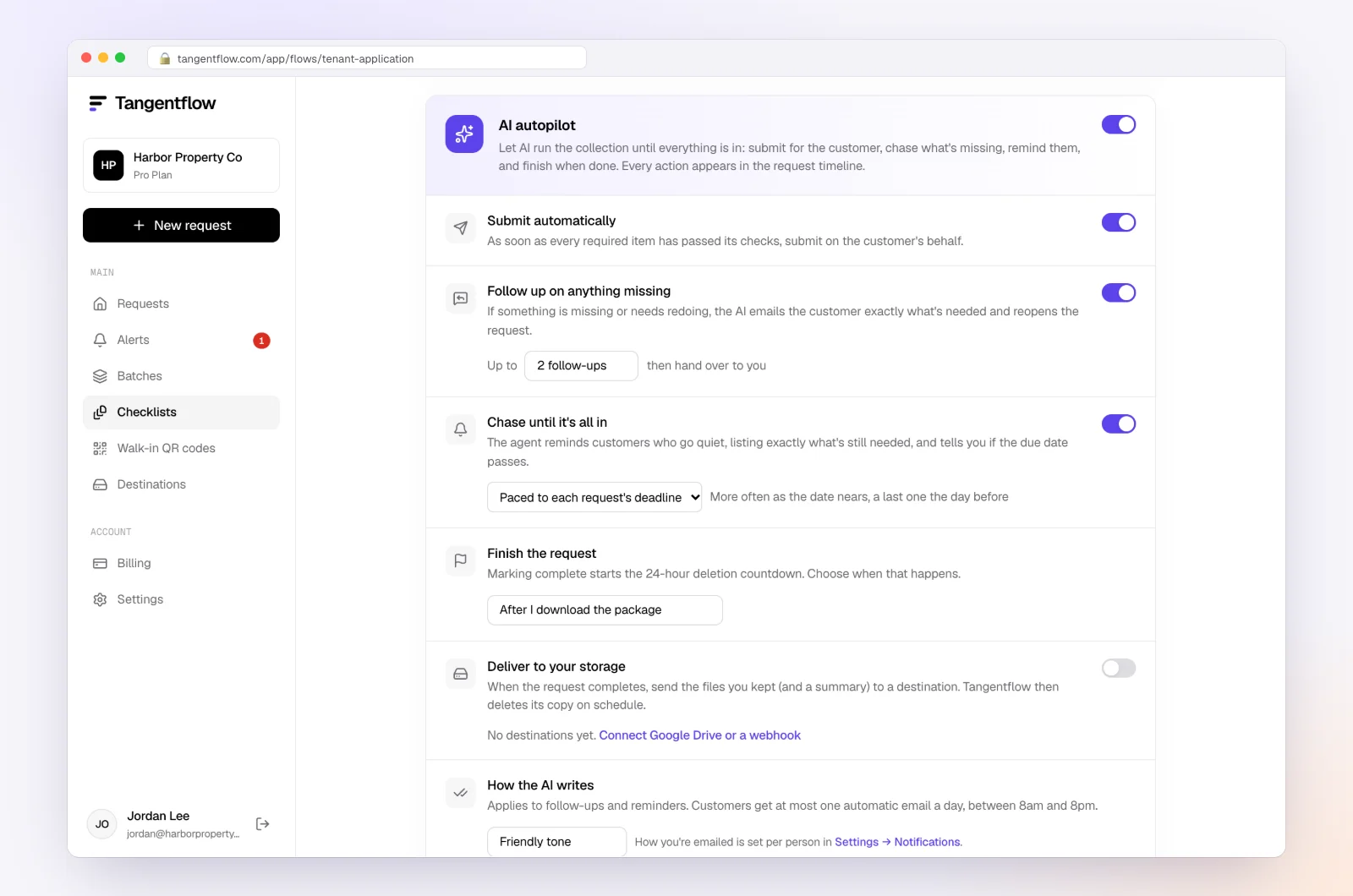
That covers emails 1, 3 and 5 for you. Turn on "Follow up on anything missing" so the agent reopens a submitted request and asks for exactly what is left.
5. Every reminder lists only what's missing
Each reminder shows only the items still outstanding, with the same link. If a slip was flagged at upload, such as last year's 1099 or page one of a six-page brokerage statement, the reminder says what to fix.
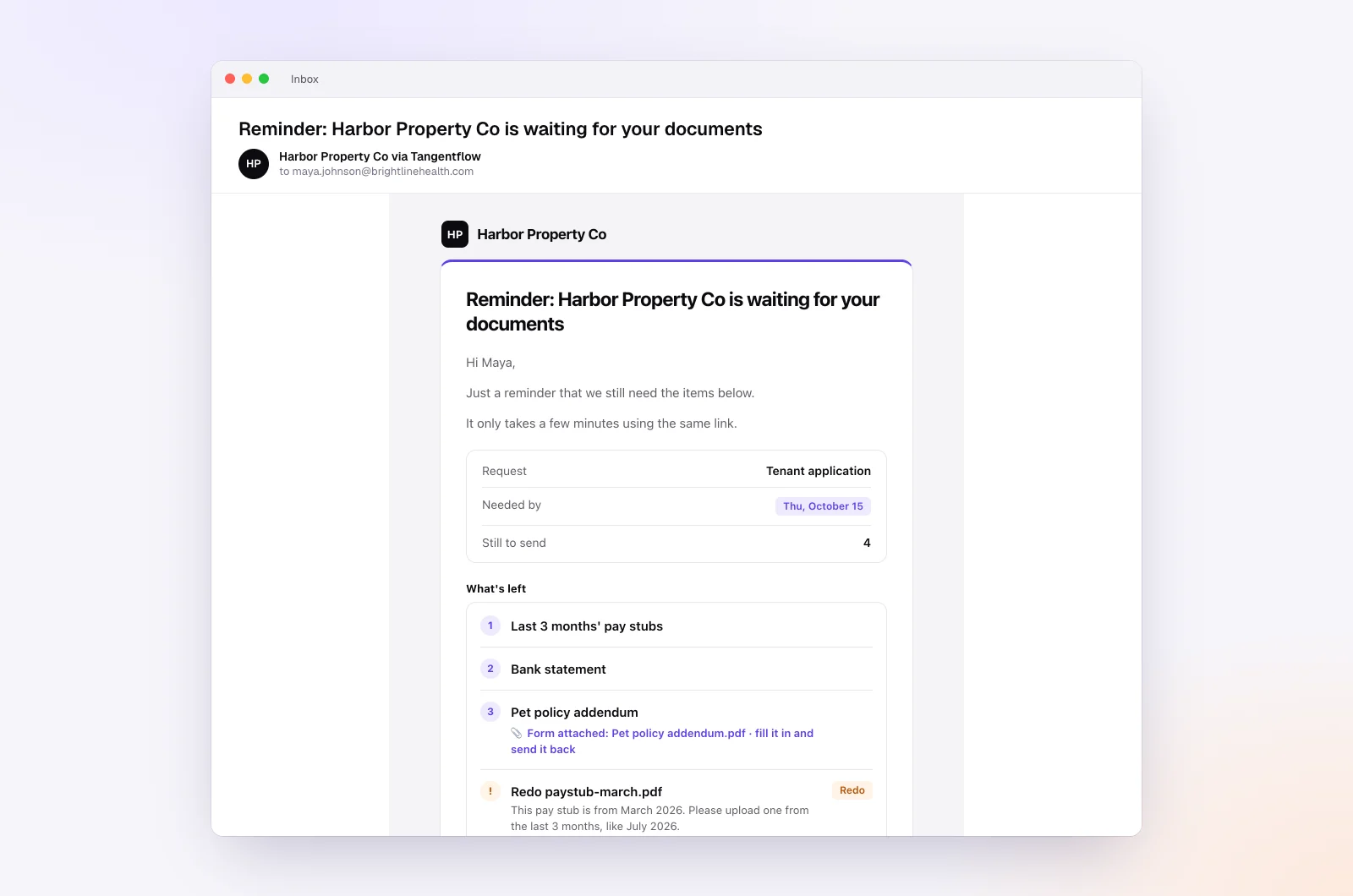
When a client replies "my K-1 hasn't come yet," the agent answers from your checklist and your "Notes for the agent (private)" and hands tax questions to you. Extension decisions stay with you: when the date passes, the request shows up in "Alerts" so you can call and send email 6 or 7 yourself.
Variations by practice
| Practice | Template to start from | Client due date | Sequence tweaks |
|---|---|---|---|
| US individual returns | Year-end documents | Mid March | Add a K-1 item; plan the Form 4868 email |
| Canadian individual returns | Year-end documents | Early April | Add RRSP receipts; "file on time" email instead of extension |
| Canadian self-employed | Year-end documents | Late April | Remind about the April 30 balance on the June 15 track |
| Small business year-end | Year-end documents | 4 to 6 weeks after year end | Pair with the year-end bookkeeping checklist |
| Bookkeepers feeding a tax preparer | Monthly bookkeeping | 5 to 7 days after month end | "Repeat every month" all year so January is not a scramble |
For bookkeepers, a batch with "Repeat every month" turned on sends each client the "Monthly bookkeeping" checklist on the same day every month until you stop it. More for tax firms in accounting and tax.
When something goes wrong
| Problem | Likely cause | Fix |
|---|---|---|
| Client never opens the kickoff | Spam folder, or it looked like phishing | Ask them to check spam; text them the link from your phone |
| Client sends last year's slip | Grabbed the wrong envelope | The check flags the tax year at upload; use "Ask for changes" if one slips through |
| "I already emailed it to you" | Sent to your inbox | Upload it to the request yourself, or on Pro ask them to reply to the agent's email with it attached |
| Client is annoyed by reminders | Too many, too close | Switch that request's "Chasing" to "Only when they write" |
| Link went to the wrong person | Typo in the email address | Reset the link from the request page; the old link stops working |
| Due date passes with items missing | Client stuck or overwhelmed | Call, then send the extension or late-filer email yourself |
For extra protection on tax requests, turn on "Require an email code" for the checklist. The client must enter a 6-digit code sent to their email before the link opens. After the client sends everything, the link no longer shows their files.
Free and Pro, honestly
You can run a real request without paying anything.
| Free | Pro ($29/month) | |
|---|---|---|
| Open requests | 1 at a time | Unlimited |
| AI check on each file | Yes | Yes |
| AI autopilot (answers, reminders, follow-ups) | Your first request | Every request |
| Clients reply by email with attachments | No | Yes |
| Bulk requests (up to 100 clients per batch) | No | Yes |
| Branding | Tangentflow badge | Your logo |
| Delivery to Google Drive or a webhook | No | Yes |
| Works with AI assistants (MCP) | No | Yes |
| File retention | 7 days | 60 days |
Both plans include unlimited checklists, QR codes and posters, ZIP export, AI summaries and email delivery. Pro is billed monthly with no contract, so you can turn it on for tax season and cancel after. Full details on the pricing page.
What Tangentflow does not do: SMS or text messages, a native mobile app, full legal e-signature certificates, identity verification, collecting payments, or permanent storage. If you need any of those, pair it with a tool that does.
Your tax season sequence as a checklist
- Confirm this year's federal, state and provincial dates on irs.gov and canada.ca.
- Set client due dates a few weeks before each filing deadline, on a Friday.
- Build separate US and Canadian checklists with each slip as its own item.
- Send the kickoff in late January (US) or early February (Canada), inviting partial uploads.
- Follow up on the organizer questions about 10 days later.
- In February, send a nudge that lists only what is missing.
- In early March, ask which late slips are still in the mail.
- Send a direct "last call" the week of your due date.
- Send the final reminder about a week before your filing cutoff.
- Call anyone still stuck, then file the extension and send the notice.
- Thank every client when they are done, and stop the reminders.
Frequently asked questions
When should I send tax season reminder emails to clients?
For US clients, send the kickoff in the last week of January, as W-2s and most 1099s go out, then remind on a schedule paced to your due date. For Canadian clients, start in the first half of February, since most T-slips arrive by early March. Space reminders out early and bring them closer as the date nears.
What should a tax document request email include?
The tax year, a due date with a reason, a short bulleted list of slips and receipts, one upload link, a line inviting partial uploads, and a note that you will never ask for passwords or PINs by email.
How do I email a client about missing tax documents without sounding pushy?
Thank them for what they already sent, list only the items still missing by name, and repeat the same link and date. Offer an easy out, such as "reply if you're still waiting on a form."
What should a final reminder before an extension say?
Name the date you need the items by, list them, and explain what happens if they do not arrive: you will file an extension, which gives more time to file but not to pay. Give the client a clear choice, such as replying "extend." Whether to extend is a decision for you and the client.
Do Canadian clients get a filing extension like Form 4868?
Canada has no general filing extension for individual returns. Most individuals must file and pay by April 30, and self-employed individuals and their spouses or common-law partners have until June 15 to file, with any balance still due April 30. Check canada.ca for the current year's dates.
Can I send tax season reminders by text message?
Yes, many firms text a short reminder with the upload link. Never ask clients to send tax slips by text. Tangentflow sends email only, but you can copy any client's request link and text it from your own phone.
Can these reminders be sent automatically?
Yes. In Tangentflow, the AI agent sends the invitation and reminders paced to each client's due date, listing only what is still missing, and hands off to you when the date passes. The Free plan includes the full agent on your first request, so you can try it free with a real client.