Checklists
Law Firm Client Intake Checklist and Form Questions (2026)
A law firm client intake checklist for the US and Canada: intake stages, conflict check questions, documents by practice area, ID rules and engagement letters.
By Bibin MathewUpdated 19 min read
The short answer
Run intake in four stages: a short inquiry that collects only what you need to check conflicts, the conflict check itself, a signed engagement letter, and then the matter's documents. Ask for names of every adverse and related party up front, flag any deadline the client mentions for a lawyer to review the same day, and request documents with a practice-area checklist instead of a vague "send us everything." Collect the signed letter and the documents through one private link per client rather than email, and move them into your practice management system when you are done.
A new client calls on Tuesday. By Thursday you have run conflicts and they want to hire you. Then intake stalls. The engagement letter sits unsigned. The police report arrives as two blurry photos of page one. Two weeks later, a paralegal is still sending follow-up emails.
Most small firms do not lose time on the legal work. They lose it on the paperwork between "yes, we'll take it" and "we have what we need." This guide is for solo practitioners and small law firms in the US and Canada. You will get intake questions you can copy into any form, conflict check information, document lists for six practice areas, how client identification rules differ between the two countries, and a step-by-step setup in Tangentflow if you want an agent to do the follow-up.
The four stages of law firm client intake
Intake goes wrong most often when firms collect everything at once, before anyone has checked whether the firm already represents the other side. Splitting intake into stages avoids that and keeps each request short.
| Stage | Goal | What you collect | Who usually handles it |
|---|---|---|---|
| 1. Inquiry | Decide whether to schedule a consult | Contact details, matter type, names of other parties, any urgent date | Front desk or intake form |
| 2. Conflict check | Confirm you can take the matter | Every party, related person and entity, former names | Staff, then a lawyer clears it |
| 3. Engagement | Agree on scope and fees in writing | Signed engagement letter or retainer, client ID where required | Lawyer and staff |
| 4. Document collection | Get what the matter needs to start | Practice-area documents and detailed questions | Paralegal or assistant |
Stage 1: Keep the first inquiry short
The first form should answer one question: is this a matter you might take, and is there a reason to move fast? Do not ask for the full story yet. Under the ABA Model Rules, a prospective client is owed confidentiality even if you never take the matter (Model Rule 1.18), and information you receive from them can disqualify you from representing someone else in the same matter. The rule's comments suggest limiting the first interview to what you need to decide whether to take the case. Check your own state or provincial rules.
Stage 2: Run the conflict check before the consult
Run every name from stage 1 through your conflict system before anyone discusses the facts in depth, and record who cleared it and when.
Stage 3: Sign the engagement letter before work starts
Put the scope, fees and responsibilities in writing and get it signed. The ABA Model Rules say the scope and the basis of fees should be communicated, preferably in writing (Rule 1.5(b)), and require a contingent fee agreement to be in writing and signed by the client (Rule 1.5(c)). States and provinces add their own requirements, particularly for contingency fees. Do any client identification or verification (covered below) at this stage too.
Stage 4: Collect documents with a specific checklist
Only now do you ask for the full story and the paperwork. This is where most of the chasing happens, and where a clear checklist pays off.
Client intake questions for lawyers
Here are the questions most firms ask, grouped by purpose. Use the "Stage" column to decide which form each belongs on.
| Group | Question | Why you ask | Stage |
|---|---|---|---|
| Contact | Full legal name, and any other names used | Identification and conflicts | 1 |
| Contact | Best phone number and email | Follow-up | 1 |
| Contact | Mailing address | Engagement letter, identification | 1 |
| Matter | What type of matter is this? (choice list) | Routing to the right lawyer | 1 |
| Matter | Are you contacting us for yourself or a business? | Who the client is | 1 |
| Conflicts | Names of every other person or company involved | Conflict check | 1 |
| Conflicts | Spouse, partner or co-owners, with former names | Conflict check | 1 |
| Conflicts | Insurance companies or lawyers already involved | Conflict check and next steps | 1 |
| Urgency | Is there a date you're worried about? (court date, letter deadline, closing date) | Flags possible limitation or filing deadlines | 1 |
| Urgency | Have you been served with any papers? | Response deadlines may already be running | 1 |
| Facts | What happened, in your own words, with dates | Case assessment | 4 |
| Facts | What outcome are you hoping for? | Scope of engagement | 3 or 4 |
| Billing | Who is paying the fees, if not you? | Third-party payer rules | 3 |
Conflict check information to collect
A conflict check is only as good as the names you put into it. Ask for:
- Adverse parties: every person and organization on the other side, spelled out in full.
- Related parties: spouses, former spouses, children in custody matters, business partners, co-defendants, guarantors.
- Entities behind entities: a parent company, franchisor or property management company that may be the real decision maker.
- Former names: maiden names, prior married names, business trade names.
- Insurers and other counsel already involved.
Law firm intake documents by practice area
Once the engagement is signed, ask for documents with a list built for the type of matter. These are starting points; trim and add based on the facts and your jurisdiction. Our guide to collecting documents from clients covers how to word each item.
Personal injury intake documents
- Police, accident or incident report, every page
- Photos of the scene, vehicles and property damage
- Photos of injuries, taken over time if possible
- The client's own auto, health and disability insurance details, plus any claim numbers
- Letters or emails from any insurance company, including the other side's
- Medical providers seen since the incident, with dates
- Medical bills and receipts for out-of-pocket costs
- Proof of lost income: pay stubs before and after, or a letter from the employer
- Signed medical records release or authorization, on the form your firm uses
Family law intake documents
- Marriage certificate, and any separation agreement or prenuptial or marriage contract
- Existing court orders, including custody, support or protection orders
- Children's names and dates of birth, and the current parenting schedule
- Tax returns for the last few years (or Notices of Assessment in Canada)
- Recent pay stubs and other proof of income
- Bank, investment and retirement account statements
- Mortgage, loan and credit card statements
Family courts often have their own financial disclosure forms with required attachments, so check your local court's forms.
Estate planning intake documents
- Names, dates of birth and contact details of the client, spouse, children and other beneficiaries
- Names of proposed executors or personal representatives, trustees and guardians
- A list of assets: real estate, accounts, retirement plans, life insurance, business interests
- Existing wills, trusts and powers of attorney
- Beneficiary designations on retirement accounts and life insurance
- Deeds for real property
Immigration intake documents
Immigration documents depend on the application and the client's history, so generic lists are often wrong. Common requests include:
- Passport, every page that has stamps, visas or the photo
- Birth certificate, and certified translations of any document not in English (or French, for Canadian applications)
- Marriage certificate or proof of relationship, and any divorce decrees
- Current and prior visas, permits and status documents
- Every notice or letter from the immigration authority (for example USCIS notices in the US, or IRCC correspondence in Canada)
- Proof of employment or education, police certificates, and any prior refusals
Check the official checklist for the specific application on the USCIS or IRCC website, and treat your list as a first pass.
Real estate intake documents
- Purchase or sale agreement, with every amendment and addendum
- Photo ID for every buyer or seller (see the identification rules below)
- Mortgage commitment or lender contact details
- Property tax bill and any condo or HOA documents
- Information about where the funds for closing are coming from, where your rules require it
Employment law intake documents
- Employment contract or offer letter
- Termination or discipline letters
- Pay stubs, and records of commissions or bonuses
- Employee handbook or policies that apply
- Emails, texts or messages relevant to the dispute, exported or screenshotted with dates visible
- Any severance offer or release the client has been asked to sign, and its deadline
Client identification and verification: US vs. Canada
| Canada | United States | |
|---|---|---|
| Source of the rules | Each law society's rules, based on the Federation of Law Societies of Canada Model Rule on Client Identification and Verification | No general federal know-your-client rule for lawyers; ethics rules set by each state |
| Identification | Basic client information whenever you are retained, subject to listed exceptions | Not a general rule requirement; firms ask for what they need |
| Verification | Required when you act or give instructions on a financial transaction (receiving, paying or transferring funds), subject to exemptions | No general requirement; a risk-based inquiry under ethics rules |
| Methods | Government-issued photo ID, a credit file, or a dual-process method, with rules on how ID is checked remotely | Firm's choice |
| Other duties | Source of funds information for financial transactions, ongoing monitoring, record keeping | ABA Model Rule 1.16(a) duty to inquire, explained in ABA Formal Opinion 513 (2024) |
Canada
Canadian law societies have adopted rules based on the Federation of Law Societies' model rule. In general terms:
- Identification means basic information about who the client is, whenever you are retained, with some exceptions.
- Verification means confirming identity with an approved method, generally when you act on a financial transaction.
- Records must be kept for a set period after the file closes, which several societies describe as six years.
- Firms must also obtain source of funds information for financial transactions and monitor the retainer for warning signs.
Societies have updated how remote verification works, including when a photo ID can be checked over video. Those details differ by province and have changed recently, so read your own law society's current rules.
United States
The US has no general federal requirement for lawyers to verify client identity the way banks must. Instead, in August 2023 the ABA amended Model Rule 1.16(a) to say a lawyer "shall inquire into and assess the facts and circumstances of each representation" to decide whether to accept or continue it. ABA Formal Opinion 513, issued in August 2024, explains that this calls for a reasonable, risk-based inquiry: not a perfunctory one, and not a dragnet. Higher-risk matters, such as unusual money transfers or opaque entities, call for more questions.
The Model Rules only apply once a state adopts them, so check your state's version. Many firms collect a photo ID anyway, especially in real estate and business matters.
Confidentiality, privilege and email
Intake is when clients send some of the most sensitive things they own. A few cautions apply whatever tool you use.
- Email is convenient but leaky. Attachments copy into every inbox and synced device. ABA Formal Opinion 477R (2017) says some highly sensitive information may call for more than ordinary email; your state bar or law society may have its own guidance.
- Watch out for shared and work accounts. A client writing from a work account, or one a spouse can read, may put confidentiality and privilege at risk. Ask which address is safe.
- Collect only what the matter needs, then delete copies in inboxes and upload tools once documents are in your practice management system.
Our guide to secure ways to receive sensitive documents goes deeper on what a safer setup looks like.
Five ways to run client intake, compared
| Method | Client effort | Cost | Tracks what is missing | Signed engagement letter | Reminders |
|---|---|---|---|---|---|
| Phone call plus email attachments | Low at first, then high | Free | No | Separate step | Manual |
| Web form builder (Google Forms, Jotform) | Low | Free to $ | Questions only | Sometimes, with add-ons | Rarely |
| Practice management client portal | High (account and password) | Often bundled, per seat | Some | Often built in | Some |
| Full e-signature platform | Medium | Per seat or envelope | Signing only | Yes, with audit certificate | Signing only |
| Private intake link with checklist and AI agent (Tangentflow) | Low (no account) | Free to start, $29/month Pro | Yes, per item | Simple e-signature on your PDF | Paced to your date |
Form builders suit the stage 1 inquiry, practice management portals suit long matters where clients already log in, and a full e-signature platform is worth it for any letter you expect to rely on in a fee dispute. A dedicated collection link fits stage 4: one checklist of named documents, checked as they arrive, with reminders you do not have to write.
Law firm client intake in Tangentflow, step by step
Tangentflow is not a practice management system, a conflict check database or a full e-signature platform. It handles the part of intake that causes the most chasing: getting the signed letter, answers and documents back from the client.
1. Start from the "New client intake form" template
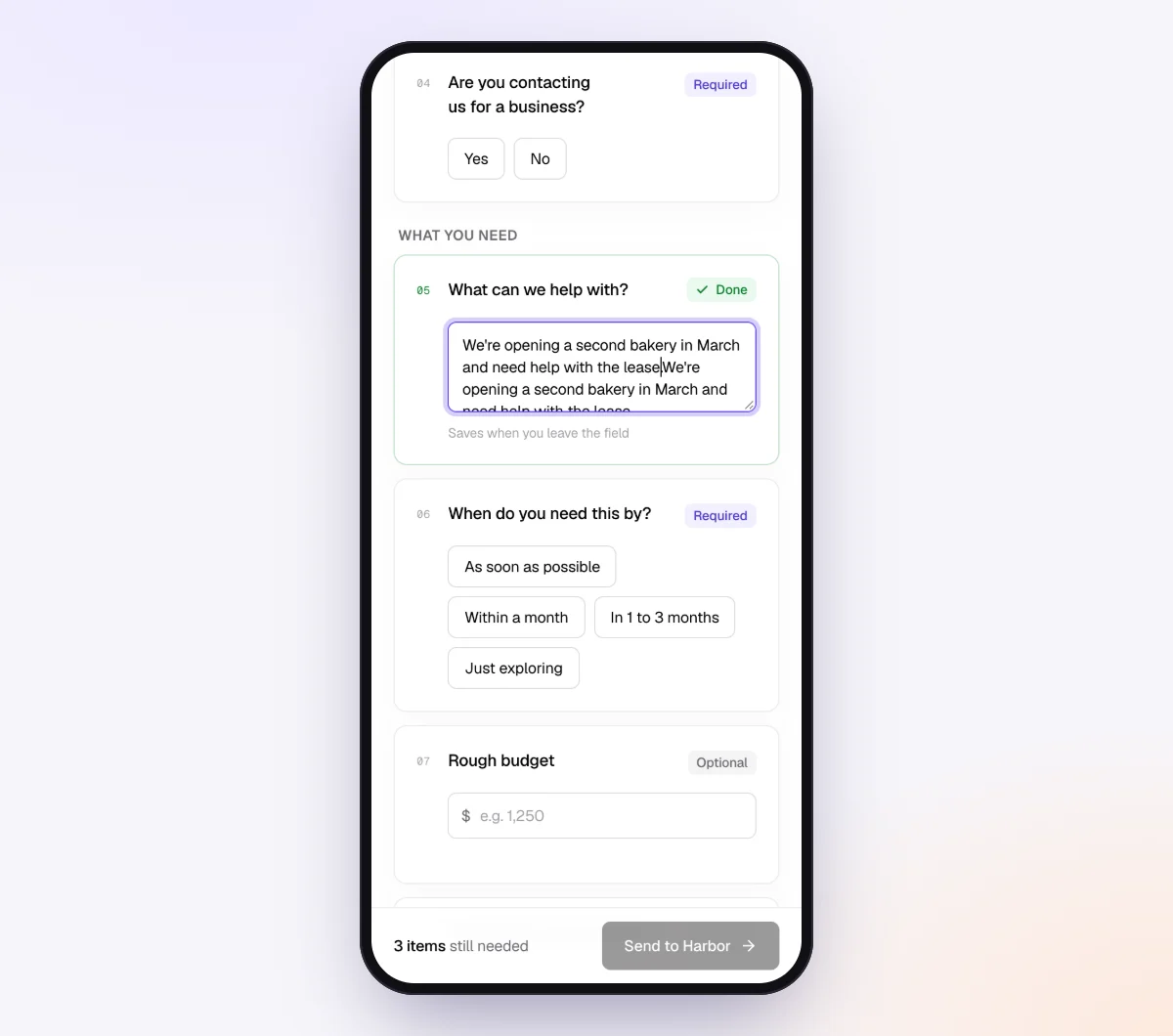
Go to Checklists, choose "Browse templates" and open "New client intake form." It ships with form fields grouped under the headings "About you" and "What you need": "Full name," "Best phone number," "Mailing address," "Are you contacting us for a business?" (which shows "Business name and website" only if the answer is yes), "What can we help with?," "When do you need this by?," "Rough budget," "How did you hear about us?" and "Anything useful to share (optional)."

For a law firm, remove "Rough budget" and add a long text field, "Names of every other person or company involved," plus a date field, "Is there a date you're worried about?"
2. Add practice-area items with "Only ask if…"
Keep one checklist and show items only when they apply. Add a single choice question, "Type of matter," then add document items with "Only ask if…" pointed at it. A personal injury client sees "Police or accident report" and "Photos of injuries." A family law client sees "Existing court orders" and "Last 3 months of bank statements."
Form field types include short and long text, yes/no, single choice, "Tick all that apply," date, phone, email, address and dollar amount. More on these in forms and e-signatures.
For each document item, fill in "What should it be?", set a count, and add conditions such as every page, the client's own name or signed. Use a date rule like "dated in the last 3 months" for bank statements and pay stubs.
3. Attach your engagement letter and releases
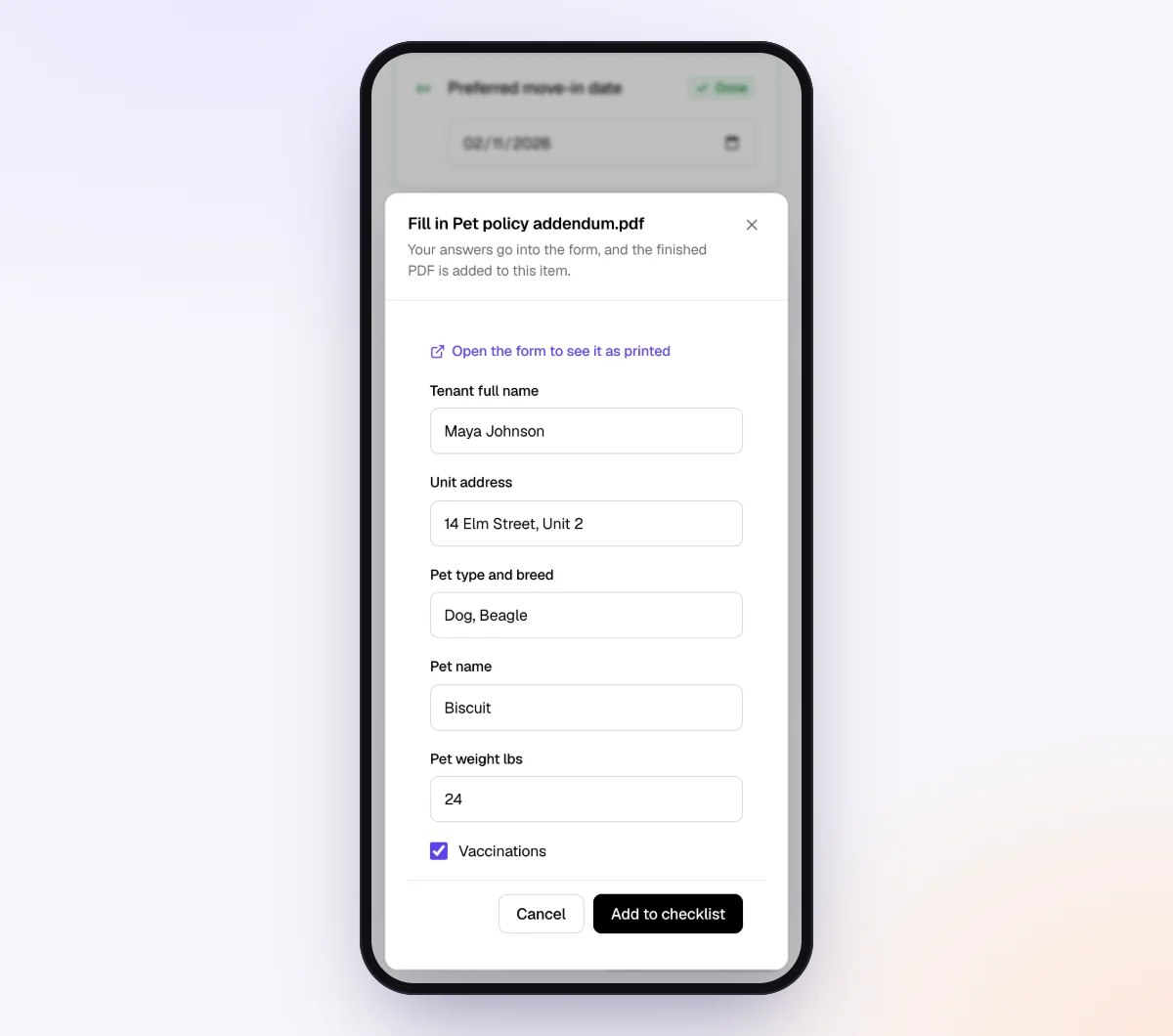
Add a file item such as "Signed engagement letter," choose "Form to fill in" and upload your PDF. Tick signed and every page. Do the same for a medical records release or other authorizations. Clients fill in the PDF on their phone and draw a signature, stamped "Signed electronically by" with their name, date and time. See collecting signed forms online for preparing the PDF.
4. Lock down sensitive items before you send
Three settings matter for law firms:
- AI check off for items like IDs, medical records or immigration documents. Those files are never sent to the AI provider; they are stored and marked "Received" for your team to review.
- "Require an email code" on the checklist, so the client enters a 6-digit code sent to their email before the link opens.
- Private notes for the agent, such as "client prefers email only, do not call the home number."
5. Create the request and let the agent follow up
In Requests, click "New request." Choose the checklist, add a reference such as "Chen estate plan," the client's name and email, and a needed-by date a few days before you actually need everything. Leave "Email the link" on, and the AI collection agent sends the invitation from your firm's name and paces reminders to that date.
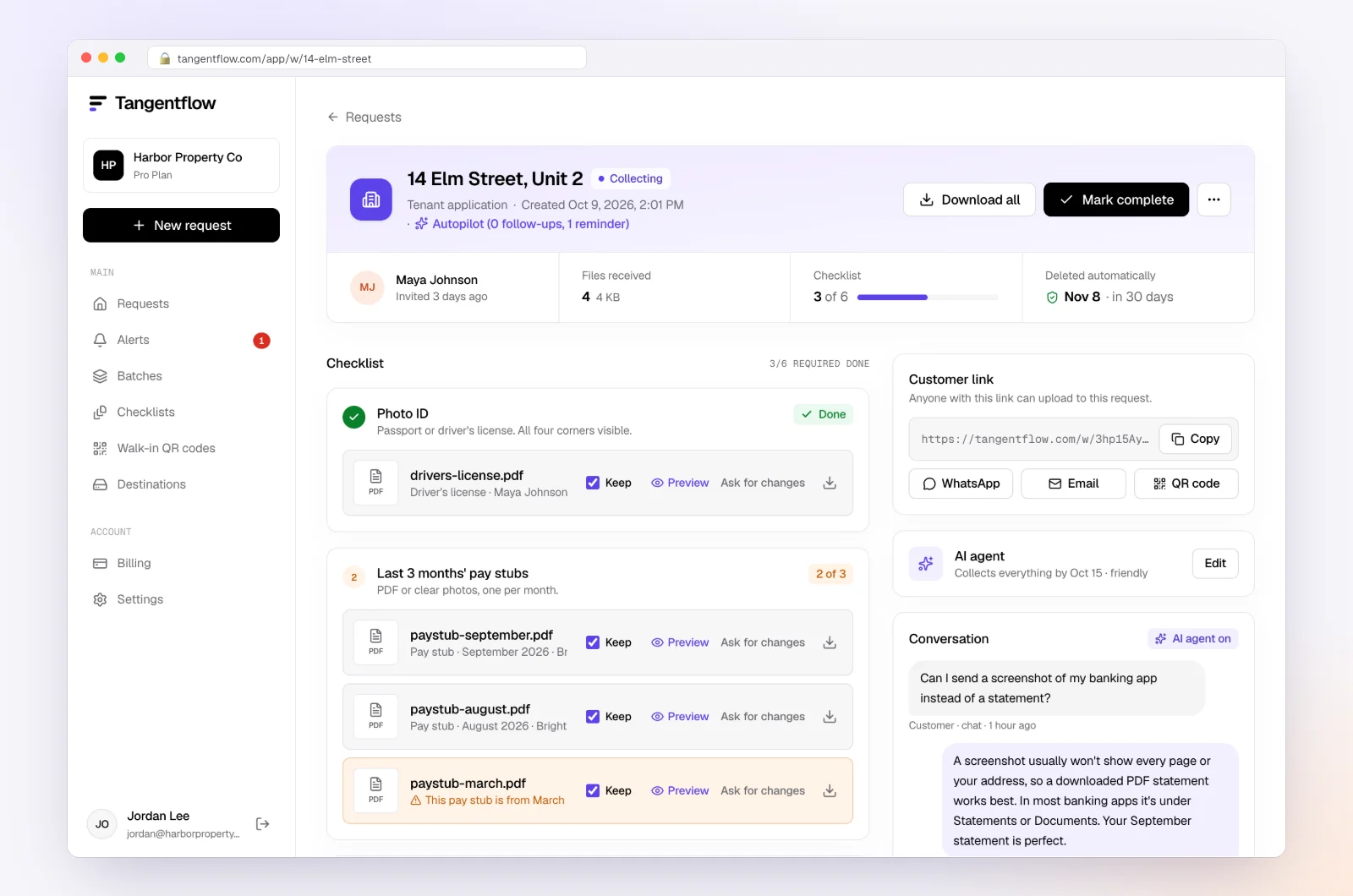
As uploads arrive, document checks flag a missing page, an unsigned form or the wrong document while the client is still on the page. The agent answers questions about what to upload, but not legal questions, which go to your team. When everything is in, download the ZIP package or, on Pro, deliver to Google Drive or a webhook, then mark the request complete.
Intake setups by practice area
| Practice area | Key checklist items | Settings worth turning on |
|---|---|---|
| Personal injury | Signed engagement letter, medical records release, accident report, injury photos, insurance letters | Signed on forms, every page on reports, minimum photo count |
| Family law | Signed engagement letter, court orders, tax returns, pay stubs, bank statements | Date rules on statements, "Require an email code," safe contact question |
| Estate planning | Intake questions on family and assets, existing wills, beneficiary designations, deeds | Mostly form fields, "Only ask if" for business owners |
| Immigration | Passport pages, status documents, notices, certificates and translations | AI check off on IDs, so your team checks expiry dates by hand |
| Real estate | Agreement of purchase and sale, photo ID, mortgage commitment, condo or HOA documents | "Client ID check (AML / KYC)" template alongside, every page |
| Employment | Employment contract, termination letter, pay stubs, severance offer | Needed-by date set before the severance deadline |
See more ideas on the law firms page.
When something goes wrong
| Problem | Likely cause | Fix |
|---|---|---|
| Engagement letter not signed after a week | Client is unsure about fees or scope | The agent hands off questions it can't answer; call them about the letter |
| Client sent the whole story before conflicts cleared | Inquiry form asked for too much | Shorten the form and add a "don't send details yet" line |
| Police report arrives with one page missing | Client photographed the first page only | Tick "every page" on the item so the check flags it |
| Client emailed records from a work account | No guidance on which address to use | Ask for a safe email at intake and use the private link going forward |
| Link went to the wrong email address | Typo, or a shared family account | Reset the link from the request page and send it to the right address |
Check "Alerts" daily for handoffs and missed dates.
Free and Pro, honestly
You can run a real intake request without paying anything.
| Free | Pro ($29/month) | |
|---|---|---|
| Open requests | 1 at a time | Unlimited |
| AI check on each file | Yes | Yes |
| Forms to fill in and sign online | Yes | Yes |
| AI autopilot (answers, reminders, follow-ups) | Your first request | Every request |
| Clients reply by email with attachments | No | Yes |
| Branding | Tangentflow badge | Your logo |
| Delivery to Google Drive or a webhook | No | Yes |
| Works with AI assistants (MCP) | No | Yes |
| File retention | 7 days | 60 days |
Both plans include unlimited checklists, QR codes and posters, ZIP export, AI summaries and email delivery. Pro is billed monthly with no contract, and you can cancel any time. Full details on the pricing page.
What Tangentflow does not do: SMS or text messages, a native mobile app, full legal e-signature certificates, identity verification, collecting payments, or permanent storage. If you need any of those, pair it with a tool that does. For a law firm, that also means it does not replace your practice management system, conflict check database, trust accounting or file retention. Files are deleted after the retention period, so move what you need into your own records.
The whole intake process as a checklist
- Use a short inquiry form: contact details, matter type, other parties and any worrying date.
- Tell prospective clients not to send the details of their situation yet.
- Flag any court date, deadline or incident date for a lawyer the same day.
- Run the conflict check on every name, and record who cleared it.
- Send the engagement letter, with a contingent fee agreement signed where your rules require it.
- Identify and, where required, verify the client using your law society's or firm's methods.
- Ask which email and phone number are safe to use.
- Send a practice-area document checklist through one private link.
- Set a needed-by date ahead of any filing or response deadline.
- Check documents as they arrive and ask for fixes right away.
- Move everything into your practice management system and delete other copies.
Frequently asked questions
What should be on a law firm client intake checklist?
Contact details, the type of matter, names of every adverse and related party for the conflict check, any deadline the client mentions, a signed engagement letter and the documents for that practice area. Collect detailed facts after the conflict check clears.
What information do you need for a conflict check?
Full names of every other person and organization involved, related parties such as spouses, business partners and parent companies, former names, and any insurers or lawyers already involved. The more complete the names, the more reliable the check.
Do lawyers have to verify client identity?
In Canada, yes in many situations. Every law society has client identification and verification rules based on the Federation of Law Societies' model rule, with verification generally required for financial transactions. In the US there is no general federal requirement, but ABA Model Rule 1.16(a) and Formal Opinion 513 call for a risk-based inquiry into each representation, and your state's rules control.
Can clients sign an engagement letter online?
Electronic signatures are widely accepted for engagement letters in both countries, and Tangentflow lets clients sign your PDF on their phone. For an audit certificate or multiple signers in order, use a full e-signature platform, and check your jurisdiction's rules for contingent fee agreements.
Is it safe for clients to email legal documents?
Email works for routine paperwork, but attachments copy across inboxes and devices, and a work or shared account can put confidentiality at risk. A private upload link per client, with files deleted afterward, is a safer default.
Does the AI give legal advice to clients?
No. Tangentflow's agent answers questions about what to upload and how, using your checklist and notes. Anything about the matter itself is handed to a person at your firm.
Is Tangentflow a practice management system?
No. It collects the signed engagement letter, answers and documents for intake, which you then download or deliver to your own storage. Conflicts, calendaring, billing and long-term storage stay in your practice management software.
Is there a free way to try it?
Yes. The Free plan gives you one open request at a time with the full AI agent on your first request. Try it free.